

REST API
Atomic CRM exposes a complete REST API that lets you do everything you can do with the CRM. The API is built on top of Supabase, that is itself built on top of Postgrest.
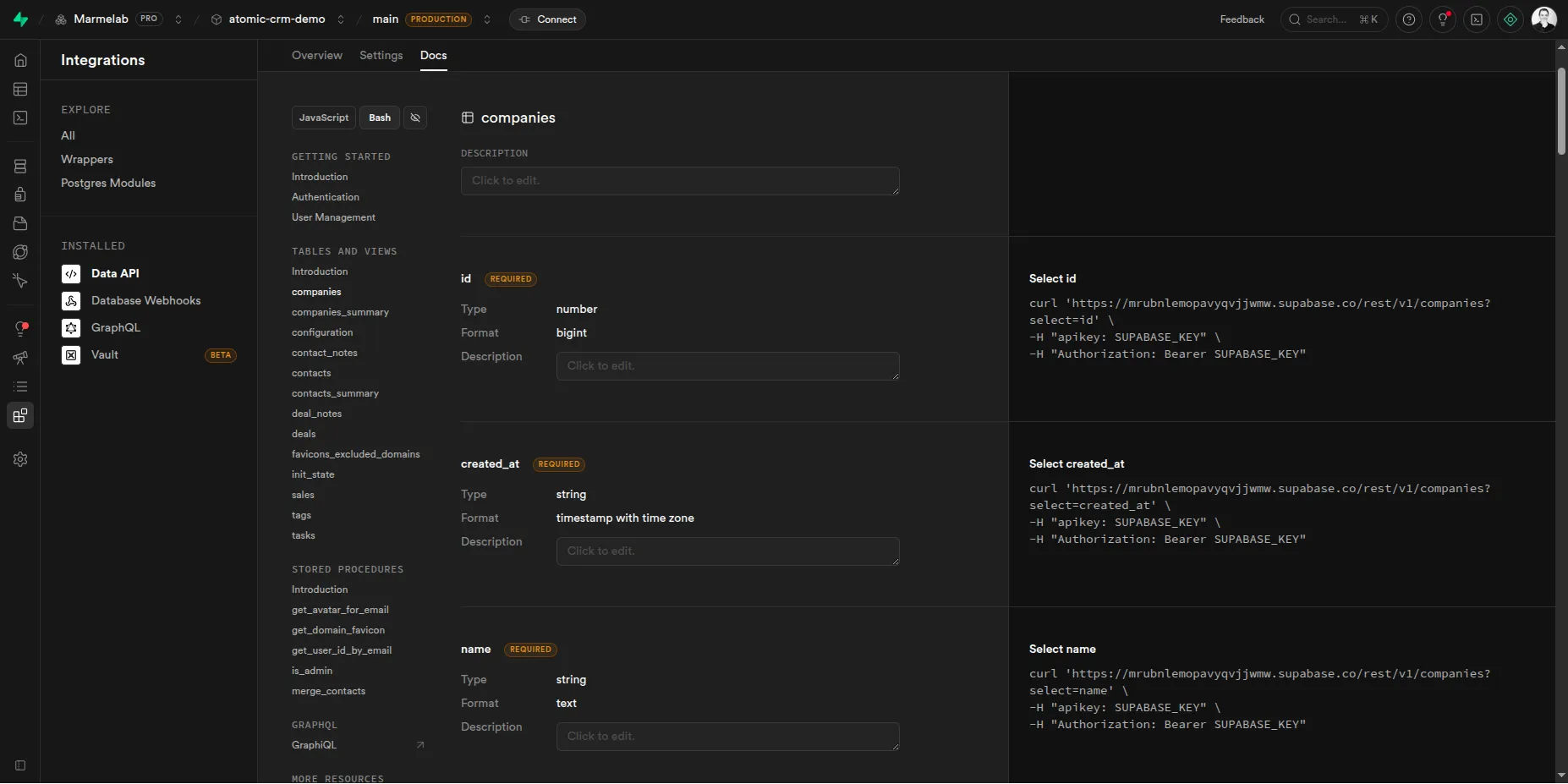
Instance API Doc In Studio
Section titled “Instance API Doc In Studio”Use the Supabase Studio to see the automatically generated documentation for your Atomic CRM instance. It lists all the available endpoints and their parameters. This page explains how to call each endpoint either with the supabase client, or bash (curl).
Authentication
Section titled “Authentication”To call the API, you need to pass an apikey in the headers of your requests. The API key is the API key of your Supabase project, you can find it in the Supabase dashboard in the settings section.
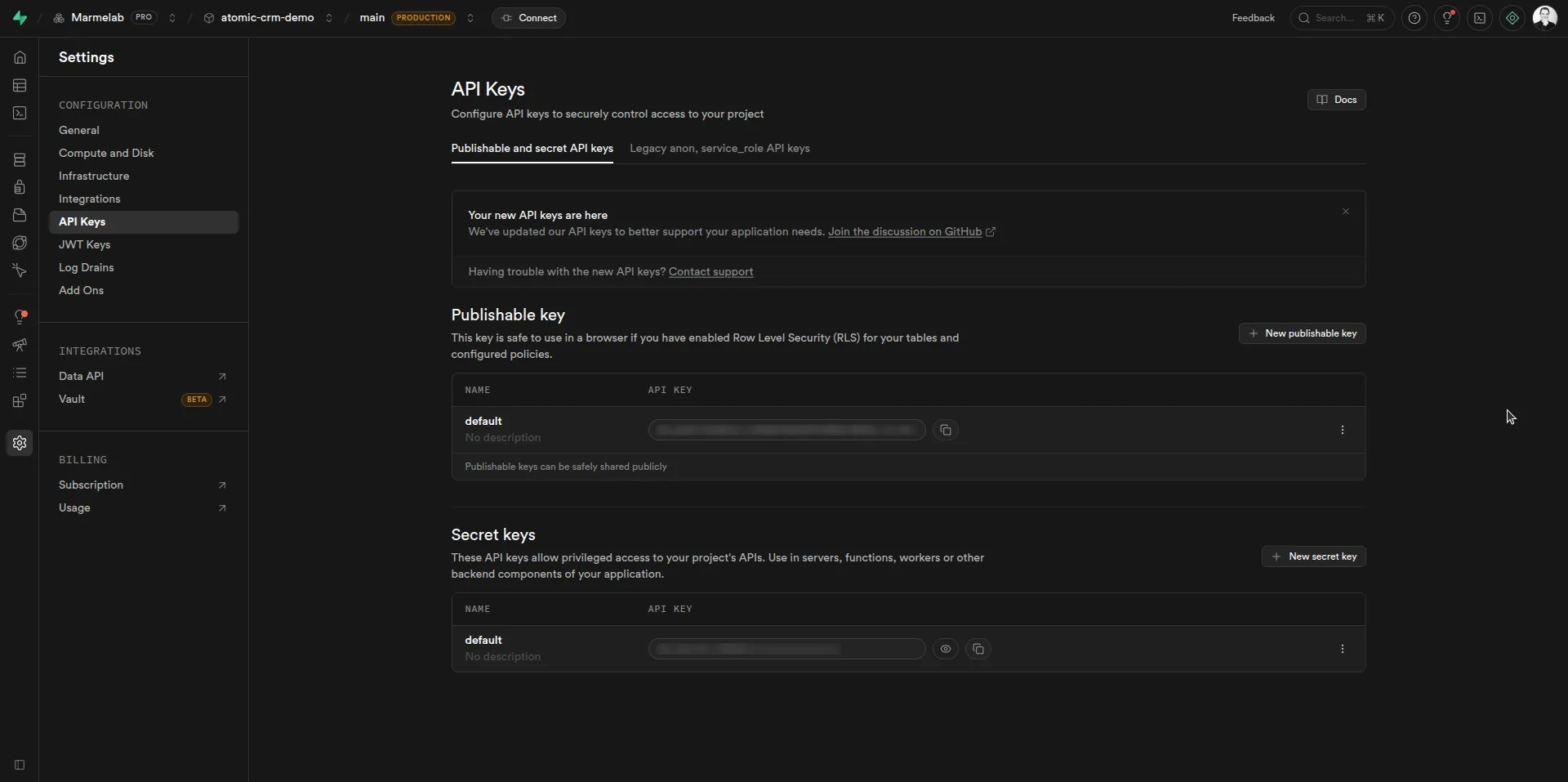
You have two types of API keys in Supabase: the publishable API key, and the secret API key. You should use the publishable API key to call the API from your frontend or from any client side code, as it has limited permissions and does not allow to bypass RLS policies. You should never use the secret API key in client side code, as it gives full access to your database and can be easily extracted from your code. Only use the secret API key server side, and be sure to handle all authentication and security yourself if you go this way.
When calling protected endpoints with the publishable API key, you also need to authenticate the user and get a JWT token to be able to call the API.
Use the /auth/v1/token endpoint to authenticate a user and get a JWT token. You need to pass the user’s email and password in the body of the request.
curl -X POST 'https://<instance_url>/auth/v1/token?grant_type=password' \ -H 'Content-Type: application/json' \ -H 'apikey: <your_api_key>' \ -d '{ "email": "user@email.com", "password": "user_password" }'See the Supabase documentation on self hosting auth for more details on how to setup your own auth mechanism in its entirety.
You then need to pass the JWT token in the Authorization header of your requests, with the Bearer scheme.
Example to get the list of contacts:
curl -X GET 'https://<instance_url>/rest/v1/contacts' \ -H 'Content-Type: application/json' \ -H 'apikey: <your_publishable_api_key>' \ -H 'Authorization: Bearer <your_jwt_token>'OpenAPI Specification
Section titled “OpenAPI Specification”The API exposes an OpenAPI specification. You need to use your API key to access it:
curl https://<instance_url>/rest/v1/ \ -H 'apikey: <your_publishable_api_key>' \ -H 'Authorization: Bearer <your_jwt_token>'You can customize the OpenAPI specification via comments on tables. See the Postgrest documentation for more details.
Auth API Endpoints
Section titled “Auth API Endpoints”Here is a list of the main supabase auth endpoints you are most likely to use for authentication:
POST /auth/v1/signup: to create a new user and get a JWT token.POST /auth/v1/token: to authenticate a user and get a JWT token. (multiple grant types are supported, check the documentation for more details)POST /auth/v1/logout: to log out the authenticated user.GET /auth/v1/user: to get the authenticated user information.
See the Supabase project’s API documentation for all the possible endpoints.
Data API Endpoints
Section titled “Data API Endpoints”Here is the list of all the atomic crm specific endpoints:
- contacts
GET /rest/v1/contacts_summary: to get the list of contacts with their company name and number of tasks.GET /rest/v1/contacts: to get the list of contacts.POST /rest/v1/contacts: to create a new contact.GET /rest/v1/contacts?id=eq.{id}: to get contacts* by idPATCH /rest/v1/contacts?id=eq.{id}: to update a contact by idDELETE /rest/v1/contacts?id=eq.{id}: to delete a contact by id.
- contact notes
GET /rest/v1/contact_notes: to get the list of contact notes.POST /rest/v1/contact_notes: to create a new contact note.GET /rest/v1/contact_notes?id=eq.{id}: to get contact notes* by idPATCH /rest/v1/contact_notes?id=eq.{id}: to update a contact note by idDELETE /rest/v1/contact_notes?id=eq.{id}: to delete a contact note by id
- tasks
GET /rest/v1/tasks: to get the list of tasks.POST /rest/v1/tasks: to create a new task.GET /rest/v1/tasks?id=eq.{id}: to get tasks* by idPATCH /rest/v1/tasks?id=eq.{id}: to update a task by idDELETE /rest/v1/tasks?id=eq.{id}: to delete a task by id
- companies
GET /rest/v1/companies_summary: to get the list of companies with the number of contacts and tasks.GET /rest/v1/companies: to get the list of companies.POST /rest/v1/companies: to create a new company.GET /rest/v1/companies?id=eq.{id}: to get companies* by idPATCH /rest/v1/companies/?id=eq.{id}: to update a company by idDELETE /rest/v1/companies?id=eq.{id}: to delete a company by id
- deals
GET /rest/v1/deals: to get the list of deals.POST /rest/v1/deals: to create a new deal.GET /rest/v1/deals?id=eq.{id}: to get deals* by idPATCH /rest/v1/deals?id=eq.{id}: to update a deal by idDELETE /rest/v1/deals?id=eq.{id}: to delete a deal by id
- deal notes
GET /rest/v1/deal_notes: to get the list of deal notes.POST /rest/v1/deal_notes: to create a new deal note.GET /rest/v1/deal_notes?id=eq.{id}: to get deal notes* by idPATCH /rest/v1/deal_notes?id=eq.{id}: to update a deal note by idDELETE /rest/v1/deal_notes?id=eq.{id}: to delete a deal note by id
- configuration
GET /rest/v1/configuration: to get the configuration of the CRM, including the custom fields.
These API endpoints are generated from the database schema via PostgREST.
API Endpoints support all the query parameters supported by Postgrest. For example, to filter the list of contacts by status, you can use the following query:
GET /rest/v1/contacts?status=eq.hotOr to get the list of tasks that are due after today, you can use the following query:
GET /rest/v1/tasks?due_date=gt.2024-01-01To only get the last_name and first_name of the contacts, you can use the following query:
GET /rest/v1/contacts?select=last_name,first_nameExample Usage
Section titled “Example Usage”Let’s say you want to integrate the CRM with another tool with a widget that allows to save a note for a contact.
The following example is using JavaScript and the native fetch API to make the HTTP requests, but you can use any programming language and any HTTP client. You could also use the supabase client library to do it.
async function addMessageAsNoteToContact({  message,  email,  password,  apikey}) {  // Step 1: Authenticate the user of the widget and get a JWT token  const authResponse = await fetch('https://<instance_url>/auth/v1/token?grant_type=password', {    method: 'POST',    headers: { 'Content-Type': 'application/json', apikey },    body: JSON.stringify({ email, password }),  });  const authData = await authResponse.json();  const jwtToken = authData.access_token;
  // Step 2: Find the contact by email  const contactsResponse = await fetch(    `https://<instance_url>/rest/v1/contacts_summary?email_fts=ilike.*${      encodeURIComponent(message.email)    }*`,    {      headers: {        apikey,        Authorization: `Bearer ${jwtToken}`      },    }  );  const contacts = await contactsResponse.json();
  if (contacts.length === 0) {    console.log(`No contact found with email ${message.email}`);    return;  }
  const contact = contacts[0];
  // Step 3: Add a note to this contact with the content of the message  await fetch('https://<instance_url>/rest/v1/contact_notes', {    method: 'POST',    headers: {      apikey,      Authorization: `Bearer ${jwtToken}`,      'Content-Type': 'application/json',    },    body: JSON.stringify({      contact_id: contact.id,      text: message.content,    }),  });
  console.log(    `Added note to contact ${contact.last_name} with email ${message.email}`  );}