The Open-Source School CRM: Every Family, From First Inquiry to Graduation
A ready-to-customize education CRM: families, students, admissions and re-enrollment in one place. Free, open source, no per-user fees.
- 1,400+ stars on GitHub
- MIT licence
- By Marmelab, the team behind react-admin (25k+ stars)
Why Choose Atomic CRM for Your School?
Student information systems manage grades and timetables, and sales CRMs track deals. Neither follows a family with two guardians, three children and a re-enrollment every year. Atomic CRM is an open-source school CRM that you own and shape to the way you work.
Families, Not Just Contacts
A household groups guardians and children. Each guardian has explicit roles: parental authority, payer, emergency contact, authorized to pick up.
One Pipeline per Intake
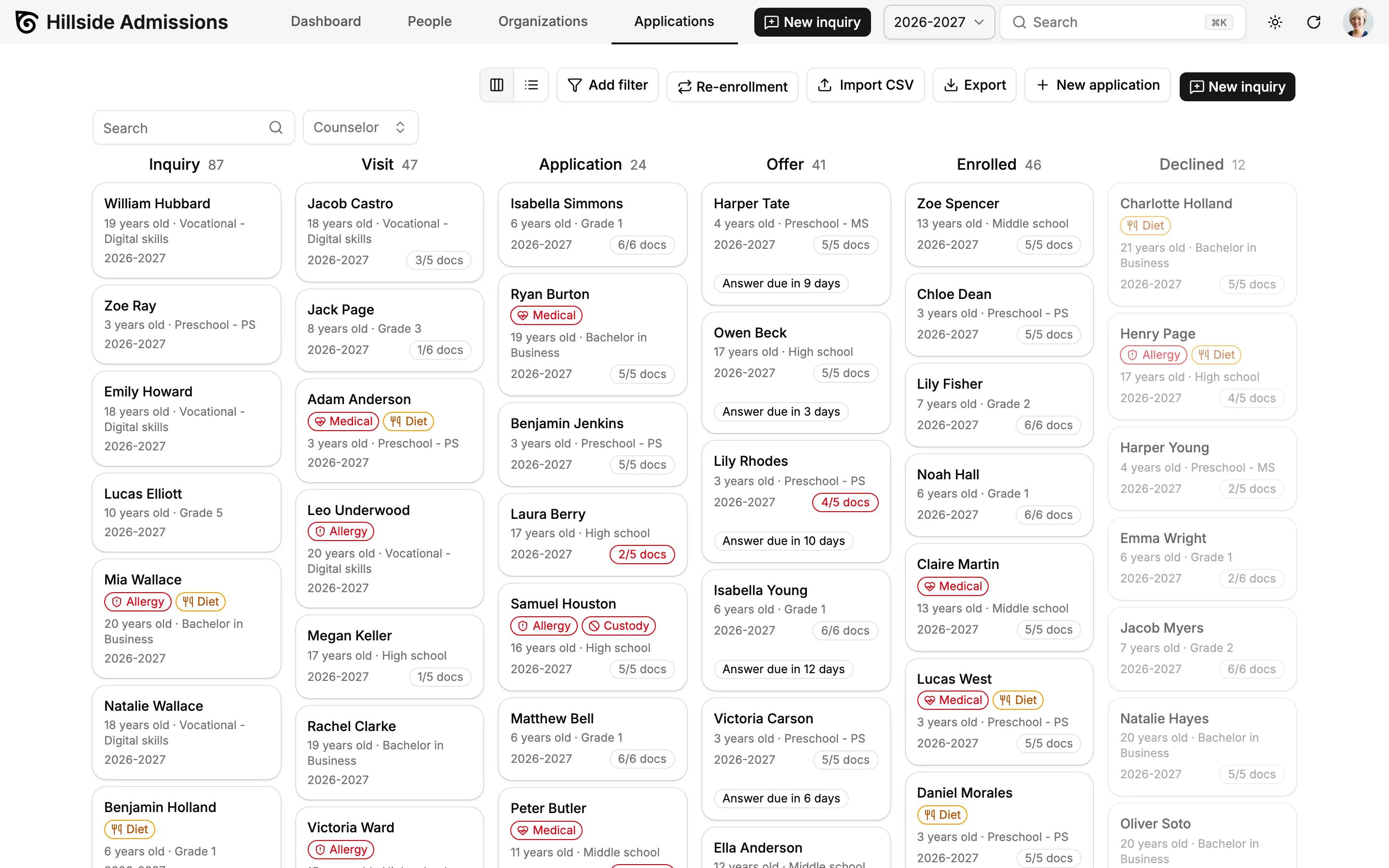
Follow every application from inquiry to enrollment on a Kanban board, filtered by intake, program and campus, with seats left per program.
Paperwork Under Control
See which files are complete at a glance: "3/5 docs" on every card, a missing-documents filter and one-click checklists.
Decisions With Deadlines
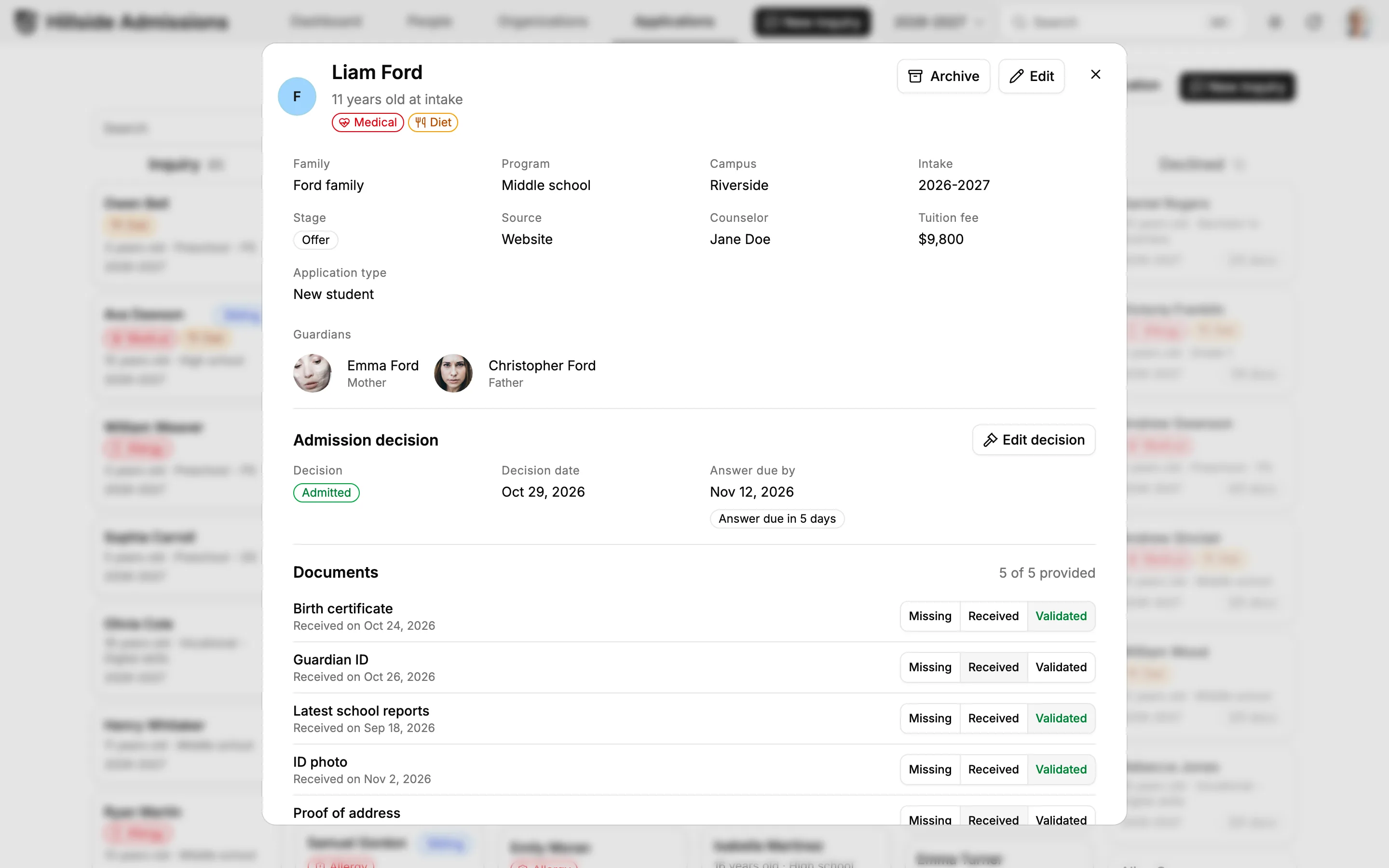
Record each admission decision with the date the family must answer by, and spot overdue offers before the seat is lost.
Re-Enrollment in a Few Clicks
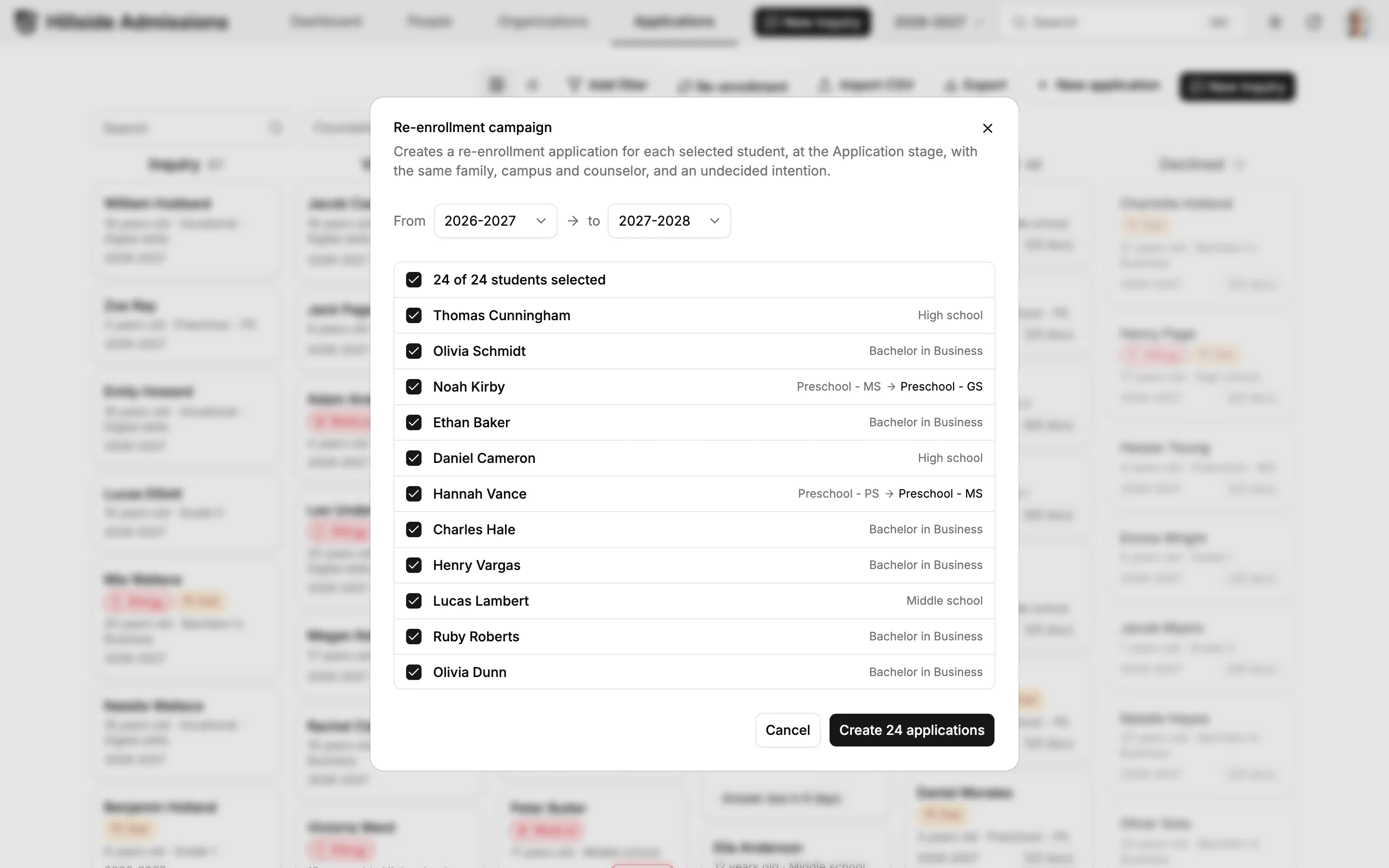
Roll your enrolled students over to next year's intake and see who is confirmed, undecided or leaving.
Know Every Child
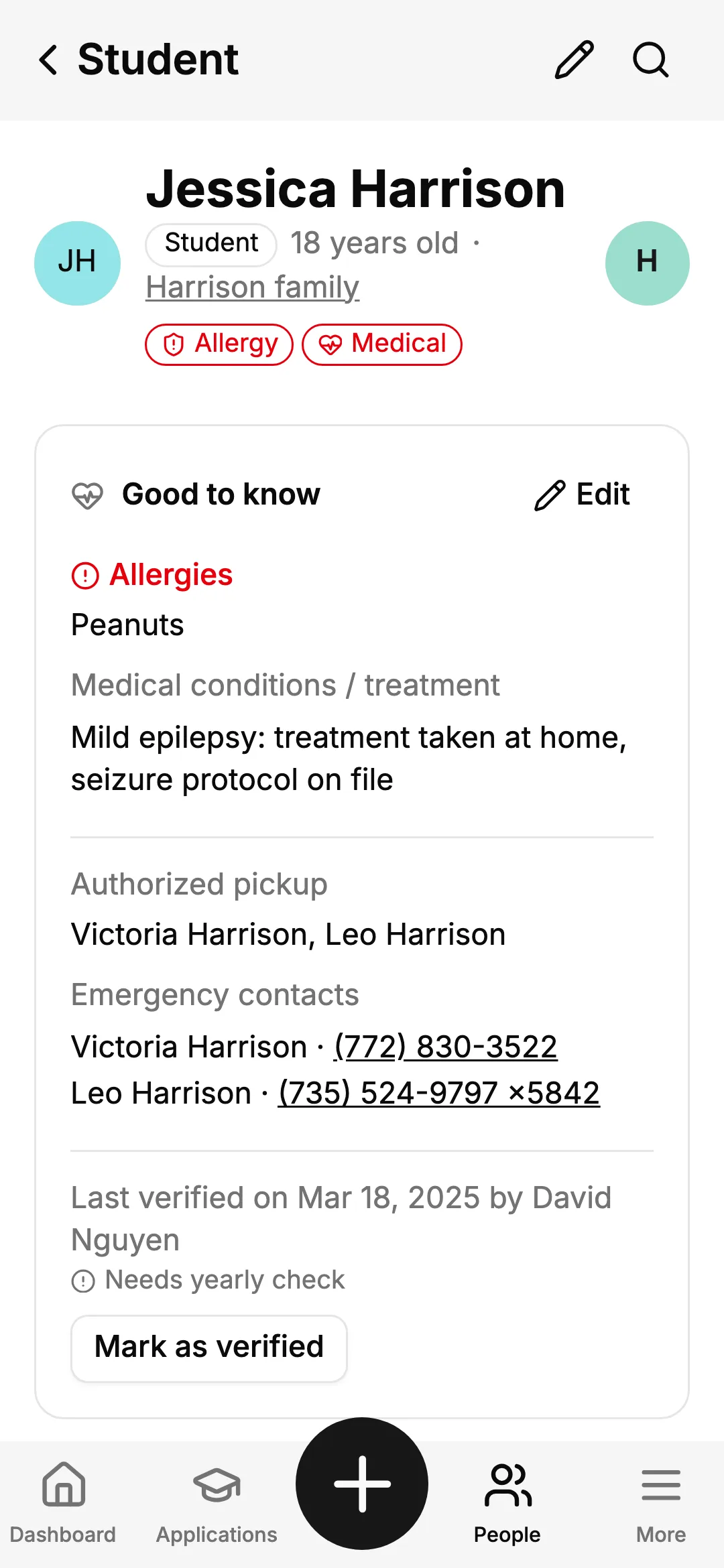
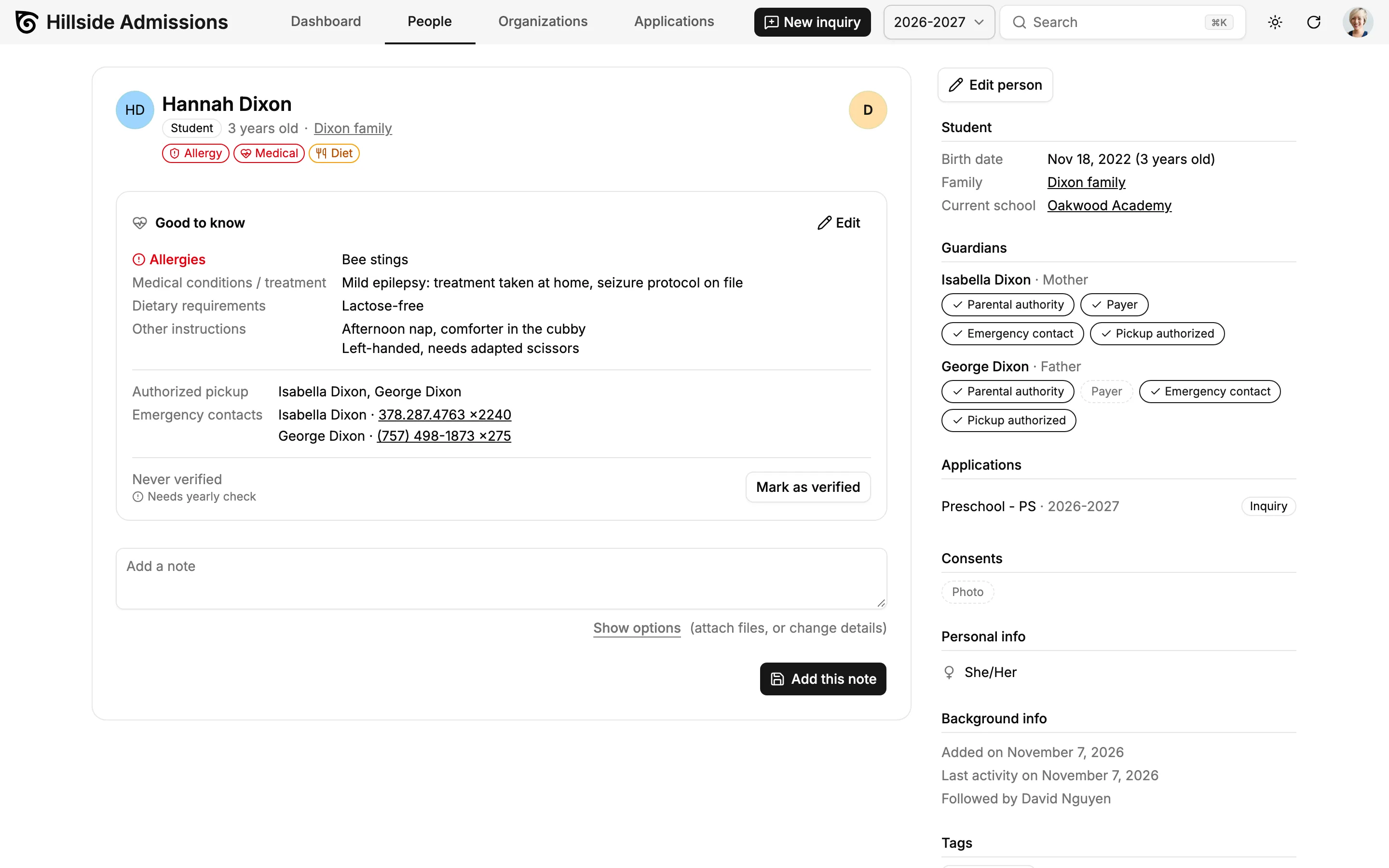
Allergies, medical needs, diet and custody instructions on a good-to-know card, with alert pills wherever the child appears.

Everything Your School Needs to Manage Families, From Open Day to Re-Enrollment
The demo follows Hillside, a fictional private school with three campuses, from preschool to a bachelor's program: admissions, families, students and re-enrollment. Every screen can be adapted to the way your school works during a Setup Week, and new ones added for the rest of your school life.
A Dashboard for Admissions and Re-Enrollment
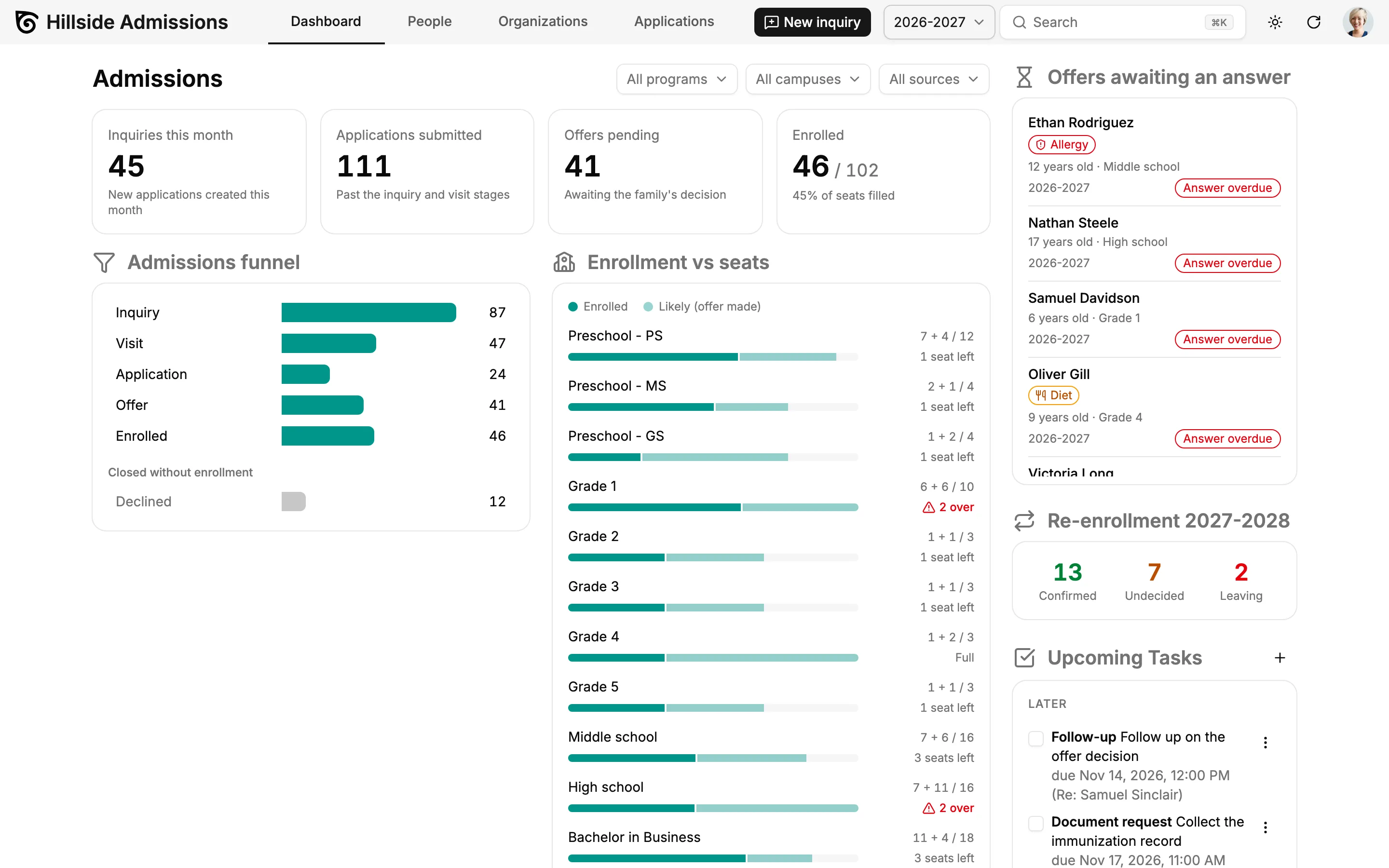
Start the day with this month's inquiries, applications submitted, offers pending and enrolled students against seats. The funnel and the seats per program follow the intake, program, campus and source you pick, and each stage links to the filtered list behind it. Offers awaiting an answer and re-enrollment progress sit right next to them.
Record an Inquiry in One Form
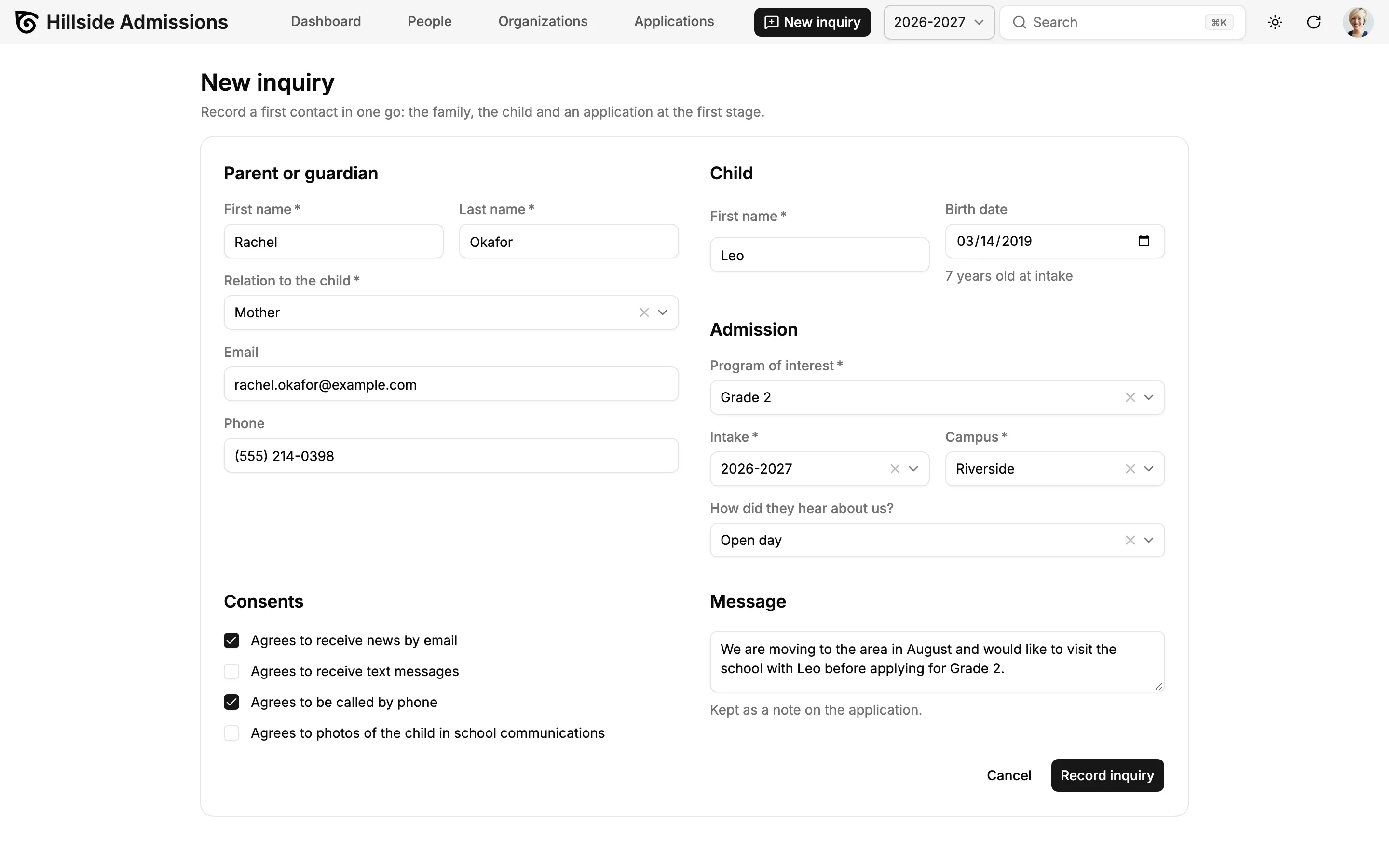
A parent calls or stops by at the open day: one form creates the family, the guardian, the child, the application at the first stage, a note and the consents. If the family already exists, the CRM says so and attaches the new child to it.
Families and Guardians
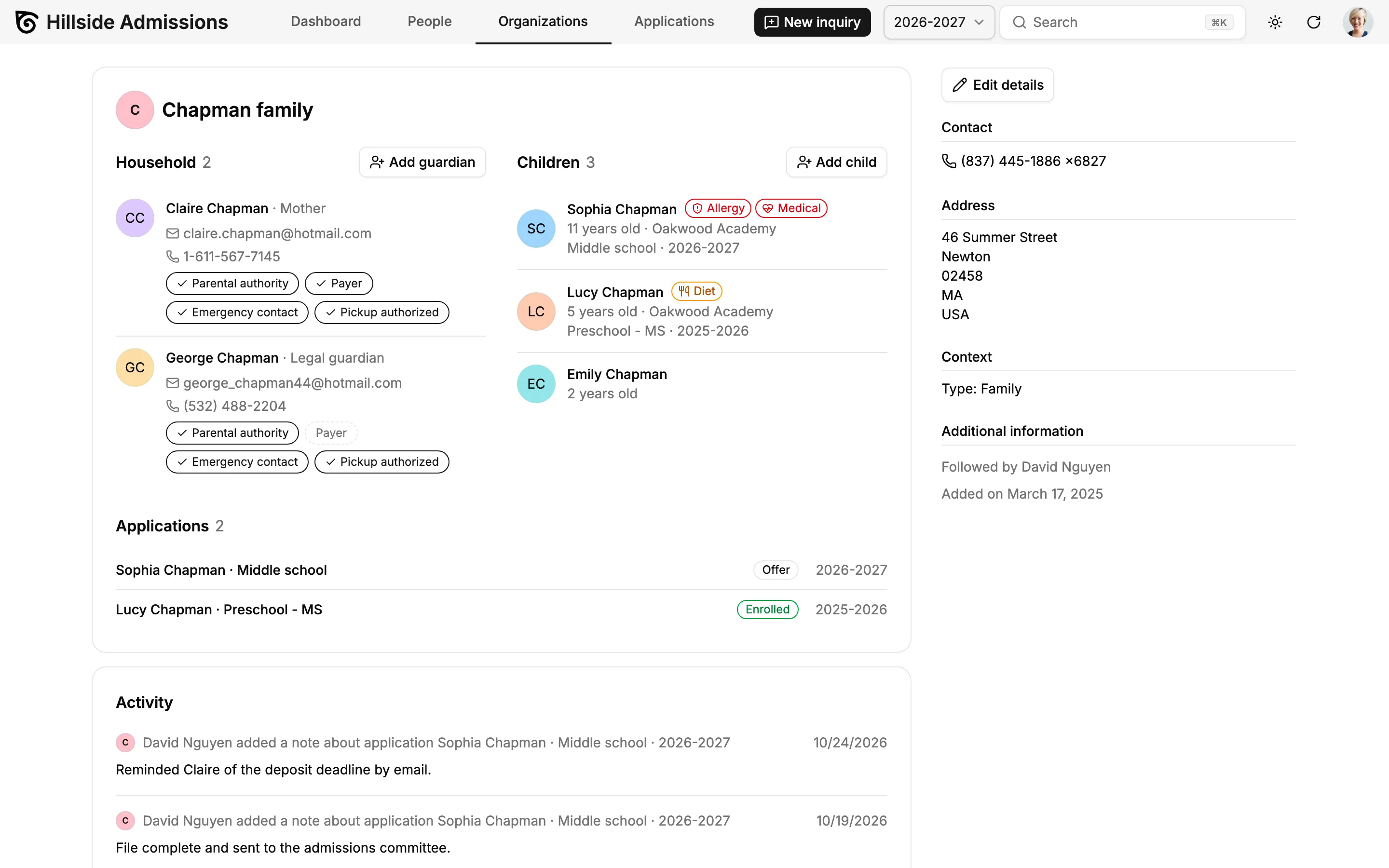
The family page shows the household, the children with their age and current school, and every application. Each guardian has clickable roles (parental authority, payer, emergency contact, pickup authorized), and consents are recorded per channel with their date and source.
An Admissions Pipeline on a Kanban Board
Inquiry, Visit, Application, Offer, Enrolled: drag the cards from one stage to the next. Each card shows the child's age at intake, the program, a sibling badge, the documents counter and the answer deadline. Switch to the list view for bulk actions: change the stage, assign a counselor or export to CSV.
Required Documents and Admission Decisions
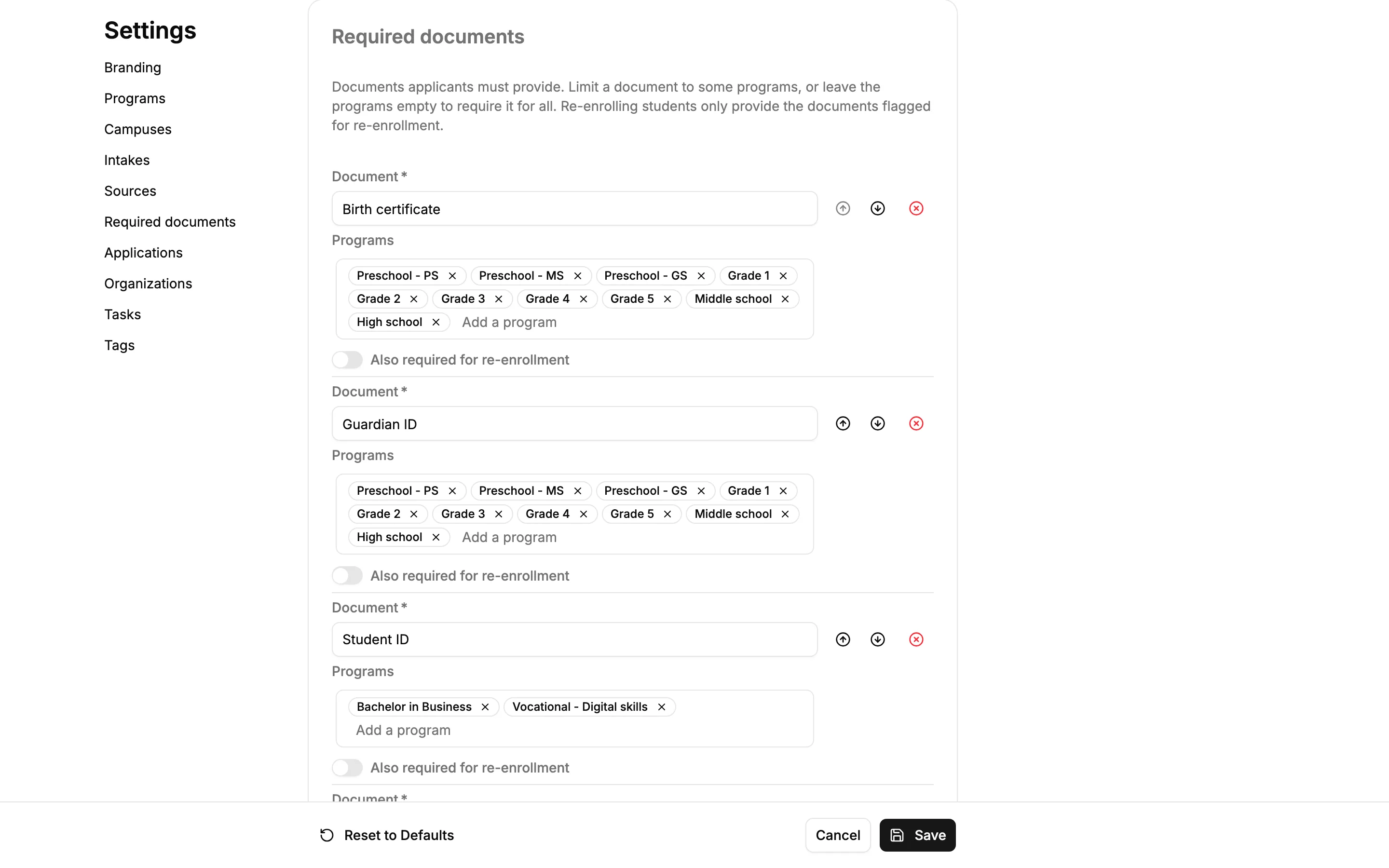
Decide which documents each program requires: birth certificate, school reports, vaccination record, ID photo. On the application page, one click marks a document received or validated. Moving a card to the Offer stage asks for the decision (admitted, waitlisted, refused) and sets the date the family must answer by.
Re-Enrollment Campaigns
Every spring, create next year's applications for all enrolled students in one step, with the next grade suggested. Running the campaign twice never creates duplicates. Each family's intention (confirmed, undecided, leaving) is one click away, and families at risk stand out.
A Good-To-Know Card on Every Child
Allergies, medical conditions, diet, custody restrictions and other instructions live on the student's page, next to who may pick the child up and who to call in an emergency. A yearly check reminds staff to confirm the information with the family, and alert pills follow the child on every list and card.
Building Blocks, Not Modules
A preschool, a K-12 school and a business school don't need different education software, just different settings. Programs with their seats, fees and entry age, campuses, intakes, sources, required documents, admission stages and application types are lists you edit in Settings. The student is not a separate module: a child is a person, linked to guardians with roles, from the first inquiry to the last school year.
| Building block | Preschool | K-12 school | Higher education |
|---|---|---|---|
| Families and people | parents, child, nanny | guardians, student, siblings | student, parents as payers |
| Programs | Toddlers, Pre-K, Kindergarten | Grade 1 to Grade 12 | Bachelor, Master, vocational track |
| Intakes | September, mid-year | school year | fall, spring |
| Stages | inquiry, visit, offer | inquiry, visit, interview, offer | application, review, offer |
| Required documents | vaccination record | school reports | diploma, transcripts |
| Good to know | nap, allergies, pickup | allergies, custody | accessibility needs |
MCP Server and AI Agents
Talk to Your School CRM
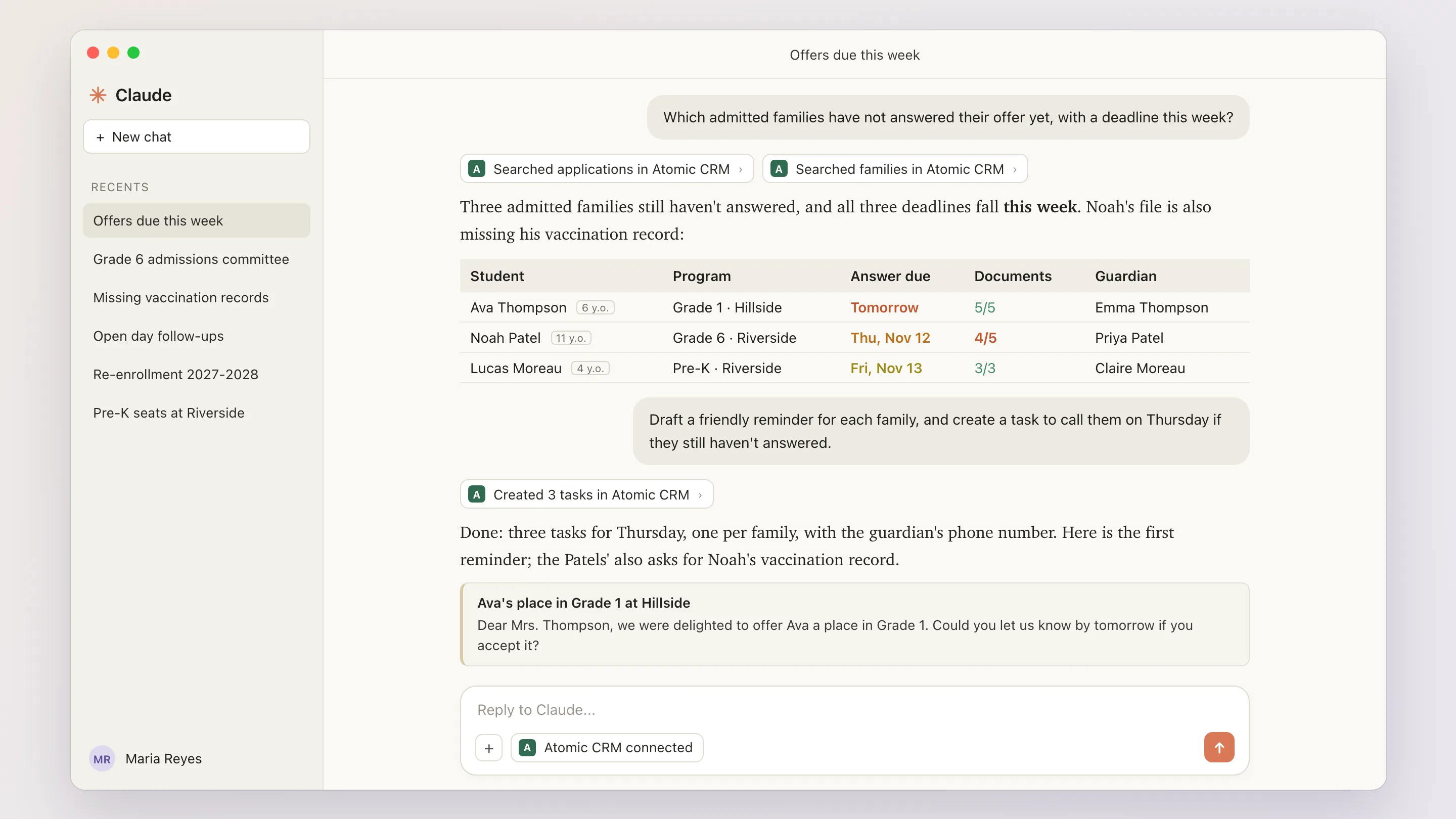
School staff spend their days with families, on the phone, at open days and at the school gate, not in front of a CRM. With the built-in MCP server, they can ask Claude, ChatGPT or any MCP-compatible assistant about families, students, applications and documents in plain language, and update the CRM without opening it.
- Prepare the School Trip
- “Which Grade 4 students have an allergy or a medical alert, and who is authorized to pick them up?”
- Chase the Paperwork
- “Which families at the Offer stage still owe a vaccination record? Draft a friendly reminder for each.”
- Save the Seats
- “Which admitted families have not answered and their deadline is this week?”
- Report From the Open Day
- “Mrs. Okafor visited with Leo, 7, who might join Grade 2 in September. Add a note to the application and a task to call her on Friday.” The assistant records the note and creates the task.
- Your Data, Your Rules
- The assistant goes through the same API and permissions as the app. Nothing is copied to a third-party CRM, and you choose which assistant to connect.
Reshape the CRM With a Prompt
The same AI-powered builder as on the Atomic CRM home page can extend the school CRM for you, test the change and explain it.
See how it worksTry asking:
- Add an interview stage with an evaluation grid
- Add parent-teacher meetings to each student's page
- Email the family 3 days before their answer deadline
- Let each counselor see only their own campus
What You Can Add to Your Education CRM
Atomic CRM is not a locked-down product, and admissions are only the start. Your school can extend it to the rest of its relationship with families and students, with your own developer or with our team.
Public Inquiry Form
An inquiry form on your website that creates the family and the application, with the campaign it came from.
Family Portal
Families update their details, sign forms and upload the requested documents themselves through a secure link, without an account.
Events and Meetings
Open days, parent-teacher meetings and school trips: registration, time slots, a check-in list with a QR code, and attendance tracked on each family.
Family Communication
Newsletters, class announcements, bulk emails to a segment and automatic reminders that respect each family's consent.
Decision Letters and Waitlist
Admission letters generated from a template, waitlist ranks and automatic offers when a seat frees up.
Fees, Deposits and Contracts
Tuition, application fees, deposits, sibling discounts and scholarships, and an enrollment contract signed online.
Year-Over-Year Reports
Compare this season with the last one, conversion rate per source and counselor performance.
Roles and Sensitive Data
Counselors limited to their campus, medical details visible to the school nurse only, retention rules and an audit log.
Student Information System Sync
Send enrolled students to your student information system and keep families in sync.
Alumni and Fundraising
Keep in touch with former students and their families, invite them to alumni events and track donations to your school.
Also included from Atomic CRM
- Single sign-on (Google, Azure, Keycloak, Auth0)
- Email to note (CC the CRM)
- CSV import with column mapping and duplicate merge
- Mobile app
- REST API
Not Just Private Schools
The school-specific part (programs, intakes, documents, stages, vocabulary) is one swappable set of data. The rest is a generic core for any organization that enrolls learners and keeps in touch with their families: language schools, training centers for adults, summer camps.



From the Demo to Your School
Your school can go from the demo to its own school CRM in four steps, with our team or with your own developer.
- 1
Explore the Demo
Record an inquiry, move applications through the pipeline, tick documents, record a decision and run a re-enrollment campaign, in a fictional school. This is the template you'll start from, nothing to install.
Open the demo - 2
Scope Your School
We map how your school works with families (programs, campuses, admission stages, documents, re-enrollment) and turn it into settings before going live.
Book a Setup Week - 3
Bring Your Families
Import your families, students and applicants from a spreadsheet or your previous tool with column mapping, then merge duplicates.
Import guide - 4
Go Live
Invite admissions officers, the school office, counselors and teachers. No per-user fee, so everyone gets an account.
Deployment guide
Education CRM Pricing
Free Forever, or Set Up by Experts
Use Atomic CRM for free, or let us set it up on your cloud or infrastructure.
Open-Source
The full power of Atomic CRM, self-managed on your own infrastructure.
Free
- Unlimited users, data & storage
- Host on Supabase or your own infrastructure
- SAML 2.0 single sign-on
- Email integration
- API access
- Community support on GitHub
Setup Week
Done for you
In one week, the team behind Atomic CRM designs, configures, and deploys it for your business, on your cloud or your infrastructure.
Custom quoteOne-time fee
What's included
- ScopingWe map your sales process, team, and needs.
- SpecificationsWe turn your requirements into a tailored configuration.
- Set-up & deploymentWe deploy your CRM on your own infrastructure, or host it for you.
No subscription. No per-seat pricing. No vendor lock-in.
Just a customized open-source CRM that you own, set up by CRM experts.
School and Education CRM: Frequently Asked Questions
What is an education CRM, and why choose an open-source one?
An education CRM, also called a school CRM, admissions software or enrollment management software, keeps track of the families and students around your school and everything you do with them, from the first inquiry to the last school year: visits, applications, documents, decisions, good-to-know information and re-enrollment. Most of these tools charge per user, per student or per module. Atomic CRM is open source: no per-seat fee, and code you can adapt and extend to the way your school works.
Is Atomic CRM really free for a school?
The code is open source under the MIT licence, with no per-user fee and no paid module. You pay only for what you choose to run it with: hosting, and the time to set it up, by your own developer or during a Setup Week with our team. If you'd rather not deal with servers, we can also host it for you, with your data in Europe or the US.
Can I use it for my school today?
Not as is. The demo shows the full admissions and re-enrollment workflow but runs entirely in your browser, and its data resets on every reload. Going live means connecting these screens to a database on Supabase or your own infrastructure and adapting the settings to your school. That is what the Setup Week is for.
Does it replace our student information system or school management software?
No. Atomic CRM manages the relationship with families: inquiries, applications, documents, decisions, the good-to-know card on every student and re-enrollment. Timetables, grades and attendance stay in your student information system, such as PowerSchool or Veracross. Syncing the two is an extension you can build.
Can we import our families from Finalsite, Blackbaud or a spreadsheet?
Yes. Export your families, students and applicants as a CSV file from your current admissions software or spreadsheet, then import them with column mapping and merge the duplicates. Bringing over the full history of past seasons usually takes a custom import script, written by your developer or by our team.
Is it only for admissions?
No. Admissions are where the demo starts, but families, guardians and students stay in the CRM for their whole time at your school: the family page, the good-to-know card and the yearly re-enrollment are already in the demo. Family communication, parent-teacher meetings, a family portal, fees or alumni relations are extensions you can build on the same data.
Does it work for preschools, K-12 schools and higher education?
Yes. Programs, intakes, stages, required documents and application types are settings. A preschool tracks families and a toddler's nap; a business school tracks student recruitment by program and intake. The same screens work for both without changing code.
How does it handle children's personal and medical data?
Consent is recorded per channel (email, SMS, phone, photo) with its date and source. The good-to-know card keeps allergies, medical needs and custody instructions with a yearly check, and alert pills show only the category and a short summary. Restricting the medical details to the school nurse and setting retention rules are part of a Setup Week. You choose where your data is hosted: on your own servers, or by us in Europe.
Can families apply online?
Not in the demo: staff record inquiries with a single form. A public inquiry form on your website and a family portal to upload documents are extensions to build, with our team or your own developer.
Does it collect application fees and deposits?
Not by itself. The application shows the tuition fee of the program; online payments, deposits and scholarships are an extension to build, usually by syncing a payment platform such as Stripe.
See the Education CRM in Action
Explore a fictional private school with its families, students, applications, documents and re-enrollment campaign, right in your browser. The data resets on every reload. Ready to make it yours? We adapt it to your school in a Setup Week.