The Open-Source CRM for Hospitality: From First Inquiry to Returning Guest
A ready-to-customize hospitality CRM template: guests, stays, properties, housekeeping and owners, next to your booking software. Start from a working app, adapt it to the way you host. Free, no fee per room or per listing, no commission on your bookings.
- 1,400+ stars on GitHub
- MIT licence
- By Marmelab, the team behind react-admin (25k+ stars)
Why Choose Atomic CRM for Your Hotel or Rental Business?
Hospitality software is usually priced per room or per listing, often with a cut of every booking. The guest file is spread across Airbnb, Booking.com, your booking software, your inbox and a spreadsheet, so a returning guest is a stranger every time. Atomic CRM is an open-source template you own: start from a working hospitality CRM and shape it to the way you host — with our team or your own developer.
No Fee Per Room or Per Listing
Open source, hosted on your own servers or by us. Add rooms, units and staff without a new licence, take no commission on bookings, and export all your data at any time.
Every Guest Recognised
One profile per guest, whatever the channel they booked on: stay history, total spent, preferences, allergies and flags. Possible duplicates are detected and merged from a review queue.
Direct Inquiries Answered Fast
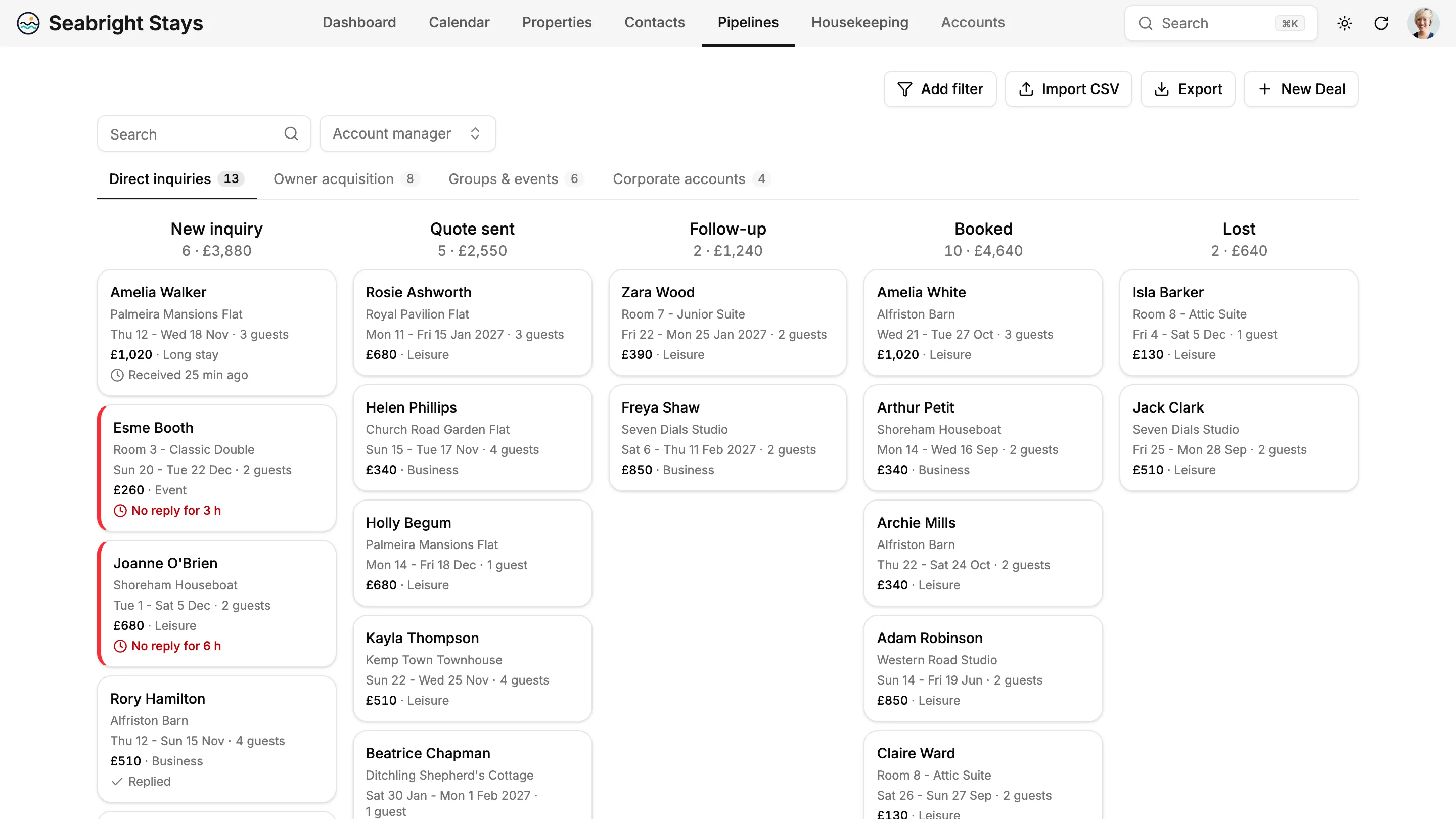
Each direct request shows the time since it arrived and turns red after two hours without a reply. The dashboard tracks your average response time.
A Clean Room for Every Arrival
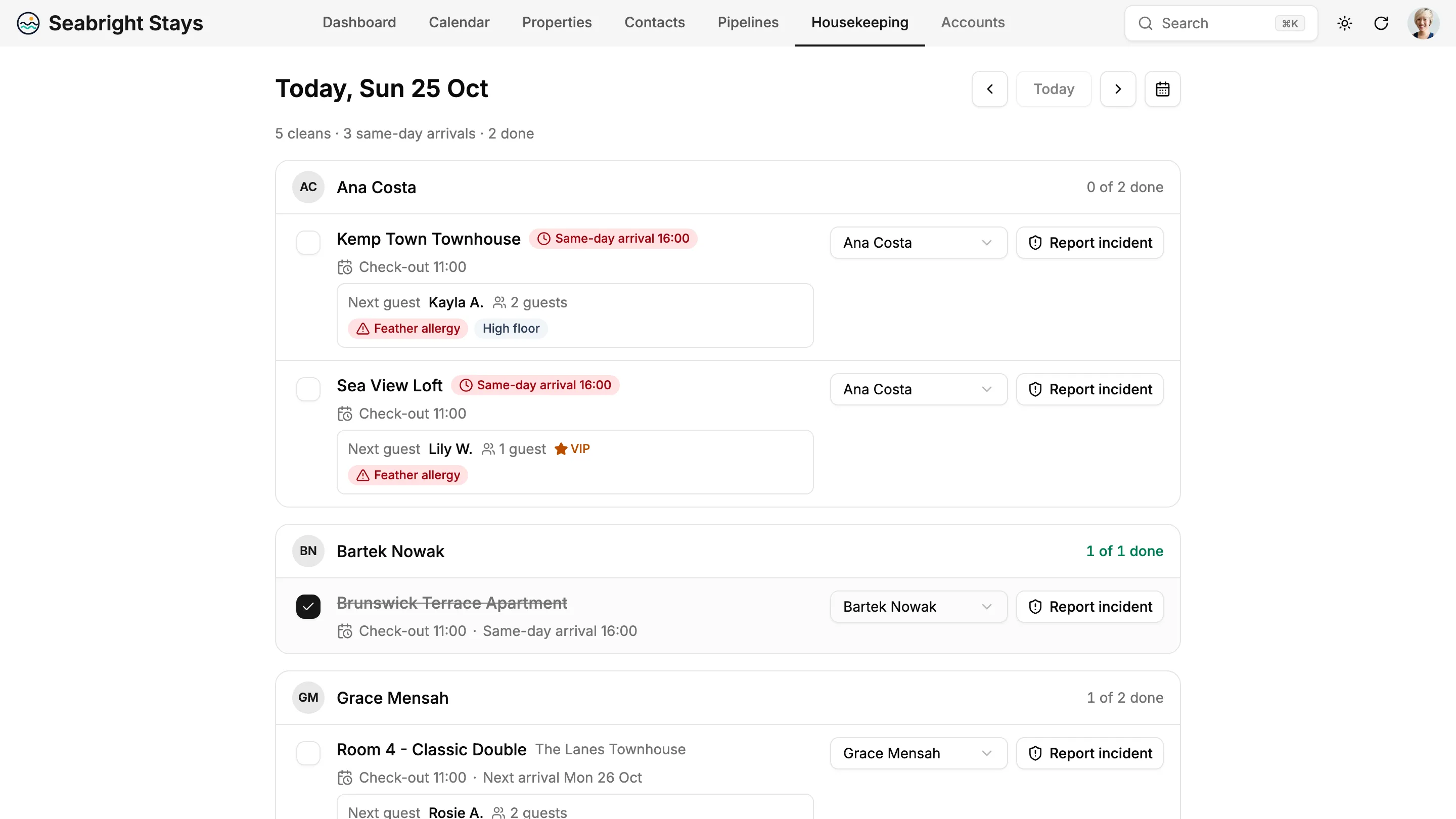
A housekeeping task is created for each departure, grouped by housekeeper, with same-day arrivals first and the next guest's needs on the task.
Owners Who Stay
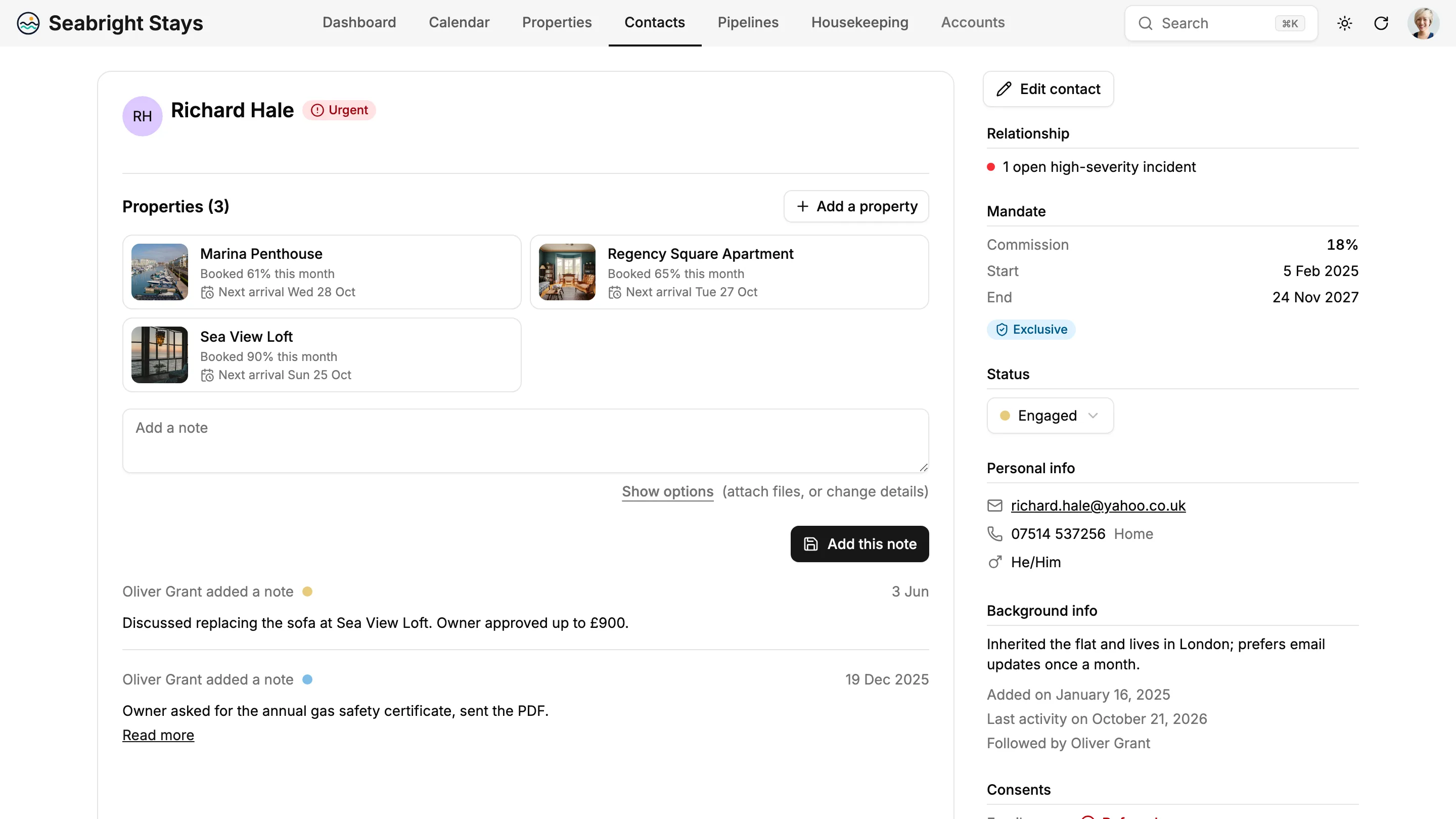
For rental managers: mandate terms, properties and every exchange in one place, with a health indicator that warns you before an owner leaves.
Your Business at a Glance
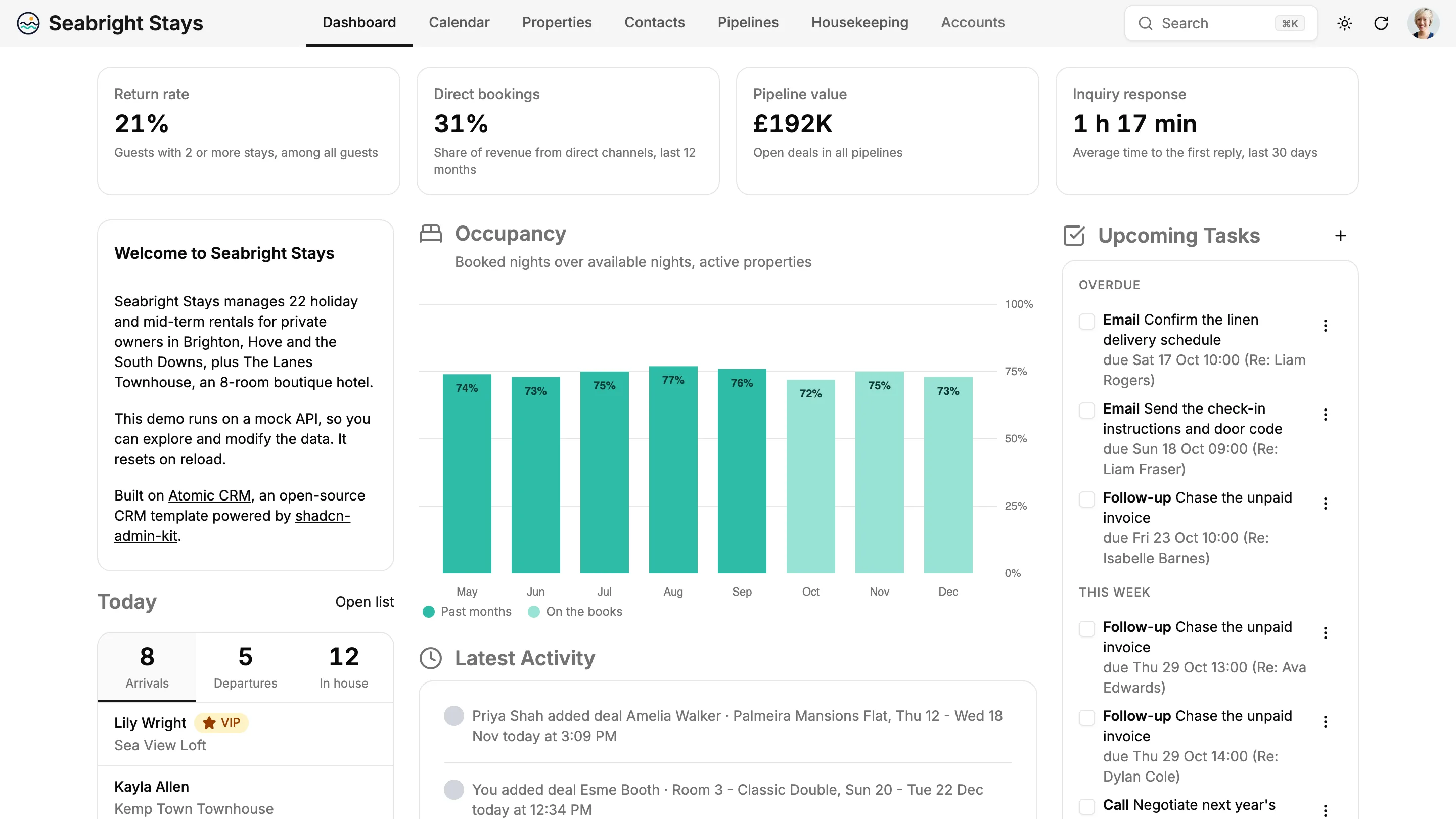
Return rate, direct booking share, pipeline value, inquiry response time and monthly occupancy on one screen.

Everything You Need, From Inquiry to Checkout
The template ships with a complete hospitality workflow: the property, the guest, the stay, the clean and the owner. Every screen can be adapted to the way you host during a Setup Week.
Properties Your Team Knows by Heart
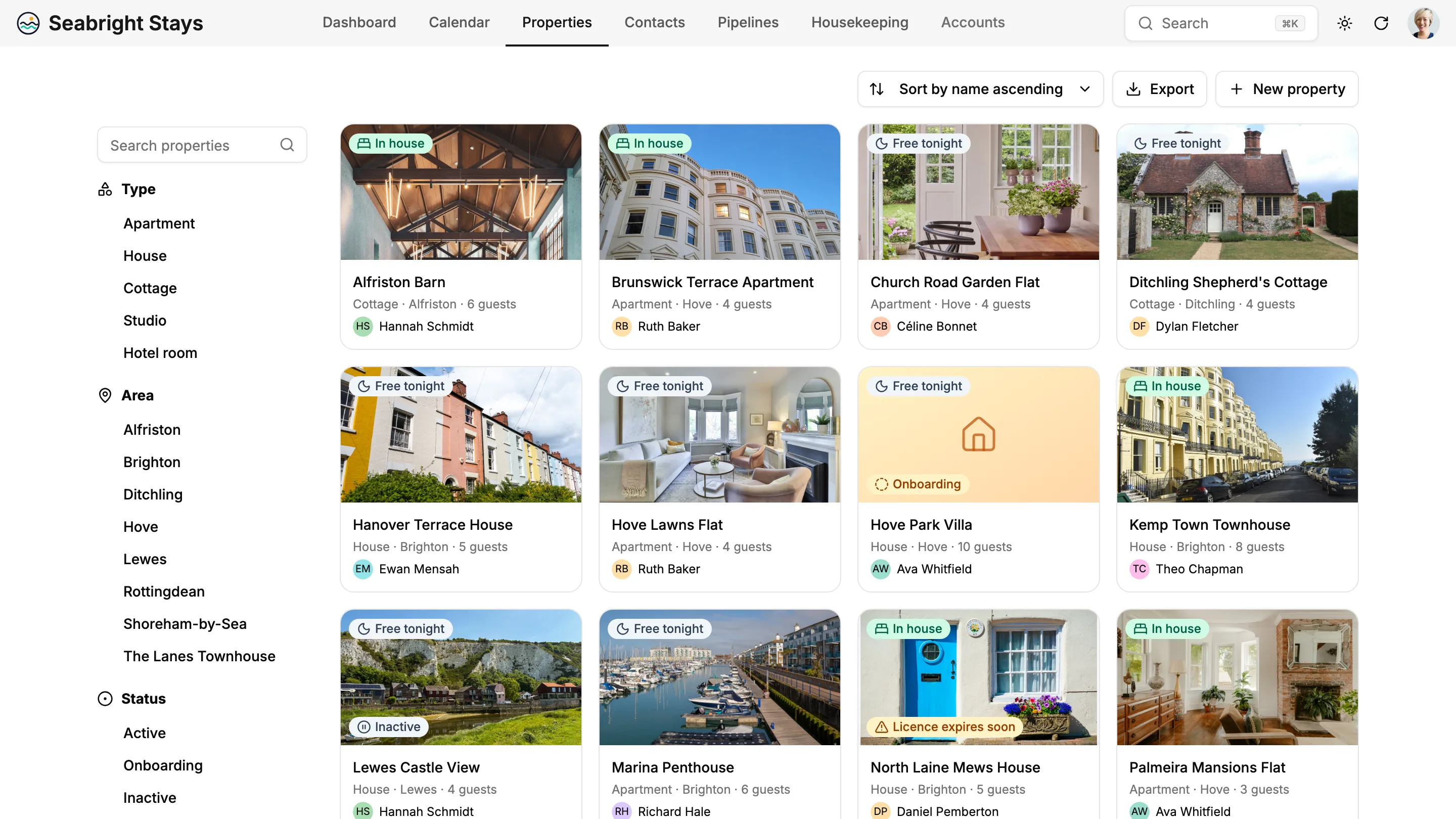
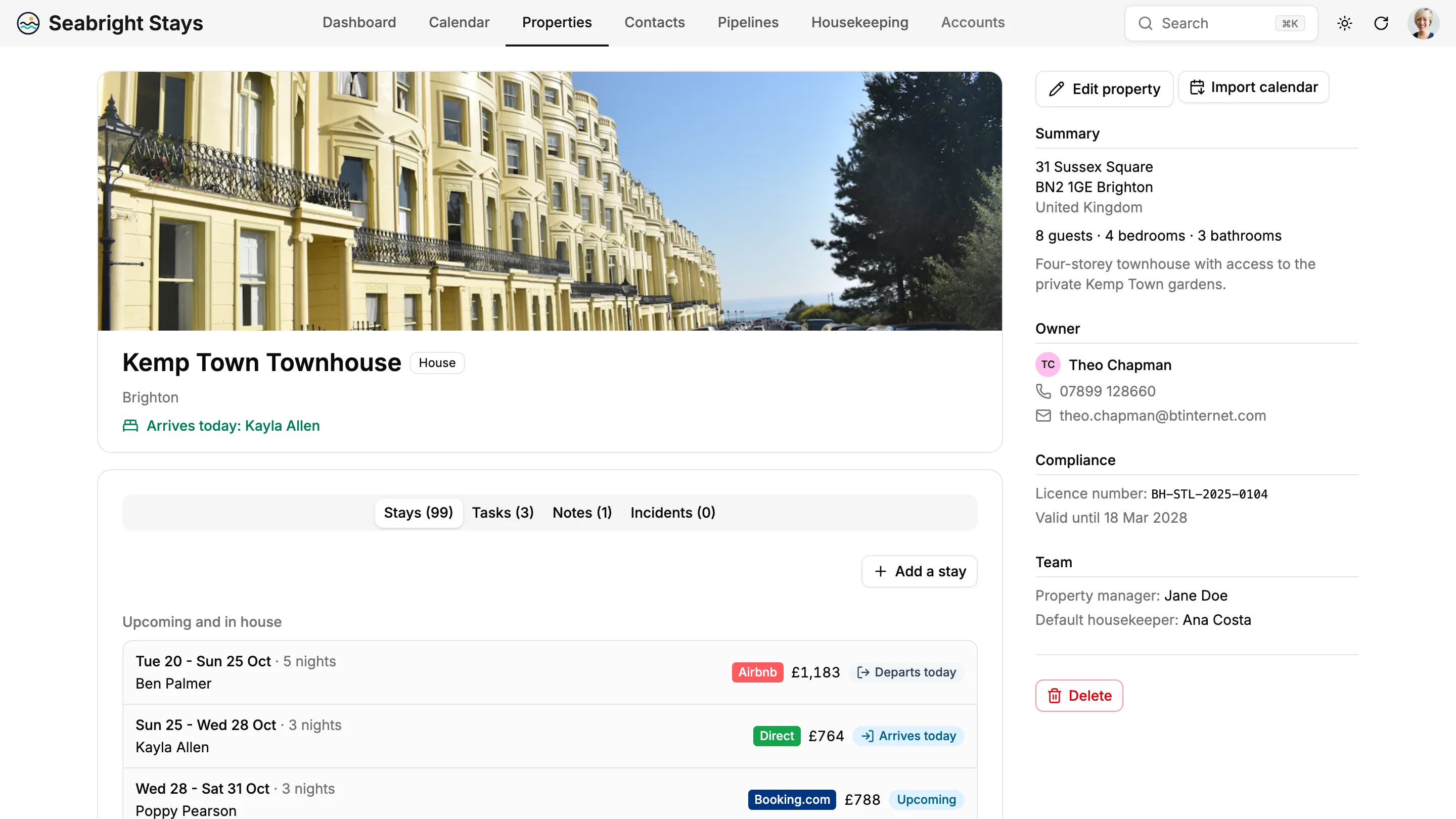
Browse rooms, flats, cottages and villas as photo cards, each with a live badge: in house, free tonight, licence expiring soon. Filter by type, area or status. Each property page gathers its stays, tasks, notes and incidents, its owner, its housekeeper and its licence number with the expiry date.
Occupancy Planning at a Glance
One row per property, stays as bars coloured by channel (direct, Airbnb, Booking.com, Vrbo, corporate), owner blocks hatched and one- or two-night gaps highlighted so you can fill them. Click a free slot to create a direct inquiry for that property and those dates. No booking software yet? Import a property's calendar from an iCal file.
Guest Profiles That Remember
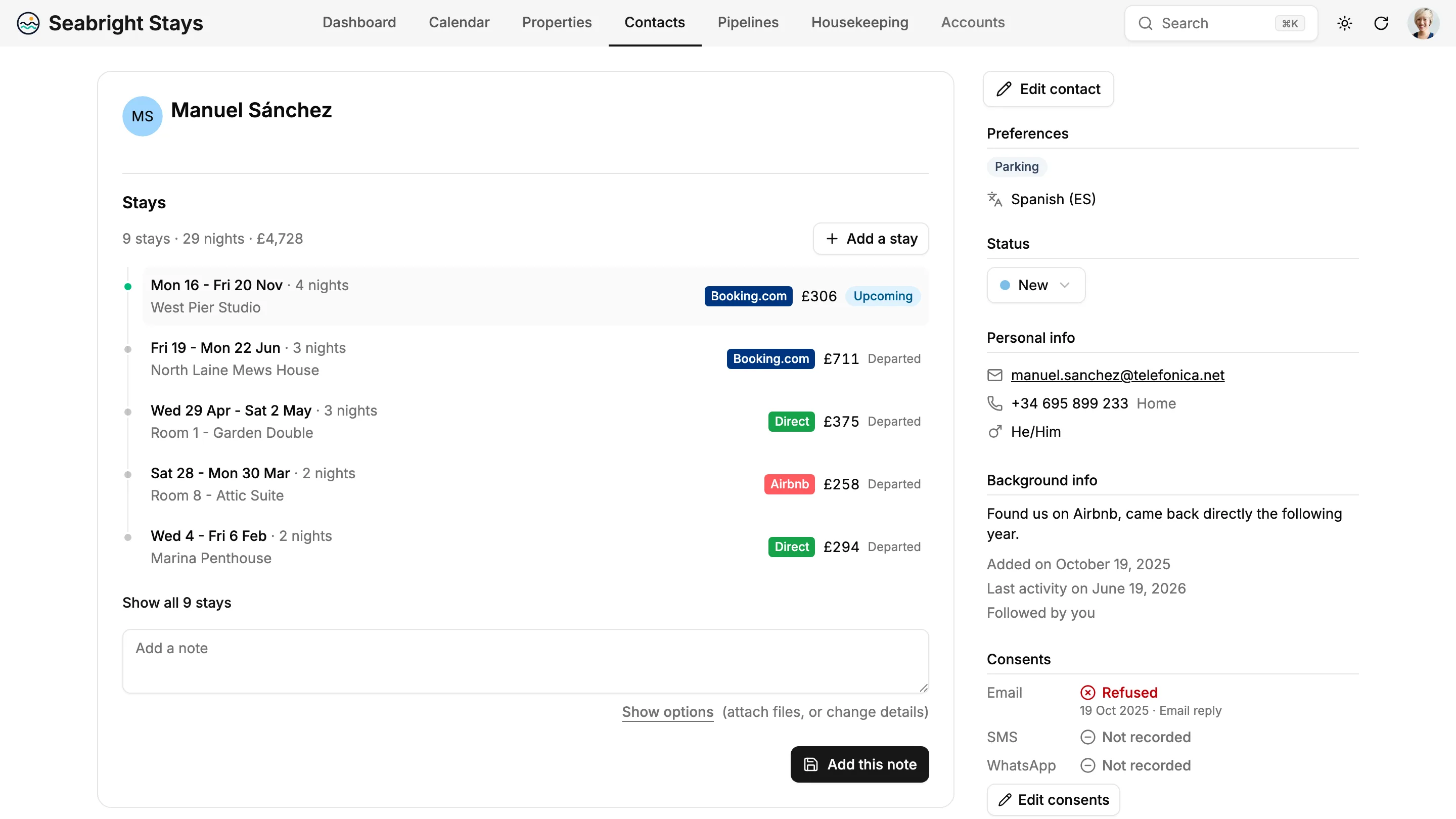
Language, preferences, allergies and accessibility needs, VIP and do-not-rebook flags, the full stay history with totals, and the open requests. Allergies show in red everywhere the guest appears: on the stay, the arrival list and the housekeeping task.
Housekeeping Without the Group Chat
Each departure creates a turnover clean on the property, between check-out and the next arrival. The daily board groups cleans by housekeeper, puts same-day arrivals first and shows what the next guest needs. Housekeepers tick their cleans on their phone and report an incident with a photo.
Pipelines for Direct Bookings, Groups and Owners
Separate boards for direct inquiries, group and event requests, corporate accounts and owner acquisition, each with its own stages. Inquiry cards show the requested property, dates and guests, and a timer that turns red when nobody has replied. Every board total shows what is at stake.
Owners Kept in the Loop
For managers who rent on behalf of owners: the commission, the mandate dates and exclusivity, the owner's properties with their occupancy this month, and a health indicator based on the last contact, open incidents and the end of the mandate. Owners can get their own read-only access.
Your Hospitality Dashboard
KPI tiles for return rate, direct booking share, pipeline value and inquiry response time, a monthly occupancy chart with what is already on the books, today's arrivals, departures and guests in house, upcoming tasks and open incidents.
Plugged Into the Way Your Team Works
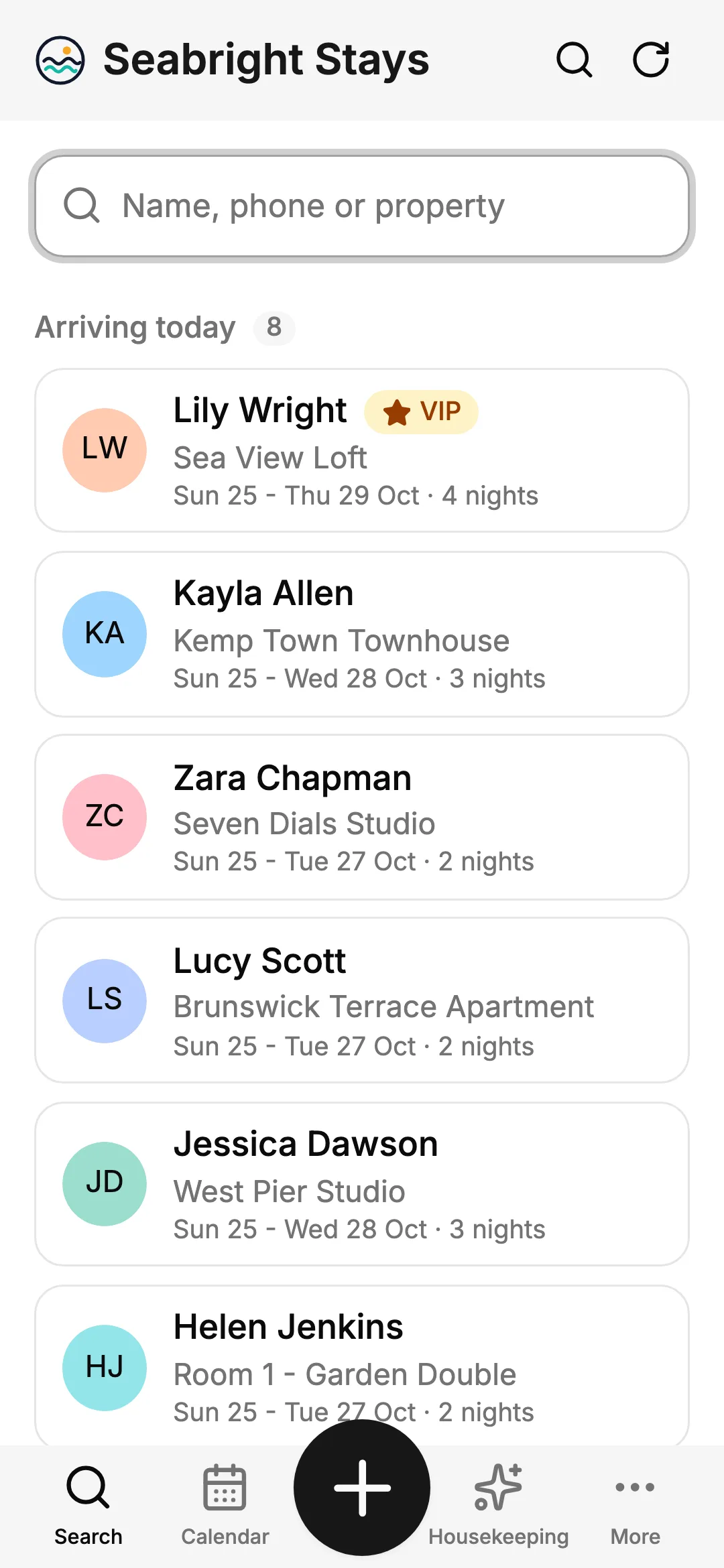
Front desk, managers and housekeepers rarely sit at a desk. Atomic CRM meets them on their phone and in their inbox, and every exchange ends up in the guest file.
Emails Filed Automatically
Add the CRM's address in Bcc when writing to a guest or an owner, or forward an email you received: it lands as a note on the right contact, and the contact is created if needed.
Read the docsAn App for Every Member of Staff
Install the CRM on any phone from the browser, without an app store. The front desk lands on a guest search with today's arrivals; housekeepers land on their cleans for the day.
Read the docsYour Booking Tools, Through the API
Every screen relies on a documented REST API. Send your website's booking requests to the inquiry pipeline, or import stays from your booking software's exports.
Read the docs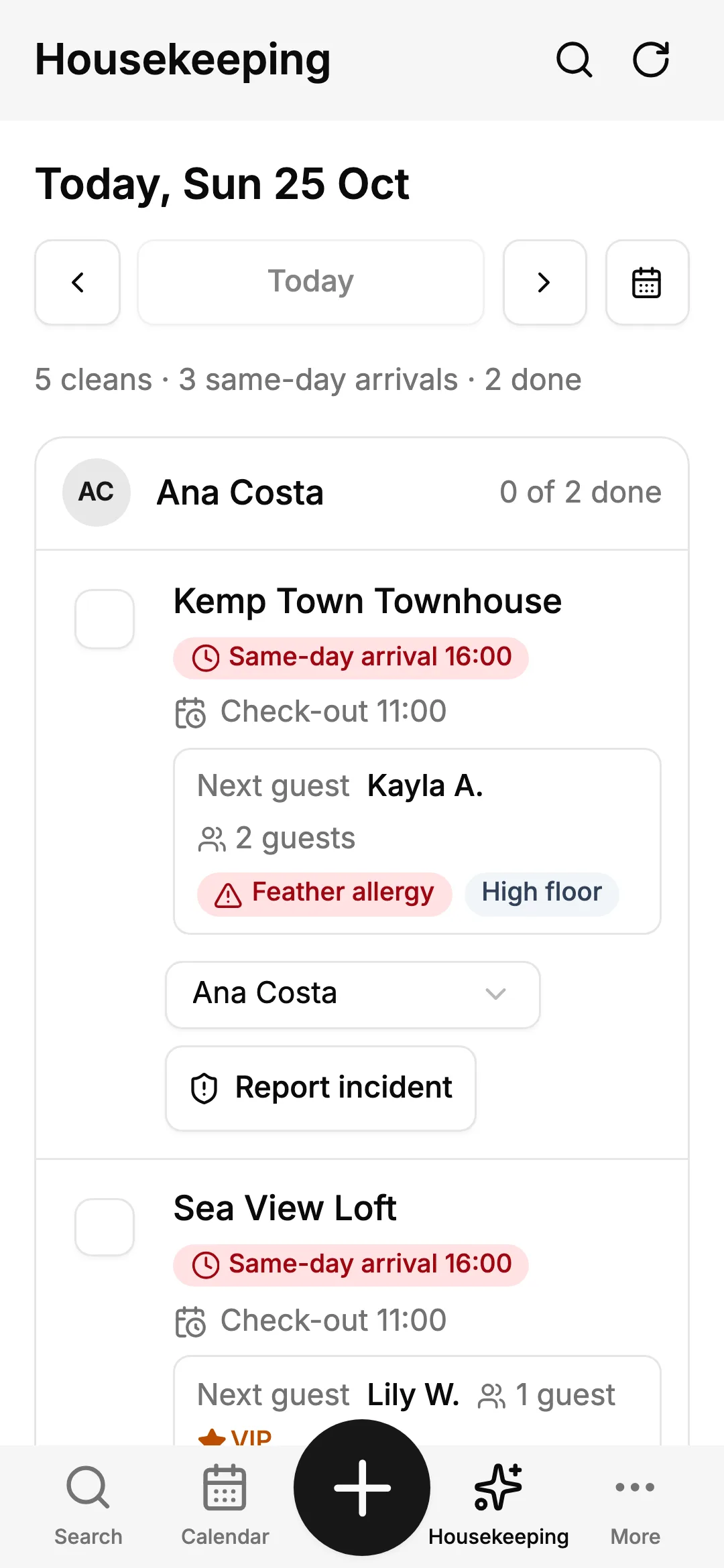
MCP Server and AI Agents
Talk to Your Hospitality CRM
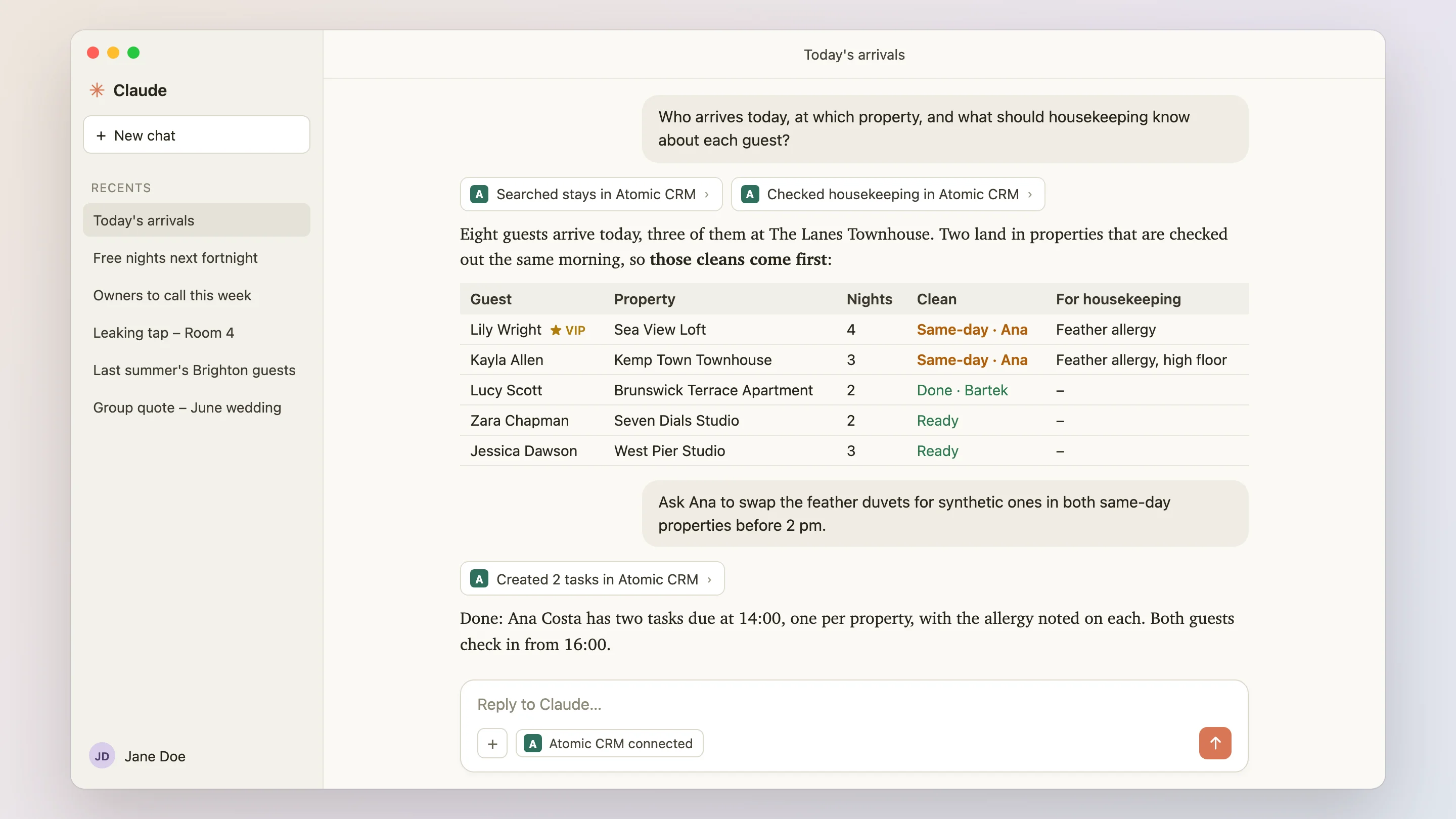
With the built-in MCP server, your team can ask Claude, ChatGPT or any MCP-compatible assistant about guests, stays and owners in plain language, and update the CRM without opening it.
- Prepare the Day
- “Who arrives today, at which property, and what should housekeeping know about each guest?”
- Fill the Gaps
- “Which properties have one or two free nights in the next two weeks? Draft a short offer for our returning guests who stayed in Brighton last summer.”
- Keep Owners Happy
- “Which owners haven't heard from us in 30 days or have an open incident? Give me a two-line update for each.”
- Log From the Corridor
- “Room 4 has a leaking tap, guest Esme Booth checks in at 4 pm. Report it and ask maintenance to fix it before then.” The assistant records the incident and creates the task.
- Your Data, Your Rules
- The assistant goes through the same API and permissions as the app. Nothing is copied to a third-party CRM, and you choose which assistant to connect.
Reshape the CRM With a Prompt
The same AI-powered builder as on the Atomic CRM home page can extend the hospitality CRM for you, test the change and explain it.
See how it worksTry asking:
- Add a lost and found register to properties
- Show the occupancy per property on the dashboard
- Send a thank-you email with a direct booking link after each checkout
- Let housekeepers see only their own properties
What You Can Build Next on Your Hospitality CRM
Atomic CRM is not a locked-down product: your business can extend it freely, with your own developer or with our team.
Booking Software Sync
Receive stays from your PMS or channel manager (Mews, Cloudbeds, Hostaway, Smoobu, Beds24) through webhooks, and read booking confirmations from Airbnb and Booking.com emails to create the guest and the stay automatically.
Real Guest Contacts
Spot the temporary addresses that OTAs give you, and collect the guest's own email and consent through a web check-in form or a QR code at the front desk.
Messages in the Guest's Language
Templates per language for pre-arrival, in-stay and post-stay messages, filled with the guest's name, property and dates, and logged on the profile.
Direct Rebooking Campaigns
Saved segments sent to Brevo or Mailchimp with consent checked, to bring last year's guests back without a commission.
Reviews and Reputation
Reviews linked to the guest and the stay, low ratings turned into incidents to follow up, and an average score per property.
Quotes and Upsells
Quotes with several options for villas and groups, and early check-in, late check-out or extras offered and tracked on each stay.
Owner Reports and Portal
A monthly report per owner with stays, revenue, reviews and incidents, sent in one click, or a read-only owner page.
Corporate and Mid-Term Stays
Negotiated rates and room nights per corporate account, tenant applications with document checks, lease end reminders and gap-day tracking.
Compliance
Short-term rental licences and night caps per property, damage deposits and insurance claims, and GDPR retention with anonymisation.
And with the MCP server and the AI builder described above, many of these can start as a prompt.
Not Just Holiday Rentals
Hospitality knowledge (contact and account types, property types, channels, guest preferences, pipelines and their stages) lives in the Settings page, not in the code. Start from the demo and adapt it to your own way of hosting, from a single guesthouse to a hotel group.

From the Demo to Your Business
Go from the demo to your own CRM in four steps, with our team or with your own developer.
- 1
Explore the Demo
Plan stays, recognise returning guests, run the housekeeping board and follow owners in a fictional Brighton rental company with a boutique hotel. This is the template you'll start from — nothing to install.
Open the demo - 2
Scope Your Business
We map how you host (property types, channels, pipelines, housekeeping and owners) and adapt the CRM before going live.
Book a Setup Week - 3
Import Your Data
Import contacts, accounts and deals from CSV files, and stays from the exports of your booking software.
Import guide - 4
Go Live
Invite the front desk, managers and housekeepers at no extra cost, and have them install the mobile app before their next shift.
Deployment guide
Hospitality CRM Pricing
Free Forever, or Set Up by Experts
Use Atomic CRM for free, or let us set it up on your cloud or infrastructure.
Open-Source
The full power of Atomic CRM, self-managed on your own infrastructure.
Free
- Unlimited users, data & storage
- Host on Supabase or your own infrastructure
- SAML 2.0 single sign-on
- Email integration
- API access
- Community support on GitHub
Setup Week
Done for you
In one week, the team behind Atomic CRM designs, configures, and deploys it for your business, on your cloud or your infrastructure.
Custom quoteOne-time fee
What's included
- ScopingWe map your sales process, team, and needs.
- SpecificationsWe turn your requirements into a tailored configuration.
- Set-up & deploymentWe deploy your CRM on your own infrastructure, or host it for you.
No subscription. No per-seat pricing. No vendor lock-in.
Just a customized open-source CRM that you own, set up by CRM experts.
Hospitality CRM: Frequently Asked Questions
What is a hospitality CRM, and how is it different from a PMS?
A property management system (PMS) or a channel manager runs operations: availability, rates, distribution to OTAs and payments. A hospitality CRM manages relationships: who your guests are, what they like, how they came back, the direct requests you are working on, and, for rental managers, your owners. Atomic CRM sits next to your PMS instead of replacing it. Stays can be imported from your PMS; syncing them automatically requires an integration.
Is Atomic CRM really free for a hotel or a rental business?
Yes. The code is open source under the MIT licence, with no fee per room, per listing or per user, and no commission on bookings. You only pay for hosting: Supabase has a free plan to get started, and its paid plans start at about $25 per month for the whole business. If you want us to set it up, the Setup Week is a one-time fee. If you'd rather not deal with servers, we can also host it for you, with your data in Europe or the US.
Do I need a developer to use it?
Not to use it day to day: property types, channels, guest preferences, pipelines and stages are all edited in the Settings page, and staff are managed in the app. Deploying it takes a few commands that a technical person can run by following the guide. The Setup Week is designed for teams with no technical staff: we adapt the template, deploy it and hand you the keys.
Does it connect to Airbnb, Booking.com or my channel manager?
Not out of the box. Atomic CRM imports stays from CSV exports and iCal calendars, and the REST API lets a developer receive stays from your PMS or channel manager through webhooks. It does not manage availability or rates on the OTAs: that stays the job of your booking software.
How does it handle guests who booked through an OTA?
Each guest has one profile whatever the channel, with the channel recorded on every stay so you can measure your direct booking share. Duplicate detection suggests merging two profiles that share a name, an email or a phone number.
How does it handle GDPR?
Each guest records a dated consent per channel (email, SMS, WhatsApp) with its source, and you can anonymise a guest in one click while keeping their stays for your statistics. Since you host the CRM, you choose where your data lives, including in the European Union, and no third-party vendor has access to your guest file.
Can housekeepers and owners use it?
Yes. Each user has a role: admin, front desk, housekeeping or owner. Housekeepers land on their cleans for the day on their phone; owners see their own properties and stays, read-only.
Is it suited to a single guesthouse, or to a hotel and a portfolio of rentals?
Both. There is no limit on properties or users. The demo itself mixes 22 holiday and mid-term rentals with an 8-room boutique hotel, and the property list and the planning can be filtered by area or property type.

See the Hospitality CRM in Action
Explore Seabright Stays, a fictional Brighton company managing 22 holiday and mid-term rentals and an 8-room boutique hotel, with guests, stays, housekeeping, owners and direct inquiries, right in your browser, in English or French. The data resets on every reload. Ready to make it yours? We adapt it to your business in a Setup Week.