The Open-Source CRM for Non-Profits: Run Your Whole Season in One Tool
A ready-to-customize non-profit CRM template: members and families, teams, membership fees, required documents, events and attendance, messages and grants. Start from a working app, adapt it to your association. Free, no per-user fees, no lock-in.
- 1,400+ stars on GitHub
- MIT licence
- By Marmelab, the team behind react-admin (25k+ stars)
Why Choose Atomic CRM for Your Association?
Donor CRMs are powerful but priced for professional fundraisers. All-in-one association software handles memberships and accounting but little of the relationship work. Free payment platforms collect the money but barely know who your members are. Atomic CRM is an open-source template your association owns: a real CRM built from a few generic building blocks, shaped to the way you work — with our team or your own developer.
Free for Every Volunteer
No per-seat fee. Give a login to every coach, board member and volunteer without watching the budget.
One Place for the Whole Season
Registrations, teams, fees, documents, events and messages share the same data, so nothing lives in a spreadsheet on someone's laptop.
Families, Not Just Contacts
Minors are linked to their parents. Reminders and messages go to the legal guardian automatically.
Paperwork Under Control
See at a glance who still owes a fee or a medical certificate, and remind them in two clicks.
Built for the Pitch Side
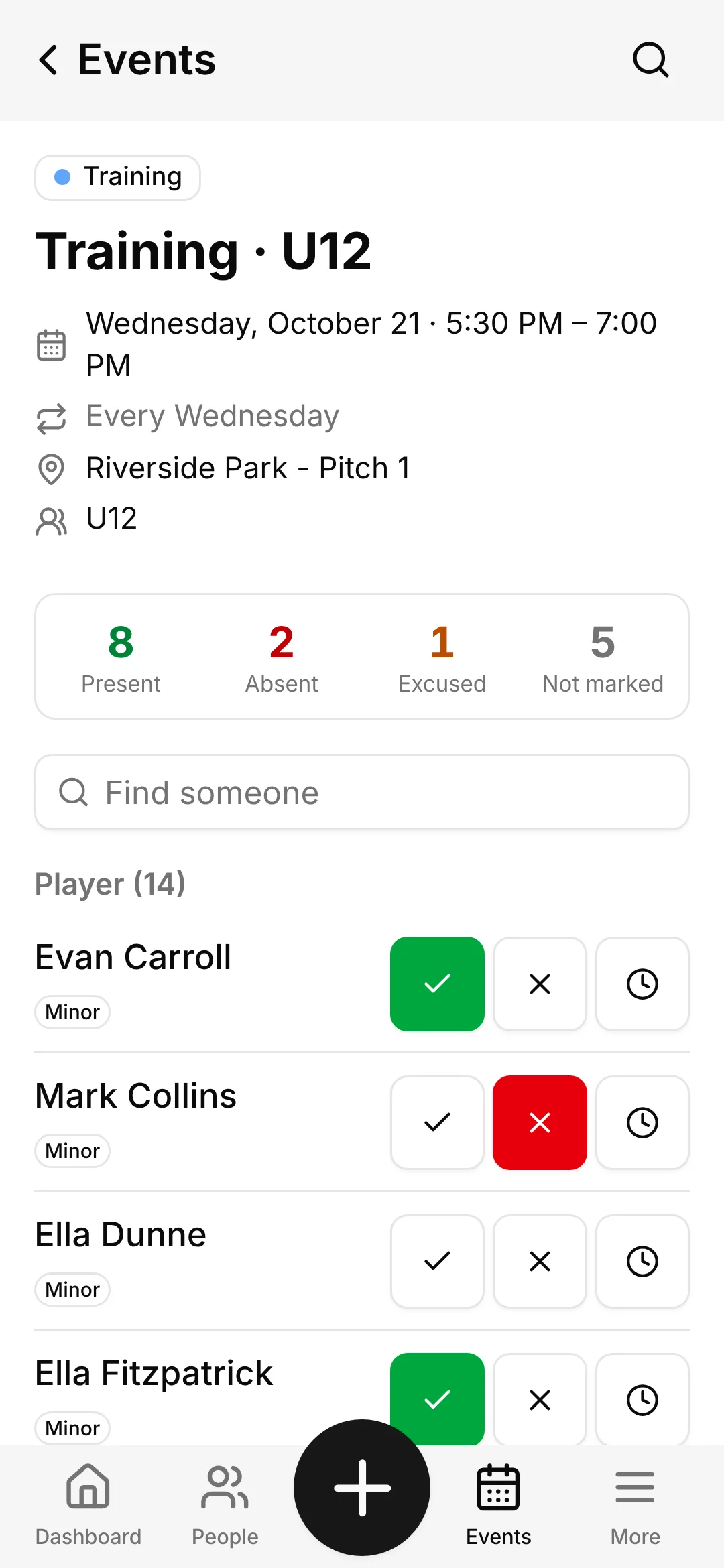
A mobile roll call with big buttons, so a coach takes attendance in seconds, phone in one hand.
Your Data, Your Rules
Consent recorded per channel, sensitive documents restricted to administrators, and self-hosting for full data sovereignty.

Everything Your Association Needs, From Registration to the Last Match
The demo follows one season of Riverside FC, a neighbourhood football club. It covers the full workflow, and every screen can be adapted to the way your association works during a Setup Week.
A Dashboard for the Whole Club
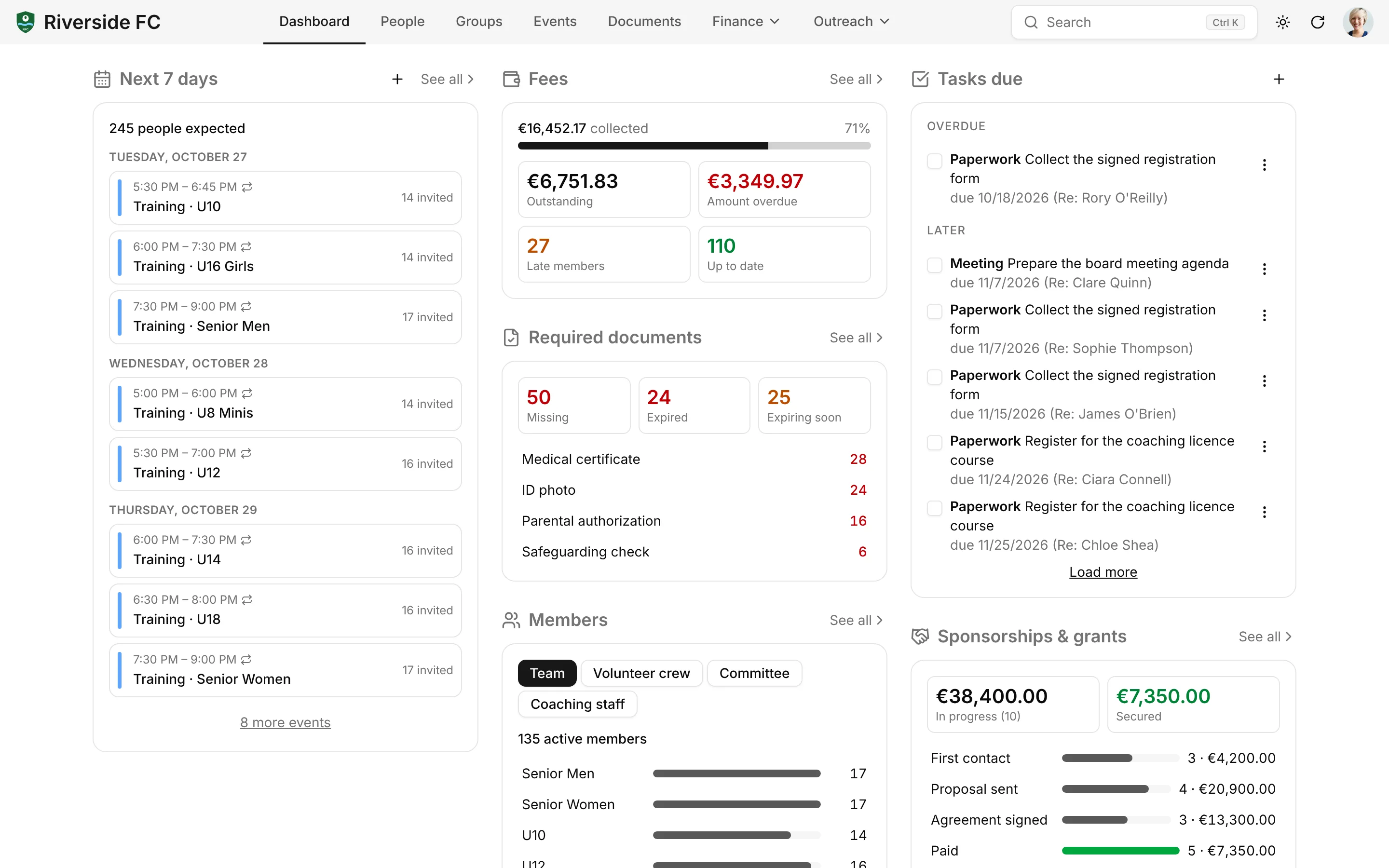
Start the week with the next 7 days of events and how many people are expected, fees collected versus outstanding, missing and expiring documents, members per team, the grants pipeline and tasks due. Each block links to the filtered list behind it.
Members and Their Families
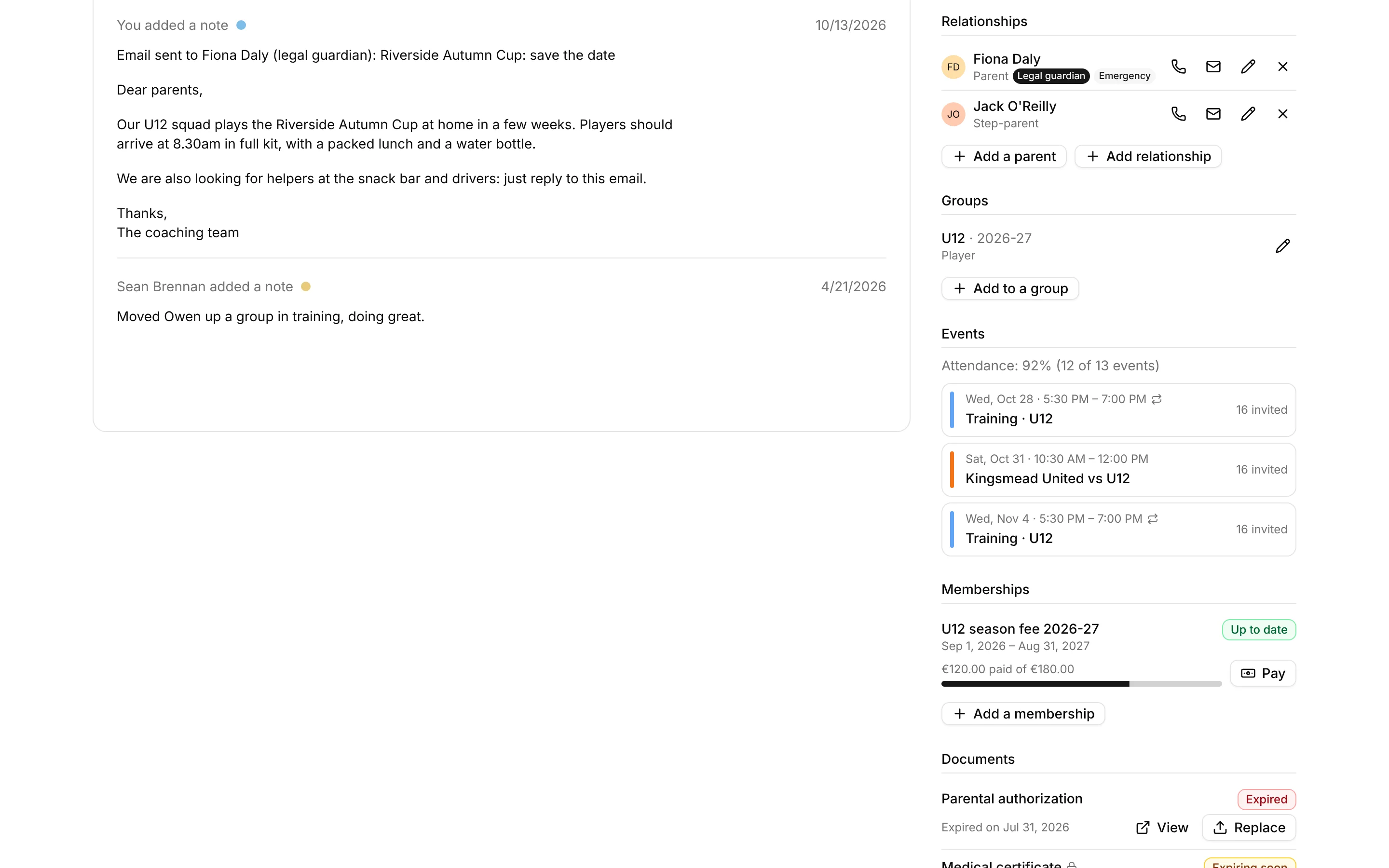
Register a child and add a parent in the same flow. Each person shows their age and a "minor" badge, their guardians, groups, memberships and documents. Consent is recorded per channel (email, SMS, post) with its date, source and legal basis, and custom fields (shirt size, licence number…) are defined in Settings, without code.
Teams, Crews and Committees
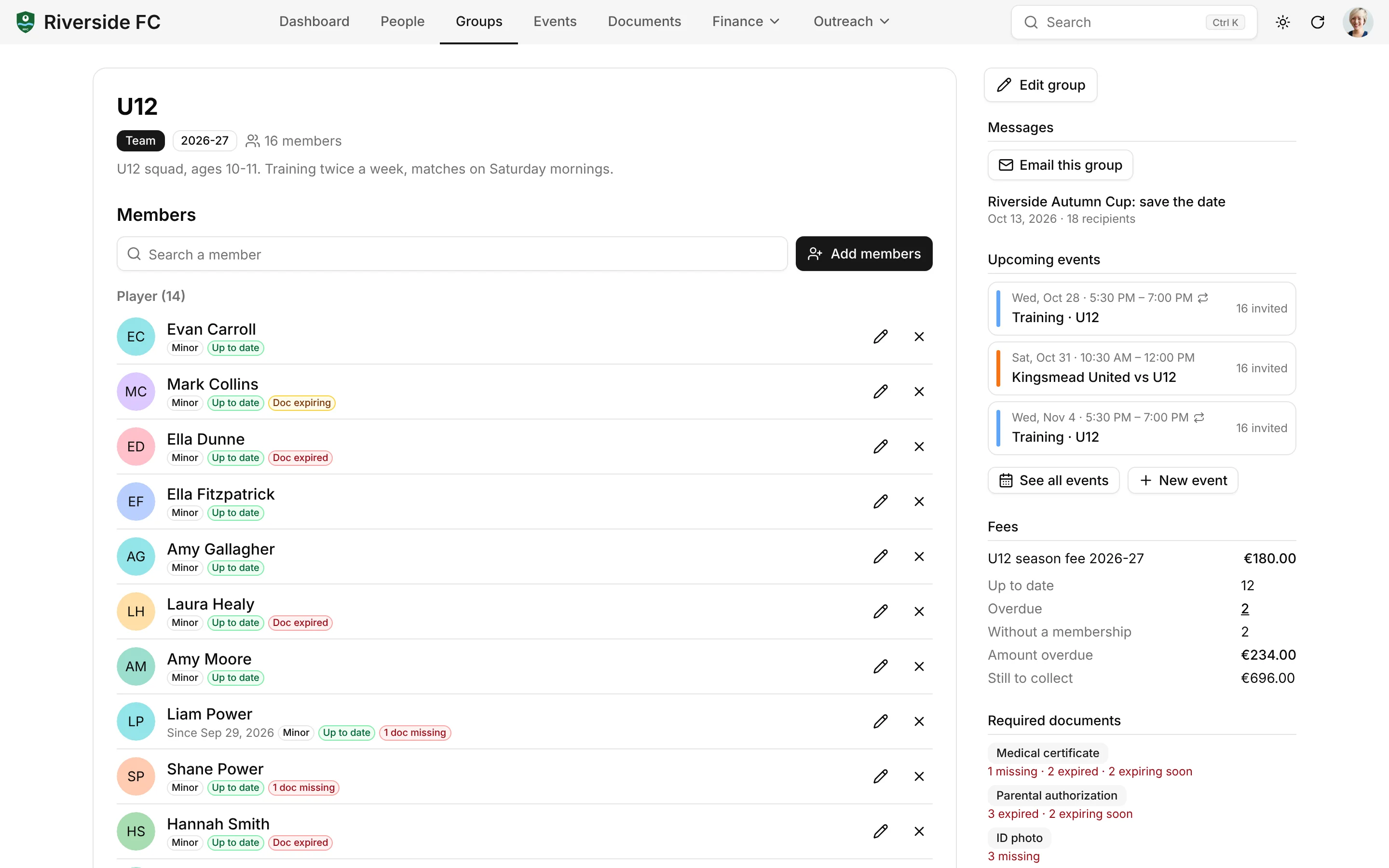
Groups have a type, a season and members with a role and dates: players and coaches in a team, volunteers in the snack-bar crew, the board. The group page shows the roster with each member's fee status and missing documents.
Membership Fees, Even in Installments
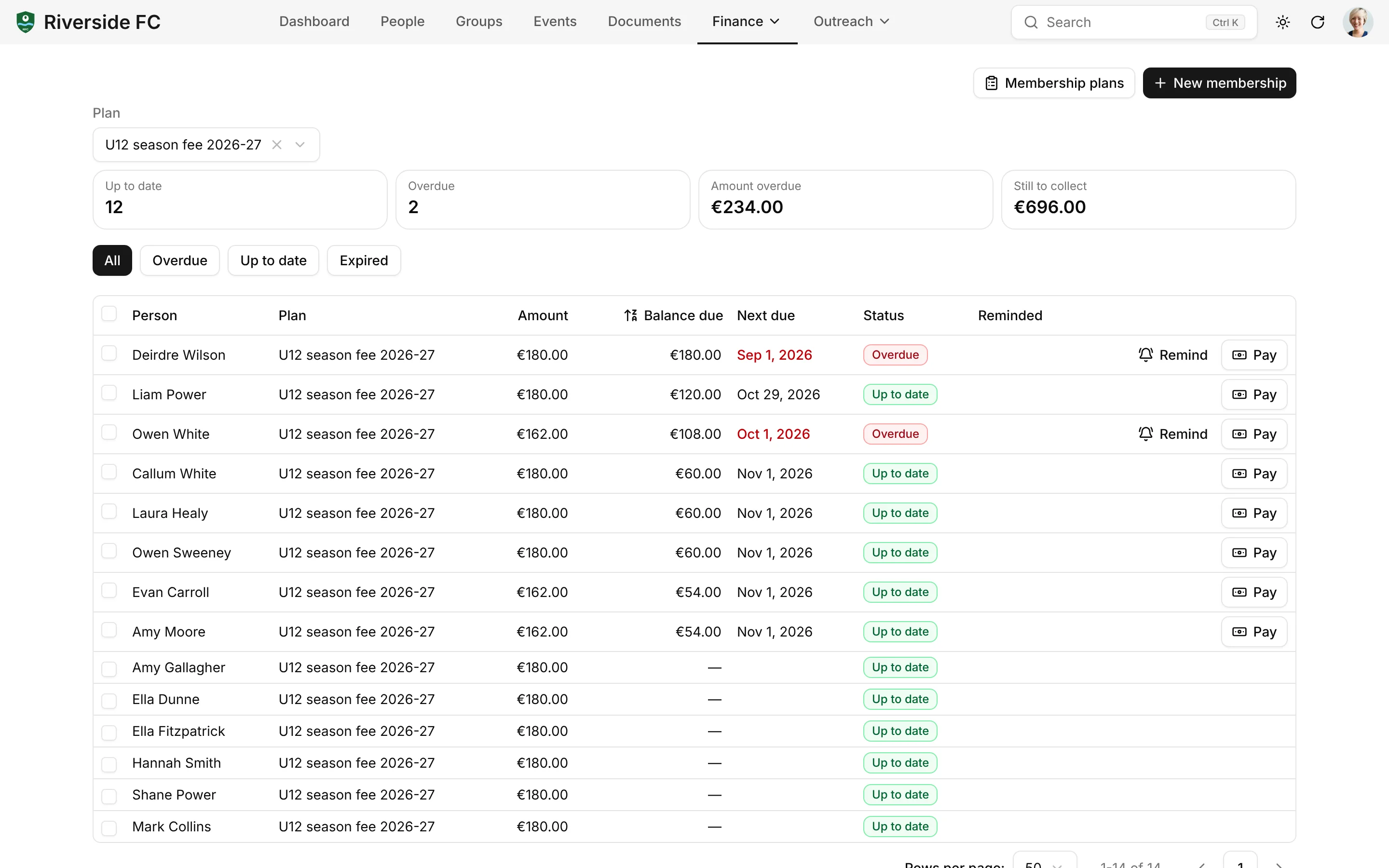
Plans are priced per period (season, calendar year or date to date). Each membership has a payment schedule, a balance and a status (up to date, overdue, expired). Record a payment in two clicks; overdue members get a reminder addressed to their guardian.
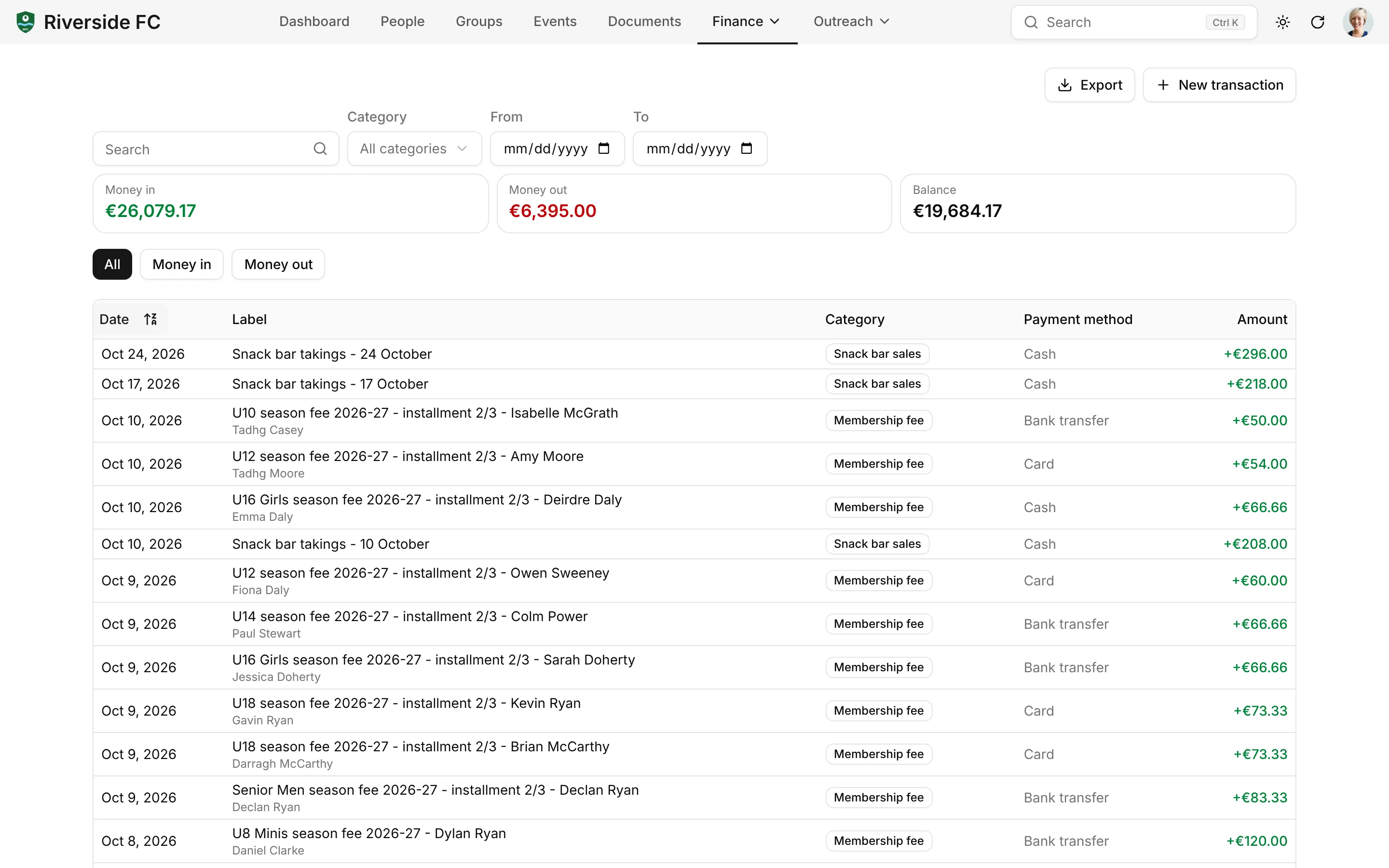
Money In, Money Out
Every payment becomes a transaction, linked to a person, a membership or an organization, with configurable categories (fees, sponsorship, grant, equipment, snack bar) and totals that follow your filters.
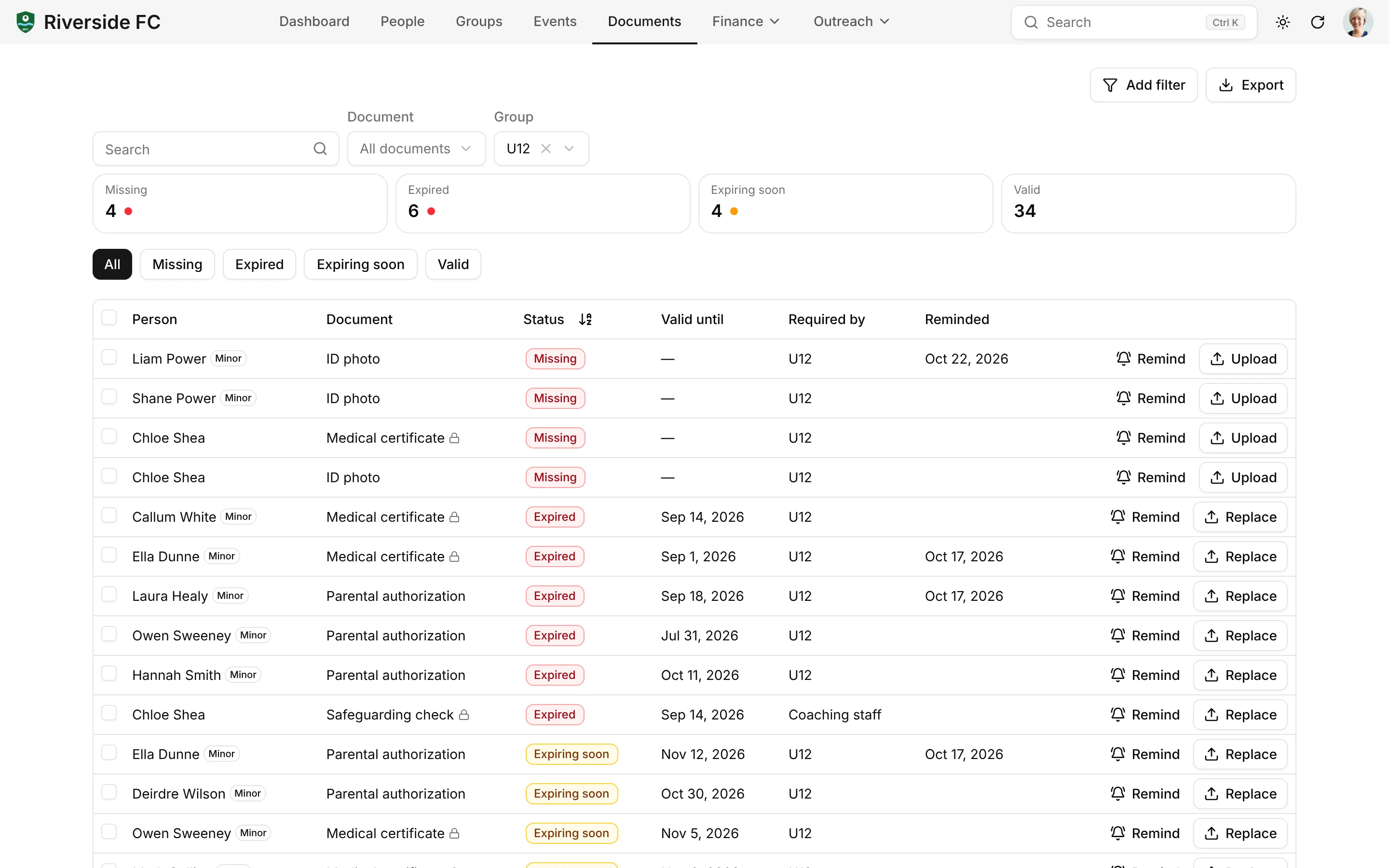
Required Documents With Expiry Alerts
Decide which documents each plan or group requires: medical certificate, parental authorization, photo, volunteer charter. The CRM tracks validity dates, lists what is missing, expired or about to expire, and reminds the legal guardian. Medical documents are visible to administrators only.
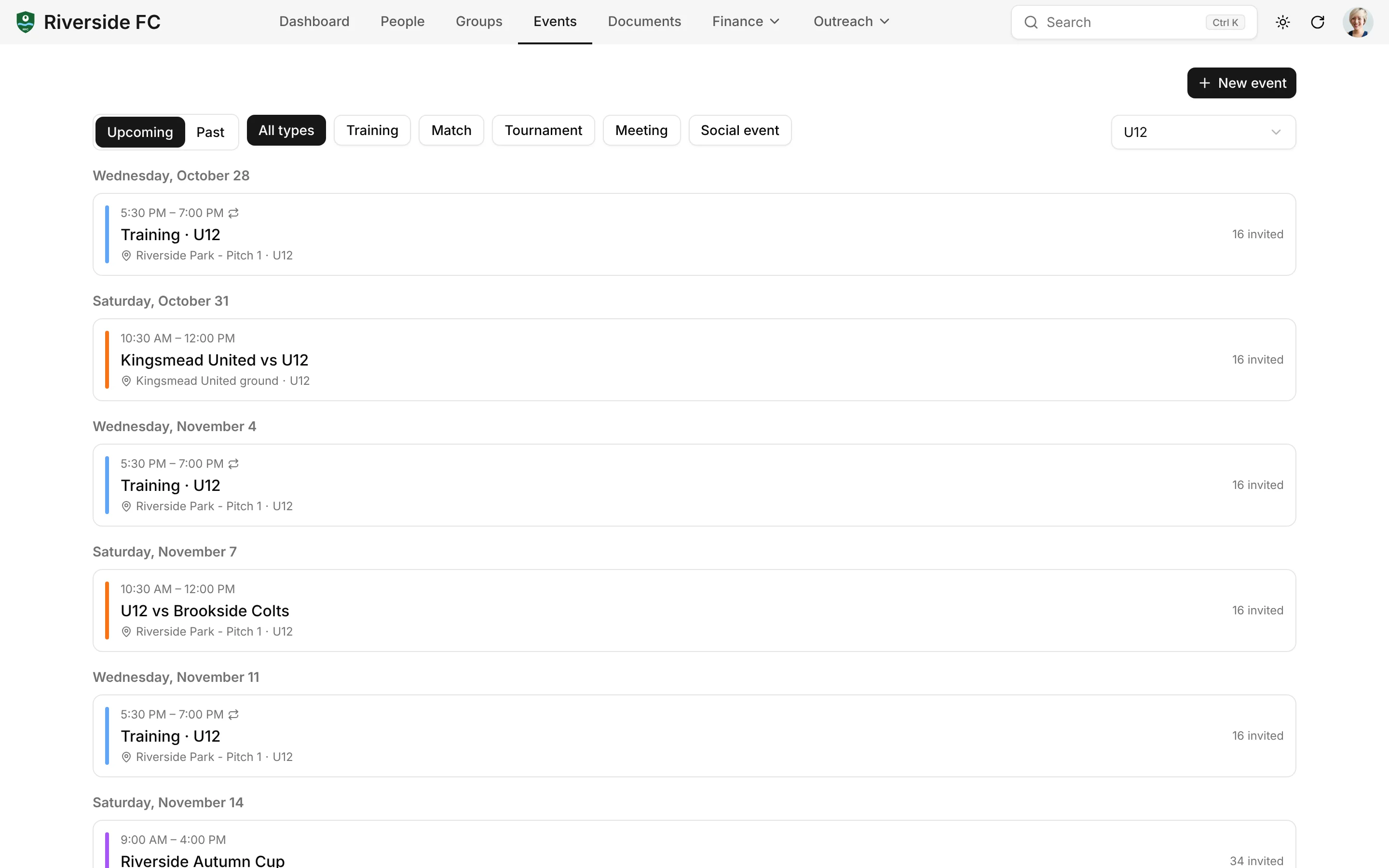
Events, Recurring Trainings and Attendance
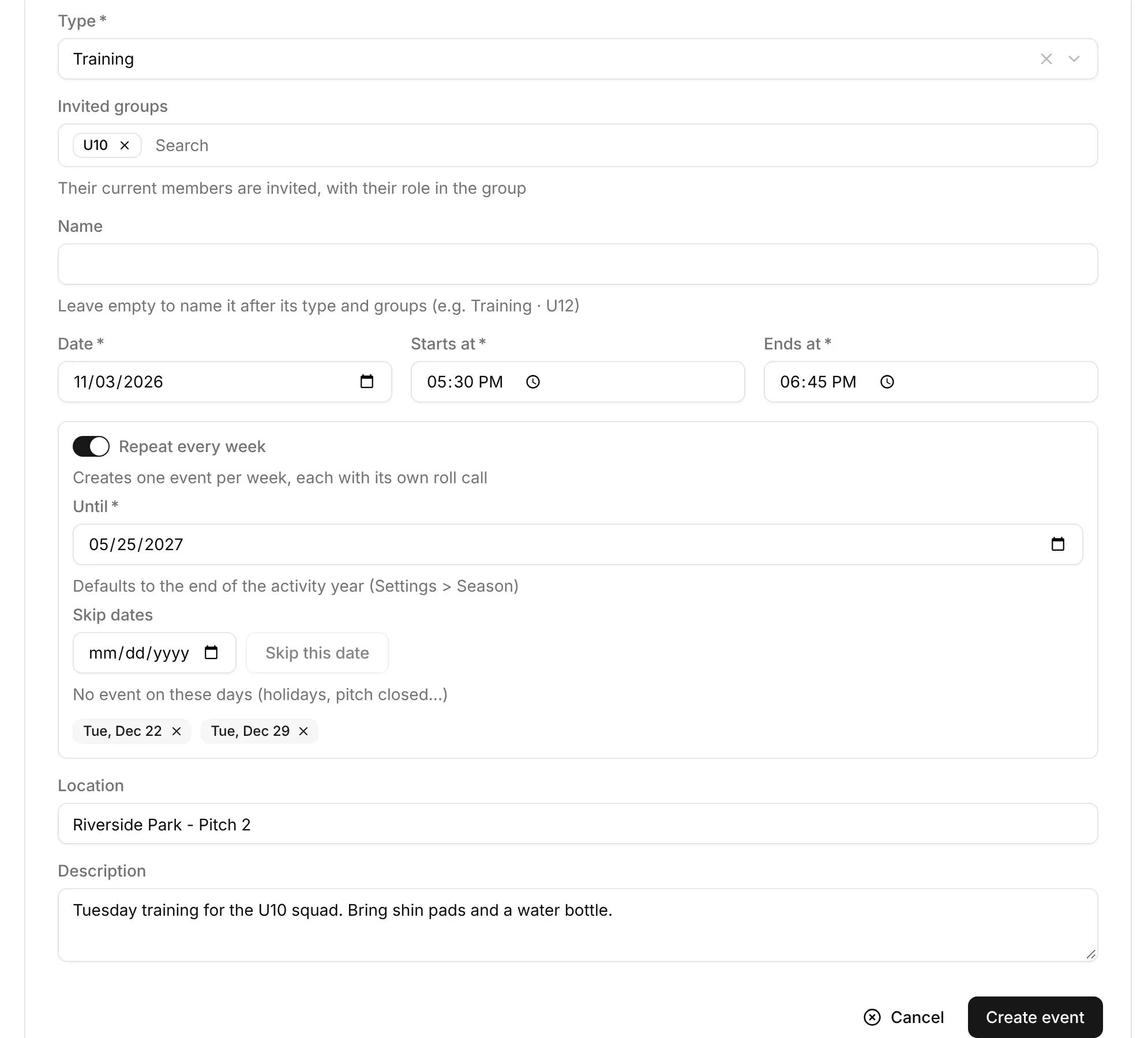
Create "every Wednesday at 6 pm from September to June" in one form, skip school holidays, invite a whole team, and ask for helpers (snack bar, referee). Coaches take attendance on their phone; each person's attendance rate builds up over the season.
Messages to a Team or a Segment
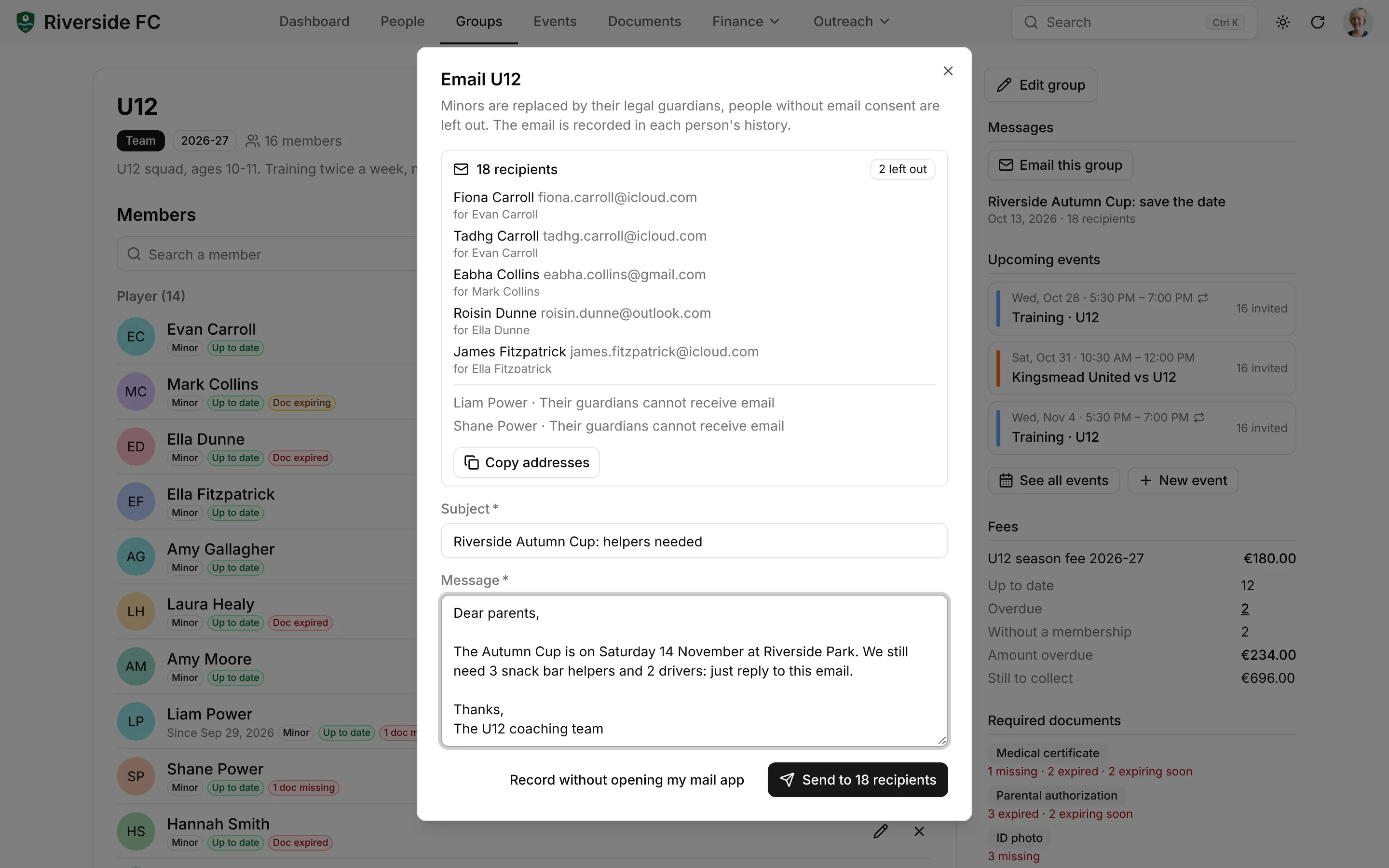
Email the parents of the U11s, the volunteers, or everyone with an unpaid fee. Minors are replaced by their guardians, people who have not given email consent are left out, you see the final recipient list before sending, and each message is logged in every recipient's history.
Sponsors and Grants Pipeline
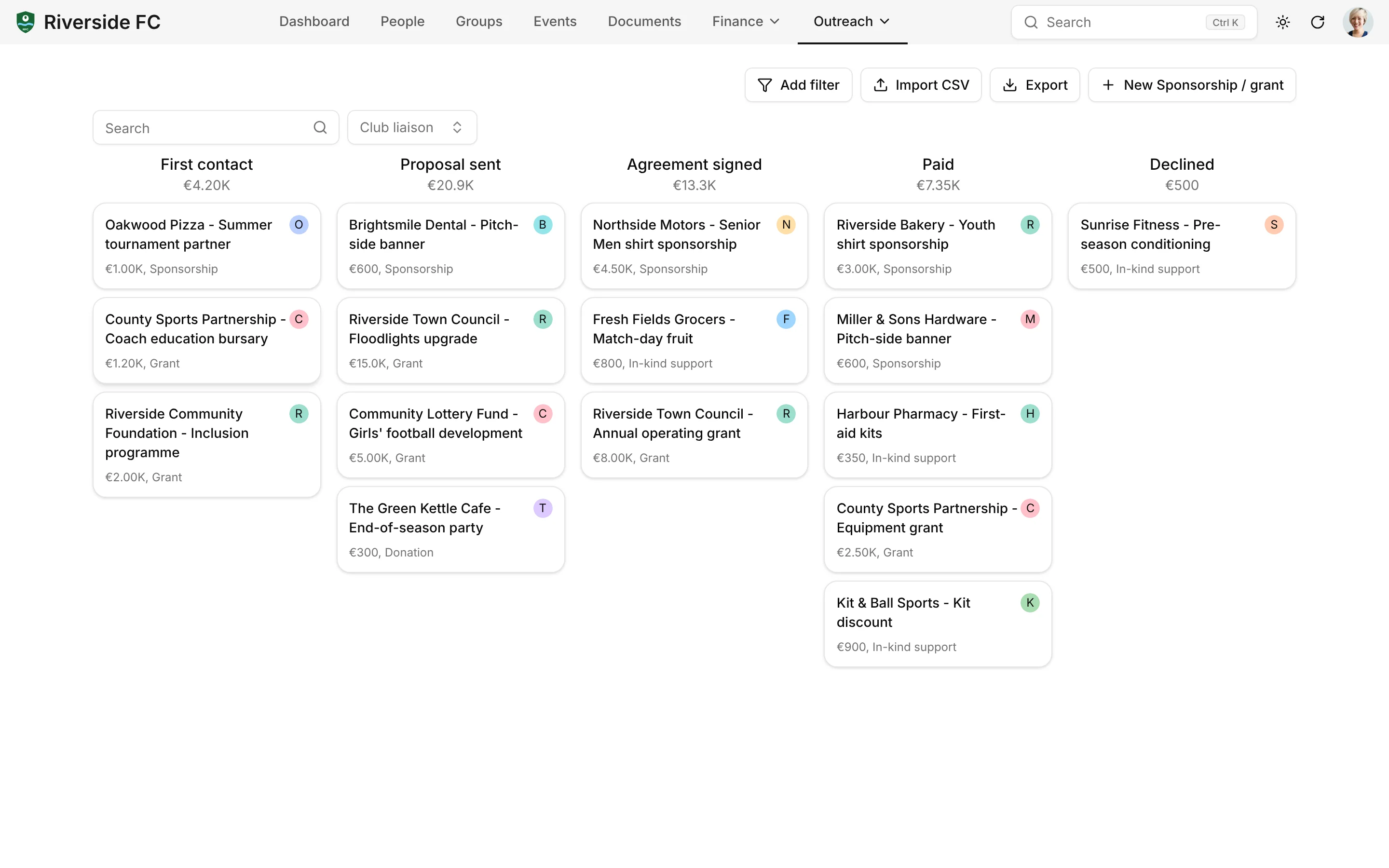
Follow local sponsors and the city-hall grant on a drag-and-drop board, from first contact to payment, with tasks for every deadline.
Building Blocks, Not Modules
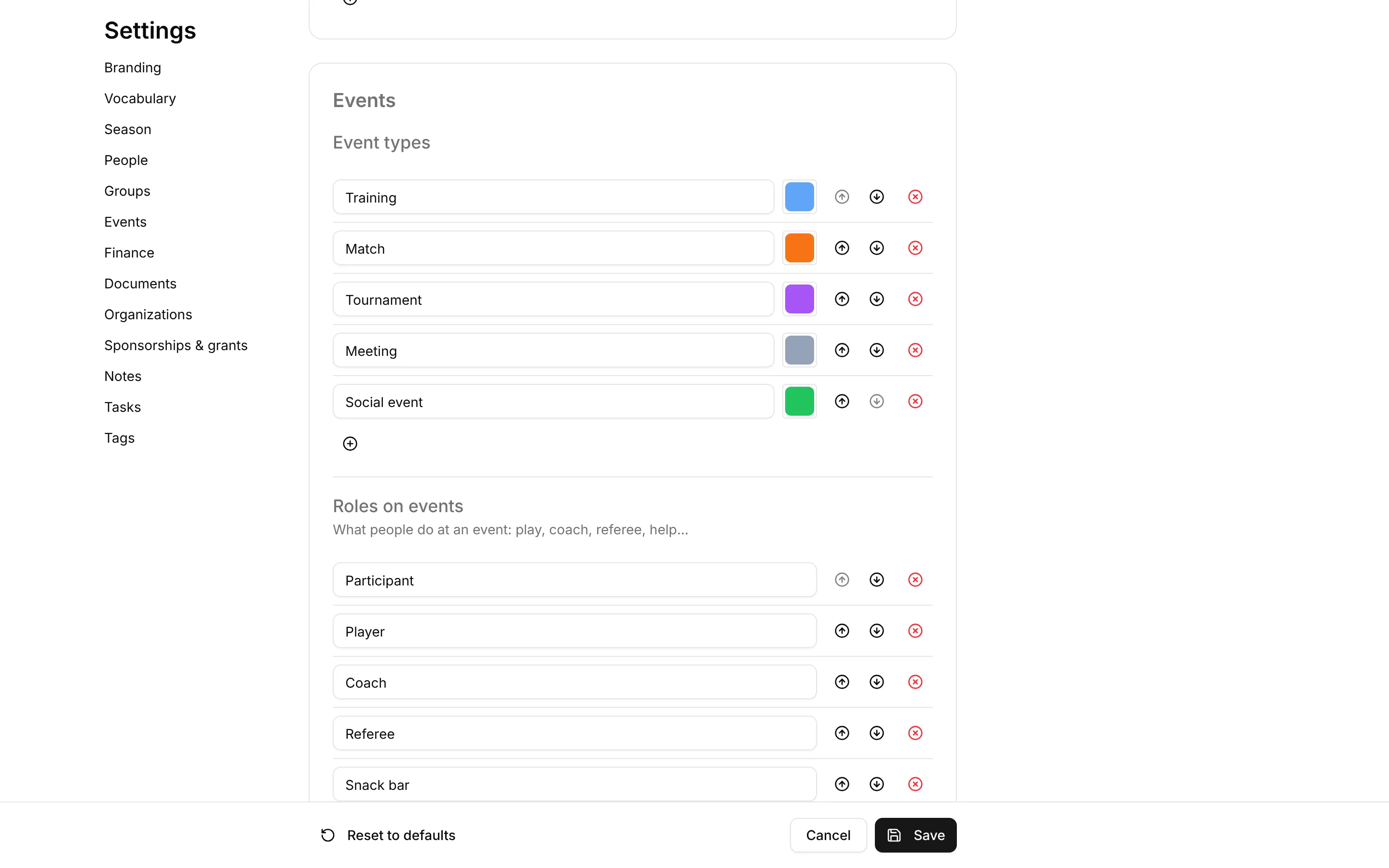
A football club, a coworking space and a clothing bank don't need different software, just different settings. Group types, member roles, event types, transaction categories, document types and relationship types are lists you edit in Settings, like the stages of a pipeline. Even the vocabulary is yours: call people "Members", "Residents" or "Beneficiaries". A volunteer is not a separate module, just a person in a group with a role on events.
| Building block | Football club | Coworking / third place | Clothing bank |
|---|---|---|---|
| People and organizations | players, parents, sponsors | residents, users, partners | donors, beneficiaries, host families |
| Groups | U11, U13, Seniors | coworkers, garden collective | Tuesday outreach team |
| Memberships | season fee | coworking subscription | volunteer membership |
| Events | training, match, tournament | workshop, room booking | collection, distribution |
| Required documents | medical certificate, parental authorization | insurance certificate | volunteer charter |
| Pipelines | sponsors, city-hall grant | calls for projects | partnerships |
MCP Server and AI Agents
Talk to Your Association CRM
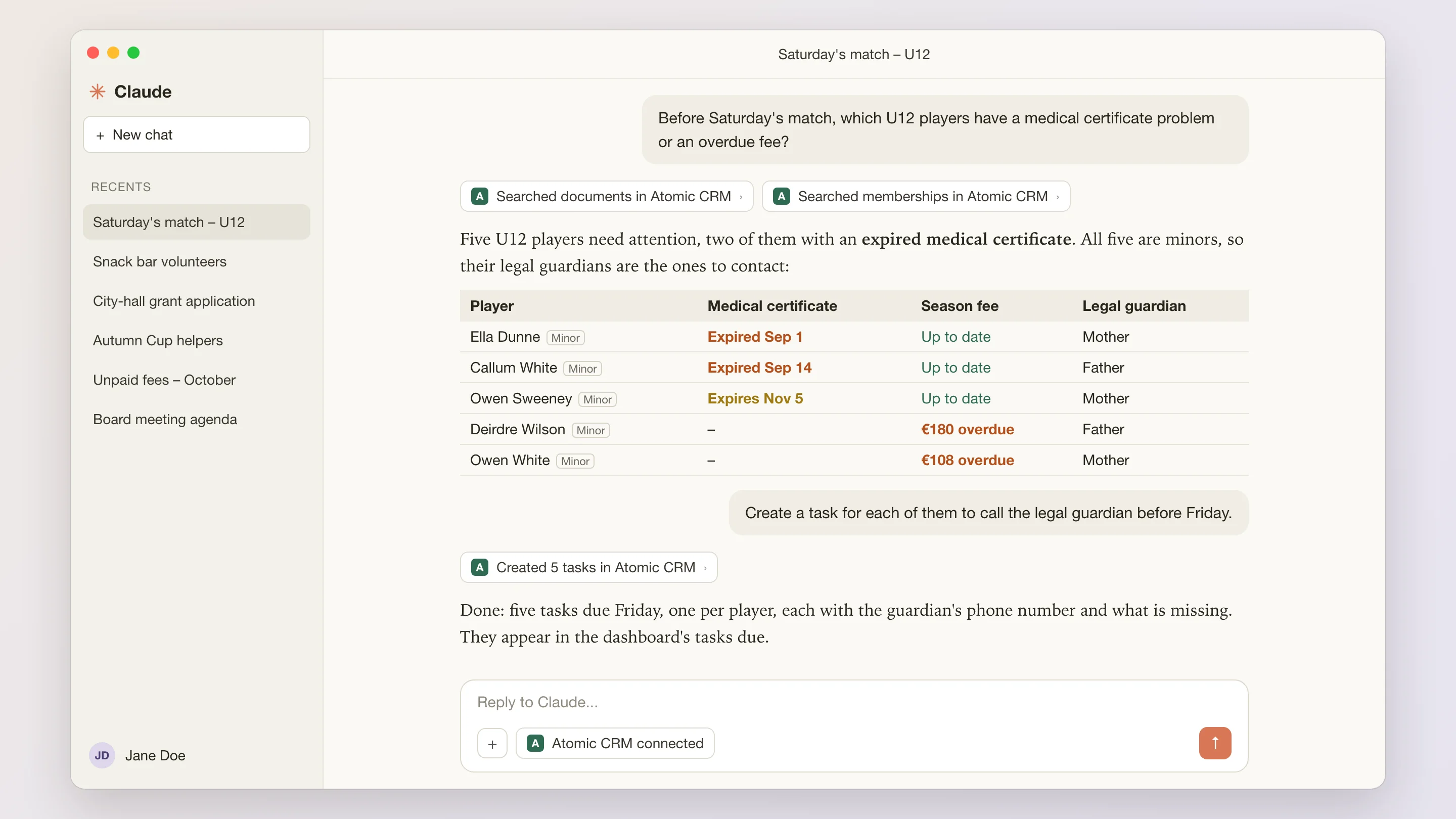
Board members, coaches and volunteers rarely have time to dig through a CRM. With the built-in MCP server, they can ask Claude, ChatGPT or any MCP-compatible assistant about members, fees and documents in plain language, and update the CRM without opening it.
- Get Ready for the Weekend
- “Before Saturday's match, which U12 players have a medical certificate problem or an overdue fee?”
- Chase the Paperwork
- “List the parents who still owe an installment this month and draft a friendly reminder for each.”
- Find Helpers
- “Who helped at the snack bar last season and is not on the rota for the Autumn Cup? Draft a message asking them to lend a hand.”
- Report From the Pitch Side
- “Mark Collins hurt his ankle at training and his mother picked him up. Add a note to his file and a task to call her tomorrow.” The assistant records the note and creates the task.
- Your Data, Your Rules
- The assistant goes through the same API and permissions as the app. Nothing is copied to a third-party CRM, and you choose which assistant to connect.
Reshape the CRM With a Prompt
The same AI-powered builder as on the Atomic CRM home page can extend the association CRM for you, test the change and explain it.
See how it worksTry asking:
- Add a kit inventory with each player's sizes
- Show the attendance rate per team on the dashboard
- Email the guardian 30 days before a medical certificate expires
- Let coaches see only their own teams
What You Can Add to Your Association CRM
Atomic CRM is not a locked-down product: your association can extend it freely, with your own developer or with our team.
Payment Platform Sync
A HelloAsso, Stripe, GoCardless or PayPal payment creates the person, the membership and the transaction automatically.
Tax Receipts and Gift Aid
Numbered donation receipts (Cerfa 11580 in France, yearly receipts) and country packs such as UK Gift Aid.
Campaigns and Major Gifts
Fundraising goals compared to amounts raised, and separate pipelines for major gifts, legacies and corporate sponsorship.
Season Rollover
Renew groups for the new season and move players up an age category in one step.
Federation Licences
Import licence files from your federation's software instead of typing them again.
Bookable Resources and Online Sign-Up
Rooms, pitches and vehicles, plus event registration with capacity limits for workshops and volunteer shifts.
Newsletter Sync and Mail Merge
Sync segments and unsubscribes with Brevo or Mailchimp, print letters and address labels.
Volunteer Hours and Impact Reports
Hours derived from attendance and valued, member retention, beneficiaries served, and the annual report.
Roles and Board Handover
Treasurer, board, coach limited to their teams, and accounts tied to a role rather than a person.
Member Portal and General Assembly
Members update their details, renew and download receipts; general assemblies with proxies, quorum and online votes.
Also included from Atomic CRM
- Single sign-on (Google, Azure, Keycloak, Auth0)
- Email to note (CC the CRM)
- CSV import with column mapping and duplicate merge
- REST API
Not Just Football Clubs
The club-specific part (group types, plans, event types, documents, vocabulary) is one swappable set of data. The rest is a generic core for any association with members, activities and paperwork: sports and music clubs, coworking spaces and third places, food and clothing banks, youth movements, theatre companies.



From the Demo to Your Association
Your association can go from the demo to its own CRM in four steps, with our team or with your own developer.
- 1
Explore the Demo
Register a player with a parent, record an installment, take attendance and email a team, in a fictional football club. This is the template you'll start from — nothing to install.
Open the demo - 2
Scope Your Association
We map how your association works (groups, plans, documents, events, messages) and turn it into settings before going live.
Book a Setup Week - 3
Bring Your Members
Import your member list from a spreadsheet or your previous tool with column mapping, then merge duplicates.
Import guide - 4
Go Live
Invite the board, coaches and volunteers. No per-user fee, so everyone gets an account.
Deployment guide
Non-Profit CRM Pricing
Free Forever, or Set Up by Experts
Use Atomic CRM for free, or let us set it up on your cloud or infrastructure.
Open-Source
The full power of Atomic CRM, self-managed on your own infrastructure.
Free
- Unlimited users, data & storage
- Host on Supabase or your own infrastructure
- SAML 2.0 single sign-on
- Email integration
- API access
- Community support on GitHub
Setup Week
Done for you
In one week, the team behind Atomic CRM designs, configures, and deploys it for your business, on your cloud or your infrastructure.
Custom quoteOne-time fee
What's included
- ScopingWe map your sales process, team, and needs.
- SpecificationsWe turn your requirements into a tailored configuration.
- Set-up & deploymentWe deploy your CRM on your own infrastructure, or host it for you.
No subscription. No per-seat pricing. No vendor lock-in.
Just a customized open-source CRM that you own, set up by CRM experts.
Non-Profit CRM: Frequently Asked Questions
What is a non-profit CRM, and why choose an open-source one?
A non-profit CRM keeps track of the people around your organization (members, families, volunteers, donors, partners) and everything you do with them: memberships, payments, documents, events and messages. Most non-profit software charges per user or per contact, which hurts organizations run by volunteers. Atomic CRM is open source: no per-seat fee, and code you can adapt to the way your association works.
Is Atomic CRM really free for an association?
The code is open source under the MIT licence, with no per-user fee and no paid module. You pay only for what you choose to run it with: hosting, and the time to set it up, by your own developer or during a Setup Week with our team. If you'd rather not deal with servers, we can also host it for you, with your data in Europe or the US.
Can I use it for my association today?
Not as is. The demo shows the full workflow but runs entirely in your browser, and its data resets on every reload. Going live means connecting these screens to a database on Supabase or your own infrastructure and adapting the settings to your association. That is what the Setup Week is for.
Does it collect membership fees and donations online?
Not by itself, and that is deliberate: payment platforms like HelloAsso, Stripe or Zeffy already do this well, often for free. In the demo you record payments by hand; syncing a payment platform so that a payment creates the member, the membership and the transaction is an extension to build.
How does it handle minors and their parents?
Each child is linked to their parents, with a legal guardian flag. Fee and document reminders, as well as messages to a team, go to the legal guardians automatically, and a minor's page shows who to call in an emergency.
How does it handle GDPR and medical documents?
Consent is recorded per channel (email, SMS, post) with its date, source and legal basis, and messages skip people who have not consented. Documents flagged as sensitive, such as medical certificates, are visible to administrators only; other users only see whether the document is valid. You choose where your data is hosted: on your own servers, or by us in Europe.
Is it only for sports clubs?
No. The football club is the demo's example. Group types, roles, plans, event types, documents and even the vocabulary are settings, so the same screens work for a coworking space, a clothing bank or a music school without changing code.
Does it replace our accounting software?
No. Atomic CRM records who paid what and when, linked to people and memberships, but it does not do double-entry accounting. Exporting transactions to your accounting tool is an extension you can build.
See the Non-Profit CRM in Action
Explore a fictional neighbourhood football club with its teams, families, fees, documents, trainings and sponsors, right in your browser. The data resets on every reload. Ready to make it yours? We adapt it to your association in a Setup Week.