The Open-Source CRM for Real Estate Agencies: From Mandate to Final Deed
A ready-to-customize CRM template with properties, mandates, portal leads, buyer matching, visits and offers. Start from a working app, adapt it to your agency. Free, no per-agent fees, no lock-in.
- 1,400+ stars on GitHub
- MIT licence
- By Marmelab, the team behind react-admin (25k+ stars)
Why Choose Atomic CRM for Your Real Estate Agency?
Agency software is often sold per agent and per module, with paid portal gateways, long contracts and painful migrations. Agents end up typing the same data into three tools. Atomic CRM is an open-source template you own: start from a working real estate CRM, and shape it to the way your agency works — with our team or your own developer.
No Per-Agent Fees, No Lock-In
Open source, hosted on your own servers or by us. Add agents, assistants and interns without a new licence, and export all your data at any time.
Every Lead Answered
Portal enquiries land in one inbox, linked to the right property, checked for duplicates and assigned to an agent automatically. The time since reception is always visible.
The Right Buyer for Each Property
Buyer search criteria are matched against your stock in both directions, with a score that explains why a property fits or misses.
Sellers Kept in the Loop
Visits, feedback and offers are recorded as they happen, so you can tell an owner exactly where their sale stands.
No Missed Deadline
Mandate expiry, cooling-off period, loan condition and deed date are tracked for you, with reminders before it is too late.
Your Agency at a Glance
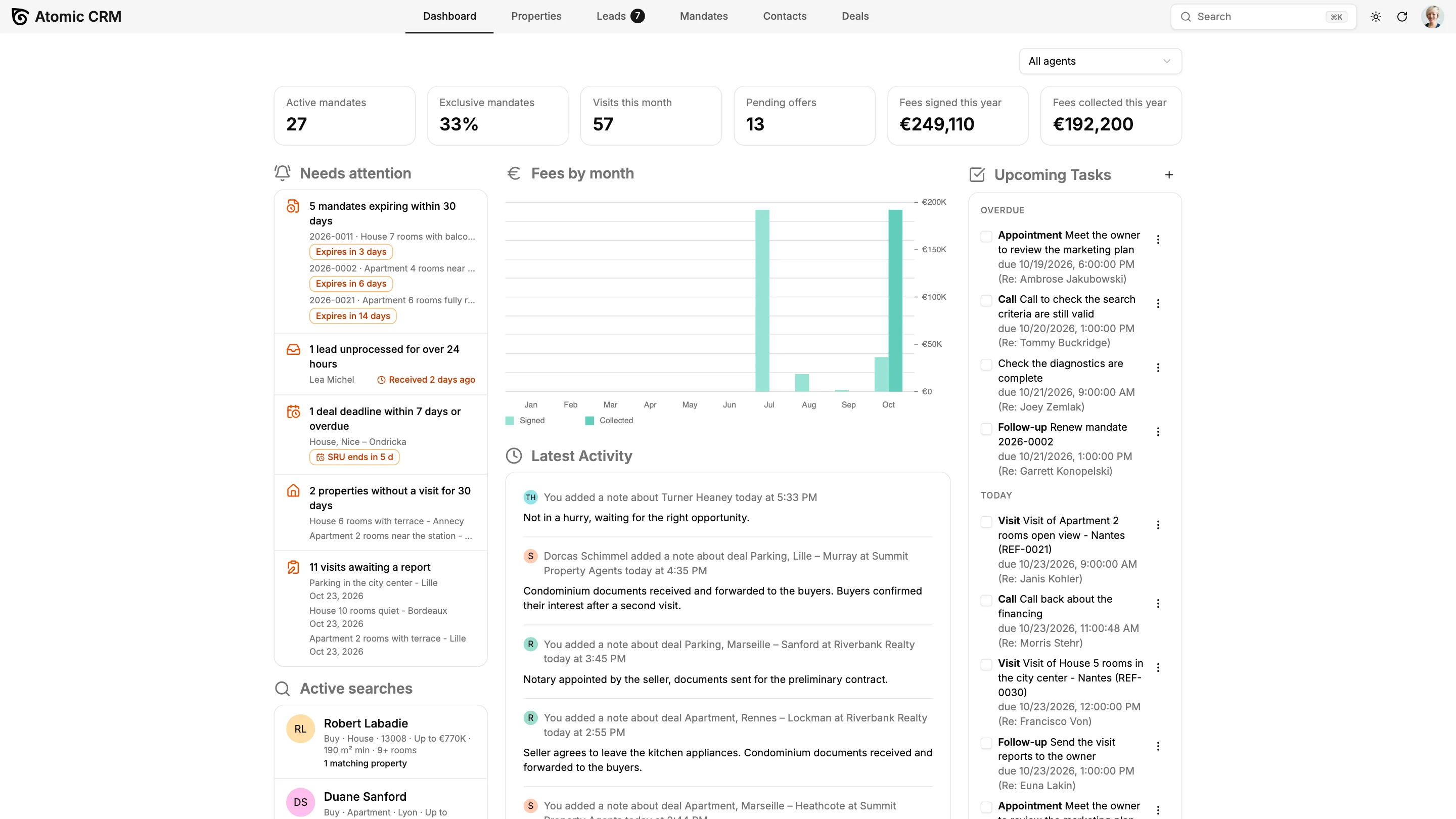
Active mandates, exclusive share, visits, pending offers and fees signed or collected on one screen, for the whole team or one agent.

Everything Your Real Estate Agency Needs, From Mandate to Final Deed
The template ships with a complete agency workflow: the property file, the mandate, the buyer, the visit, the offer and the deal. Every screen can be adapted to the way your agency works during a Setup Week.
Properties Your Clients Can Picture
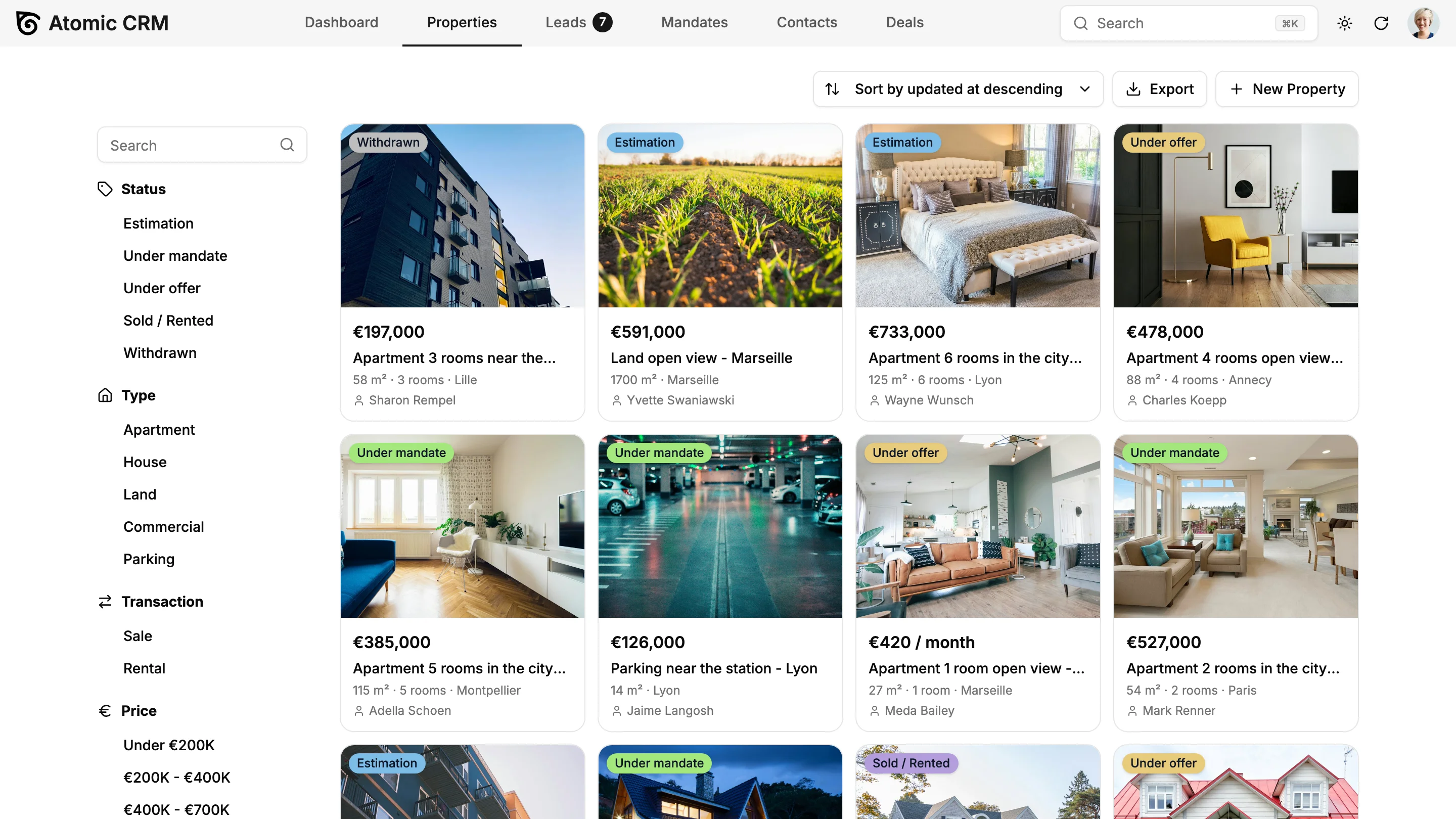
Browse your stock as a grid of photo cards and filter it by status, type, sale or rental, city, price range or agent. Each property page gathers photos, surfaces, rooms, energy rating, the owner (a person or an organization such as an SCI) and the full price history, so every price drop is on record.
Mandates and a Register That Cannot Be Tampered With
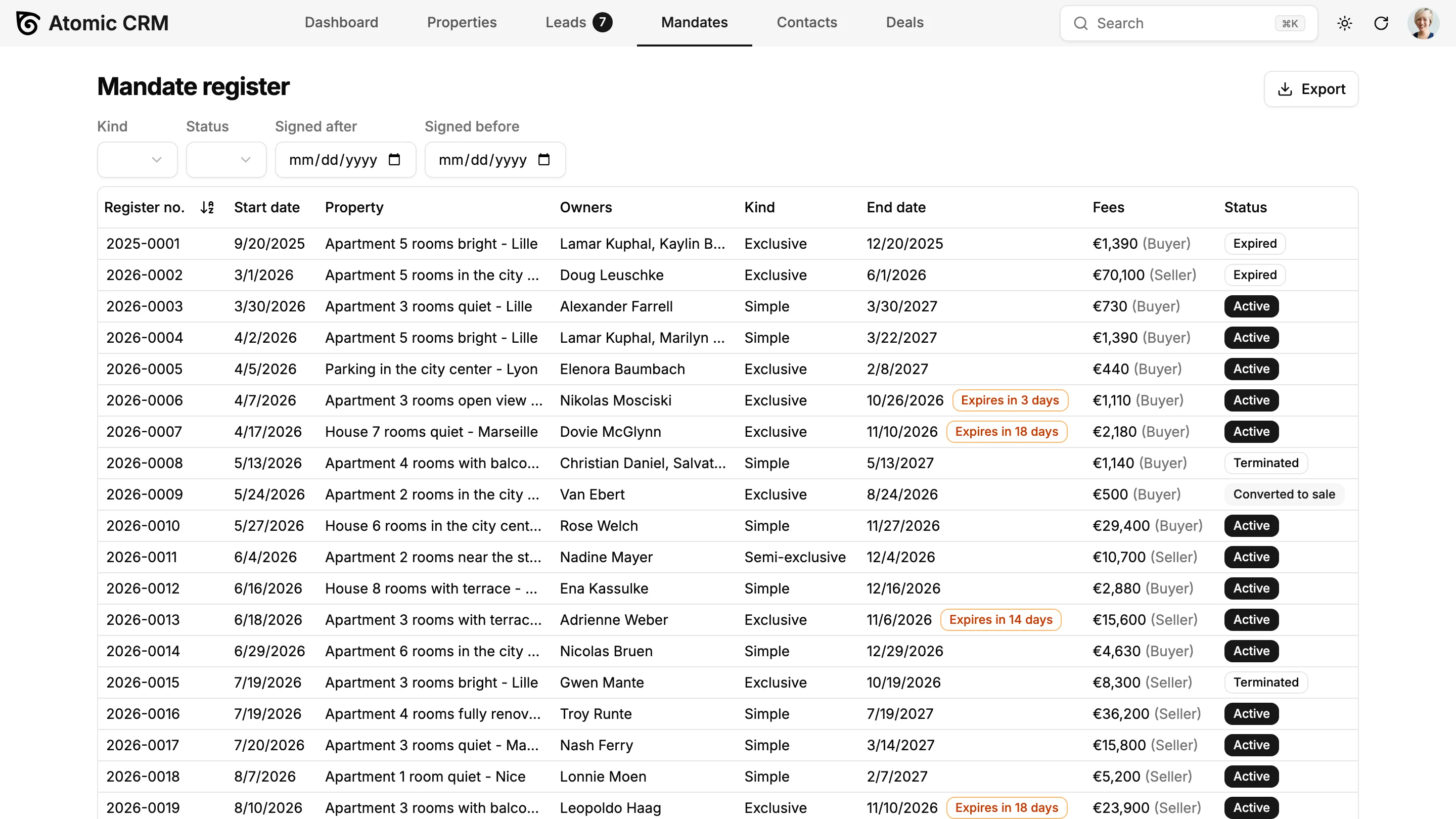
Create a simple, exclusive or semi-exclusive mandate from the property page. The register number is assigned automatically and can never be edited, the register exports to CSV, and a renewal task is created 30 days before the mandate expires.
One Inbox for Portal Leads
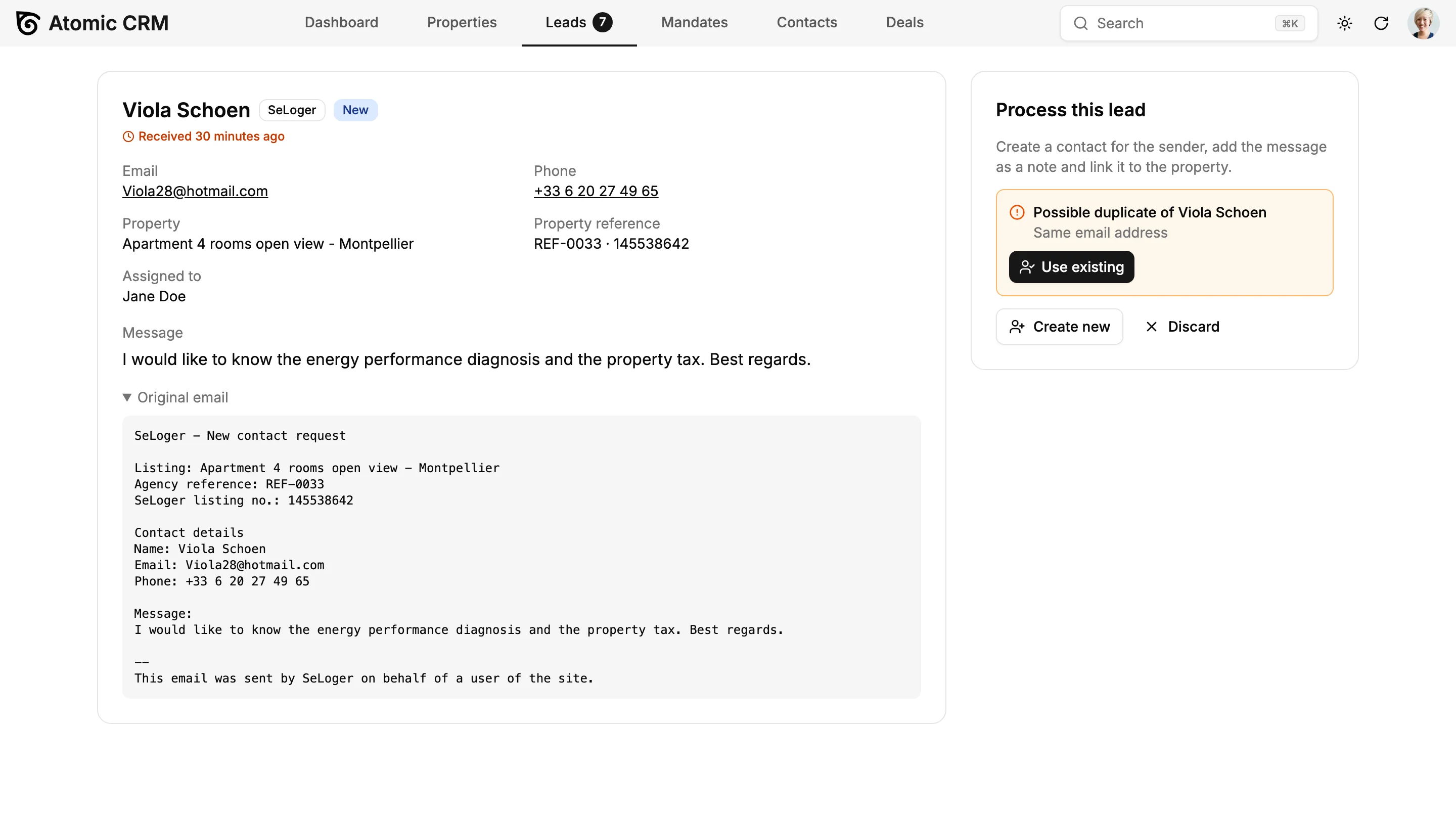
Enquiries from listing portals and your website are parsed into a name, an email, a phone number and the listing they refer to. One click turns a lead into a contact, or merges it with an existing one when the email or phone already exists. New leads are assigned to the property's agent or in rotation across the team.
Buyer Matching That Explains Itself
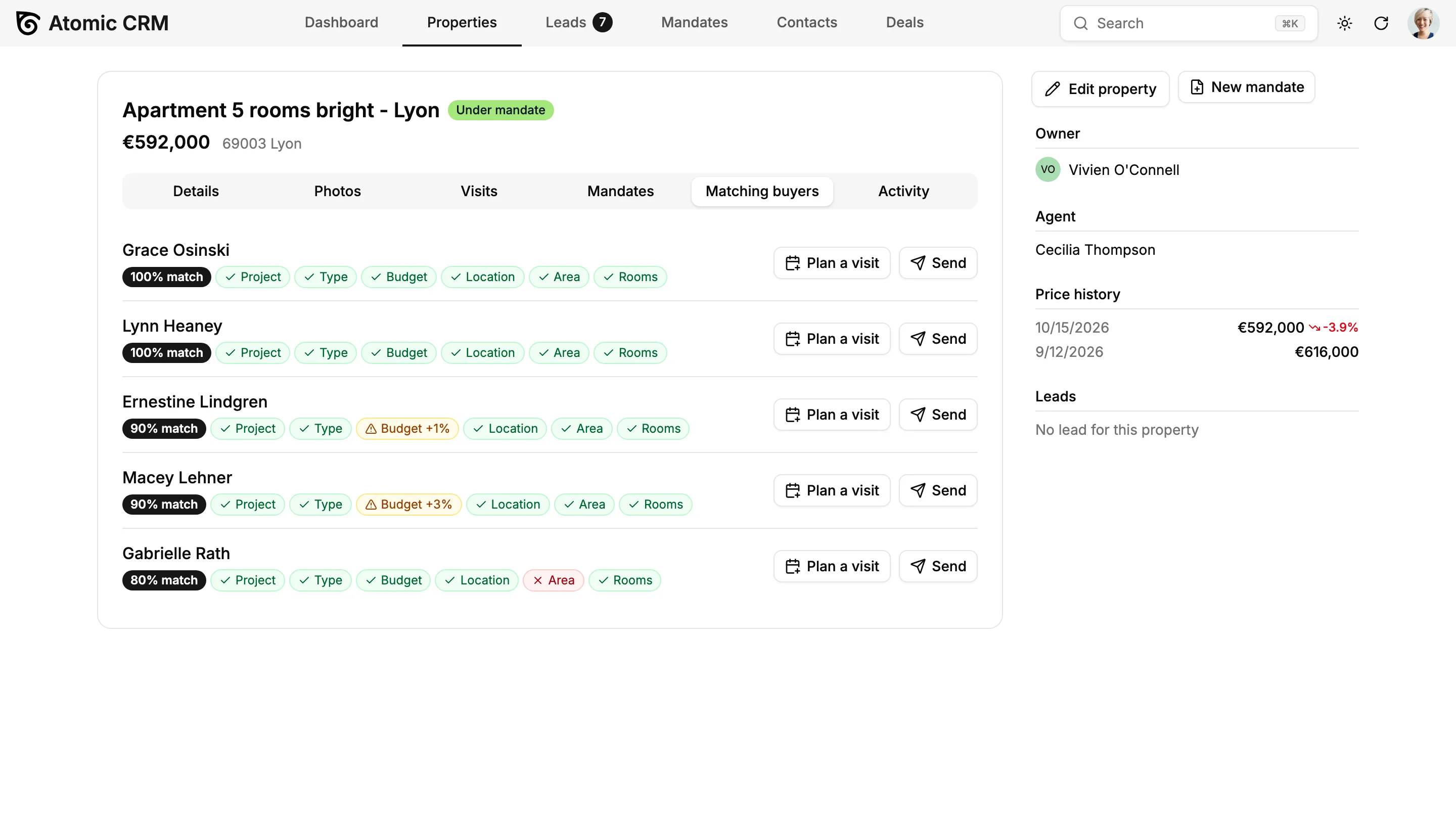
Record what each buyer is looking for: budget, cities, property types, surface, rooms, energy rating. The property page lists matching buyers, the buyer page lists matching properties, and each match shows which criteria fit and which do not. Plan a visit straight from the list.
Visits With a Report in Ten Seconds
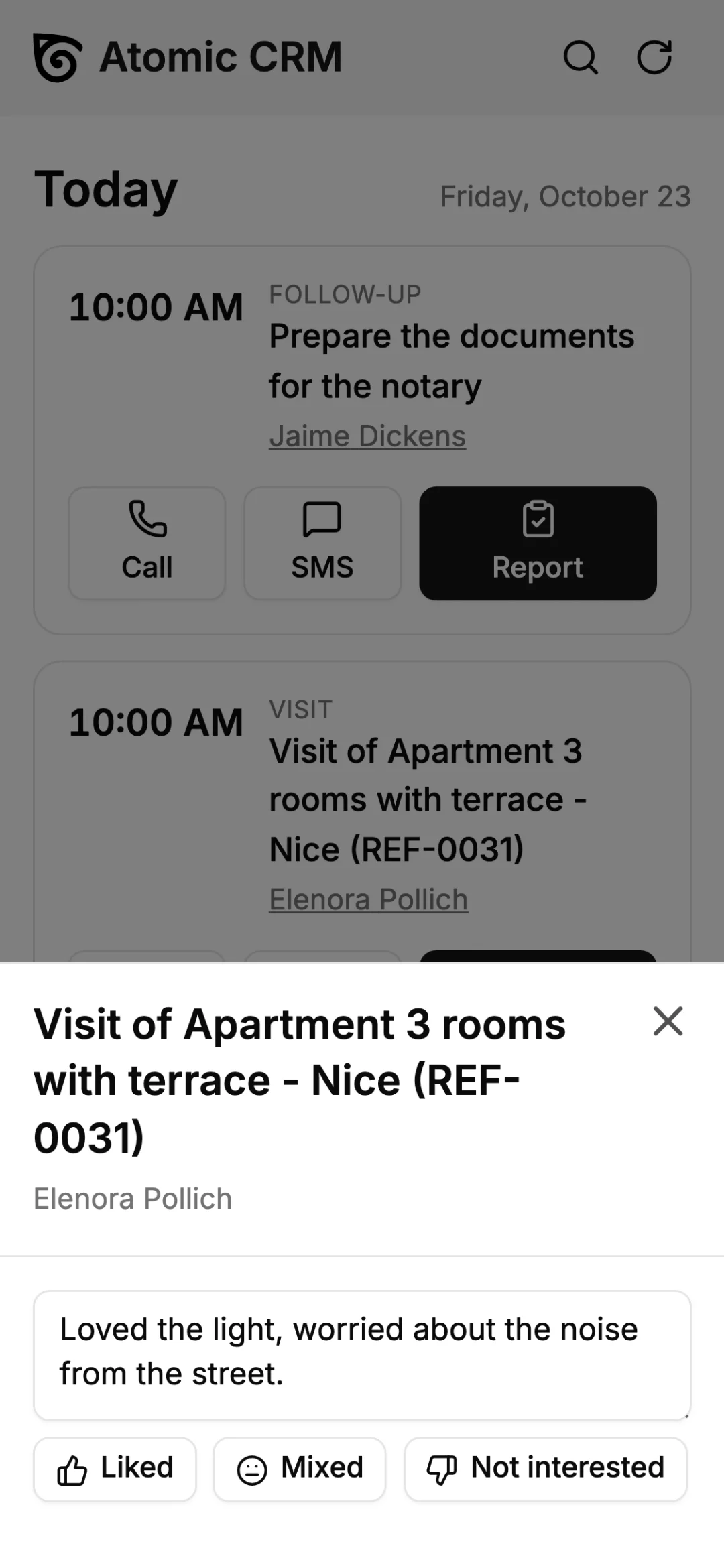
Schedule visits from the property or from a matching buyer. Afterwards, the agent picks Liked, Mixed or Not interested and adds a comment. Feedback adds up on the property page, ready for the next call with the owner.
Offers, Counter-Offers and a Clear Sales Pipeline
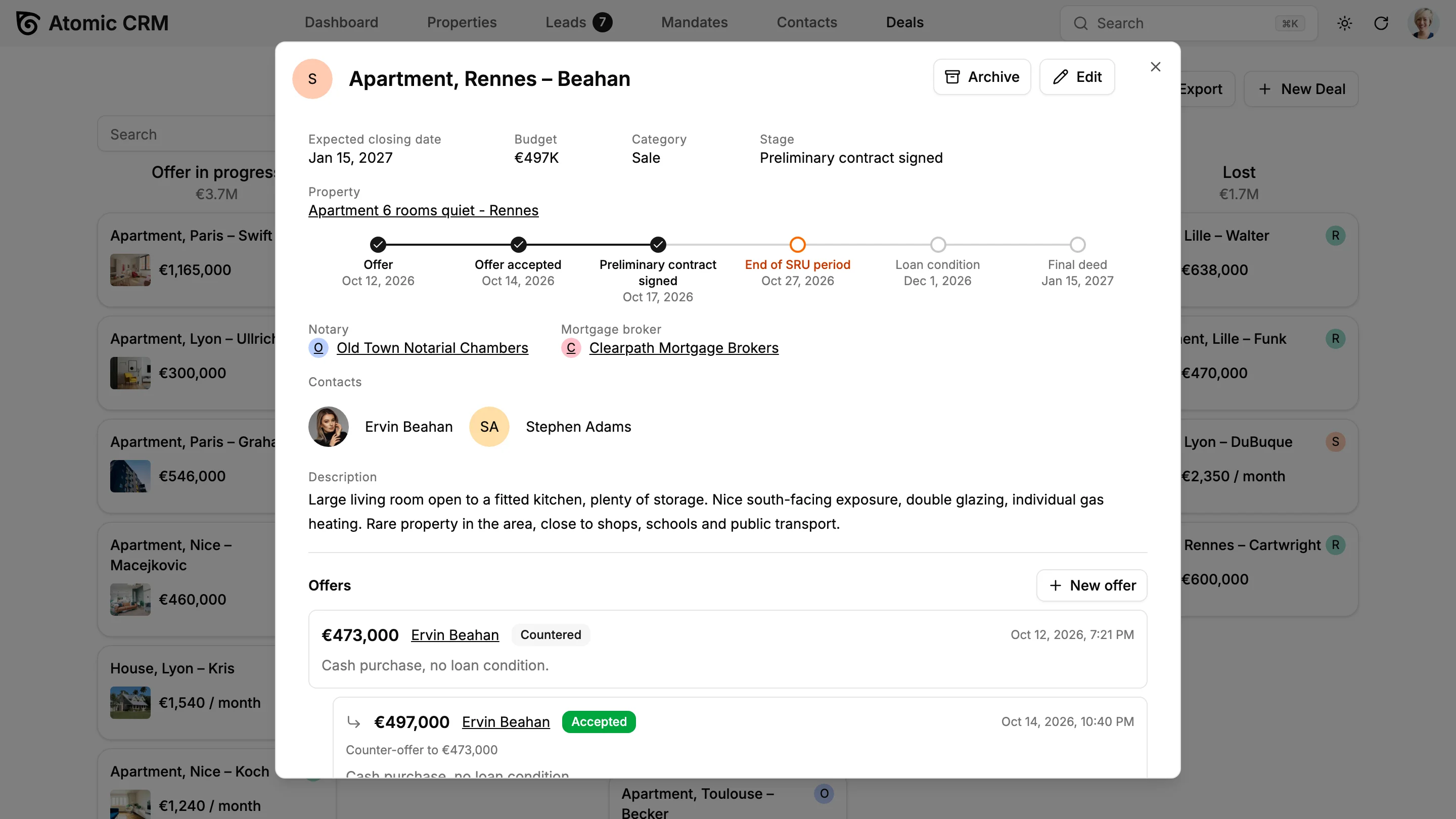
Every offer and counter-offer is timestamped on the deal and never deleted. Accepting an offer moves the deal forward and puts the property under offer. The Kanban board has five readable stages, from offer to sold or lost, and each card shows the next deadline: end of the cooling-off period, loan condition, final deed. The deal page shows the whole journey as a timeline, with the notary and the mortgage broker in charge.
Your Agency Dashboard
KPI tiles for mandates, exclusives, visits, pending offers and fees, a monthly fees chart, the active buyer searches and a Needs attention card that lists what to do today: expiring mandates, unanswered leads, close deadlines, properties without a visit for 30 days and visits waiting for a report. Filter it all by agent.
Plugged Into the Way Agents Work
Agents live in their inbox and on their phone. Atomic CRM meets them there, and every exchange ends up in the client file.
Emails Filed Automatically
Add the CRM's address in Bcc when writing to a buyer or an owner, or forward an email you received: it lands as a note on the right contact, and the contact is created if needed.
Read the docsAn App in Every Agent's Pocket
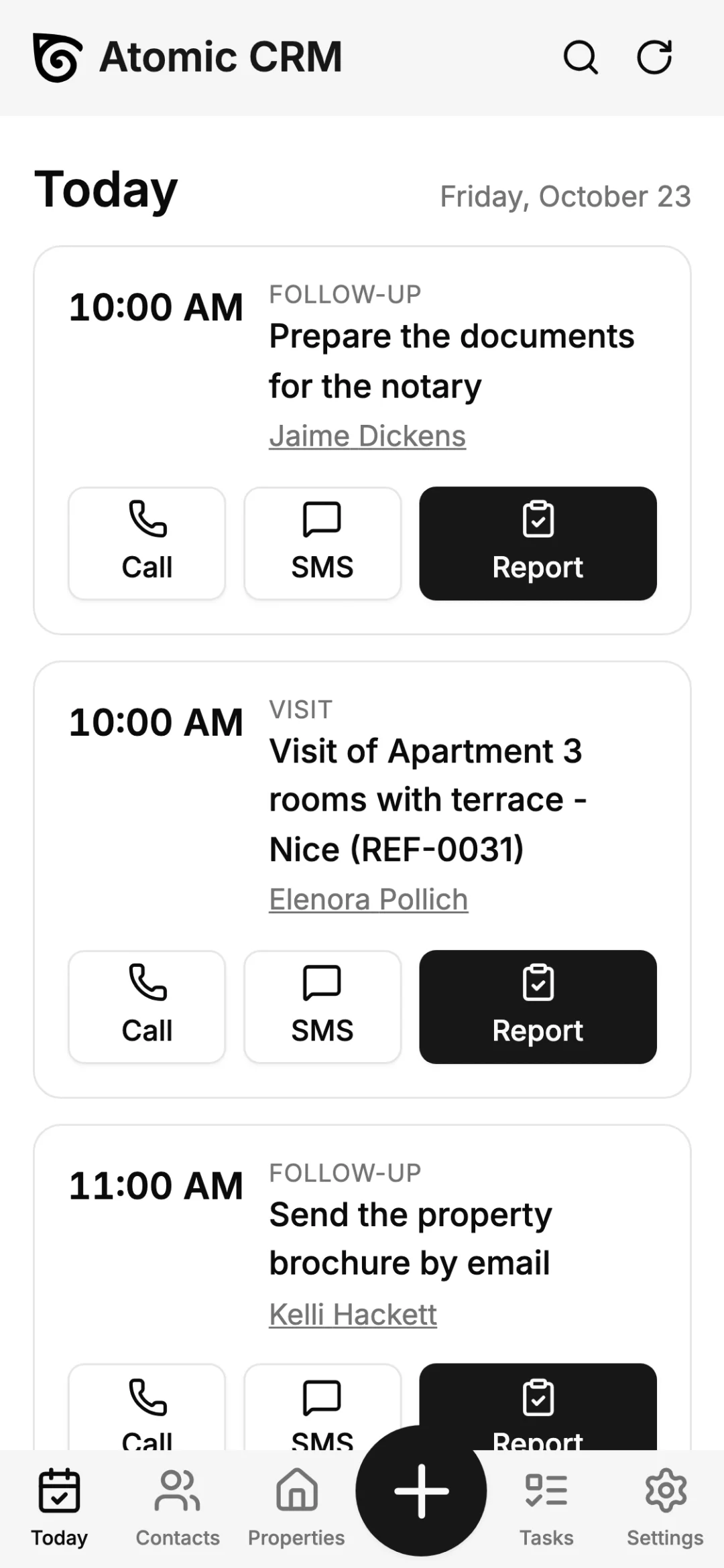
Install the CRM on any phone from the browser, without an app store. The Today view lists visits and follow-ups, with one tap to call, text or write the visit report.
Read the docsYour Website and Tools, Through the API
Every screen relies on a documented REST API. Send your website's contact forms to the lead inbox, or connect your telephony and your accounting software.
Read the docsMCP Server and AI Agents
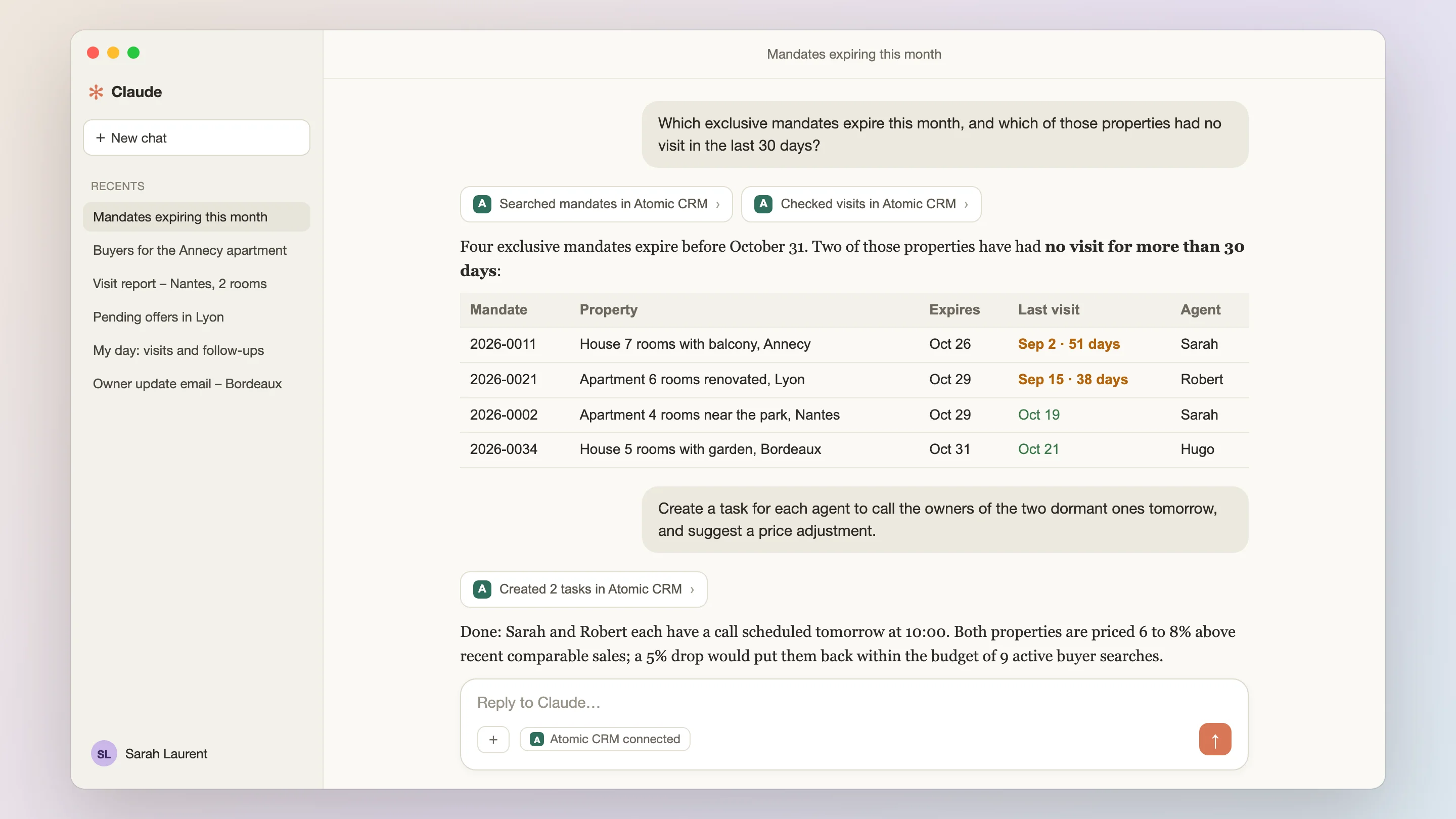
Talk to Your Real Estate CRM
Agents spend their days on the road, between two visits. With the built-in MCP server, they can ask Claude, ChatGPT or any MCP-compatible assistant about their properties, buyers and deals in plain language, and update the CRM without opening it.
- Ask Your Pipeline
- “Which exclusive mandates expire this month, and which of those properties had no visit in the last 30 days?” “What are the pending offers on the Lyon apartments, and the best one for each?”
- Find the Right Buyers
- “A 3-room apartment in Annecy just came in at €420,000. Which active buyers match it? Draft a short email for each of them.”
- Report From the Car
- “Log the visit of 2 rooms open view in Nantes with Janis Kohler: she liked it, worried about the noise, wants a second visit on Saturday.” The assistant records the report and creates the follow-up task.
- Start the Day Prepared
- “List my visits and follow-ups for today with the owner's phone number and the last feedback on each property.”
- Your Data, Your Rules
- The assistant goes through the same API and permissions as the app. Nothing is copied to a third-party CRM, and you choose which assistant to connect.
Reshape the CRM With a Prompt
The same AI-powered builder as on the Atomic CRM home page can extend the real estate CRM for you, test the change and explain it.
See how it worksTry asking:
- Add a key register to properties
- Show the fees signed per agent on the dashboard
- Send an email alert to matching buyers when a price drops
- Only let managers delete mandates
What You Can Build Next on Your Real Estate CRM
Atomic CRM is not a locked-down product: your agency can extend it freely, with your own developer or with our team.
Listing Syndication
Publish properties to portals through a standard feed or a syndication service, check mandatory mentions (fees, energy rating) before going live, and track leads and cost per portal.
Owner Reports and Portal
A weekly report generated from visits and feedback, sent in one click, or a read-only owner page with a magic link.
E-Signature and Documents
Send mandates, visit vouchers and offers for signature through Yousign or DocuSign, with a document checklist per deal stage and a shared file for the notary and the broker.
Valuations and Prospecting
Comparable sales from open data (DVF in France) on the property page, valuation reports in PDF, and a call queue for owners who sell on their own.
Lettings and Light Property Management
Online tenant applications with document checks, lease generation, check-in and check-out reports with photos, rent receipts and indexation.
Alerts and Messaging
Email alerts to buyers when a matching property or a price drop appears, SMS visit confirmations, and a unified inbox for email, SMS and WhatsApp.
Compliance
Anti-money-laundering checks (client identification, risk level, register ready for an audit) and tracking of professional cards and mandatory training.
Commissions and Invoicing
Fee splits between agents and agencies, targets per agent, invoices and reconciliation with the payments received from the notary.
And with the MCP server and the AI builder described above, many of these can start as a prompt.
Not Just Residential Agencies
Real estate knowledge (property types and statuses, mandate kinds, deal stages and deadlines, partner types) lives in one swappable configuration pack, editable in the Settings page. The rest is a generic core for any business that sells or rents assets to clients: commercial real estate brokers, new-build developers and property managers, and beyond real estate, car dealers or yacht brokers.



From the Demo to Your Agency
Your agency can go from the demo to its own CRM in four steps, with our team or with your own developer.
- 1
Explore the Demo
Browse properties, match buyers, plan visits and follow offers in a fictional French agency. This is the template you'll start from — nothing to install.
Open the demo - 2
Scope Your Agency
We map how your agency works (property types, mandates, deal stages, lead sources) and adapt the CRM to its specifics before going live.
Book a Setup Week - 3
Import Your Data
Import contacts, organizations and deals from the CSV files exported by your current software. Properties and mandates can be loaded through the API.
Import guide - 4
Go Live
Invite every agent, assistant and intern at no extra cost, and have them install the mobile app before their first visit.
Deployment guide
Real Estate CRM Pricing
Free Forever, or Set Up by Experts
Use Atomic CRM for free, or let us set it up on your cloud or infrastructure.
Open-Source
The full power of Atomic CRM, self-managed on your own infrastructure.
Free
- Unlimited users, data & storage
- Host on Supabase or your own infrastructure
- SAML 2.0 single sign-on
- Email integration
- API access
- Community support on GitHub
Setup Week
Done for you
In one week, the team behind Atomic CRM designs, configures, and deploys it for your business, on your cloud or your infrastructure.
Custom quoteOne-time fee
What's included
- ScopingWe map your sales process, team, and needs.
- SpecificationsWe turn your requirements into a tailored configuration.
- Set-up & deploymentWe deploy your CRM on your own infrastructure, or host it for you.
No subscription. No per-seat pricing. No vendor lock-in.
Just a customized open-source CRM that you own, set up by CRM experts.
Real Estate CRM: Frequently Asked Questions
What is a real estate CRM, and why choose an open-source one?
A real estate CRM gathers an agency's properties, mandates, buyers, sellers and deals in one place, and reminds agents of what to do next. Many real estate software vendors charge per agent and keep your data on their servers. An open-source real estate CRM like Atomic CRM is yours: no per-agent fee, hosting where you want, and code you can adapt to the way your agency works.
Is Atomic CRM really free for a real estate agency?
Yes. The code is open source under the MIT licence, with no fee per agent and no paid module. You only pay for hosting: Supabase has a free plan to get started, and its paid plans start at about $25 per month for the whole agency, whatever the number of agents. If you want us to set it up, the Setup Week is a one-time fee. If you'd rather not deal with servers, we can also host it for you, with your data in Europe or the US.
Do I need a developer to use it?
Not to use it day to day: configuring stages, statuses and types, importing CSV files and managing users all happen in the app. Deploying it takes a few commands that a technical person can run by following the guide. The Setup Week is designed for agencies with no technical team: we adapt the template, deploy it and hand you the keys.
Can we migrate from our current agency software?
Contacts, organizations and deals import from CSV files, which most agency software can export. Properties, mandates and their history usually need a migration script written against the REST API. Our team can write it for you as part of a setup project.
Does it publish our listings to property portals?
Not out of the box. Atomic CRM handles the leads coming back from portals: it parses enquiries from SeLoger, Leboncoin, Bien'ici and your website, links them to the property and assigns them to an agent. Publishing listings through a standard feed or a syndication service is one of the extensions you can build on top of the same data.
Does it follow French real estate rules?
The demo is set up for a French agency: a mandate register with sequential numbers that cannot be edited and a CSV export, the 10-day cooling-off period, the loan condition and the final deed date, all tracked with reminders. These rules live in a configuration pack, so you can adapt them to another country. It does not replace the advice of your lawyer or your professional body.
How does it handle GDPR?
Each contact records a dated marketing consent, and you can export or anonymize a contact's data in one click, or export the whole database. Since you host the CRM, you choose where your data lives, including in the European Union, and no third-party vendor has access to your client file.
Is it suited to a single agent, or to a network of agencies?
Both. There is no limit on users, the dashboard and the lists can be filtered by agent, and new leads can be assigned in rotation across the team. For a network with several agencies, separating data between agencies is a customization that the open code makes possible.

See the Real Estate CRM in Action
Explore a fictional French agency with 40 properties across 12 cities, mandates, portal leads, buyer searches, visits, offers and 26 partners, right in your browser, in English or French. The data resets on every reload. Ready to make it yours? We adapt it to your agency in a Setup Week.