The Open-Source Recruitment CRM: Every Candidate, From Sourced to Placed
A ready-to-customize CRM and ATS for recruitment agencies: jobs, candidates, clients and placements in one place. Built on open source, no per-user fees.
- 1,400+ stars on GitHub
- MIT licence
- By Marmelab, the team behind react-admin (25k+ stars)
Why Choose Atomic CRM for Your Recruitment Agency?
Sales CRMs track deals, not candidates moving through several jobs at once. Corporate applicant tracking systems track applicants, not the clients who pay your fees. Our recruitment template is an ATS and a CRM in one, that you own, built on open-source Atomic CRM and shaped to the way you recruit.
Jobs, Not Deals
Clients open jobs with a location, a salary range, a number of openings, a hiring manager and a recruiter in charge.
One Pipeline per Job
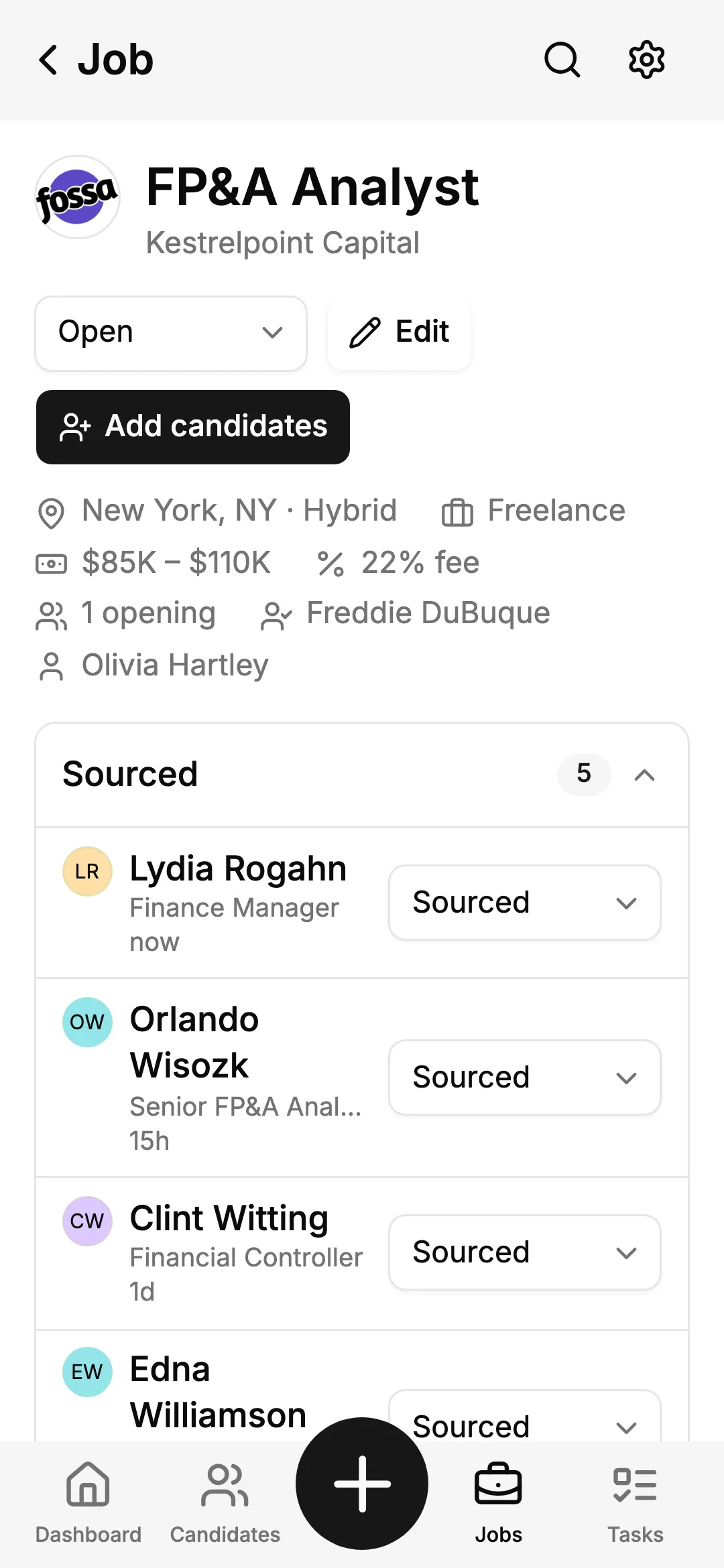
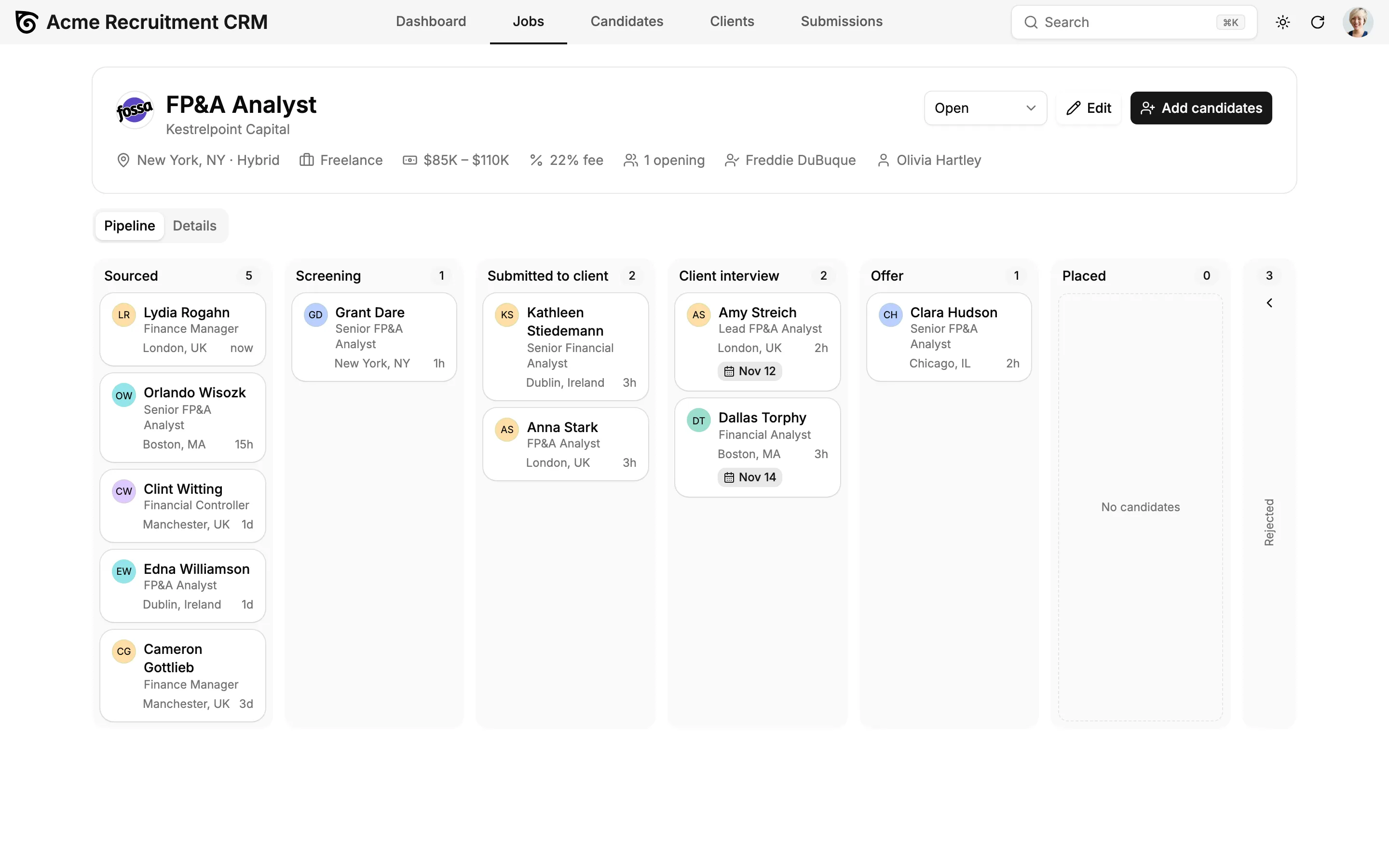
From Sourced to Placed, drag each candidate from one stage to the next on the job's Kanban board, and see how long they have been there.
One Candidate, Several Jobs
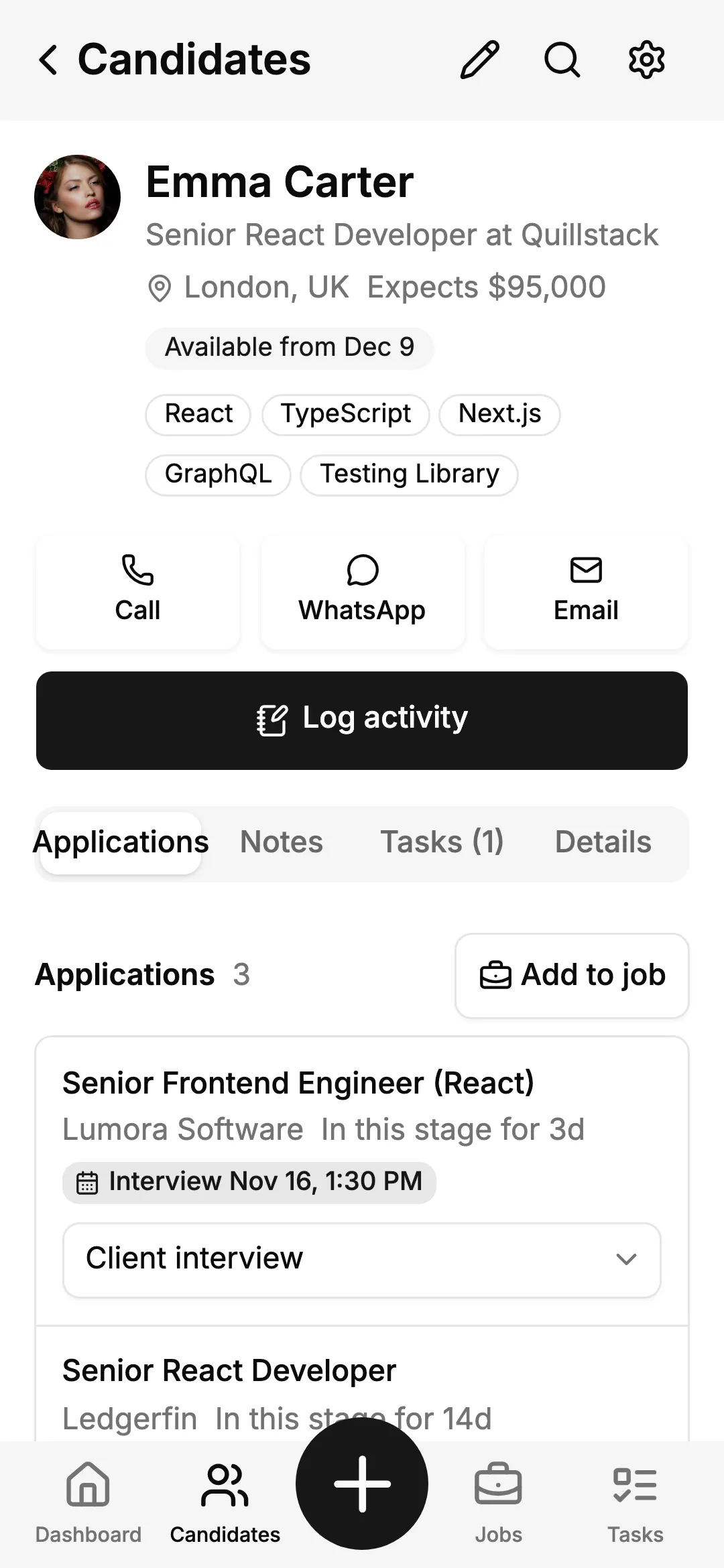
A candidate can be in several pipelines at once. Their page shows where they stand in each, and changes the stage in one click.
Fees Computed for You
The placement fee comes from the client's terms, and the guarantee end date from your guarantee period.
Every Submission on Record
Who sent which candidate to which client, and when: logged automatically as soon as a candidate reaches the submitted stage.
GDPR Built In
The legal basis, source and date of consent are recorded on each candidate, next to their resume and history.

Everything Your Recruitment Agency Needs, From Brief to Placement
The demo follows Acme Recruitment, a fictional agency placing finance, tech and sales profiles in New York, London and remote: jobs, candidates, clients, submissions and placements. Every screen can be adapted to the way your agency works during a Setup Week, and new ones added for the rest of your business.
A Dashboard for Recruiters
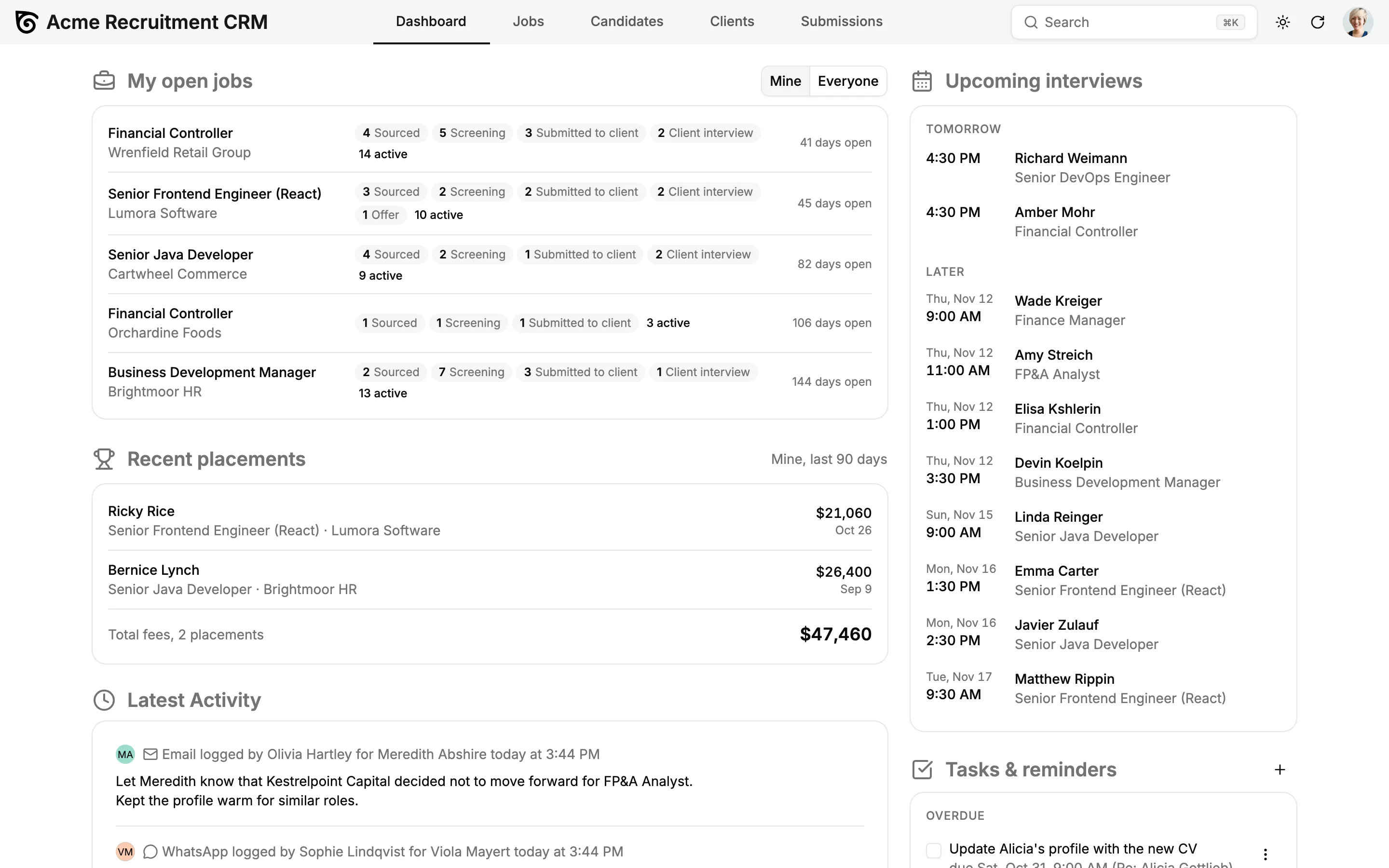
Start the day with your open jobs and their candidates at each stage, the interviews coming up, your tasks and reminders, and your placements of the last 90 days with the fees they bring. Switch from your own jobs to the whole team's in one click.
A Kanban Pipeline for Every Job
Sourced, Screening, Submitted to client, Client interview, Offer, Placed: drag the candidates from one stage to the next. Each card shows the current role, the location, the time spent in the stage and the next interview. Rejected candidates stay out of the way, in a column you can collapse.
The Full Story of Each Application
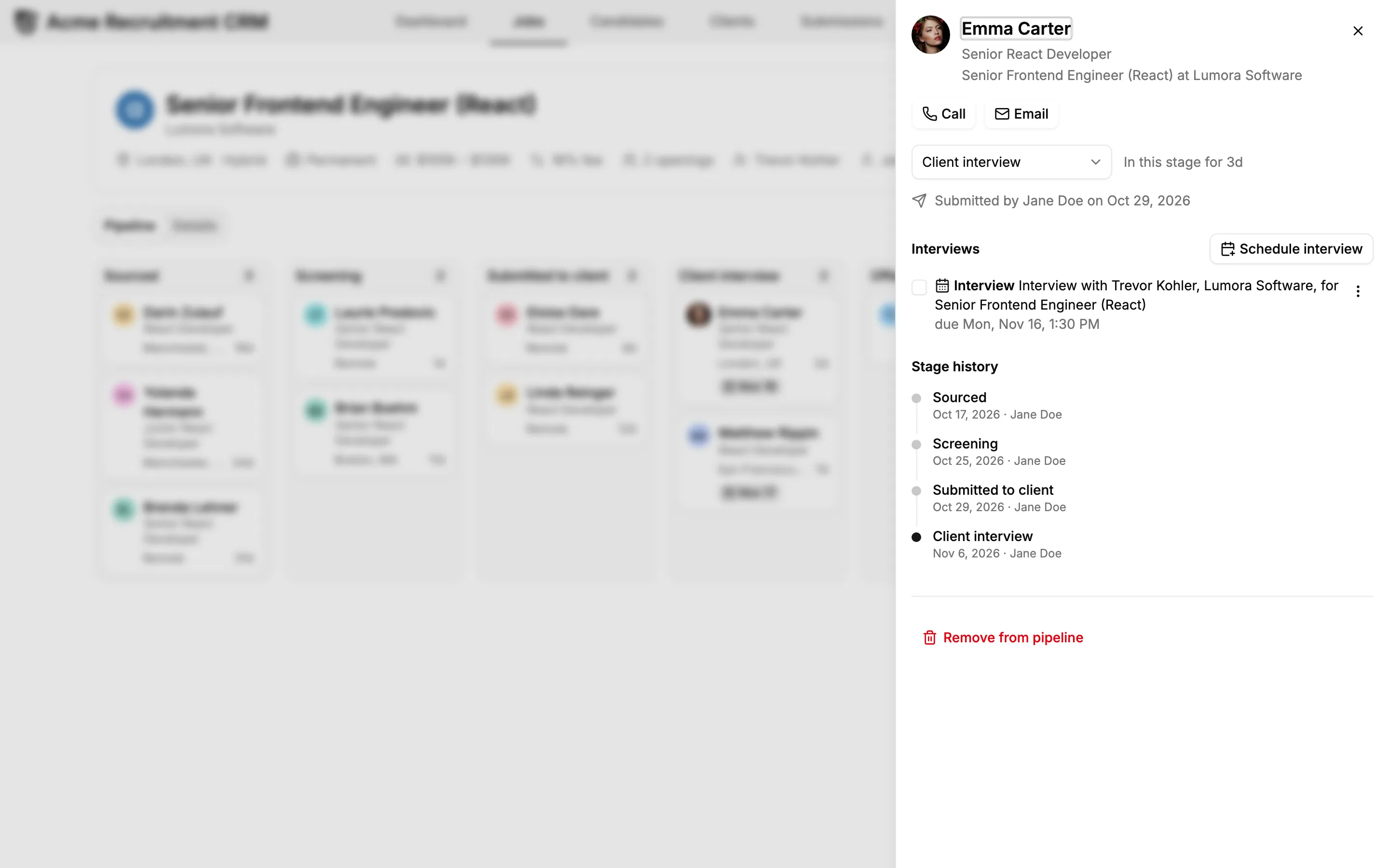
Click a card to open the application: the current stage and how long it has been there, who submitted the candidate and when, the scheduled interviews and the stage history. Reaching an interview stage offers to schedule the interview, and moving a candidate to Rejected asks for a reason.
Offers, Placements and Fees
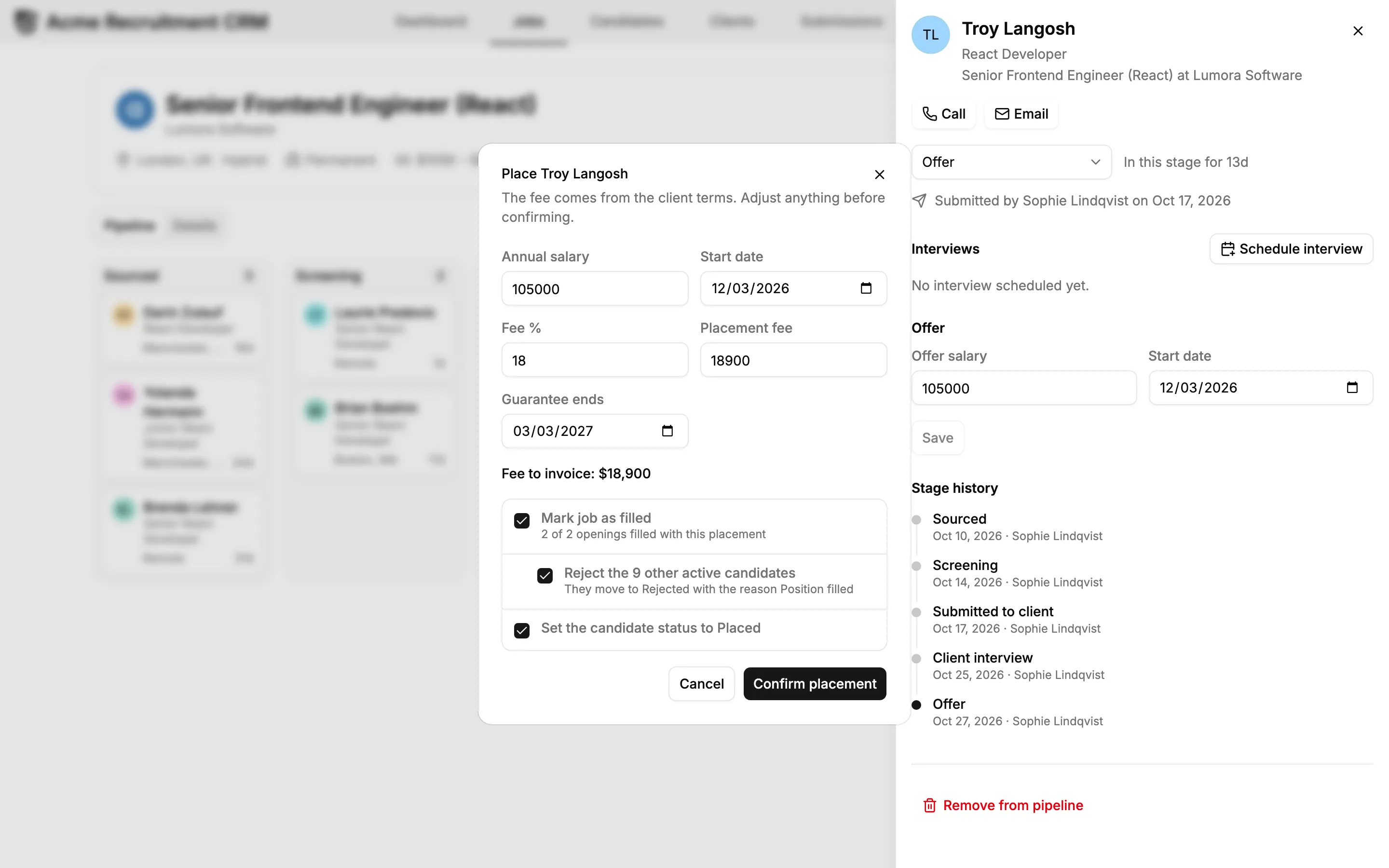
Record the offered salary and start date. On placement, the fee is computed from the client's fee percentage, and the guarantee end date from your guarantee period. When the last opening is filled, the CRM offers to mark the job as filled and to reject the other candidates with the reason Position filled.
Candidate Profiles With Quick Actions
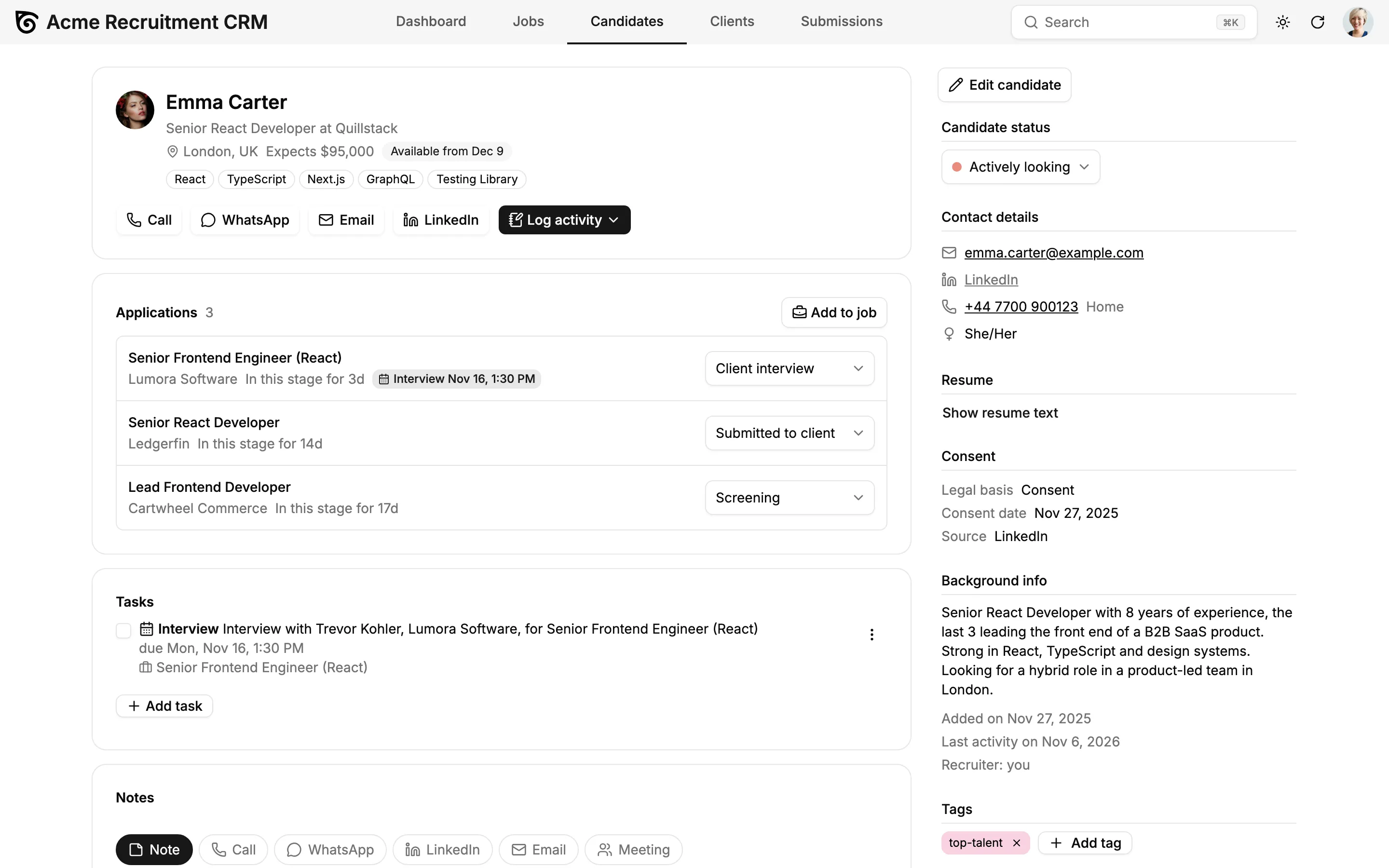
Current title and company, location, expected salary, availability date, skills, resume and consent on one page, with every job the candidate is in and its stage. Call, WhatsApp, email or open LinkedIn in one click, then log the call, message or meeting as a typed note.
Search Your Candidate Database
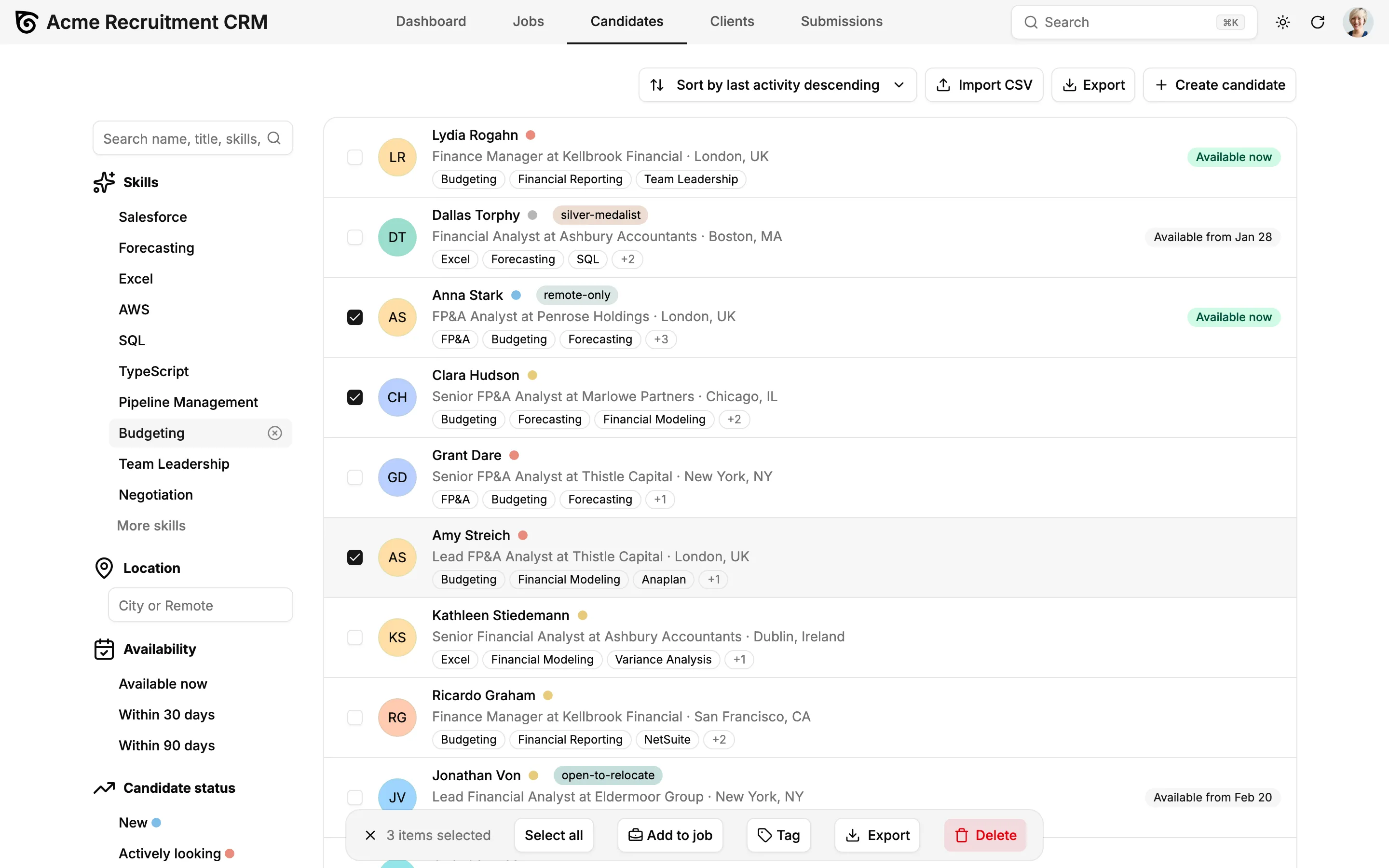
Find the right profile in your talent pool with a full-text search across names, titles, skills, locations, resumes and notes, and filters on skills, availability, status, source and tags. Select a few candidates and add them to a job in one go. Duplicates are flagged when a candidate is created, and can be merged.
Clients, Terms and Submissions
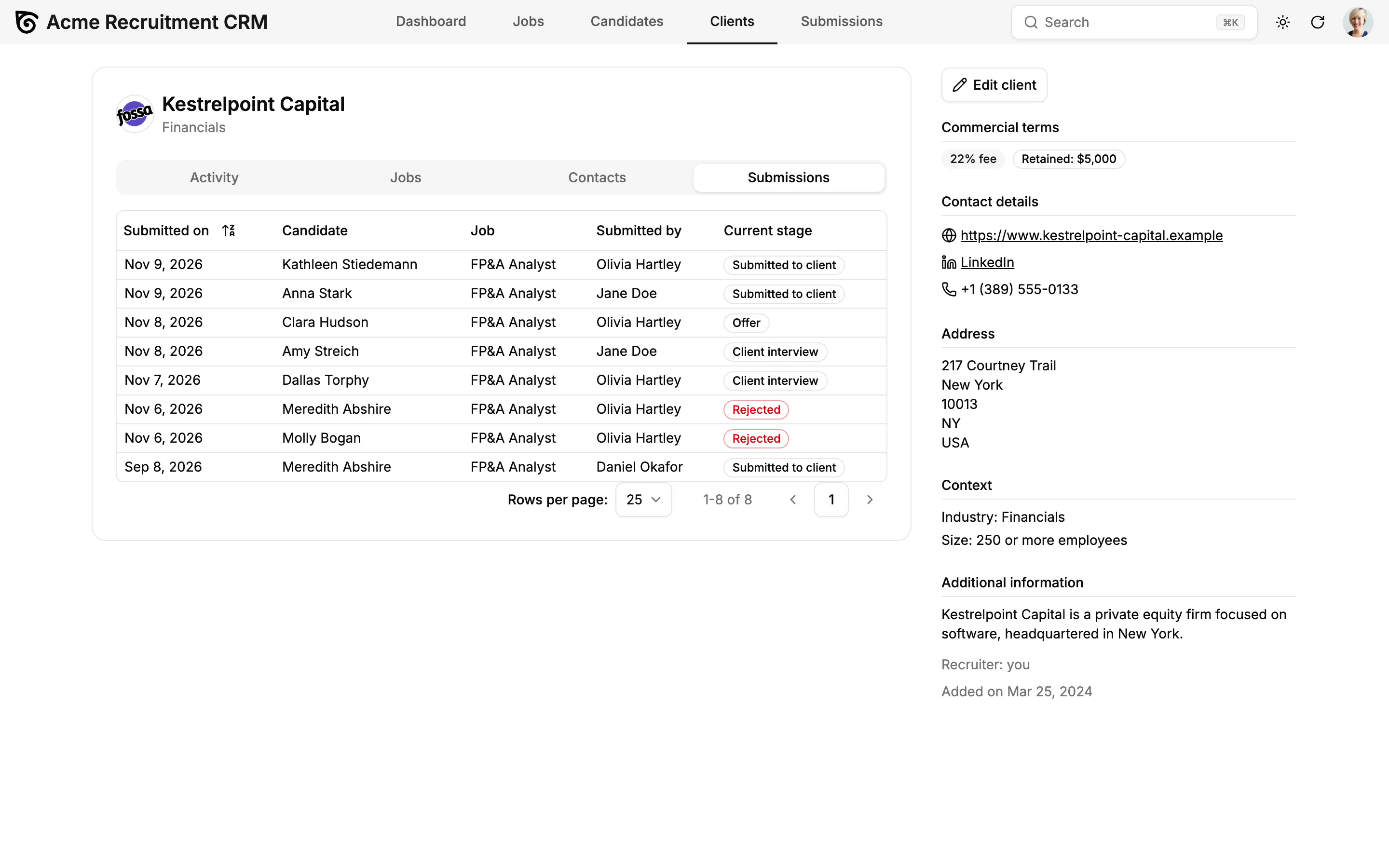
Each client has its commercial terms (fee percentage, retained or contingency, exclusivity), its jobs, its hiring managers and its activity. The submission log shows every candidate sent to the client, by whom and where they stand now, and a global Submissions page covers all your clients.
Building Blocks, Not Modules
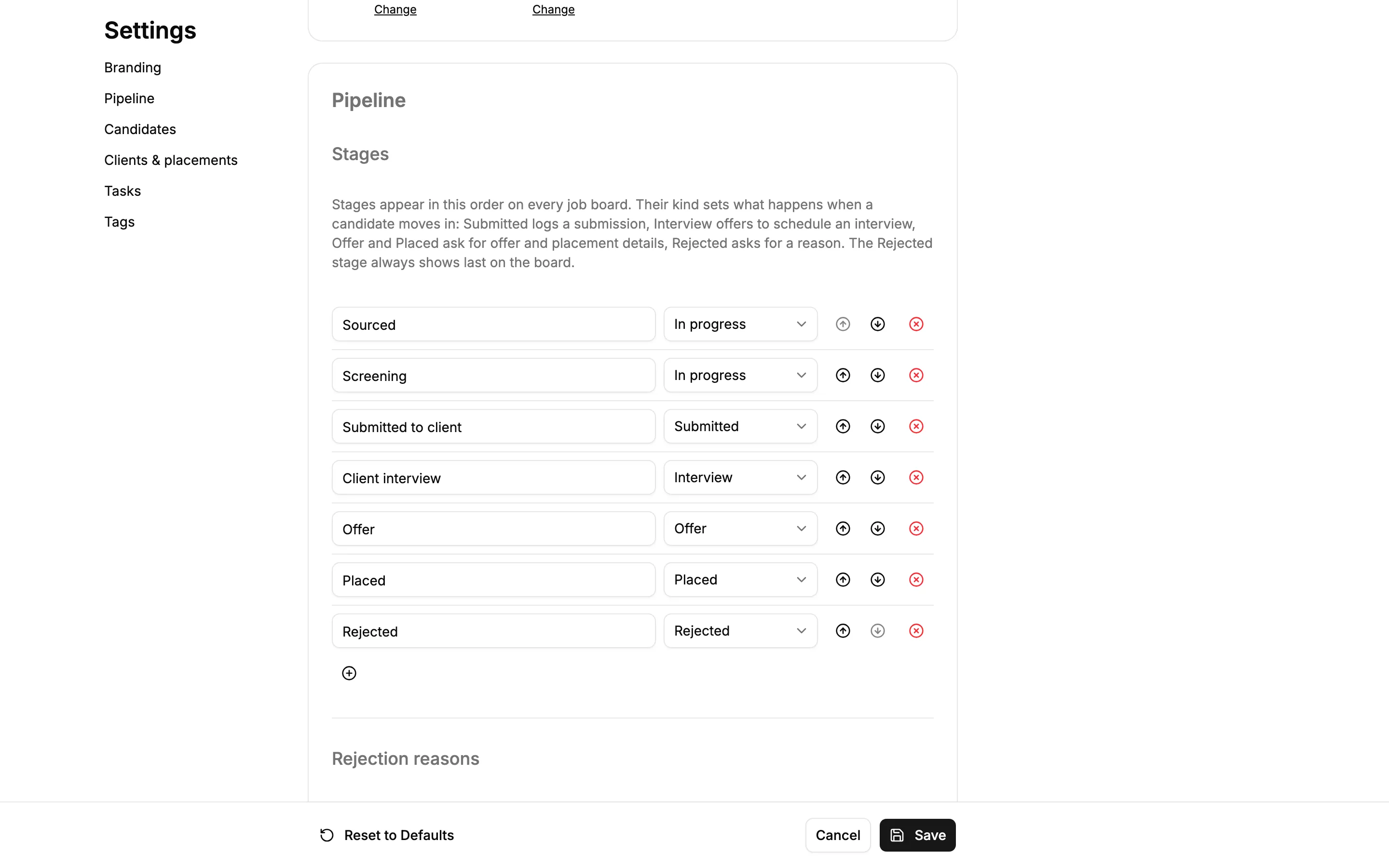
A tech recruitment agency, an executive search firm and an in-house talent team don't need different recruiting software, just different settings. Pipeline stages, rejection reasons, candidate statuses and sources, default fee, guarantee period, currency and task types are lists you edit in Settings. Each stage has a kind (submitted, interview, offer, placed, rejected) that drives what happens, so you can rename, add or reorder stages without touching the code.
| Building block | Tech recruitment agency | Executive search firm | In-house talent team |
|---|---|---|---|
| Stages | sourced, tech test, client interview | longlist, shortlist, final interview | applied, phone screen, onsite |
| Commercial terms | 20% contingency fee | retainer in three installments | no fee, hiring budget |
| Candidate sources | LinkedIn, GitHub, referral | network, research | careers page, job boards |
| Rejection reasons | salary expectations | rejected by client | not qualified |
| Task types | call, tech test | reference check | interview, debrief |
| Tags | remote-only, needs visa | board member | silver medalist |
MCP Server and AI Agents
Talk to Your Recruitment CRM
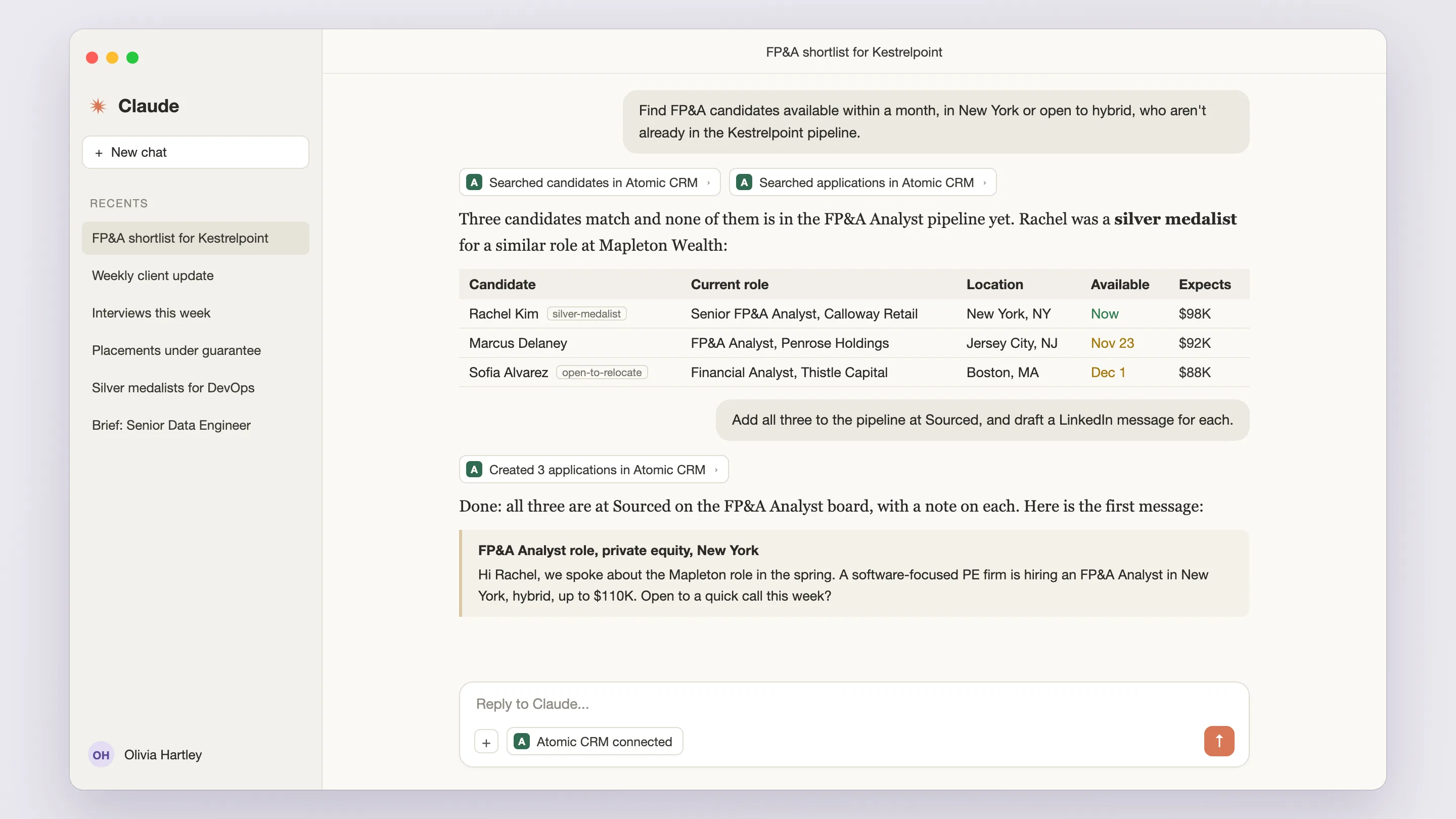
Recruiters spend their days on the phone with candidates and clients, not filling in forms. With the built-in MCP server, they can ask Claude, ChatGPT or any MCP-compatible assistant about candidates, jobs, clients and submissions in plain language, and update the CRM without opening it.
- Build the Shortlist
- “Find FP&A candidates available within a month in New York who aren't already in the Kestrelpoint pipeline.”
- Update Your Clients
- “Summarize where each candidate I submitted to Ledgerfin stands, and draft my weekly update to the hiring manager.”
- Prepare the Week
- “Which interviews are coming up this week, and which candidates have been waiting for client feedback for more than 7 days?”
- Log a Call in a Sentence
- “Just spoke with Emma Carter: she accepts the Lumora offer, starting December 3. Add a note and a task to check in after her first week.” The assistant records the note and creates the task.
- Your Data, Your Rules
- The assistant goes through the same API and permissions as the app. Your candidate database is not copied to a third-party CRM, and you choose which assistant to connect.
Reshape the CRM With a Prompt
The same AI-powered builder as on the Atomic CRM home page can extend the recruitment CRM for you, test the change and explain it.
See how it worksTry asking:
- Add a technical test stage with a score
- Track the notice period of each candidate
- Remind me to call the candidate 30 days after placement
- Let each recruiter see only their own clients
What You Can Add to Your Recruitment CRM
Atomic CRM is not a locked-down product, and the pipeline is only the start. Your agency can extend it to the rest of its business, with your own developer or with our team.
Careers Page and Job Boards
Publish your open jobs on your website and on job boards, and turn each application into a candidate in the right pipeline.
AI Resume Parsing
Drop a resume and let an AI model fill in the title, company, skills, location and contact details.
LinkedIn Extension
Add a profile you are viewing on LinkedIn to your database, or to a job, in one click from the browser.
Email and Calendar Sync
Gmail or Outlook emails attached to the right candidate or client, and interviews synced with your calendar.
Client Feedback Portal
Send a shortlist to the hiring manager through a secure link, and get their feedback on each candidate without an account.
Sequences and Reminders
Follow-up sequences for candidates and clients, and automatic reminders when a candidate has been waiting too long in a stage.
Invoicing
Generate the invoice when a candidate is placed, track payments and retainer installments, and sync with your accounting software.
Recruiting Reports
Time to fill, conversion rate per stage and per source, submissions per week and fees per recruiter or per client.
Contractors and Timesheets
For temporary and freelance placements: assignments, timesheets, pay and bill rates, and margins.
Roles and Permissions
Recruiters limited to their own clients, salary details hidden from some roles, retention rules for candidate data and an audit log.
Also included from Atomic CRM
- Single sign-on (Google, Azure, Keycloak, Auth0)
- Email to note (CC the CRM)
- CSV import with column mapping and duplicate merge
- Mobile app
- REST API
Not Just Recruitment Agencies
The recruiting-specific part (stages, fees, sources, rejection reasons, vocabulary) is one swappable set of data. The rest is a generic core for anyone who matches people with positions: executive search firms, in-house talent teams, freelance and interim consultancies.



From the Demo to Your Agency
Your agency can go from the demo to its own recruitment CRM in four steps, with our team or with your own developer.
- 1
Explore the Demo
Open a job, move candidates through its pipeline, schedule an interview, record an offer and place a candidate, in a fictional agency. This is the template you'll start from, nothing to install.
Open the demo - 2
Scope Your Agency
We map how your agency recruits (stages, fee terms, sources, guarantee, team) and turn it into settings before going live.
Book a Setup Week - 3
Bring Your Candidates
Import your candidates, clients and contacts from a spreadsheet or your previous ATS with column mapping, then merge duplicates.
Import guide - 4
Go Live
Invite your recruiters, researchers and account managers. No per-user fee, so everyone gets an account.
Deployment guide
Recruitment CRM Pricing
Free Forever, or Set Up by Experts
Use Atomic CRM for free, or let us set it up on your cloud or infrastructure.
Open-Source
The full power of Atomic CRM, self-managed on your own infrastructure.
Free
- Unlimited users, data & storage
- Host on Supabase or your own infrastructure
- SAML 2.0 single sign-on
- Email integration
- API access
- Community support on GitHub
Setup Week
Done for you
In one week, the team behind Atomic CRM designs, configures, and deploys it for your business, on your cloud or your infrastructure.
Custom quoteOne-time fee
What's included
- ScopingWe map your sales process, team, and needs.
- SpecificationsWe turn your requirements into a tailored configuration.
- Set-up & deploymentWe deploy your CRM on your own infrastructure, or host it for you.
No subscription. No per-seat pricing. No vendor lock-in.
Just a customized open-source CRM that you own, set up by CRM experts.
Recruitment CRM and ATS: Frequently Asked Questions
What is a recruitment CRM, and how is it different from an ATS?
An applicant tracking system (ATS) follows candidates through the hiring process for a job. A recruitment CRM also manages the relationships around it: your candidate database over the years, and for an agency, the clients who open jobs and pay your fees. Atomic CRM's recruitment template does both: a pipeline per job, candidates who can be in several jobs at once, clients with their terms, submissions and placements.
Is Atomic CRM really free for a recruitment agency?
Atomic CRM itself is free and open source under the MIT licence, with no per-user fee. Running it for your agency means hosting it and adapting the recruitment template to the way you work, with your own developer or with our team. If you'd rather not deal with servers, we can also host it for you, with your data in Europe or the US.
Can I use it for my agency today?
Not as is. The demo shows the full recruiting workflow but runs entirely in your browser, and its data resets on every reload. Going live means connecting these screens to a database on Supabase or your own infrastructure and adapting the settings to your agency. That is what the Setup Week is for.
Can we import our candidates from Bullhorn, Recruitee or a spreadsheet?
Yes. Export your candidates, clients and contacts as a CSV file from your current recruitment software or spreadsheet, then import them with column mapping and merge the duplicates. Bringing over resumes, notes and the history of past placements usually takes a custom import script, written by your developer or by our team.
Does it work for independent recruiters and in-house teams?
Yes. An independent recruiter gets the same pipeline, candidate database and fee tracking as a larger agency, without paying per seat. An in-house talent team can use the same screens with its own company as the only client, its own stages and no fees.
How does it handle GDPR and candidate data?
Each candidate records the legal basis for processing their data, its source and its date. Resumes are stored with the candidate, and you choose where your data is hosted: on your own servers, or by us in Europe. Retention rules, such as deleting candidates without activity for two years, are an extension you can add during a Setup Week.
Does it parse resumes or post jobs to job boards?
Not in the demo: you upload the resume file and paste its text so it is searchable. AI resume parsing, a careers page and job board posting are extensions to build, with our team or your own developer.
Does it work with LinkedIn, Gmail and Outlook?
The demo stores each candidate's LinkedIn URL and opens it in one click, and you can log LinkedIn messages and emails as notes. As in every Atomic CRM, you can also CC the CRM to turn an email into a note. A LinkedIn browser extension and a full Gmail or Outlook sync are extensions to build.
Does it handle temporary staffing and contractors?
The demo covers permanent and freelance placements with a one-off fee. Assignments, timesheets, pay and bill rates for temporary staffing are an extension you can build on the same jobs, candidates and clients.
Does it send invoices for placement fees?
Not by itself. The placement records the fee to invoice and the guarantee end date, and the dashboard totals the fees of your recent placements. Invoicing is an extension to build, usually by syncing your accounting software.
Get Atomic CRM for Your Recruitment Agency
Follow every candidate from sourced to placed, with a recruitment CRM you own.
- No per-user fees
- No lock-in