
MCP Servers: Your Next User Is An AI Agent

MCP servers can expand the capabilities of AI assistants and let them do more for you. Born as a technical standard (MCP stands for “Model Context Protocol”) for connecting tools to AI assistants, they are now very popular, and may be the future of human-computer interaction. Although some people may be skeptical about their true usefulness, I am very enthusiastic about them, and I think every software vendor should provide an MCP server. Let me explain why.
I’ll start with an introduction for beginners, feel free to skip it if you’re already familiar with the basics.
What Is An MCP Server?
MCP servers are third-party extensions for AI assistants. For example, Gmail offers an MCP server that allows ChatGPT (the assistant) to search, read and send emails on your behalf. You, the user, can install an MCP server in your assistant just like you would install a plug-in.
Another way to describe MCP servers is applications for agents. When you need to book a flight on your mobile phone, you have to install an app. Alternatively, you can install the airline’s MCP server in your agent app and let it handle the booking for you.
MCP servers often rely on an API, which is a set of rules that allows different software to communicate with each other. But an API alone isn’t enough to connect with an AI assistant, and the semantics of APIs aren’t always adapted to the way AI assistants work.
What Is an Agent?
An agent is the technical name for modern AI assistants. It’s an AI with the capability to act, instead of just generating text. At the core of agents are models or LLMs, like GPT-5, Claude Opus or Mistral. These models can only read and write text. An agent contains an LLM but also has access to tools, and runs them in a loop until it considers the response correct. For example, ChatGPT, Claude or Le Chat are agents. Among their tools, they have a web browser, which lets them read a web page, a file reader, which lets them read and write Word and Excel files, and more. Agents are the natural successors to chatbots. Because they can interact with your computer, specialists say that they have agency.
How Can I Install An MCP Server?
If you have an account on ChatGPT, Claude or similar tools, they all offer some sort of “Apps”, “Connectors” or “Extensions” in the settings. These all rely on an MCP server.
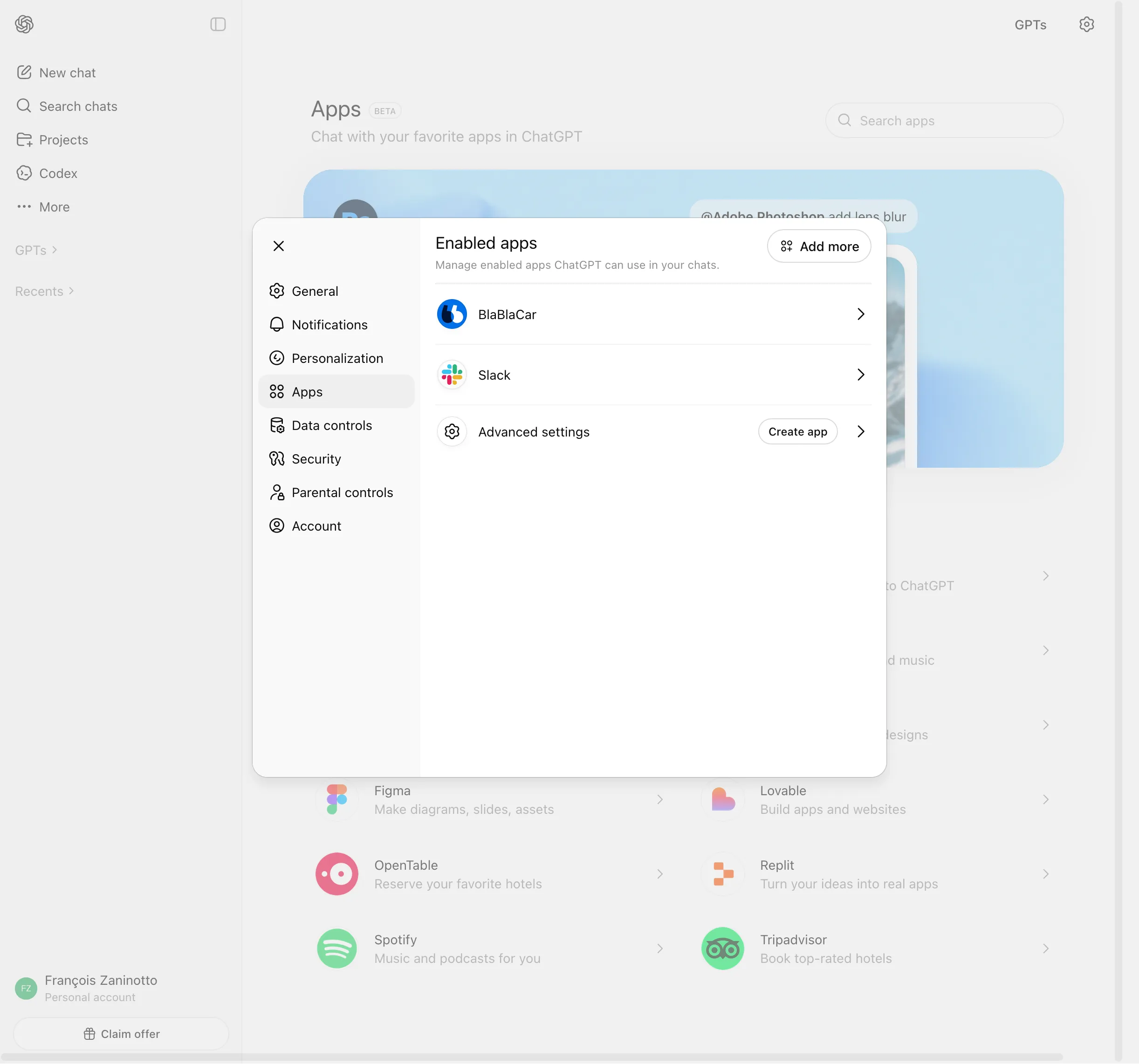
AI assistants offer some kind of “App Store” where you can install apps from a small set of featured publishers. But they also let you install an MCP server directly from a URL, just like you can install software on your computer by downloading the executable, without going through any store.
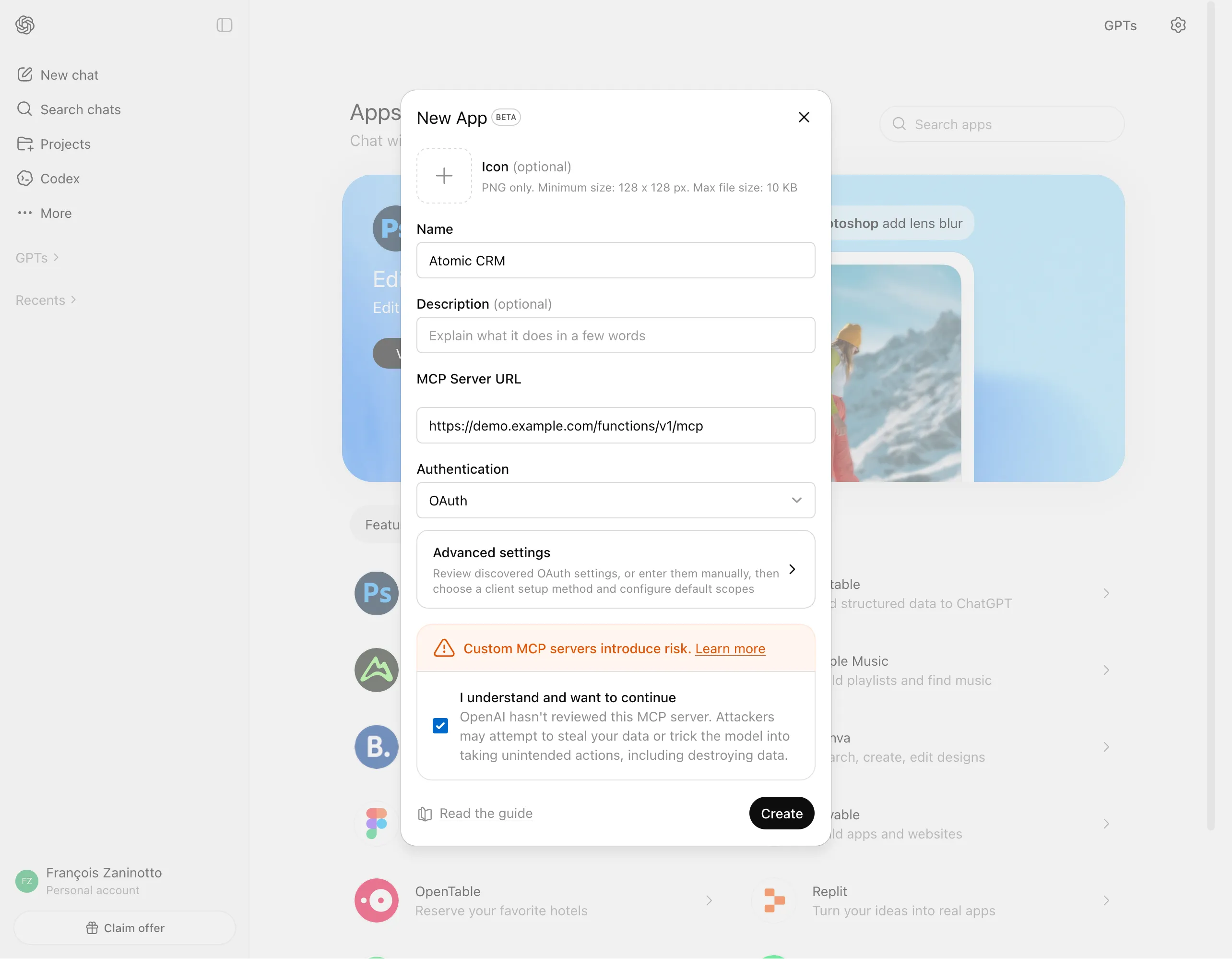
In Claude, this is called a “Custom Connector”. In ChatGPT, this feature is hidden behind the “developer mode”: in the “Advanced Settings” panel, once you enable the Developer Mode, you can “Create an app”, which means connecting an MCP server from a URL.
MCP servers are often offered by online service providers or SaaS. For example, our CRM Atomic CRM exposes an MCP server. The URL of this MCP server is displayed by the frontend in the User Profile page:
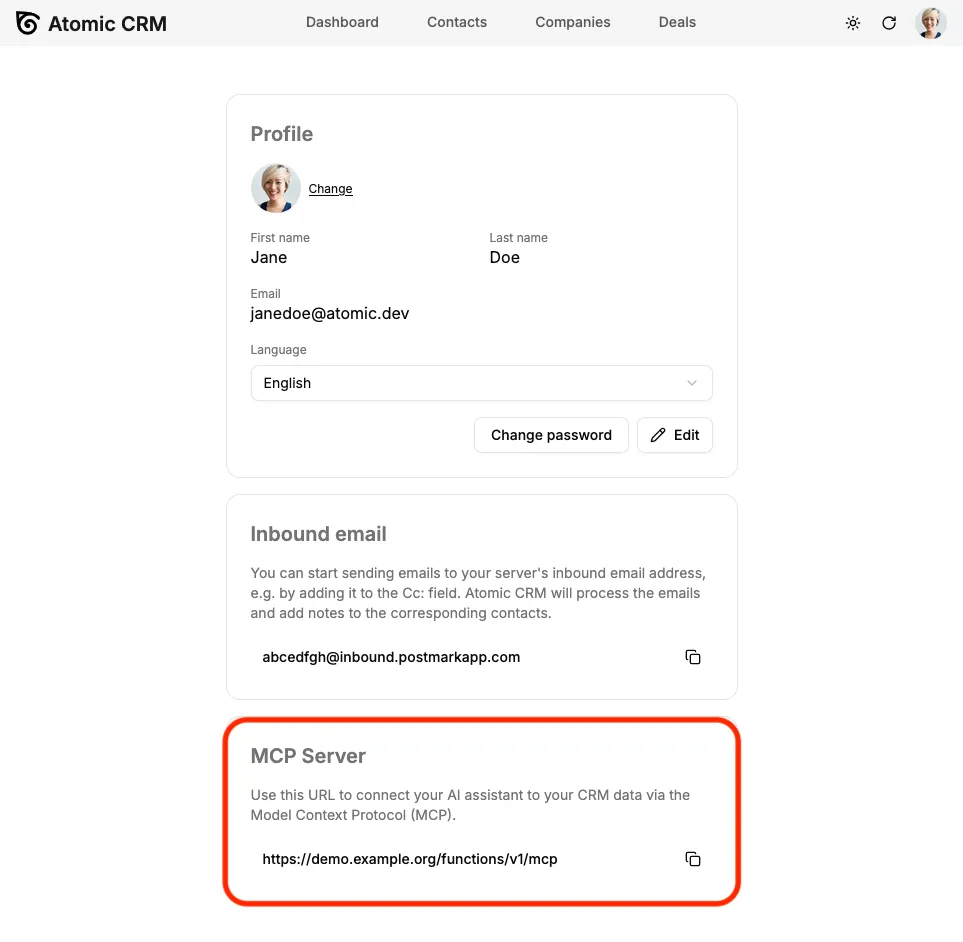
To connect an AI assistant to my CRM, all I have to do is copy this URL and paste it in the “custom connector” dialog in Claude or “create an app” dialog in ChatGPT.
What Happens When I Install An MCP Server?
When you install a new MCP server, your AI assistant fetches the URL to get the list of tools provided by the server. For example, an MCP server for a CRM will offer tools to search through contacts, add notes, create a reminder, or manage deals.
From then on, the AI assistant will include these tools in the context of every conversation, a bit like the following:
You are a helpful assistant.
You have the following tools at your disposal:- from Atomic CRM:  - search_contact  - add_note  - create_reminder  - create_deal  - update_deal- ...
This means that when you connect an MCP server, you send no data to the AI assistant. Connecting a Gmail MCP server to ChatGPT doesn’t send your entire email history to OpenAI. But it allows ChatGPT to read relevant emails when you ask it to perform a task.
Installing an MCP server also involves authentication, which lets it act on your behalf within the third-party service. For example, when you add the Atomic CRM MCP Server to Claude, Atomic CRM will ask you if you want to enable Claude to access this service. If you agree, this creates a three-way connection between you, the third-party service (Atomic CRM) and the AI assistant (Claude). Then, every time the AI assistant calls a tool from that MCP server, it does so with your credentials. This classic third-party authentication is powered by a popular standard called OAuth.
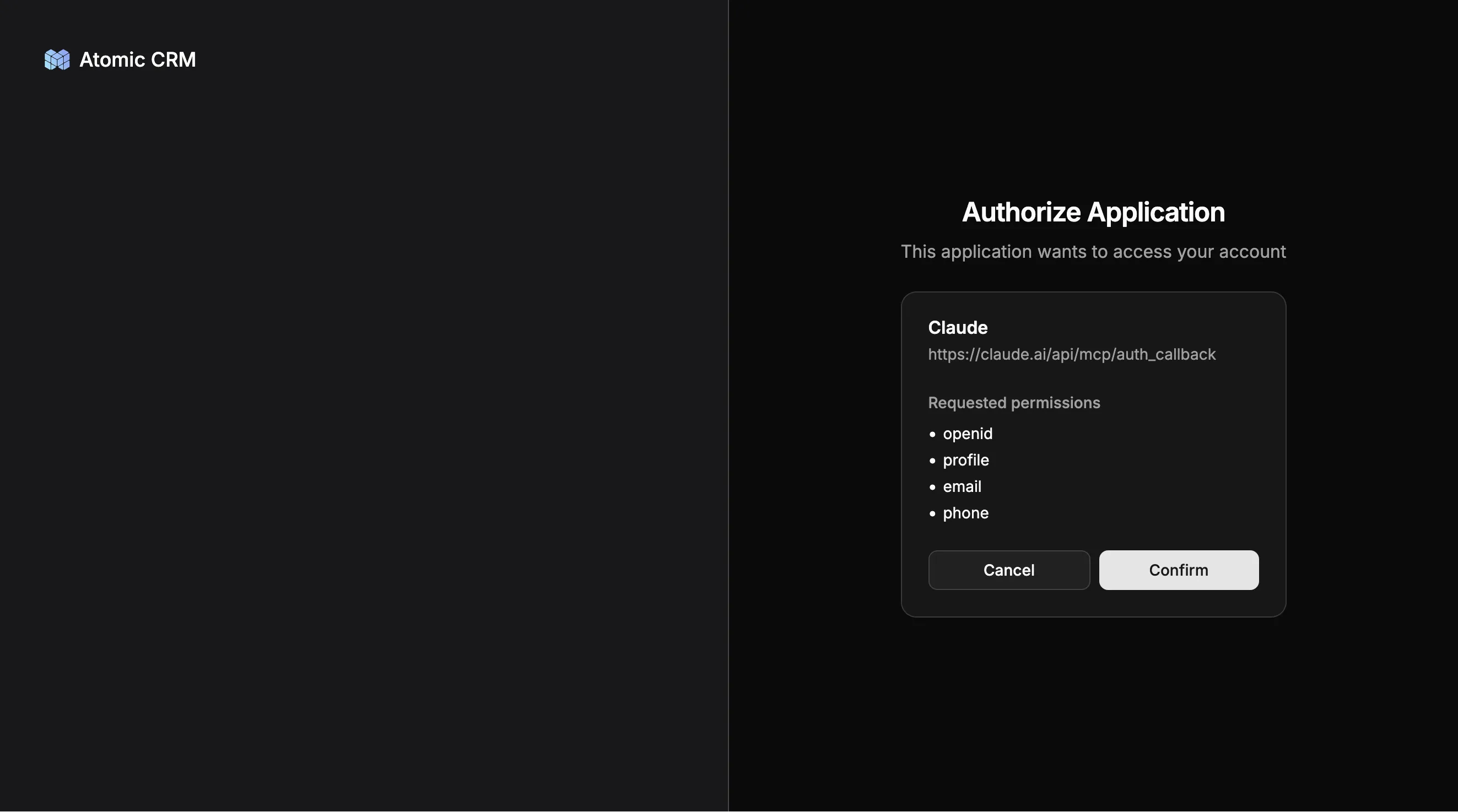
This means that the AI assistant doesn’t have access to your direct credentials on the third-party service (email and password). Instead, it just receives a token that lets it act on your behalf in the third-party platform. You can revoke this token at any time.
What Can An MCP Server Do?
Once the AI assistant has access to the new tools provided by the MCP server, it can choose to use them when needed. For example, if I ask my assistant:
Add a note about John Doe explaining that our meeting is postponed until after the holidays
The assistant will understand that it needs to call the following tools:
search_contactwith first name “John” and last name “Doe”add_notefor that contact with the content “Meeting postponed until after the holidays”
There is no need to explicitly mention the tool name; the assistant will determine which tools to use on its own.
Most AI assistants can chain several tool calls to perform more sophisticated tasks. For example:
List all open deals for companies in the Automotive sector with a value greater than $10,000.
AI assistants become truly powerful when you connect several MCP servers from unrelated services. For instance, if I add an MCP server for Gmail, I can ask the AI assistant:
Find the contacts I met last week and write a draft email to each of them summarizing our last conversation and suggesting next steps.
Or:
Book a meeting for the Acme deal, include the deal notes in the description, and invite the contact person from that deal.
Normal apps have boundaries that can’t be crossed. MCP servers, on the other hand, let AI assistants do cross-service tasks.
Finally, MCP servers can render specialized UI widgets in the conversation. For example, an accounting MCP server can render a chart of revenue over the last 12 months. For a CRM app, the MCP server can render an interactive list of tasks, where the user can check them off, or navigate to the relevant contact:
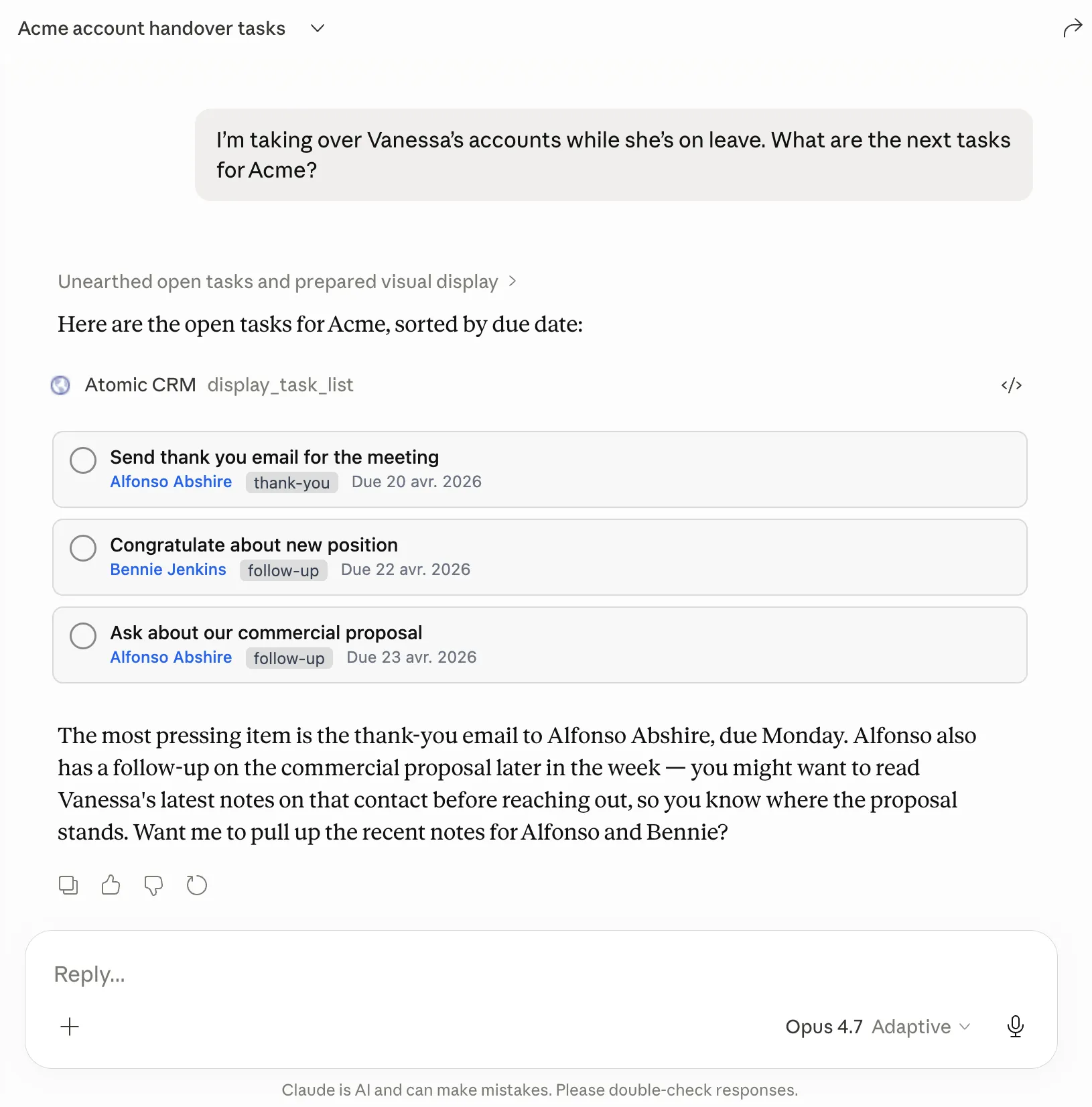
This is made possible by a standard called MCP Apps.
How MCP Servers Can Enable New Workflows
Here are some examples of workflows that could be enabled by MCP servers in different industries:
-
Real estate agent (using MCP Servers for Listings + Calendar + Email + Maps): “Find all properties under $400K within 20 minutes of the client’s workplace, schedule viewings for Saturday with at least 30 minutes between each, optimize the driving route, and email the client the itinerary with photos.”
-
Event planner (using MCP Servers for Venue booking + Catering + Guest list + Email): “Check which venues are available on June 14 for 80 people, get quotes from our 3 preferred caterers, cross-reference the guest list for dietary restrictions, and send save-the-date emails with a menu preview.”
-
Recruiter (using MCP Servers for Job board + LinkedIn + Calendar + ATS): “Pull all applicants from this week’s job posting, enrich their profiles with LinkedIn data, shortlist the ones with 5+ years of experience, schedule phone screens in my available slots, and send them calendar invites.”
-
Sales rep (using MCP Servers for CRM + Flight booking + Expense tool + Calendar): “I need to visit our top 3 prospects in Germany next week. Find the cheapest flights, book them, block my calendar, pre-fill expense reports for each trip, and email each prospect to confirm the meeting.”
-
Restaurant owner (using MCP Servers for POS + Inventory + Supplier + Menu): “Check what sold the most this week, compare with current ingredient stock levels, order what’s running low from our usual suppliers, and update the weekend specials menu based on what we have plenty of.”
-
Fitness coach (using MCP Servers for Scheduling + Payment + Workout app + Messaging): “Show me clients who haven’t booked a session in 3 weeks, check if their subscription is still active, send them a personalized message with a suggested workout plan, and offer them a free session to come back.”
-
Journalist (using MCP Servers for News feed + Contacts + Calendar + CMS): “Monitor press releases from these 5 companies, alert me when one publishes something, find the PR contact in my address book, schedule a 15-minute call, and create a draft article stub in my CMS with the press release as source.”
Are MCP Servers Out Of Fashion?
MCP servers were initially designed for coding agents (GitHub Copilot, Claude Code, Codex, etc). They helped developers connect with their usual tools (on GitHub, in continuous integration, etc.). In this context, most MCP servers were local: instead of getting the list of tools from a URL, they used a secondary process running on the same computer.
Developers have found an alternative for this scenario called Agent Skills. It’s a simplified but more versatile way to “augment” a coding agent based on command-line interface (CLI) tools.
However, Skills don’t address the exact same needs as MCP servers. In particular, Skills lack a standard for authentication like OAuth. For interacting with a third-party service in an authenticated way, MCP remains superior.
Developers also require more from their coding agents than just tools: custom instructions, hooks, rules, and subagents. The MCP standard doesn’t cover this. That’s why every coding agent is currently developing its own “plugin” standard that can contain an MCP server and other things.
So even if some people claim that “Skills are better than MCP”, it applies only to very specific scenarios, and even then it’s not entirely true. MCP servers remain central for connecting to other services.
Why You Should Have An MCP Server For Your Service
Over the past 20 years, the main platform for day-to-day work has been the browser, or mobile apps. To design a new feature, product managers use Figma in their browser. To plan an email campaign, marketing teams use Brevo in their browser. To find the shortest route for a delivery, drivers use the Google Maps app on their phone.
The problem is that each of these apps is a walled garden. If a user wants to perform a task that spans more than one app or website, they have to copy/paste or import/export data between apps. This is cumbersome, and it makes cross-app workflows slow and impractical. MCP servers completely remove the friction from cross-application workflows.
Because of this, AI assistants are becoming the go-to platform. Instead of opening a website or an app, users increasingly start with a text or voice interaction with their AI assistant. If you provide a service, you need to go where your users are. That’s why your service must also be present as an MCP server.
In any case, adding an MCP Server isn’t a huge investment. The MCP server is a thin layer on top of your existing API — typically a few days of engineering work.
Tradeoffs
MCP Servers have a few downsides that need attention.
First and foremost is security. Even though an MCP Server uses OAuth and gives the same credentials to the agent as to the user of the agent, the main risk is data leakage through other MCP Servers. Since an editor doesn’t control which MCP Servers are installed by their customers, they can’t guarantee that a rogue server doesn’t do prompt injection to exfiltrate personal information about the user, or perform actions on their behalf.
Each MCP server adds tools to the AI assistant context, so if a user adds many MCP servers, their LLM tokens may baloon. This is a problem for the user rather than the MCP server editor, but the inflated costs may come as a surprise for the users. On the other hand, MCP servers don’t necessarily use LLMs and have no special running costs compared to a classic API.
The editor of an MCP server has no control on how the service is used, and agents may misuse them, producing wrong or problematic results. There are legal implications related to the obligations of the editor, and you must clearly state your responsibilities as an MCP Server editor in the Terms & Conditions of your service.
Finally, if you want to turn your MCP server into an App that is distributed in the agent’s app store, you will have to comply with their App Policies, which currently prevent monetization of digital product and services.
Conclusion
Despite rumors of their death, MCP servers are here to stay. They are a key piece of the AI assistant ecosystem, and companies like OpenAI and Anthropic have fully grasped their potential. OpenAI is dreaming of a walled garden similar to the iOS App Store, where they could get a share of every transaction on every service. Anthropic is (currently) more open, allowing anyone to add any MCP server without warning about “elevated risks”.
If you’re building a new product, or rebuilding an existing product, think of the MCP server as a key interface for your users. Passing on MCP servers will cut you off from a huge user base, or send users to alternatives that support unstructured, cross-app workflows. In short, it’s a must-have.
Authors
Marmelab founder and CEO, passionate about web technologies, agile, sustainability, leadership, and open-source. Lead developer of react-admin, founder of GreenFrame.io, and regular speaker at tech conferences.