Recently I worked on a legacy Python application that was difficult to maintain because the tooling was lacking and the codebase was somehow outdated. It was a great opportunity to apply modern Python practices to breathe new life into the project.
In this article, I’ll share the tools and techniques I used to transform an aging project into a modern, efficient, and future-proof codebase.
By default, pip install puts packages in our system Python. That works fine until we work on two projects at once (e.g., project A needs Django 3.2, while project B needs Django 5.0). A global install breaks one of them, and the error we get won’t immediately tell us why.
A virtual environment solves this by giving each project its own isolated Python installation and package directory.
Here’s how it works in practice:
Terminal window
# Create a virtual environment
cdmy-project
python-mvenv.venv
# Activate it
source.venv/bin/activate# Linux / macOS
# .venv\Scripts\activate # Windows
# Now `python` and `pip` point to the local .venv copy
whichpython
# /home/user/my-project/.venv/bin/python
# Install packages - they go into .venv, not the system Python
pipinstalldjango==5.0
When we activate the environment, our shell’s PATH is temporarily modified so that python points to the version inside .venv rather than the system one. Most shells also prefix the prompt with (.venv) as a visual reminder. When we’re done, deactivate restores the original PATH.
Our global Python stays clean, and every project gets exactly the dependencies it declared.
Many legacy codebases have no requirements.txt, or one that hasn’t been updated in years. Adding a virtual environment is the first step toward reproducibility: once we pin our dependencies in a lockfile, every developer and every CI run installs exactly the same versions.
The most popular package managers for Python have been pip and poetry for a long time, but there are new tools that are worth considering.
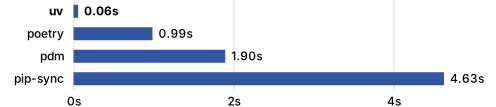
uv is a modern and fast alternative written un Rust that offers a lot of features. Maintained by Astral (and recently acquired by OpenAI), it adopts new features and standards more rapidly than poetry.
What makes uv stand out is that it can handle many things:
It replaces pip, pip-tools, pipx, poetry, pyenv, twine, virtualenv
Like poetry, it creates a pyproject.toml and has a lockfile (uv.lock) that ensures reproducible builds across environments
It can install and manage Python itself (like pyenv)
It has specialized support for easily invoking and installing tools such as linters, formatters, and type checkers (like ruff, black, ty)
It automatically manages isolated environments — no manual venv setup needed
It installs dependencies 10x-100x faster and has better resolution than legacy pip workflows
Here are the basic commands to get started with uv:
Terminal window
uvinit# create a new project with pyproject.toml
uvpythoninstall3.12.4# install a specific Python version
uvpythonpin3.12.4# pin the Python version for this project
uvadd--devpytest# add packages to dev dependencies
uvsync# install all deps in pyproject.toml and update uv.lock
uvrunexample.py# run a script in the uv environment
uvtoolinstallruff# install a tool globally
uvxruffcheck.# run a tool installed with uvx
Bonus: uv has a an official pre-commit hook that allows to perform several checks before committing, like making sure the uv.lock file is up to date even if our pyproject.toml file was changed:
Before picking up any other tool, there is a document worth knowing: PEP 8, the official Python style guide. It covers naming conventions, indentation, line length, import ordering, whitespace rules, and more.
Legacy codebases rarely follow it consistently. One file uses camelCase for functions, another uses snake_case. Some modules have 200-character lines. Imports are scattered between standard library, third-party, and local modules with no clear separation. Reading code like this is tiring, even when the logic is sound.
PEP 8 introduces a few key rules that make the biggest difference in practice:
Naming: functions and variables use snake_case, classes use PascalCase, constants use UPPER_CASE
Imports: standard library first, then third-party, then local, each group separated by a blank line
Line length: 79 characters is the original limit; most teams relax it to 88 or 100
Blank lines: two blank lines between top-level functions and classes, one between methods
Compare how PEP 8 transforms a piece of legacy code:
How pleasant is it to write code without worrying about style issues, syntax errors, or import order… press ctrl+s and see the linter automatically fix them for us? In Node.js, I use eslint --fix or prettier to automatically fix linting issues and format code on save.
There are many linters and formatters in the Python ecosystem, but one that stands out is Ruff, also by the Astral team.
Why? Because Ruff replaces many tools like:
Flake8 with its .flake8 or setup.cfg
Pylint with its .pylintrc
Black with its section in pyproject.toml
isort with its section in pyproject.toml
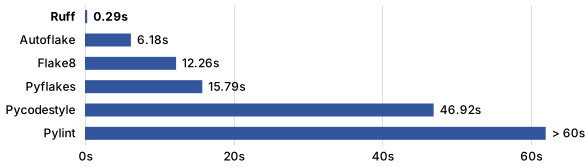
Ruff is also built with Rust, so it’s super-fast:
Install and run Ruff with uv:
Terminal window
uvadd--devruff# install ruff as a dev dependency
uvrunruffcheck.# check for linting issues
uvrunruffcheck--fix.# automatically fix issues
uvtoolinstallruff# install ruff globally with uv
uvxruffcheck.# run ruff globally
uvxruffcheck--fix.# run ruff globally with auto-fix
Since Ruff supports more than 800 rules, a dedicated article would be needed to cover all of them, but here are some tips to get the most out of it.
We can configure Ruff in ruff.toml to select which rules we want to apply. For instance:
ruff.toml
# Assume Python 3.9
target-version = "py39"
# Rules to enable
[lint]
select = [
"E", # Style errors (pycodestyle)
"F", # Pyflakes errors (unused variables, etc.)
"I", # Import sorting (isort)
"B", # Potential bugs (flake8-bugbear)
"UP", # Syntax modernization (pyupgrade)
"SIM", # Code simplification (flake8-simplify)
"N", # Naming conventions (pep8-naming)
"S", # Security issues (flake8-bandit)
]
# Rules to ignore
ignore = [
"E501", # Line too long (handled by the formatter)
]
# Rules that --fix can automatically correct
fixable = ["ALL"]
These rules come in addition to the default ones, and we can customize them as needed.
There is also a VS Code extension for Ruff maintained by Astral.
We can configure Ruff to format Python code on-save by enabling the editor.formatOnSave action in settings.json — exactly what we were looking for!
settings.json
{
"[python]": {
"editor.formatOnSave": true,
"editor.defaultFormatter": "charliermarsh.ruff",
"editor.codeActionsOnSave": {
"source.fixAll.ruff": "explicit",
"source.organizeImports.ruff": "explicit"
}
}
}
To ensure that all code is linted and formatted before committing, we can add Ruff to our pre-commit hooks:
Coming from TypeScript, I already know how much a type checker helps catching bugs before runtime and improves the editor experience.
In the world of Python type checkers, mypy has been the go-to for years. But a new contender has entered the race: ty.
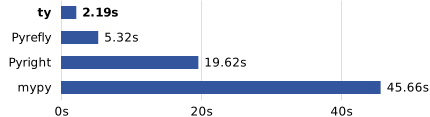
ty is a modern, extremely fast type checker built by… Astral, and written in Rust (what a surprise!). As you may expect, it’s fast:
But it’s not its only advantage:
Clear error messages: Actionable diagnostics that are easy to understand
Single config file: Everything lives in pyproject.toml
Same ecosystem: If we’re already using uv and ruff, ty fits right in
Install and run ty with uv:
Terminal window
uvadd--devty
uvruntycheck
Configure it in pyproject.toml:
[tool.ty]
strict = true
src = ["src"]
And now your IDE will warn you about type errors:
defget_user_email(user_id: int) -> str|None:
# legacy code might return None if user not found
...
email = get_user_email(42)
print(email.upper())
# Error: Method "upper" is not defined on type "str | None"
You can ensure code is type-checked before committing by using a pre-commit hook:
.pre-commit-config.yaml
- repo: local
hooks:
- id: ty
name: ty type check
entry: uv run ty check
language: system
types: [python]
pass_filenames: false
The combination of ty for type checking and ruff for linting/formatting — all orchestrated by uv — forms a cohesive modern toolchain from a single team.
Without Pylance, VS Code gives me generic completions. It suggests method names without knowing their signatures. It doesn’t tell me when I pass the wrong type to a function. I have to run the code to find out.
Pylance is Microsoft’s language server for Python. It reads the type annotations and uses them to power the editor. The difference is immediate. It gives:
Completions based on actual types, not just names
F12 to jump to any definition, even inside third-party libraries
Inline documentation on hover
Errors highlighted as we type, not just at runtime
Pylance comes bundled with the Python extension for VS Code. To enable it on a legacy codebase, add these lines to .vscode/settings.json:
{
"python.languageServer": "Pylance",
"python.analysis.typeCheckingMode": "basic"
}
Starting with "basic" mode on a legacy project is the right approach. "strict" mode is overwhelming at first (it surfaces hundreds of errors). "basic" catches the most impactful issues without blocking progress.
The combination of Pylance for real-time editor feedback and ty for CI enforcement gives us the best of both worlds.
Adding types to a legacy project can feel overwhelming at first. Where do we start? But we don’t need to annotate everything at once. Here is a gradual approach that pays off:
Annotate new code first: Any function we write from now on should get type annotations. That costs nothing and sets the baseline.
Then annotate existing code progressively.
Take a typical legacy function that reads user data from a raw dict:
# Before — no types, no clue what `users` contains or what comes back
deffind_user(users, name):
for user in users:
if user["name"] == name:
return user
returnNone
The first step is to add annotations to the signature. It already helps: Pylance now knows what to expect at every call site.
But list[dict] is still vague. A dict can hold anything. The next step is to replace the raw dict with a proper typed structure — a plain Python class with annotated attributes:
Pylance now autocompletes user. with the actual fields. If we rename email to email_address, every caller is immediately highlighted. ty will catch user["name"] (dict access on a class instance) as an error.
Now deactivate() and display_name() are discoverable via autocomplete, documented by their return type, and checked by ty. No more hunting through the codebase for what methods a “user object” might have.
Finally, use Any as an escape hatch on hard-to-type legacy code:
from typing import Any
deflegacy_parser(raw: Any) -> Any:
# TODO: type properly once we understand the data shape
return raw["value"]
Any is not a solution, but it lets us annotate progressively without blocking. Replace it as we understand the codebase better.
Even partial type coverage pays off immediately. Pylance starts giving smarter completions, ty starts catching real bugs. The return on investment is immediate.
The User class above gives us autocomplete and static type checks. But type annotations are only hints for the editor and the type checker. Nothing stops us from writing User(id="not-a-number", ...) at runtime: Python builds the object anyway, and the bug only shows up later when something tries to use id as a number.
That matters when data comes from outside the code: API payloads, form submissions, files, environment variables. We need to validate it before using it.
Pydantic is the Python equivalent of Zod in TypeScript. We define a model class, pass our data to it, and get back a typed object — or a ValidationError with the exact field that is wrong.
Install it with uv:
Terminal window
uvaddpydanticpydantic-settings
The previous User class becomes a Pydantic model with very few changes:
from pydantic import BaseModel
classUser(BaseModel):
id: int
name: str
email: str
is_active: bool=True
No __init__ to write anymore. And construction now checks the data:
User(id=1, name="Alice", email="alice@example.com") # ✅ ok
pytest is the go-to testing framework for Python. It is expressive, and its fixture system makes it easy to share setup code across tests.
Install it with uv:
Terminal window
uvadd--devpytestpytest-cov
uvrunpytest# run all tests
uvrunpytest--cov=src--cov-report=html# with HTML coverage report
Here is a simple test file using pytest:
tests/test_tasks.py
import pytest
from myapp.tasks import Task
deftest_complete_task():
task = Task("Buy milk")
task.complete()
assert task.done isTrue
deftest_task_title_cannot_be_empty():
with pytest.raises(ValueError, match="title cannot be empty"):
Task("")
Fixtures are one of pytest’s superpowers. If you come from unittest, think of them as a more flexible version of setUp and tearDown. A fixture is a function decorated with @pytest.fixture that provides a test with some pre-configured resource (a database connection, a test client, a temporary file, etc.) The magic is that pytest injects them automatically into any test that declares them as a parameter.
We can define reusable fixtures in conftest.py (a special file that pytest discovers automatically):
tests/conftest.py
import pytest
from myapp.db import create_database, drop_database
@pytest.fixture
defdb():
db = create_database(":memory:") # Setup: create a fresh in-memory database
yield db # Provide it to the test
drop_database(db) # Teardown: clean up after the test
The yield keyword is the key here: everything before it runs before the test, everything after runs after, even if the test fails. Now any test function can request this fixture simply by naming it as a parameter:
deftest_insert_task(db): # pytest sees "db" and calls the fixture above
db.execute("INSERT INTO tasks (title) VALUES ('Buy milk')")
assert db.execute("SELECT COUNT(*) FROM tasks").fetchone()[0] ==1
No manual setup, no manual teardown, and each test gets its own fresh database.
Another cool feature of pytest are parametrized tests. They let us cover many cases with minimal code:
Legacy codebases often contain scattered scripts for routine tasks. Makefiles work well, but they can feel out of place in a Python project (besides, they don’t work the same way on Windows). The best python tool to organize these commands is Poe the Poet, a task runner that lets us define all our project commands in pyproject.toml, right next to the rest of our configuration.
Install it with uv:
Terminal window
uvadd--devpoethepoet
Then define tasks in pyproject.toml:
[tool.poe.tasks]
start = "uv run python main.py"
test = "uv run pytest"
lint = "uvx ruff check --fix ."
format = "uvx ruff format ."
typecheck = "uv run ty check"
check = ["lint", "format", "typecheck", "test"]
The check task chains lint, format, typecheck, and test in sequence. One command before committing, and we know the project is in good shape.
Terminal window
uvrunpoecheck# run all checks at once before committing
If you prefer a standalone file over pyproject.toml entries, just is worth a look. It has a clean Justfile syntax and works on every platform.
I used to use print(variable) everywhere. It works, but it’s slow: we add prints, re-run, find the output, then remove the prints — and always forget one somewhere.
VS Code’s Python debugger changes this completely. We click on a line number to set a breakpoint, press F5, and the program pauses there. We can inspect every variable, call functions in the debug console, and step through the code line by line.
This requires a bit of setup in .vscode/launch.json:
{
"version": "0.2.0",
"configurations": [
{
"name": "Run App",
"type": "python",
"request": "launch",
"program": "${workspaceFolder}/main.py",
"console": "integratedTerminal",
"justMyCode": true
},
{
"name": "Debug Tests",
"type": "python",
"request": "launch",
"module": "pytest",
"args": ["-xvs"],
"console": "integratedTerminal",
"justMyCode": false
}
]
}
The "Debug Tests" configuration is especially useful: when a test fails, set a breakpoint inside the test, press F5, and inspect exactly what the variables contain at that moment.
Here are the main features that make debugging with breakpoints so powerful:
Breakpoints: Click any line in the gutter. The program pauses before executing that line.
Conditional breakpoints: Right-click the gutter to add a condition like user.age > 100. The program only pauses when the condition is true.
Variable inspector: We see every local variable and its full value. No more print(json.dumps(data, indent=2)).
Debug console: We can evaluate any expression in the current context, call functions, modify variables, and test a fix before writing it.
justMyCode: false: Set this in the test configuration to step into library code when we don’t understand why an assertion fails.
If we can’t click in the gutter (for example in a script running remotely or inside a complex loop), use the built-in breakpoint() function instead. Drop breakpoint() anywhere in our code and Python will pause execution at that line, opening an interactive pdb session in the terminal. It’s equivalent to setting a breakpoint manually, without needing an IDE.
Breakpoints are perfect for development, but there are situations where we genuinely need logs: tracking what happens in production, understanding the sequence of events before a crash, or monitoring a long-running process.
The standard library’s logging module works, but its setup is verbose and its output is hard to read. Loguru is a drop-in replacement that requires zero configuration and produces much more useful output than print.
Install it with uv:
Terminal window
uvaddloguru
Then replace print statements with logger calls:
from loguru import logger
logger.info("Starting sync for user {user_id}", user_id=42)
logger.warning("Rate limit reached, retrying in {delay}s", delay=5)
logger.error("Failed to connect to database")
Out of the box, Loguru colorizes output by level, includes the timestamp, file name, and line number, and formats exceptions with the full traceback with local variable values:
@logger.catch
defprocess_batch(items):
for item in items:
do_something(item) # Any exception here is logged with full context
Loguru can also log to a rotating file, send to an external service, or filter by level — all without changing the call sites. For writing to a file with automatic rotation:
Updating dependencies manually means running uv sync --upgrade once every few months, hoping nothing breaks. In practice, we end up several major versions behind, and catching up becomes painful.
Dependabot is a GitHub feature that automatically opens pull requests when a new version of a dependency is available. It costs nothing, and it takes two minutes to enable.
Enable it with .github/dependabot.yml:
.github/dependabot.yml
version: 2
updates:
- package-ecosystem: "pip"
directory: "/"
schedule:
interval: "weekly"
groups:
dev-dependencies:
dependency-type: "development"
The package-ecosystem: "pip" setting works with both requirements.txt and pyproject.toml, including projects managed by uv.
Then, every week, Dependabot scans our pyproject.toml and opens a PR for each outdated dependency. Our CI runs on those PRs automatically. If the tests pass, we can merge in one click.
The groups option is a recent addition worth knowing. Instead of receiving twenty separate PRs for dev dependencies, Dependabot groups them into one. Our PR list stays manageable.
Tip: We can keep production and dev dependencies in separate groups, with different schedules:
updates:
- package-ecosystem: "pip"
directory: "/"
schedule:
interval: "weekly"
groups:
production-dependencies:
dependency-type: "production"
development-dependencies:
dependency-type: "development"
With uv, there is one caveat: Dependabot updates pyproject.toml version constraints, but it does not regenerate uv.lock. We can add a step to our CI to detect this:
.github/workflows/ci.yml
- name: Check uv.lock is up to date
run: uv lock --check
This fails if anyone commits a pyproject.toml change without also committing an updated uv.lock. Combined with the uv-lock pre-commit hook shown earlier, the lockfile stays honest.
These tools won’t transform our codebase overnight. But they will make our daily work less frustrating. We’ll spend less time hunting bugs that a type checker would have caught. Less time arguing about formatting in code review. Less time wondering which command to run.
The Python ecosystem has matured a lot. Tools like uv, ruff, and ty — all from the same team, all configured in the same pyproject.toml — make adopting modern practices feel coherent rather than piecemeal.
If I had to pick just one starting point for a legacy project, I’d pick Ruff. The auto-fix on the first run alone makes it feel like an immediate win.