
Cutting the Coding Agent Bill: 5 Plugins Under Test


Headroom, RTK, Ponytail, Caveman, Graphify: in 2026, a new agent plugin ships every week, each promising cheaper and smarter code. We tested five of them on a real-world workload. Some cut our costs sharply. Others made things worse.
Our Use Case
Atomic CRM Builder is an open-source project we built to be self-adaptive. We don’t want users to adapt to the software. We want the software to adapt to the user. We discuss this in more detail in our article on software factories.
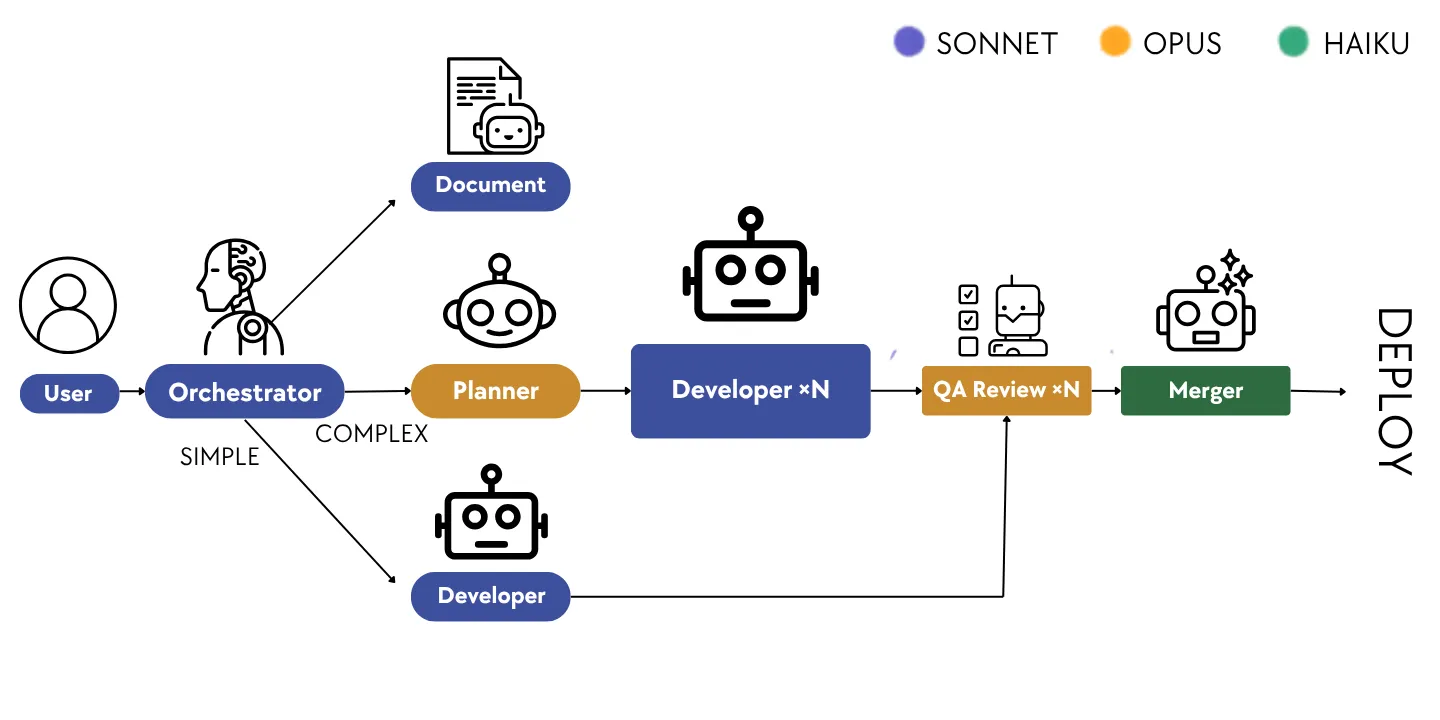
The process relies on a conversation between a user (using natural language, without technical expertise) and a team of specialized agents who transform the CRM based on the user’s description. An orchestrator leads the team and breaks the work down into small tasks. It usually takes just a few dozen minutes (a few hours if the request deviates from the model). The user then receives a custom CRM, which they can test and deploy immediately.
No tickets, no sprints, no developers involved. That’s what we call a software factory.
Optimizations
But a factory is only as good as the quality of what it produces. To generate good code that adheres to coding conventions, the structure of Atomic CRM, and avoids common pitfalls, our agents need a great deal of context. Before trying to optimize anything, we first had to understand where our money was actually going.
So we measured the token consumption of a typical CRM Builder run. The breakdown leaves little room for doubt:
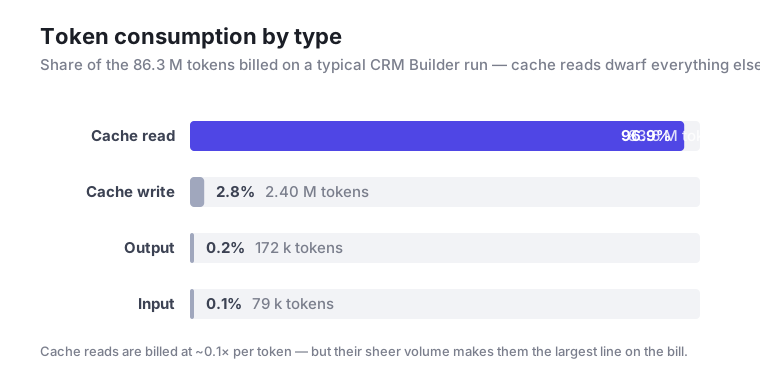
The vast majority of our spending doesn’t come from the text our agents write, nor even from the code they generate: it comes from cache reads.
The reason is that CRM Builder is an agentic loop. A task goes to a team of agents (an orchestrator, developers, and quality-reviewers) that iterate over many turns. At each turn, the entire context is re-sent and read back from the cache: system prompts, agent instructions, tool definitions, the conversation so far, and every file already read. The more turns a task takes, and the larger the context grows, the more those cache reads pile up. A single developer agent can grind through a dozen review iterations on a bloated context. It then reads millions of tokens from the cache while writing only a few hundred lines of code.
This reframes the optimization problem. Shaving off output tokens barely moves the needle. Two things actually matter:
- Keep the context small, by loading only the knowledge an agent needs, when it needs it.
- Reduce the number of turns, by producing simpler code that is correct on the first try, so agents stop going back and forth.
One obvious solution is to cram everything into the prompt. But this bloats the context, dilutes the model’s focus, and sends token consumption through the roof. Just sequencing agent files isn’t enough either. The opposite approach would be to add instructions to the agents such as
“If you need to know how to do X, go read
X.md.”
While this might seem elegant, it is unreliable (there’s no guarantee the agent will consult the right file at the right time) and merely reinvents the concept of skills, but with lower performance.
Between these two extremes sits a middle ground: plugins. The idea is to move instructions into standalone modules, loaded only when relevant and isolated from one another. This keeps the context under control without sacrificing knowledge. Spreading knowledge across rules, skills, and plugins lets us shrink our agents while still giving them the tools they need.
This is why we tested five plugins on CRM Builder:
Each one attacks the cache-read problem from a different angle. Some shrink the context, others cut the number of turns, and some don’t help at all.
Headroom: Compression That Breaks The Cache
Headroom is an open-source HTTP proxy that compresses everything an agent reads before it reaches the model. It offers two modes. In token mode, it summarizes the entire context on every turn. Compression is maximal, but rewriting the history produces a brand-new prefix, so the cache is destroyed each turn. In cache mode, it compresses only the newly added messages and forwards the established prefix untouched, which preserves the cache.
We benchmarked both on a single task, run three times per configuration to average out variance: “Add a rental entity linked to contacts, with a start date, end date, and status (pending / active / returned).”
| Configuration | $ / operation | Δ vs baseline |
|---|---|---|
| Baseline | $2.09 | — |
| Headroom cache | $2.00 | − 4 % |
| Headroom token | $2.76 | + 32 % |
Only token mode moves the needle, and in the wrong direction. The culprit is prompt caching. In a cached session, almost the entire prompt is billed as cache reads (at one-tenth the price), and only newly written tokens as cache writes (at 1.25×). Compressing the context does shave about 10% off the cheap reads. But rewriting the history into a summary produces a string the cache has never seen. That forces an expensive write where a read would have happened. Trimming the size of cheap reads is no match for tripling the number of expensive writes.
Cache mode is meant to avoid this by touching only the newest messages. But on our workload it compressed nothing (the −4% is pure noise). Its guard only reuses the prefix when the leading messages are byte-for-byte identical to the previous turn. The Claude SDK slides its cache_control markers further down the conversation every turn, so that check never passes, and it forwards everything unchanged.
For our CRM Builder use case, neither mode earns its place, so we run without Headroom.
RTK: Too Little To Compress
RTK never hits the API. It wraps the claude CLI and rewrites shell-command output before it enters the context. The problem on our workload isn’t that Bash output is too long. It’s that a Bash result barely weighs anything per operation.
Here is the tool-result size by tool, across all 9 baseline developer instances:
| Tool | calls / instance | tokens per call | % of all tool tokens |
|---|---|---|---|
Read | 19.6 | 958 | 90.6% |
Bash | 17.2 | 77 | 6.4% |
| Edit / Write / other | ~13 | ~50 | 3.0% |
Read and Bash fire at nearly the same rate, yet each Read result weighs about 958 tokens against Bash’s 77. That is a 12× difference per operation, and it is the whole story. RTK’s hook registers with the matcher "Bash" and compresses only shell output. So it trims the light, frequent calls and never sees the heavy Read results, which make up 91% of the footprint. The native Read tool is never intercepted. (RTK ships an rtk read shell command that could route reads through the hook, but our agents used the native tool throughout, so that path was never exercised.)
Even halving every Bash result would save about 650 tokens against a 2,260k-token cacheRead footprint, or 0.03%. The robust metrics agree: developer cc/cr is 2.41% at baseline versus 2.43% with RTK. RTK adds no overhead and breaks nothing. It simply has no material to work with here.
Ponytail: Less Code, Fewer Round-Trips
Developers have a tendency to overcomplicate things. Coding agents do it, too. We ask for a date field, and the coding agent installs Flatpickr, adds a wrapper component and a stylesheet, and then starts handling time zones… Ponytail fixes this problem. Before writing any code, it forces the coding agent to follow the following list and stops at the first rule that’s met, applying the YAGNI principle (You Aren’t Gonna Need It):
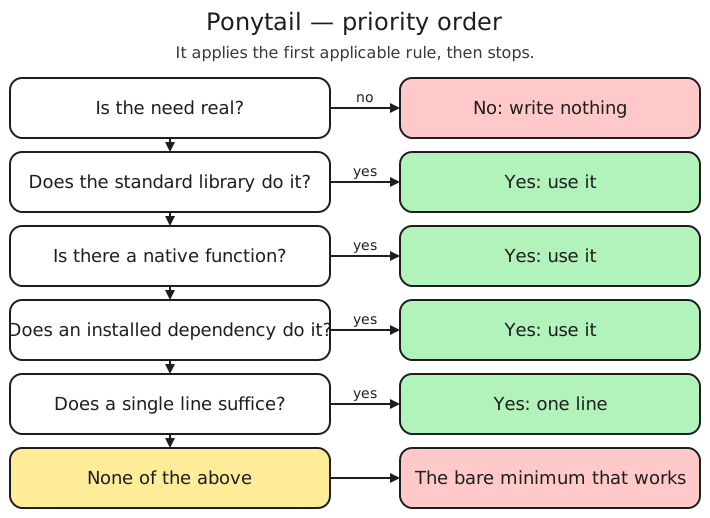
To prevent the coding agent from falling back into old habits, Ponytail re-injects these rules into the context with every iteration. We adjust their intensity based on the task, from lite to ultra (or even off to suspend them).
For our date field, the solution fits into a single <input type="date">. On our CRM Builder, Ponytail cuts the generated code by about half, without sacrificing quality.
We conducted a series of four tests with and without Ponytail on common use cases of the CRM Builder. Here are the results:
| Quick description | Cost without ponytail | Cost with ponytail | Evolution |
|---|---|---|---|
| Hide a button | 191 k tokens - 1.00 $ | 69 k tokens - 0.35 $ | - 63.87 % |
| Add a field | 147.7 k tokens - 1.16 $ | 127 k tokens - 0.94 $ | - 14.01 % |
| Add multiple fields | 6.6 M tokens - 4.10 $ | 76.7 k tokens - 0.87 $ | - 98.84 % |
| New entity | 360.9 k tokens - 4.29 $ | 23.5 k tokens - 0.27 $ | - 93.49 % |
Our costs dropped significantly, and even more so on complex tasks. On top of the smaller code volume, we saw fewer back-and-forth exchanges between the “developer” and “quality-reviewer” agents.
On CRM Builder, a coding plugin like Ponytail proved particularly effective.
Caveman: Cheaper Output, Costlier Context
Unlike Ponytail, Caveman doesn’t reduce the generated code but rather the text that the agent outputs. Its instructions call for removing filler and writing in short sentences, without compromising the technical content. The /caveman command triggers this skill. The authors added a neat hook: every time the agent outputs text, the command fires automatically, with no user action.
Caveman’s benchmarks report a 65% reduction in output tokens. But only the output tokens shrink; the reasoning and the code stay the same. In a code-generation loop like CRM Builder, most tokens come from reasoning, tool calls, and code, so we had to measure the real benefit.
| Quick description | Cost without caveman | Cost with caveman | Evolution |
|---|---|---|---|
| Hide a button | 69 k tokens - 0.35 $ | 76.6 k tokens - 0.40 $ | + 11.01 % |
| Add a field | 127 k tokens - 0.94 $ | 131 k tokens - 1.39 $ | + 3.15 % |
| Add multiple fields | 76.7 k tokens - 0.87 $ | 156.1 k tokens - 1.03 $ | + 103.52 % |
On CRM Builder, Caveman proved inconclusive. We consumed more tokens with it than without. We did save tokens on the output, but Caveman’s own instructions grew the context, and that cost more than we saved.
For a more conversational use case, it would be worth using Caveman, but for our CRM Builder use case, we decided to do without it.
LSP And Graphify: Navigating The Code Without Grep
Our agents spend a surprising share of their budget simply finding things. To add a referee field to a contact, a developer agent first has to locate where contacts are defined, which components render them, and everywhere the field might be referenced. Its default tool for this is grep (or rg), and blind text search is expensive: a single query can return hundreds of matches, each one parsed and pulled into the context, inflating exactly the cache reads we are trying to shrink.
Graphify attacks this problem. Like the Language Server Protocol (LSP) that powers “go to definition” and “find all references” in every modern IDE, its goal is to hand the agent a structured map of the codebase instead of letting it grope around with text search.
The two tools reach that goal from opposite directions. LSP is wired directly into the project’s language servers. It is always live and always in sync, and Claude ships with native LSP support exposed as an MCP server. To set it up, you point it at the language servers, tell the agents which tools to prefer, and let them navigate. Graphify takes the other route. It builds a dependency graph of the project: which file imports which, which function calls which, how each symbol is used. It builds that graph by combining static analysis with an LLM pass that reads the code and answers questions about it.
That LLM step gives Graphify one property pure static tooling lacks: it understands synonyms. When the domain calls a user a “consumer” in one place and “sales” in another, Graphify can still connect the dots. It can even extract Architecture Decision Records (ADRs) from the codebase, something LSP does not attempt. The catch is maintenance: because the graph is generated, it goes stale the moment you touch the code. Every change means re-running Graphify’s documentator to rebuild its knowledge base, and remembering to re-document what you changed. LSP has nothing to regenerate.
We ran two scenarios, each three ways, a baseline (no navigation help), LSP, and Graphify:
- A small change on Atomic CRM: adding a
refereefield to a contact (itself another contact). - A full CRM transformation that turns Atomic CRM into “LocaForce”, an equipment-rental platform with fleet management, rental tracking, and maintenance workflows.
The figures below come from the large transformation, the scenario that stresses code navigation the hardest:
| Metric | Baseline | LSP | Graphify |
|---|---|---|---|
| Cost | $47.70 | $41.68 (− 13 %) | $48.19 (+ 1 %) |
| Total tokens | 95.72 M | 84.30 M (− 12 %) | 95.82 M |
| API calls | 1,562 | 1,190 (− 24 %) | 1,530 |
| Grep / rg invocations | 340 | 189 (− 44 %) | 349 (+ 3 %) |
| Wall-clock duration | 04h22m | 03h03m | 04h21m |
| Clean first-pass reviews | 4 / 10 | 7 / 11 | 6 / 12 |
The pattern is clear. LSP cut costs by 13%, tokens by 12%, and API calls by 24%. It did this mostly by replacing blind text search: grep/rg invocations dropped 44% (from 340 to 189), and 55 precise LSP lookups took their place. Fewer, sharper lookups also meant less rework. LSP tickets passed review clean on the first try 7 times out of 11, versus 4 out of 10 for the baseline.
Graphify, on the other hand, landed right on top of the baseline (+1% cost, +3% grep), because the agents barely reached for it: 9 calls over the whole run, against LSP’s 55. Worse, rebuilding its knowledge base with the documentator is a cost the baseline never pays. That is what pushes Graphify slightly above the reference overall.
For our CRM Builder use case, LSP delivered consistent, measurable savings, while Graphify’s overhead outweighed any benefit it provided.
Conclusion
None of these plugins is a free win. And a plugin’s own benchmarks tell you little about how it behaves inside your own loop. On CRM Builder, the test was simple. Does the plugin cut the cache reads that pile up turn after turn, without inflating the context on the way?
Two plugins passed that test. Ponytail cut the most, by making agents write less code and stop ping-ponging with the reviewer. LSP gave the developer a precise way to navigate the code instead of grepping blindly, and shaved 13% off a full CRM build. Both reduce either the number of turns or the size of each turn. Those are the two levers that move cache reads.
The others fell short, each for its own reason:
- Caveman trims output tokens, but it adds instructions to every turn. In a code-generation loop, it cost us more than it saved.
- Headroom either broke the cache (token mode) or never engaged at all (cache mode).
- Graphify and RTK had no real material to work with here. The agents barely touched the graph, and RTK only ever saw lightweight shell output.
So our advice is not a ranking, but a method. Measure where your tokens actually go before you adopt anything. Then keep only what shrinks the context or cuts the number of turns for your workload. For CRM Builder, that shortlist comes down to Ponytail and LSP.
A new plugin ships every week, so this list will not stay still. We plan to re-run these benchmarks as the ecosystem grows. And if you try one of these plugins on a different workload, we would love to hear how it went.
Authors
Full-stack web developer at marmelab, Erwan works with us on Greenframe, React-Admin and many other projects. He likes to walk, run, climb, and many root sports.
Full-stack web developer at marmelab, Jérôme likes to act and to tinker on his spare time.