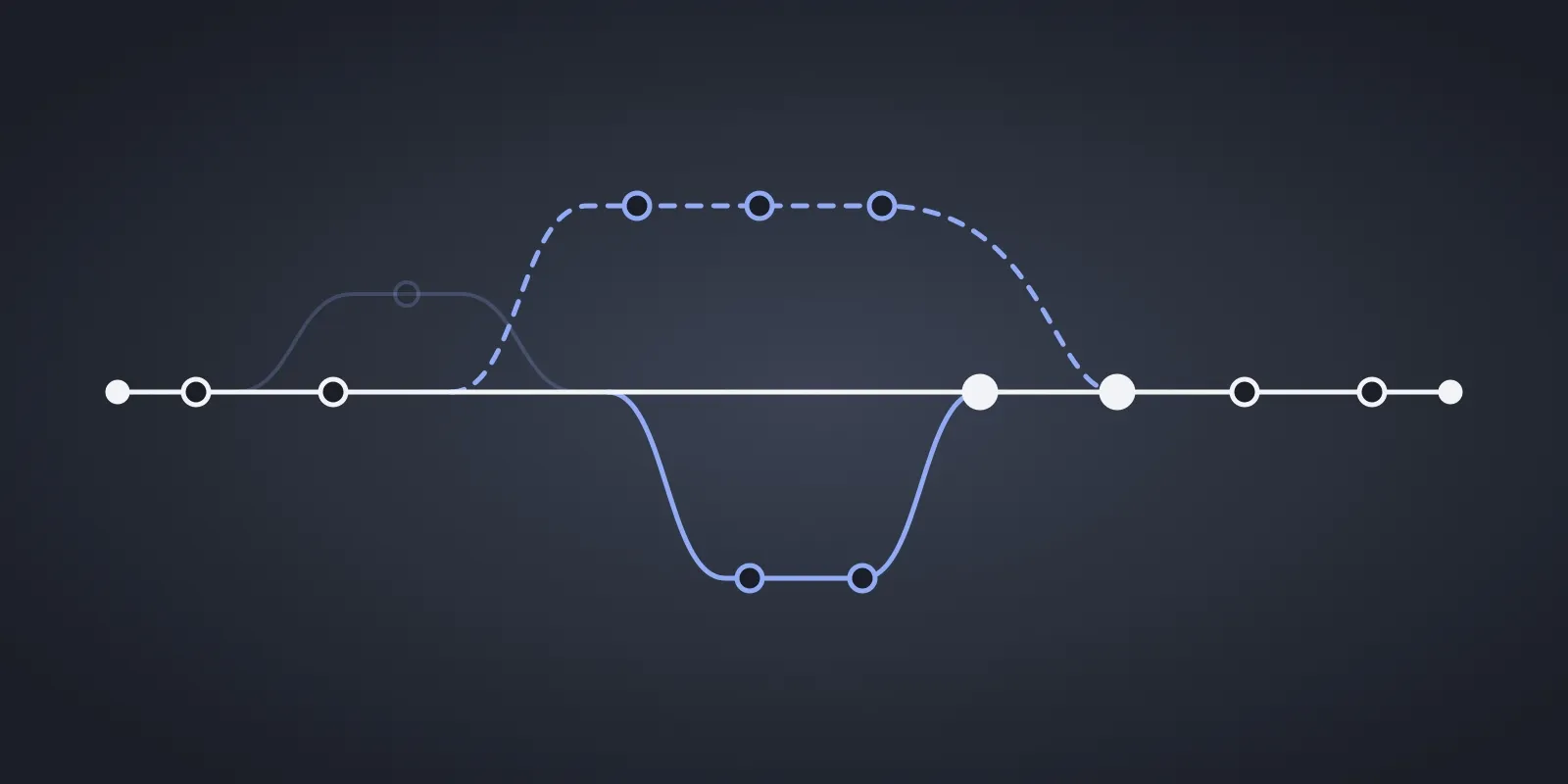
Real-Time and Offline Are the Same Problem

Local-first databases have been gaining momentum: libraries like Verdant, TanStack DB, and Zero promise instant UI, offline resilience, and real-time collaboration, without building all the plumbing yourself. As someone who builds web apps daily, I wanted to understand what these tools actually deliver and where they fall short.
So I built two projects: an offline-first CRM app with Verdant, and an integration library to wire TanStack DB into React Admin, to bring local-first capabilities to existing React Admin apps. My colleague JB had already tested Zero by building a CRM, giving me a third data point to compare against.
The goal was simple: understand what local-first databases have in common, where they diverge, and what it really takes to adopt them. I expected to learn about storage engines and sync protocols. What I didn’t expect was the most useful takeaway of all: offline support and real-time sync are fundamentally the same problem. Both require client-generated IDs, optimistic mutations, conflict resolution, and a sync protocol to reconcile divergent state. Libraries that solve one well tend to solve the other, almost for free.
In this article, I’ll walk through the hard problems I encountered: identity, live queries, mutations, conflict resolution, failure recovery. Let’s dig into what I learned about when local-first actually makes sense for a product.
 Two deer in conflict, by Sergey Koop
What Are Local-First Databases, And Why Do They Matter?
Traditional web apps follow a simple pattern: the client sends a request, the server processes it, and returns a response. Every interaction (fetching a list, saving a form, deleting a record) goes through this round trip. It works, but it comes with tradeoffs: the UI is only as fast as the network, and if the network is down, the app is dead. And when multiple users edit the same record, conflicts can arise. This last problem is traditionally solved with locks, as React Admin’s real-time module does. But locks require a constant connection to coordinate, making them fundamentally incompatible with offline mode.
Local-first databases flip this model. Instead of querying a remote server, the app reads and writes to a local database that lives in the browser (typically IndexedDB, a key-value store built into every modern browser). The UI reacts instantly to local changes, with no network latency. A sync layer then reconciles local state with the server in the background, handling conflicts, retries, and consistency. At least, that’s the promise.
But not all libraries approach this the same way. The landscape spans a wide spectrum of options. Here are three of them:
- Verdant 🌿 is opinionated and specifically designed for local-first. It handles storage and sync out of the box. Define a schema and it takes care of the rest. For conflicts, it takes what it calls a “conflict-avoidant” approach. But since conflicts are unavoidable in distributed systems, this effectively boils down to last-write-wins.
- TanStack DB is more of a generic query foundation. It provides reactive, live collections on the client side, but the sync layer is intentionally left to the developer. Think of it as a building block for an ecosystem of compatible backends. It can even be used beyond local-first apps.
- Zero is a full sync engine: it ships both a client library and a server-side cache that sits in front of Postgres. It manages auth, permissions, and bidirectional sync. No custom backend needed.
These three represent different tradeoffs between convenience and control. Understanding where each sits on that spectrum is key to picking the right tool for a given project, but is also a great way to discover the different approaches to the issues of local-first apps.
What I Built
An Offline-First CRM With Verdant
The first project was a CRM app built entirely with Verdant. The goal was to test the full local-first experience: schema definition, local persistence, offline usage, and sync between devices.
Verdant’s workflow starts with a schema. I define my data model, run the CLI to generate typed hooks and client code, and from there everything feels like a regular React app, except reads and writes hit local storage instead of a remote API. The full source code is available here: marmelab/verdant-offline-crm
Here’s what defining a schema and querying contacts looks like:
export const contacts = collection({ name: "contact", primaryKey: "id", fields: { id: schema.fields.string({ default: () => uuid() }), firstName: schema.fields.string(), lastName: schema.fields.string(), email: schema.fields.string(), phone: schema.fields.string({ nullable: true }), companyId: schema.fields.string({ nullable: true }), createdAt: schema.fields.string({ default: () => new Date().toISOString(), }), }, indexes: { companyId: { type: "string", compute: (contact) => contact.companyId, }, },});import { useAllContacts, useContact } from "@/model/client.tsx";
const contacts = useAllContacts();
const contact = useContact("a3f1b2c4-7d8e-4f9a-b6c1-2e5d8f0a3b7c");And creating a new record:
import { useClient } from "@/model/client.tsx";
const client = useClient();
const addContact = async (formData) => {  await client.contacts.put({    firstName: formData.firstName,    lastName: formData.lastName,    email: formData.email,    phone: formData.phone || null,    companyId: formData.companyId || null,  });};
The developer experience is smooth: the generated hooks feel natural in React, and the app works offline from day one without any extra effort. I won’t dive any further into the technical details to make it work. Verdant’s documentation will be more useful for that. It might look a bit overwhelming at first, expect some back-and-forth between pages to piece things together.
But once past the learning curve, here’s what I built with it without much extra effort:
I’ve only demonstrated the live update of contacts and notes here, but the same principles apply to the other entities like companies. Want to see more? Install marmelab/verdant-offline-crm and give it a try!
A TanStack DB Integration For React Admin
The second project was different. Instead of building a standalone app, I wrote an integration library to wire TanStack DB into React Admin, to bring local-first capabilities to existing React Admin apps. The ultimate goal would be to bring this to Atomic CRM, a shadcn-admin-kit-based CRM app that Marmelab maintains (shadcn-admin-kit shares the same foundation as React Admin through ra-core).
This quickly surfaced a fundamental mismatch. React Admin’s data provider model is built around plain async functions (getList, getOne, create, update) that return promises. TanStack DB, on the other hand, is fundamentally reactive: it exposes live collections that update automatically as data changes. I couldn’t truly bridge these two paradigms, and had to accept the tradeoff and work around it. This doesn’t prevent me from using TanStack DB in React Admin for local-first capabilities, and live query support could be added in the future. But it was a reminder that local-first libraries aren’t magic: they come with their own model and constraints and only work well within a compatible architecture.
I’ve published the source code of the 2 exploratory packages (ra-data-tanstack-db and tanstack-db-simple-rest-collection) in marmelab/ra-data-tanstack-db.
Here’s what wiring a TanStack DB collection into React Admin looks like:
import { DataProvider, RaRecord } from "react-admin";import { BasicIndex } from "@tanstack/db";import { tanstackDbDataProvider } from "ra-data-tanstack-db";import { QueryClient } from "@tanstack/react-query";import { simpleRestCollectionOptions } from "tanstack-db-simple-rest-collection";
const apiUrl = "https://testdb.api.marmelab.com";const tanstackDbQueryClient = new QueryClient();
const postsCollection = simpleRestCollectionOptions<RaRecord>({  queryClient: tanstackDbQueryClient,  queryKey: ["tanstack-db", "posts"],  url: `${apiUrl}/posts`,  defaultIndexType: BasicIndex,  syncMode: "eager",});postsCollection.createIndex((row) => row["id"]);postsCollection.createIndex((row) => row["published_at"]);postsCollection.createIndex((row) => row["title"]);postsCollection.createIndex((row) => row["views"]);postsCollection.createIndex((row) => row["average_note"]);
export const dataProvider: DataProvider = tanstackDbDataProvider({  collections: {    posts: postsCollection,  },});
In recent versions of TanStack DB, creating an index on each field is required to allow sorting. Since React Admin’s DataTable makes every column sortable by default, indexing all fields is a bit of a pain but is required to make it work.
Note the syncMode: "eager" option. With this option, TanStack DB will fetch all the data from the server and not only the requested page. It’s not required, but I wanted to test it that way to offer a good offline experience. The goal was to have a fully working app even without a network connection for real offline support.
With this kind of data provider, I could use React Admin’s components as usual, and benefit from TanStack DB’s local database capabilities.
const PostListDesktop = () => ( <List filters={postFilter} sort={{ field: "published_at", order: "DESC" }} exporter={exporter} actions={postListActions} offline={false} > <DataTable bulkActionButtons={postListBulkActions} rowClick={rowClick} expand={PostPanel} hiddenColumns={["average_note"]} sx={{ "& .hiddenOnSmallScreens": { display: { xs: "none", lg: "table-cell", }, }, }} > <DataTable.Col source="id" /> <DataTable.Col source="title" sx={{ maxWidth: "16em", "&.MuiTableCell-body": { overflow: "hidden", textOverflow: "ellipsis", whiteSpace: "nowrap", }, }} /> {/* ... */} <DataTable.Col label="Tags" source="tags.name" className="hiddenOnSmallScreens" sx={{ minWidth: "9em" }} > <ReferenceArrayField source="tags" reference="tags" sort={tagSort}> <SingleFieldList> <ChipField clickable source="name.en" size="small" /> </SingleFieldList> </ReferenceArrayField> </DataTable.Col> <DataTable.Col sx={{ textAlign: "center" }}> <EditButton /> <ShowButton /> </DataTable.Col> </DataTable> </List>);In this example, I could use React Admin’s <List> and <DataTable> components as usual. The UI is responsive and works offline, with no extra effort on my part. The following video has been recorded with the network disconnected, to show the offline capabilities of the app. You’ll notice that we can navigate everywhere, use filters (searched “mara” for Marathon) and edit records, even entirely offline!
There are two main issues I encountered with this integration:
- Live queries don’t work with React Admin’s data provider system. TanStack DB’s live collections update automatically as data changes, but React Admin’s data provider expects plain async functions that return promises. This means that the whole real-time aspect of TanStack DB is lost in this integration, which is unfortunate as it’s one of the nicer things a local database library gives for free.
- The two
QueryClients problem. React Admin and TanStack DB’squeryCollectionboth rely onreact-query, but with incompatible settings. React Admin needsnetworkMode: "always"so the data provider is always called, even offline. TanStack DB’squeryCollectionneeds the default behavior to queue mutations and flush them once back online. Sharing a single client broke one or the other, so I had to use two separateQueryClientinstances side by side. It works, but it’s the kind of detail that might not be obvious at first.
The Local Mutation Problem Isn’t Solved
Building these two projects looked straightforward on paper: pick a library, define a schema, wire it into the UI. In practice, the moment users can mutate data locally (before the server has acknowledged anything), a stack of problems surfaces that traditional request/response apps never have to think about.
Who generates the IDs? What happens when two clients edit the same record? How do queued mutations behave when they fail after coming back online?
Every library I tested answers these questions differently, and some don’t answer them at all. Let’s walk through each problem I ran into, how Verdant, TanStack DB, and Zero handle it, and what I took away.
Client-Generated IDs
The first problem isn’t sync or conflicts, it’s much more basic: who generates the IDs? It wasn’t something I expected, to be honest. I thought the server would generate IDs as usual, and the client would just have to deal with the fact that new records don’t have an ID until the server responds. But in practice, that doesn’t really work.
In theory, a library could remap a temporary local ID to a server ID after sync. But it comes with a lot of challenges: updating dependencies (some entities might rely on the local-only entity, not yet persisted), keeping URLs valid and stable (a view or edit page will surely need the ID of the entity to edit), etc.
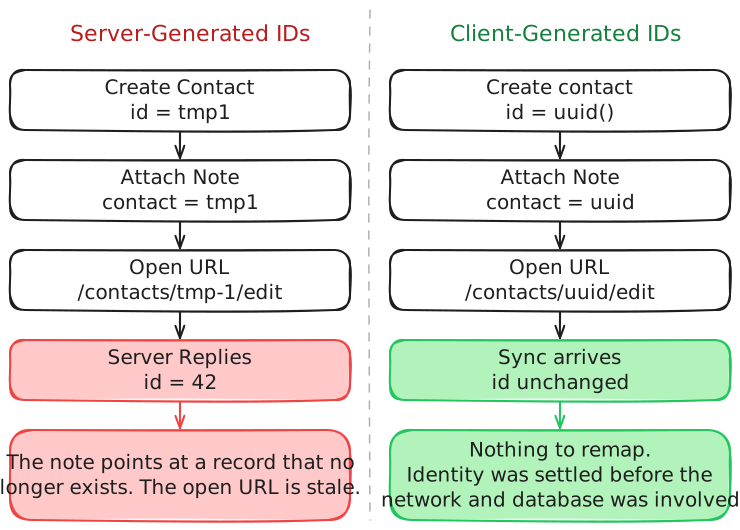
So the best solution is clear: the client should generate the ID. Using UUIDs or similar client-generable IDs is a great way to solve this problem, but it has a big implication: if a data model doesn’t already use client-generable IDs, allowing offline / local mutations will require a breaking-change migration. Swapping out the database layer alone won’t work.
In my CRM with Verdant, I built a brand new schema from scratch, so I had the chance to design it with client-generable IDs from the start. In my TanStack DB integration, I had to work with an existing API that didn’t use client-generable IDs. TanStack DB doesn’t handle this, and there’s no real way to implement a generic ID mapper that will work with any API. (Yes, the official documentation provides an example of how to do it, but it assumes control over the collection and API, which isn’t the case in my React Admin integration.)
Zero documents it clearly too.
It is strongly recommended to use client-generated random strings like uuid, ulid, nanoid, etc for primary keys.
That’s a strong recommendation, not a requirement. But in practice, persisting in using server-generated IDs while trying to support offline mutations comes with a lot of complexity and tradeoffs.
Verdant even does it by default internally. It generates unique Entity IDs for each entity. Custom primary keys are still allowed, but mutations rely on these client-generated IDs to work offline and sync properly.
Some people might think that UUIDs and similar client-generated IDs can lead to performance issues, because they’re not as easy to index and not as compact as simple integers. UUID v4 is indeed slower to insert and query, as it can fragment the index and is not time-ordered. But UUID v7 solves these two issues and with a compatible DBMS like PostgreSQL, it’s not significantly slower than BIGINT. It’s still larger to store (16 bytes VS 8 bytes), but that’s not even 1GB for 100M rows. Negligible.
Mutation Failure And Recovery
Once mutations happen locally first, what happens when the server later rejects one? A bad payload, a permission error, a stale version: the mutation looked fine locally but the server says no.
None of the libraries I looked at handle this. TanStack DB has no built-in rollback, retry, or notification. Recovery is entirely on the implementer. Zero, from what JB describes in his article, silently reverts rejected mutations with no feedback or API to react to the failure. Verdant sync can also fail if there is server-side validation.
For all these libraries, there’s nothing built-in for handling the failure case. It’s true that the right strategy is context-dependent: silent rollback, conflict UI, or replay against newer state. But still, I find it a bit disappointing that none of the libraries provide any tool to handle this common scenario. To support offline mutations, mutation failure and recovery have to be handled manually.
Conflict Resolution
Once two clients can mutate the same record offline, conflicts are unavoidable. Someone’s change has to win, and how that’s decided is one of the most important calls a local-first library makes.
Verdant calls its approach “conflict-avoidant”, but it’s effectively last-write-wins when there is a conflict. TanStack DB takes no position, as the sync engine is treated as a black box. Zero, based on JB’s testing, also looks like last-write-wins, while trying to avoid conflicts as much as possible.
Last-write-wins is a simple and pragmatic choice, but it has tradeoffs. It can lead to lost updates if two clients edit the same record offline and then sync, or cause confusion if users see their changes disappear after coming back online.
I think it should be part of the general strategy of mutation failure and recovery. If a mutation is rejected due to a conflict, there should be a way to notify the user and let them decide how to proceed: overwrite, merge, or discard. But again, none of the libraries provide any built-in tools for this scenario.
Real-Time And Offline Are The Same Problem
The biggest surprise from this exercise wasn’t a library quirk or a missing feature. It was realizing that offline support and real-time sync are the same problem under different names.
At first glance, they sound opposite. “Offline” is about the network being absent. “Real-time” is about updates flowing instantly between users. But building either one surfaces the same questions: who generates the IDs, how mutations apply optimistically, how local state is synchronized with the server, what happens when two clients disagree.
Solving one means solving the other. A real-time collaborative app where two users edit the same record at the same time has the exact same conflict resolution problem as an offline app where two devices come back online with conflicting changes. Real-Time is just being offline, but for a very short time.
Divergent state reconciliation is the real core problem here. Whether the divergence is caused by a network disconnect or two users editing the same record simultaneously, the solution is the same: a sync protocol to exchange changes, a conflict resolution strategy to decide which change wins, and a way to notify users when their changes are rejected without confusing them.
That’s why Verdant, TanStack DB and Zero all handle real-time updates natively. Verdant and Zero’s local-first designs mean that real-time sync is just a natural extension of their offline capabilities. TanStack DB’s reactivity works out of the box too, it just needs a sync engine compatible with real-time updates.
When Is It Worth The Trouble?
After building these two projects, I reflected a bit about when these libraries are worth the effort, and when they aren’t.
The strongest fit (kinda obvious, honestly) is for apps used in poor connectivity. Field workers, mobile-heavy use cases, anything where the network can disappear for minutes or hours. Of course, they can’t lose their work when the connection drops, and they need it to sync back once they’re online again.
I couldn’t guess the second fit: real-time collaborative apps. If an app needs live collaboration, local-first libraries solve many hard problems. With a sync engine and local state management, the collaborative features can be built on a consistent data model, without worrying about the underlying plumbing.
But I want to go a bit further: I’d say that a local-first architecture is worth the trouble in any case. Not only does it provide offline and real-time features, but it also encourages a more resilient and responsive architecture. TanStack DB, for example, can be used with a basic sync layer that just relies on a REST API, with a future-proof architecture that can later be extended to support offline or real-time updates without changing the client code.
It’s not over-engineering to choose an architecture that can solve real-time and offline problems when they come up. They always come up, everyone just tends to ignore them until it’s too late. I mentioned it earlier: even with the typical request / response architecture, there are still conflicts to deal with. The default behavior is often last-write-wins, without even thinking about it. This approach forces a conscious decision about how to handle conflicts, and leaves the flexibility to improve it later with better strategies or user feedback.
Since I started reading about local-first databases and real-time sync, I’ve seen people argue it’s not worth it, that it’s too complex, that the user experience isn’t good enough. It definitely requires handling complex problems, but deciding to hide them under the rug doesn’t make them go away. Request / response architectures are the default because they promote simplicity over resilience. Simplicity is a good thing, but it makes a lot of tradeoffs that most of us don’t even realize until we have to deal with them.
Conclusion
While testing Verdant and TanStack DB, I saw the same problem approached from two ends. Verdant handles the whole chain: schema, storage, sync, and conflicts. The offline CRM worked on the first day, and in exchange I take its conflict strategy as it comes.
TanStack DB doesn’t make any decisions for the synchronization layer. I really like this approach: it allows building apps incrementally while enforcing the right pattern for queries and mutations, so the architecture is ready to solve the Divergent state reconciliation problem. But it’s important to note that it won’t actually address the issue!
So, what’s next? At this step of my exploration, I still feel like there’s a lot of work remaining on the synchronization engines. I’ve heard about PowerSync, CRDT and operational transformations in general. But the Divergent state reconciliation problem is far from being resolved in our modern web apps. None of these libraries offers a clear path to tell users their changes were lost, or a way to merge conflicting changes instead of letting one silently overwrite the other.
Both libraries led me back to the same observation: offline support and real-time sync are one problem with two names. Solving one solves the other. Skipping it doesn’t remove the conflicts, it only makes them silent, falling back to the default behavior (last write wins). And it’s where we should focus: deciding what to tell the user when two truths disagree.
Authors
Matthieu is a fullstack web developer at Marmelab. His expertise ranges from Laravel to React.js, with a special taste for strong typing and free software.