
Remix v3: Fast Pages, Thin Ecosystem

React powers most of the frontend we build for our customers. In the past, we have used Remix v2 in projects that required server-side rendering. In late 2025, the Remix team announced that Remix v3 would no longer depend on React. The first release candidate came out in late August 2026. It ships as a single remix package with no external dependencies: router, component model, asset server, test runner.
We wanted to know how it holds up on a concrete project. We also wanted to know whether a coding agent can write good code for a framework released after its training data. So we developed the same real estate site with Remix v3 and with TanStack Start, which we recently used in production. The source code is available on GitHub.
Keyhaven, a High-End Real Estate Demo
Our test subject is Keyhaven, a fictional high-end agency selling apartments and houses in Paris, Lyon, Nice and Cannes. The site has:
- a landing page searching by city and maximum price,
- a search page with facets (budget, property type, bedrooms, surface, energy rating),
- a page per listing with a photo carousel,
- an admin section where agents create listings and upload photos.
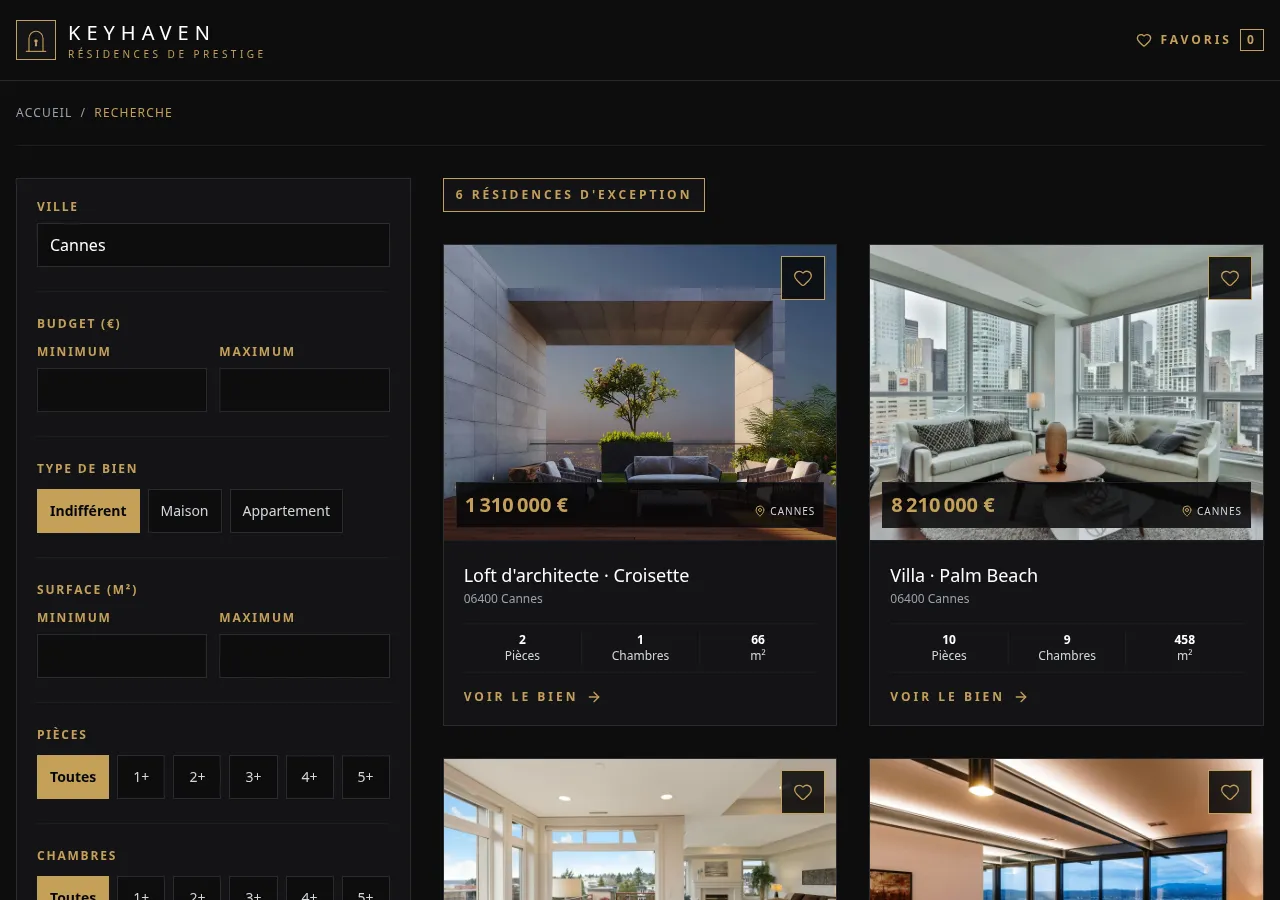
Supabase is the backend, with Postgres row-level security as the trust boundary. The Remix and TanStackStart apps share a domain package holding the Zod models, validation and Supabase data access. Both apps use Tailwind CSS and no UI library, so any difference comes from the frameworks, not from the components.
+----------------+ +-------------------+| frontend-remix | | frontend-tanstack || Remix v3 | | TanStack Start |+----------------+ +-------------------+ | | +---------+----------+ v +-------------------+ | domain | | Zod models, | | validation, | | data access | +-------------------+ | v +-------------------+ | Supabase | | Postgres + RLS, | | Auth, Storage | +-------------------+Our Claude Code Setup
We developed both apps with Claude Code, using:
- Context7, to read each library’s current docs instead of the model’s memory,
- Ponytail, a skill pushing the agent toward the shortest diff that works,
- the skill each framework ships in its npm package,
- a set of rules that holds good practices, and an agent team that develops the features.
Without Vite, Remix Wires Tailwind by Hand
TanStack Start runs on Vite, so Tailwind takes one plugin line:
import tailwindcss from "@tailwindcss/vite";
export default defineConfig({  plugins: [devtools(), nitro(), tailwindcss(), tanstackStart(), viteReact()],});
Remix v3 has no Vite and no plugin system, and Tailwind offers no plug-and-play integration for it. We had to run the Tailwind CLI next to the server and wire its output into the Remix asset server ourselves:
"dev": "trap 'kill 0' EXIT INT TERM; tailwindcss -i app/styles.css -o app/public/styles.css --watch=always & node --watch --import remix/node-tsx server.ts","build": "tailwindcss -i app/styles.css -o app/public/styles.css --minify"It works, but it is one more process to manage, and any tool that ships as a Vite plugin needs the same treatment. If a Remix app needs many tools, a task runner like Turborepo could orchestrate their watchers and builds instead of chaining them in npm scripts.
Remix Components Stay on the Server Unless Marked as Islands
Our TanStack Start app renders every component on the server, then ships it to the browser to hydrate. Code that must stay on the server opts out, through createServerFn or createIsomorphicFn.
In Remix v3, a component renders on the server and ships no JavaScript, unless clientEntry marks it as an island. The browser entry calls run() once, which loads each island found in the HTML and hydrates it with its server props. From then on, links and forms become client navigations, where the server renders the next page and the runtime patches the DOM.
Props cross the network, so they must be serializable: strings, numbers, plain objects, arrays and JSX. Functions and class instances cannot cross. JSX props let the server render part of an island.
The listing card, a server component, passes the heart icon to its FavoriteButton island as children:
let favorites = handle.context.get(Favorites);// ...<FavoriteButton listingId={listing.id} isFavorite={favorites.ids.includes(listing.id)}> <Icon icon={Heart} class="size-5" /></FavoriteButton>The browser receives the icon as HTML, without the code of Icon or the lucide icon library. It could not load them anyway, since the asset server serves only files under public/ folders and the allowed packages, here remix alone. Our domain package mixes Supabase data access with browser-safe helpers, so we had to allow its files one by one:
allowFiles: [ "app/**/public/**", "../domain/src/favorite/favorite-store.ts", "../domain/src/favorite/favorite-cookie.ts", // three more domain files],allowPackages: ["remix"],Claude Code respected both limits and wrote every island right on the first try.
Islands share no component tree. On the server, ListingCard reads the visitor’s favorites from context. In the browser, the FavoriteButton island has no ancestor left to read context from, so it knows only its props. The heart buttons and the header counter stay in sync through a store in domain, which each island subscribes to.
The TanStack app reads the same store through useSyncExternalStore, but it hydrates the whole listing page. Remix hydrates three islands on it, the photo carousel, the heart and the header counter.
Remix Components Re-Render Only When Told To
Server components render once per request, so re-rendering only concerns islands.
TanStack start uses React, so setState schedules a render. In Remix v3, a component is a setup function that runs once and returns a render function. State is a plain variable in the closure, and the component re-renders only when it calls handle.update().
We compare the two versions of the listing photo carousel. Both use native CSS scroll snapping, track the current slide on scroll, and disable the arrow at each end.
The TanStack Start version:
export function ListingGallery({ images }: { images: ListingImage[] }) {  const trackRef = useRef<HTMLUListElement>(null);  const [index, setIndex] = useState(0);
  const goTo = (nextIndex: number) => {    const track = trackRef.current;    track?.scrollTo({      left: nextIndex * track.clientWidth,      behavior: "smooth",    });  };
  return (    <section aria-roledescription="carousel" aria-label="Property photos">      <ul        ref={trackRef}        onScroll={(event) =>          setIndex(            Math.round(              event.currentTarget.scrollLeft / event.currentTarget.clientWidth,            ),          )        }        className="flex snap-x snap-mandatory overflow-x-auto"      >        {/* slides */}      </ul>      <SlideButton        label="Next photo"        isDisabled={index === images.length - 1}        onClick={() => goTo(index + 1)}      />      {/* previous button, counter */}    </section>  );}
The Remix v3 version:
export const ListingCarousel = clientEntry(  import.meta.url,  function ListingCarousel(    handle: Handle<{ count: number; slides: RemixNode }>,  ) {    // Setup: runs once    let track: HTMLUListElement | undefined;    let index = 0;    let goTo = (nextIndex: number) =>      track?.scrollTo({        left: nextIndex * track.clientWidth,        behavior: "smooth",      });
    // Render: runs on every handle.update()    return () => (      <section aria-roledescription="carousel" aria-label="Property photos">        <ul          mix={[            ref((node: HTMLUListElement) => (track = node)),            on("scroll", () => {              let nextIndex = Math.round(                (track?.scrollLeft ?? 0) / (track?.clientWidth || 1),              );              if (nextIndex === index) return;              index = nextIndex;              void handle.update();            }),          ]}          class="flex snap-x snap-mandatory overflow-x-auto"        >          {handle.props.slides}        </ul>        <SlideButton          label="Next photo"          isDisabled={index === handle.props.count - 1}          onClick={() => goTo(index + 1)}        />        {/* previous button, counter */}      </section>    );  },);
Compared with the React version:
- The Remix component decides when to re-render. Its
if (nextIndex === index) return;line skips the update when the slide has not changed. React skips it implicitly, sincesetIndexignores a value equal to the current one. - Event listeners and refs attach through the
mixprop, withon()andref()helpers, instead ofonScrollandrefprops. clientEntrymarks the carousel as an island. The server renders the slides passed inslides, so their code never reaches the browser.
Explicit updates take some getting used to. Forgetting handle.update() leaves the UI stale without any error.
The agent never forgot a handle.update() call. Instead, it avoided client state wherever it could, even if it implied losing a client feature. Both the skill Remix ships and our Ponytail skill tell the agent to prefer native platform features, so we cannot say which one drove this.
Our first carousel is an example. It used no JavaScript, only one hidden radio input per photo and CSS rules translating the track. It worked before hydration, but lost touch swipe, and its CSS grew by two rules per photo. We caught it in review and replaced it with the island above.
Remix Forms: No JavaScript, One Round Trip per Error
We compare the admin form inviting a new agent, with four fields: email, first name, last name and role. TanStack Start validates form data in the browser first, Remix only on the server.
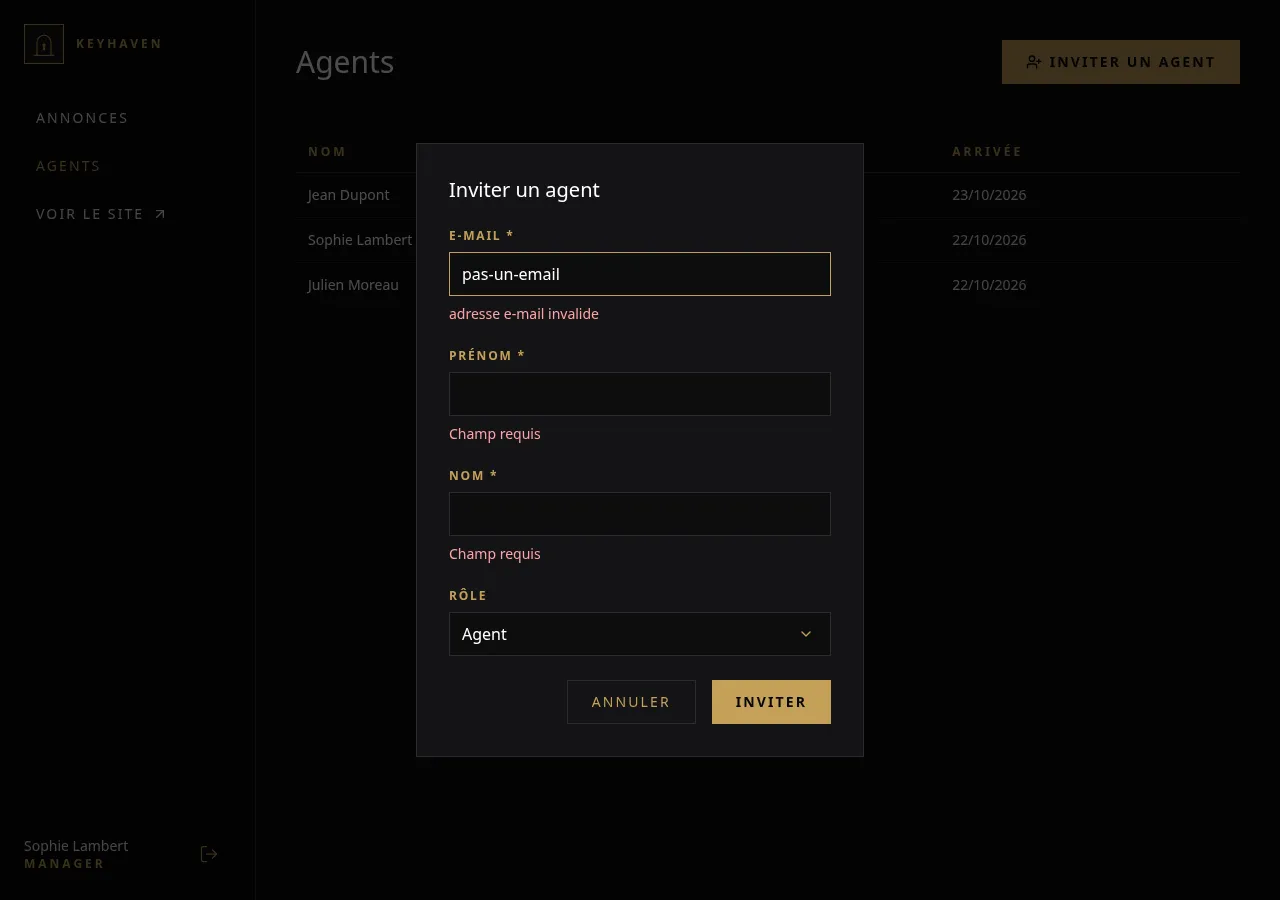
The TanStack Start app uses TanStack Form. The form keeps its values in client state, validates them with the shared Zod schema on submit, then calls a mutation:
const form = useAppForm({  defaultValues: { email: "", firstName: "", lastName: "", role: "agent" },  validators: { onSubmit: validateWith(inviteAgentSchema) },  onSubmit: ({ value }) =>    submit(async () => {      await onSubmit(inviteAgentSchema.parse(value));      form.reset();    }),});
return (  <form    onSubmit={(event) => {      event.preventDefault();      void form.handleSubmit();    }}  >    <form.AppField name="email">      {(field) => <field.TextField label="Email" type="email" isRequired />}    </form.AppField>    {/* firstName, lastName, role */}  </form>);
The mutation wraps a server function, which validates the payload a second time with the same schema:
const inviteAgentFn = createServerFn({ method: "POST" }) .validator(inviteAgentSchema) .handler(async ({ data }) => { // check the manager role, then send the invite });The Remix form is plain HTML and holds no state. The server passes the values and errors back as props.
<form method="post" action={routes.admin.agents.invite.href()} noValidate> <TextField label="Email" name="email" type="email" value={values.email} error={errors.email} isRequired /> {/* firstName, lastName, role */} <button type="button" commandfor={dialogId} command="close"> Cancel </button> <SubmitButton label="Invite" /></form>The controller action validates the submitted FormData with the same Zod schema, through remix/data-schema. It then renders the page again with a 400 status, or redirects:
async invite(context) { let values = Object.fromEntries(context.formData); let parsed = s.parseSafe(inviteAgentSchema, values); if (!parsed.success) { return renderAgents(context, { invite: { values, errors: getFieldErrors(parsed.issues) }, status: 400, }); } await inviteAgent(createServiceClient(), parsed.value, acceptInviteUrl); return redirect(routes.admin.agents.index.href(undefined, { searchParams: { invited: parsed.value.email } }), 303);},remix/data-schema accepts any Standard Schema, so s.parseSafe() takes our Zod schema as is. It does not accept the FormData itself, though. Zod reads plain object properties, while a FormData keeps its values behind .get(), so Zod reports every field as missing. A single Object.fromEntries() turns the FormData into a plain object, which also holds the submitted values the page shows again when validation fails.
Claude Code did not find this on its own. Its first version wrote a readText(formData, name) helper and read each field one by one to build the object by hand. We spotted the pattern during review and asked for Object.fromEntries(), then applied the same change to the login and accept-invite forms.
For this case, Remix ships f.object() in remix/data-schema/form-data, which builds a schema reading the FormData directly. The Remix docs call s.parse(Login, formData) with such a schema. But a schema written with it only serves Remix. Our inviteAgentSchema lives in domain, shared with the TanStack app, so adopting the wrapper would mean duplicating it. Any project sharing its validation with an API or another client hits the same limit.
The Object.fromEntries() step only comes from this choice to share Zod schemas between both apps. For most Remix apps, whose schemas serve only Remix, we advise using f.object() and validating the FormData directly.
Both apps reuse inviteAgentSchema from the domain package, so the validation rules live in one place. But TanStack Start keeps the form state in the browser, and Remix on the server:
- TanStack Form gives instant feedback without a network request. It costs a form library, a mutation hook and a server function per form.
- The Remix form needs no JavaScript at all, since even the
Cancelbutton closes the dialog with the nativecommandattribute. Each validation error costs a round trip to the server.
TanStack Form fits better into the existing ecosystem. It validates the typed form values against the Zod schema and plugs into React Query mutations. In Remix, because our schemas are shared, the action converts the FormData to a plain object before validating it. We would only recommend the Remix approach when keeping client-side scripting to a minimum is essential.
Remix Tests Target CSS Selectors, Not Roles
We skipped E2E tests on this toy project, although Remix v3 ships a layer over Playwright for them. Both apps run their component tests in a real Chromium browser.
The TanStack Start app uses Vitest browser mode with vitest-browser-react. Its locators query the page the way a user sees it, a practice Testing Library made popular:
it("should move to the next photo", async () => {  await render(<ListingGallery images={images} />);
  await page.getByRole("button", { name: "Next photo" }).click();
  await expect.element(page.getByText("2 / 3")).toBeInTheDocument();  await expect    .element(page.getByRole("button", { name: "Previous photo" }))    .toBeEnabled();});
The Remix app uses remix test, with render from remix/component/test and assertions from remix/assert. Queries go through CSS selectors ($ and $$), and every interaction runs inside act:
it("scrolls to the next photo and updates its counter after clicking Next photo", async (t) => {  let { $, act, cleanup } = render(<ListingGallery images={images} />);  t.after(cleanup);  let track = $("ul") as HTMLUListElement;  let scrolled = new Promise((resolve) =>    track.addEventListener("scrollend", resolve, { once: true }),  );
  await act(() => ($('button[title="Next photo"]') as HTMLElement).click());  await act(() => scrolled);
  assert.deepEqual(    {      counter: $("p[aria-live]")?.textContent,      previous: ($('button[title="Previous photo"]') as HTMLButtonElement)        .disabled,    },    { counter: "2 / 3", previous: false },  );});
We find the Vitest version easier to read, because it describes what the user does and sees, not the DOM structure. Testing Library would bring the same queries to the Remix tests, but it ships CommonJS, which the Remix runner does not load. Using it would mean compiling the tests with esbuild before each run. We did not want a build step in our test loop, so we kept the CSS selectors.
The Remix buttons also carry a title attribute for the selectors to target, where getByRole reads the accessible name.
The remix test API stays close to Vitest’s (describe, it, a browser mode), but it is a separate runner. The rest of the monorepo runs under a single Vitest workspace, while the Remix app needs its own command. Its browser tests even have to start from the repo root, since the browser runner only serves files under its working directory:
"test": "remix test --type server && cd ../.. && remix test --type browser --glob.test 'packages/frontend-remix/app/**/*.test.browser.tsx'"Same First Paint, but Remix Shows the Photo Sooner
We ran Lighthouse 13.5 in Chrome DevTools on production builds of both apps, behind a Caddy reverse proxy compressing responses with zstd and gzip. We used the mobile preset with DevTools throttling (Slow 4G), five runs per page, reporting the mean and standard deviation. We measured Total Blocking Time separately, from Chrome performance traces recorded with the same throttling over five runs.
Listing photos weigh the most on these pages. When an agent uploads a photo, the browser resizes it into a 1920px desktop copy and a 640px mobile copy, both in WebP. Both apps then render a <picture> element, so phones download the lighter copy.
| Metric | Remix v3 | TanStack Start |
|---|---|---|
| First Contentful Paint | 1.48 ± 0.04 s | 1.44 ± 0.05 s |
| Largest Contentful Paint | 1.54 ± 0.05 s | 1.80 ± 0.00 s |
| Total Blocking Time | 0 ± 0 ms | 44 ± 2 ms |
| Cumulative Layout Shift | 0 | 0 |
| Speed Index | 1.46 ± 0.05 s | 1.52 ± 0.04 s |
Metrics for the Cannes listings page, mean ± standard deviation of five runs
| Metric | Remix v3 | TanStack Start |
|---|---|---|
| First Contentful Paint | 1.46 ± 0.05 s | 1.42 ± 0.04 s |
| Largest Contentful Paint | 1.52 ± 0.04 s | 1.80 ± 0.00 s |
| Total Blocking Time | 2 ± 4 ms | 60 ± 18 ms |
| Cumulative Layout Shift | 0 | 0 |
| Speed Index | 1.50 ± 0.00 s | 1.52 ± 0.04 s |
Metrics for a listing details page, mean ± standard deviation of five runs
On both pages, the two apps paint first at the same time, at most 0.04 s apart, below the 0.1 s precision Lighthouse displays. Remix shows the main photo sooner, by 0.26 s on the Cannes page and 0.28 s on the details page, with no overlapping runs. Total Blocking Time stays far below the 200 ms Lighthouse rates as good. TanStack Start blocks the main thread once, for about 0.1 s, while the browser evaluates its 490 KB of uncompressed JavaScript. Remix ships 132 KB and hydrates only its islands, so only one of its ten runs counts any blocking time.
Our first runs used Lighthouse’s default simulated throttling. On the Cannes page, it put the first paint of Remix at 2.04 ± 0.37 s, against 0.80 s for TanStack Start. Yet the unthrottled Remix load spent only 170 ms on the network. Simulated throttling loads the page at full speed, then estimates a slow 4G load from it. DevTools throttling slows down the real load instead, and the 2.5× gap disappears.
Conclusion
Agentic development with Remix v3 worked out of the box, with the skill the framework ships and Context7 for the docs. Claude Code built all four features in less than a day, mostly basic CRUD, even though Remix v3 appeared after the model’s training data. Review caught a single real mistake. We would still review what the agent leaves out, since it avoids JavaScript even when users lose a feature.
What we missed most is integration with widely used tooling. We would have liked to add Vite plugins like Tailwind, and to run the Remix tests with Vitest like the rest of the monorepo.
We missed UI libraries less, since an agent writes most components quickly. There is no equivalent of shadcn/ui for remix/component, and every React library we usually reach for is off the table. Once both apps were done, we found @remix-run/ui, headless and accessible UI primitives from the Remix team. We have not tried it, but it could fill part of the gap.
Performance does not separate the two frameworks, so it should not drive the choice between them. Measure with DevTools throttling, since the default simulated throttling showed us a 2.5× gap that the real load did not have.
For us at Marmelab, we still recommend TanStack Start for most projects because the team already knows React. Remix v3 suits small, standalone projects with few external dependencies. For bigger projects, it lacks the automated reactivity and a good integration with the existing ecosystem to be viable today.
Authors
Full-stack web developer at marmelab, Jonathan likes to cook and do photography on his spare time.