

Soft Delete
Shadcn Admin Kit provides hooks and components to let users “delete” records without actually removing them from your database.
Use it to:
- Archive records safely instead of permanent deletion
- Require a second confirmation step before permanent deletion (“four-eyes” principle)
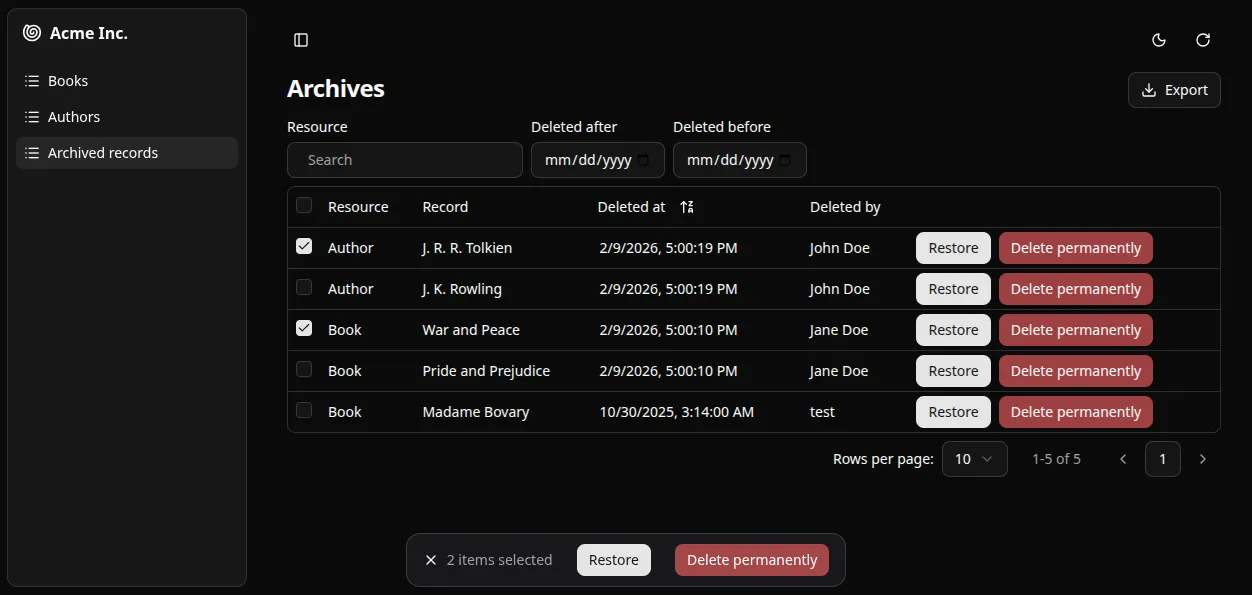
- Browse and filter all deleted records in a dedicated interface
- Restore archived items individually or in bulk
- Track who deleted what and when
Installation
Section titled “Installation”The soft delete features require a valid Enterprise Edition subscription. Once subscribed, follow the instructions to get access to the private npm repository.
You can then install the npm package providing the realtime features using your favorite package manager:
npm install --save @react-admin/ra-core-ee# oryarn add @react-admin/ra-core-eera-core-ee contains base components and hooks to implement soft deletion in your application.
At minimum, you will need to leverage useSoftDelete to implement your own <SoftDeleteButton>, and replace the standard <DeleteButton> in your list and show views with it.
This will call dataProvider.softDelete() instead of dataProvider.delete() for the selected record.
If you also want the users to be able to restore the soft-deleted records, or to permanently delete them, you can implement the following components:
<RestoreButton>: callsuseRestoreOneto restore a soft deleted record.<DeletePermanentlyButton>: callsuseHardDeleteto permanently delete a soft deleted record.
You can also implement bulk variants for all three actions:
<BulkSoftDeleteButton>:useSoftDeleteMany<BulkRestoreButton>:useRestoreMany<BulkDeletePermanentlyButton>:useHardDeleteMany
To build a trash view, use <DeletedRecordsListBase> to build your own <DeletedRecordsList>. This component fetches deleted records with dataProvider.getListDeleted() and allows to restore or permanently delete them with the buttons mentioned above.
Data Provider Requirements
Section titled “Data Provider Requirements”In order to use the Soft Delete features, your data provider must implement a few new methods.
Methods
Section titled “Methods”The Soft Delete features of ra-core-ee rely on the dataProvider to soft-delete, restore or view deleted records.
In order to use those features, you must add a few new methods to your data provider:
softDeleteperforms the soft deletion of the provided record.softDeleteManyperforms the soft deletion of the provided records.getOneDeletedgets one deleted record by its ID.getListDeletedgets a list of deleted records with filters and sort.restoreOnerestores a deleted record.restoreManyrestores deleted records.hardDeletepermanently deletes a record.hardDeleteManypermanently deletes many records.- (OPTIONAL)
createManycreates multiple records at once. This method is used internally by some data provider implementations to delete or restore multiple records at once. As it is optional, a default implementation is provided that simply callscreatemultiple times.
Signature
Section titled “Signature”Here is the full SoftDeleteDataProvider interface:
const dataProviderWithSoftDelete: SoftDeleteDataProvider = {    ...dataProvider,
    softDelete: (resource, params: SoftDeleteParams): SoftDeleteResult => {        const { id, authorId } = params;        // ...        return { data: deletedRecord };    },    softDeleteMany: (        resource,        params: SoftDeleteManyParams,    ): SoftDeleteManyResult => {        const { ids, authorId } = params;        // ...        return { data: deletedRecords };    },
    getOneDeleted: (params: GetOneDeletedParams): GetOneDeletedResult => {        const { id } = params;        // ...        return { data: deletedRecord };    },    getListDeleted: (params: GetListDeletedParams): GetListDeletedResult => {        const { filter, sort, pagination } = params;        // ...        return { data: deletedRecords, total: deletedRecords.length };    },
    restoreOne: (params: RestoreOneParams): RestoreOneResult => {        const { id } = params;        // ...        return { data: deletedRecord };    },    restoreMany: (params: RestoreManyParams): RestoreManyResult => {        const { ids } = params;        // ...        return { data: deletedRecords };    },
hardDelete: (params: HardDeleteParams): HardDeleteResult => { const { id } = params; // ... return { data: deletedRecordId }; }, hardDeleteMany: (params: HardDeleteManyParams): HardDeleteManyResult => { const { ids } = params; // ... return { data: deletedRecordsIds }; },};Once your provider has all soft-delete methods, pass it to the <Admin> component and you’re ready to start using the Soft Delete feature.
// in src/App.tsximport { Admin } from '@/components/admin/admin';import { dataProvider } from './dataProvider';
const App = () => <Admin dataProvider={dataProvider}>{/* ... */}</Admin>;
Deleted Record Structure
Section titled “Deleted Record Structure”A deleted record is an object with the following properties:
id: The identifier of the deleted record.resource: The resource name of the deleted record.deleted_at: The date and time when the record was deleted, in ISO 8601 format.deleted_by: (optional) The identifier of the user who deleted the record.data: The original record data before deletion.
Here is an example of a deleted record:
{ id: 123, resource: "products", deleted_at: "2025-06-06T15:32:22Z", deleted_by: "johndoe", data: { id: 456, title: "Lorem ipsum", teaser: "Lorem ipsum dolor sit amet", body: 'Lorem ipsum dolor sit amet, consectetur adipiscing elit', },}Builders
Section titled “Builders”ra-core-ee comes with two built-in implementations that will add soft delete capabilities to your data provider without any specific backend requirements. You can choose the one that best fits your needs:
-
addSoftDeleteBasedOnResourcestores the deleted records for all resources in a single resource. This resource is nameddeleted_recordsby default.With this builder, all deleted records disappear from their original resource when soft-deleted, and are recreated in the
deleted_recordsresource.
// in src/dataProvider.tsimport { addSoftDeleteBasedOnResource } from '@react-admin/ra-core-ee';import baseDataProvider from './baseDataProvider';
export const dataProvider = addSoftDeleteBasedOnResource(baseDataProvider, { deletedRecordsResourceName: 'deleted_records',});-
addSoftDeleteInPlacekeeps the deleted records in the same resource, but marks them as deleted.With this builder, all deleted records remain in their original resource when soft-deleted, but are marked with the
deleted_atanddeleted_byfields. The query methods (getList,getOne, etc.) automatically filter out deleted records.You’ll need to pass a configuration object with all soft deletable resources as key so that
getListDeletedknows where to look for deleted records.
// in src/dataProvider.tsimport { addSoftDeleteInPlace } from '@react-admin/ra-core-ee';import baseDataProvider from './baseDataProvider';
export const dataProvider = addSoftDeleteInPlace(baseDataProvider, { posts: {}, comments: { deletedAtFieldName: 'deletion_date', }, accounts: { deletedAtFieldName: 'disabled_at', deletedByFieldName: 'disabled_by', },});You can also write your own implementation. Feel free to look at these builders source code for inspiration. You can find it under your node_modules folder, e.g. at node_modules/@react-admin/ra-core-ee/src/soft-delete/dataProvider/addSoftDeleteBasedOnResource.ts.
Query and Mutation Hooks
Section titled “Query and Mutation Hooks”Each data provider verb has its own hook so you can use them in custom components:
softDelete:useSoftDeletesoftDeleteMany:useSoftDeleteManygetListDeleted:useGetListDeletedgetOneDeleted:useGetOneDeletedrestoreOne:useRestoreOnerestoreMany:useRestoreManyhardDelete:useHardDeletehardDeleteMany:useHardDeleteMany
createMany
Section titled “createMany”The <BulkSoftDeleteButton> has to create or update several records at once. If your data provider supports the createMany method to create multiple records at once, it will use it instead of calling create multiple times for performance reasons.
const dataProviderWithCreateMany = { ...dataProvider, createMany: (resource, params: CreateManyParams): CreateManyResult => { const { data } = params; // data is an array of records. // ... return { data: createdRecords }; },};Deleted Records List
Section titled “Deleted Records List”Here is an example implementation of a trash view using the <DeletedRecordsListBase> component.
import { AutocompleteArrayInput } from "@/components/admin/autocomplete-array-input";import { DataTable } from "@/components/admin/data-table";import { DateField } from "@/components/admin/date-field";import { DateInput } from "@/components/admin/date-input";import { ExportButton } from "@/components/admin/export-button";import { FilterForm } from "@/components/admin/filter-form";import { type ListViewProps } from "@/components/admin/list";import { ListPagination } from "@/components/admin/list-pagination";import { cn } from "@/lib/utils";import {  DeletedRecordRepresentation,  DeletedRecordsListBase,  type DeletedRecordsListBaseProps,} from "@react-admin/ra-core-ee";import { humanize, inflect } from "inflection";import {  FilterContext,  type RaRecord,  useListContext,  useResourceDefinitions,  useTranslate,} from "ra-core";
import {  BulkDeletePermanentlyButton,  BulkRestoreButton,  DeletePermanentlyButton,  RestoreButton,} from "@/components/soft-delete";
export function DeletedRecordsList<RecordType extends RaRecord = RaRecord>({  children = <DeletedRecordsTable />,  filters,  ...props}: ListViewProps<RecordType> & DeletedRecordsListBaseProps<RecordType>) {  const resources = Object.keys(useResourceDefinitions()).map((resource) => ({    id: resource,    name: resource,  }));
  return (    <DeletedRecordsListBase {...props}>      <DeletedRecordsListView<RecordType>        {...props}        filters={          filters ?? [            ...(props.resource === undefined              ? [                  <AutocompleteArrayInput                    key="resource"                    source="resource"                    label="Resource"                    choices={resources}                    alwaysOn                  />,                ]              : []),            <DateInput              key="deleted_at_gte"              source="deleted_at_gte"              label="Deleted after"              alwaysOn            />,            <DateInput              key="deleted_at_lte"              source="deleted_at_lte"              label="Deleted before"              alwaysOn            />,          ]        }      >        {children}      </DeletedRecordsListView>    </DeletedRecordsListBase>  );}
function DeletedRecordsListView<RecordType extends RaRecord = RaRecord>(  props: ListViewProps<RecordType>,) {  const {    filters,    pagination = defaultPagination,    title,    children,    actions,  } = props;
  const translate = useTranslate();
  const { defaultTitle } = useListContext();
  return (    <>      <FilterContext.Provider value={filters}>        <div className="flex justify-between items-start flex-wrap gap-2 my-2">          <h2 className="text-2xl font-bold tracking-tight mb-2">            {title ??              defaultTitle ??              translate("ra-soft-delete.deleted_records_list.title", {                _: "Deleted Records",              })}          </h2>          {actions ?? (            <div className="flex items-center gap-2">{<ExportButton />}</div>          )}        </div>        <FilterForm />
        <div className={cn("my-2", props.className)}>{children}</div>
        {pagination}      </FilterContext.Provider>    </>  );}
const defaultPagination = <ListPagination />;
export const DeletedRecordsTable = () => {  const translate = useTranslate();
  return (    <DataTable      bulkActionButtons={        <>          <BulkRestoreButton />          <BulkDeletePermanentlyButton />        </>      }    >      <DataTable.Col        source="resource"        render={(record) => {          const { resource } = record;          return humanize(            translate(`resources.${resource}.name`, {              smart_count: 1,              _: resource ? inflect(resource, 1) : undefined,            }),          );        }}      />      <DataTable.Col        source="data"        label={translate("ra-soft-delete.list.record", {          _: "Record",        })}      >        <DeletedRecordRepresentation />      </DataTable.Col>      <DataTable.Col source="deleted_at">        <DateField source="deleted_at" showTime />      </DataTable.Col>      <DataTable.Col source="deleted_by" />
<DataTable.Col> <div className="flex gap-2"> <RestoreButton /> <DeletePermanentlyButton /> </div> </DataTable.Col> </DataTable> );};Soft Delete Button
Section titled “Soft Delete Button”Here is an example implementation of a SoftDeleteButton component using the useSoftDeleteWithUndoController hook:
import { ReactNode } from "react";import { Button } from "@/components/ui/button";import { useSoftDeleteWithUndoController } from "@react-admin/ra-core-ee";import {  type RaRecord,  useRecordContext,  useResourceContext,} from "ra-core";
export function SoftDeleteButton(props: SoftDeleteButtonProps) {  const resource = useResourceContext(props);  const record = useRecordContext(props);
  const { isPending, handleSoftDelete } = useSoftDeleteWithUndoController({    record,    resource,  });
  return (    <Button      type="button"      variant="destructive"      onClick={handleSoftDelete}      disabled={isPending}    >      Delete    </Button>  );}
type SoftDeleteButtonProps = {  resource?: string;  record?: RaRecord;};
You can then replace DeleteButton with SoftDeleteButton in your edit views:
import { Edit } from '@/components/admin';import { SoftDeleteButton } from './SoftDeleteButton';
const PostEdit = () => (    <Edit actions={<SoftDeleteButton />}>        ...    </Edit>);
Restore Button
Section titled “Restore Button”For restoring soft-deleted records, you can create a RestoreButton component similar to the SoftDeleteButton, but using the useRestoreWithUndoController hook from ra-core-ee.
import { ReactNode } from "react";import { Button } from "@/components/ui/button";import {  type DeletedRecordType,  useRestoreWithUndoController,} from "@react-admin/ra-core-ee";import { useRecordContext } from "ra-core";
export function RestoreButton(props: RestoreButtonProps) {  const record = useRecordContext(props);  if (!record) {    throw new Error(      "<RestoreButton> component should be used inside a <DeletedRecordsListBase> component or provided with a record prop.",    );  }
  const { isPending, handleRestore } = useRestoreWithUndoController({    record,  });
  return (    <Button      type="button"      onClick={handleRestore}      disabled={isPending}      size="sm"    >      Restore    </Button>  );}
type RestoreButtonProps = {  record?: DeletedRecordType;};
Delete Permanently Button
Section titled “Delete Permanently Button”For permanently deleting archived records, you can create a DeletePermanentlyButton component similar to the RestoreButton, but using the useDeletePermanentlyWithUndoController hook from ra-core-ee.
import { ReactNode } from "react";import { Button } from "@/components/ui/button";import {  type DeletedRecordType,  useDeletePermanentlyWithUndoController,} from "@react-admin/ra-core-ee";import { useRecordContext } from "ra-core";
export function DeletePermanentlyButton(props: DeletePermanentlyButtonProps) {  const record = useRecordContext(props);  if (!record) {    throw new Error(      "<DeletePermanentlyButton> component should be used inside a <DeletedRecordsListBase> component or provided with a record prop.",    );  }
  const { isPending, handleDeletePermanently } =    useDeletePermanentlyWithUndoController({      record,    });
  return (    <Button      type="button"      variant="destructive"      onClick={handleDeletePermanently}      disabled={isPending}      size="sm"    >      Delete Permanently    </Button>  );}
type DeletePermanentlyButtonProps = {  record?: DeletedRecordType;};
Bulk Soft Delete Button
Section titled “Bulk Soft Delete Button”Here is an example implementation of a BulkSoftDeleteButton component using the useBulkSoftDeleteWithUndoController hook:
import { ReactNode } from "react";import { Button } from "@/components/ui/button";import { useBulkSoftDeleteWithUndoController } from "@react-admin/ra-core-ee";import { useResourceContext } from "ra-core";
export function BulkSoftDeleteButton(props: BulkSoftDeleteButtonProps) {  const resource = useResourceContext(props);
  const { isPending, handleSoftDeleteMany } =    useBulkSoftDeleteWithUndoController({      resource,    });
  return (    <Button      type="button"      variant="destructive"      onClick={handleSoftDeleteMany}      disabled={isPending}    >      Delete    </Button>  );}
type BulkSoftDeleteButtonProps = {  resource?: string;};
Bulk Restore Button
Section titled “Bulk Restore Button”For restoring soft-deleted records, you can create a BulkRestoreButton component similar to BulkSoftDeleteButton, but using useBulkRestoreWithUndoController hook from ra-core-ee:
import { ReactNode } from "react";import { Button } from "@/components/ui/button";import { useBulkRestoreWithUndoController } from "@react-admin/ra-core-ee";
export function BulkRestoreButton() {  const { isPending, handleBulkRestore } =    useBulkRestoreWithUndoController({});
  return (    <Button      type="button"      onClick={handleBulkRestore}      disabled={isPending}      size="sm"    >      Restore    </Button>  );}
Bulk Delete Permanently Button
Section titled “Bulk Delete Permanently Button”For deleting archived records permanently, you can create a BulkDeletePermanentlyButton component similar to BulkRestoreButton, but using useBulkDeletePermanentlyWithUndoController hook from ra-core-ee:
import { ReactNode } from "react";import { Button } from "@/components/ui/button";import { useBulkDeletePermanentlyWithUndoController } from "@react-admin/ra-core-ee";
export function BulkDeletePermanentlyButton() {  const { isPending, handleDeleteManyPermanently } =    useBulkDeletePermanentlyWithUndoController({});
  return (    <Button      type="button"      variant="destructive"      onClick={handleDeleteManyPermanently}      disabled={isPending}      size="sm"    >        Delete Permanently    </Button>  );}