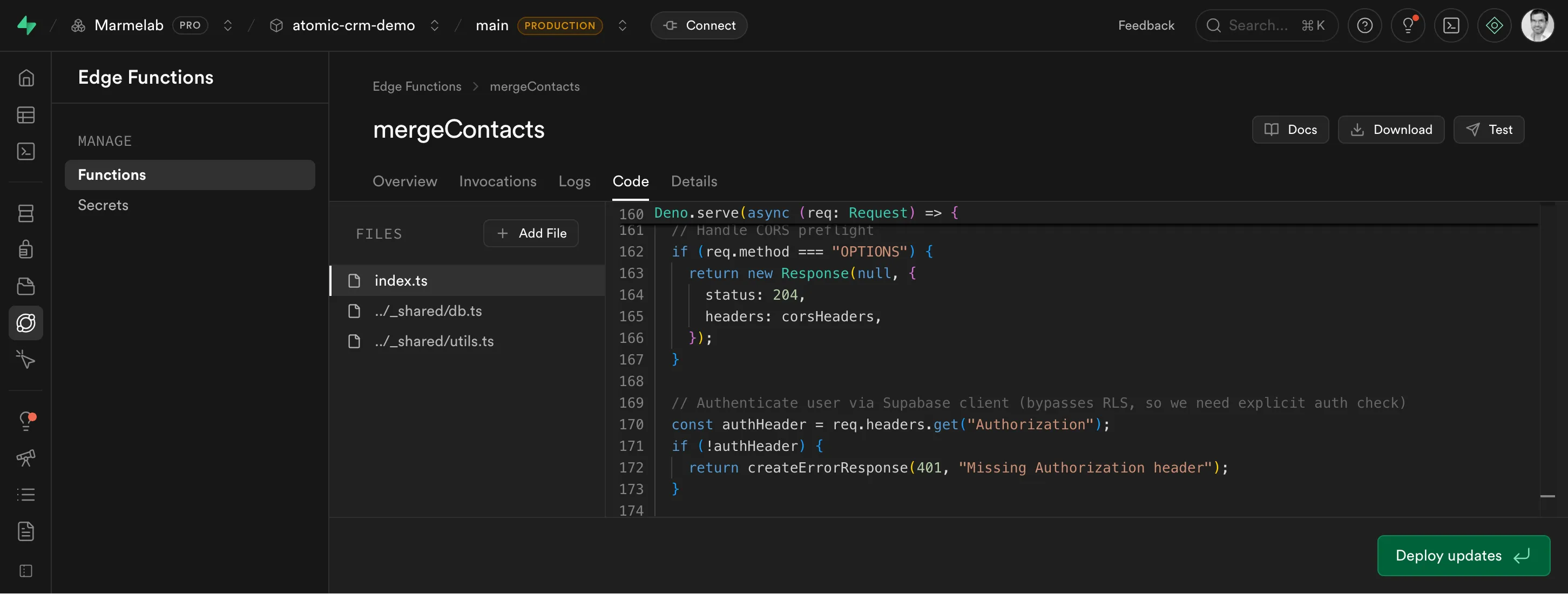
Transactions and RLS in Supabase Edge Functions

When using Supabase, the backend-as-a-service powered by PostgreSQL, Edge Functions provide a powerful way to run arbitrary server-side code. However, managing transactions and Row Level Security (RLS) within these functions can be challenging. In this post, I will explain my approach to execute multiple database operations atomically while respecting RLS policies.
Querying The Database In An Edge Function
Supabase Edge functions can query the underlying Postgres database. The Supabase doc advises using the supabase-js client to do so:
import { createClient } from 'npm:@supabase/supabase-js@2'
Deno.serve(async (req) => {  try {    const supabase = createClient(      Deno.env.get('SUPABASE_URL') ?? '',      Deno.env.get('SUPABASE_PUBLISHABLE_KEY') ?? '',      { global: { headers: { Authorization: req.headers.get('Authorization')! } } }    )
    const { data, error } = await supabase.from('countries').select('*')
    if (error) {      throw error    }
    return new Response(      JSON.stringify({ data }),      { status: 200, headers: { 'Content-Type': 'application/json' } }    )  } catch (err) {    return new Response(String(err?.message ?? err), { status: 500 })  }})
supabase-js is a powerful client that uses Supabase’s authentication and RLS policies out of the box. It even has TypeScript support for type inference, autocompletion, and type-safe queries. However, if you need to chain multiple queries in a safe way, you quickly hit a problem.
For example, let’s imagine an Edge function that merges two contacts into one. This operation involves multiple steps:
- updating references,
- updating the “winner” contact with the “loser” contact’s data,
- deleting the “loser” contact.
This is how you might implement it using the supabase-js client:
const { contactId1, contactId2 } = await req.json();const { data: contact1 } = await supabase.from('contacts').select('*')  .eq('id', contactId1).single();const { data: contact2 } = await supabase.from('contacts').select('*')  .eq('id', contactId2).single();
// Update references from contact2 to contact1await supabase  .from('orders')  .update({ contact_id: contact1.id })  .eq('contact_id', contact2.id)
// Merge contact2 data into contact1await supabase  .from('contacts')  .update({ email: contact2.email, phone: contact2.phone })  .eq('id', contact1.id)
// Delete contact2await supabase.from('contacts').delete().eq('id', contact2.id)
The problem is that if any of these steps fail, you could end up with inconsistent data. For example, if the update to contact1 fails after updating the orders, you would have orders pointing to a deleted contact.
Databases typically solve this problem using transactions, which ensure that a series of operations either all succeed or all fail together. Unfortunately, the supabase-js client does not support transactions. It’s based on PostGREST, which lacks transaction capabilities - even though this is a popular request. The PostgREST team has explained that transaction support is not a priority.
Solution 1: Stored Procedures
A common workaround is to write an SQL function in your Postgres database that performs several queries within a transaction. Then, PostgREST can invoke this stored procedure via Remote Procedure Call (RPC) from your Edge function.
For example, for a contact merge operation, the stored procedure might look like this:
CREATE OR REPLACE FUNCTION merge_contacts(contact_id1 INT, contact_id2 INT)RETURNS VOID AS $$BEGIN -- Update references from contact2 to contact1 UPDATE orders SET contact_id = contact_id1 WHERE contact_id = contact_id2; -- Merge contact2 data into contact1 UPDATE contacts SET email = (SELECT email FROM contacts WHERE id = contact_id2), phone = (SELECT phone FROM contacts WHERE id = contact_id2) WHERE id = contact_id1; -- Delete contact2 DELETE FROM contacts WHERE id = contact_id2;EXCEPTION WHEN OTHERS THEN RAISE;END;$$ LANGUAGE plpgsql;Then, in your Edge function, use supabase.rpc() to call it over HTTP:
import { createClient } from 'npm:@supabase/supabase-js@2'
Deno.serve(async (req) => {  try {    const supabase = createClient(      Deno.env.get('SUPABASE_URL') ?? '',      Deno.env.get('SUPABASE_PUBLISHABLE_KEY') ?? '',      { global: { headers: { Authorization: req.headers.get('Authorization')! } } }    )    const { contactId1, contactId2 } = await req.json();    const { error } = await supabase.rpc(      'merge_contacts',      { contact_id1: contactId1, contact_id2: contactId2 }    );    if (error) {      throw error;    }
    return new Response(      JSON.stringify({ message: 'Contacts merged successfully' }),      { status: 200, headers: { 'Content-Type': 'application/json' } }    )  } catch (err) {    return new Response(String(err?.message ?? err), { status: 500 })  }})
This works fine: the entire operation is atomic, and if any part fails, the whole transaction is rolled back. It also respects RLS policies, as the stored procedure runs with the privileges of the user executing it.
However, I don’t like the Developer Experience of stored procedures.
To add an SQL function to a Supabase project, you must create a migration file and deploy it using the Supabase CLI. If you ever have to update the procedure (e.g. after adding a field to the Contacts table), you need to create a new migration file that removes and recreates the procedure. The migrations/ directory quickly becomes a mess of SQL files that show the history of changes, but you have to use the Supabase Studio to see the actual state. The business logic is hidden in these migration files where it’s hard to find and even harder to maintain. Finally, there is no type safety, as a stored procedure is just an SQL string.
Overall, it feels like a step back compared to using supabase-js in the Edge function.
Solution 2: Direct Database Connection
Edge functions run on the server-side, so they can access the database directly, without going through PostgREST. This approach allows you to use pure SQL transactions in your Edge function code.
For example, using the deno-postgres client, you can implement the contact merge operation like this:
import { Pool } from 'jsr:@db/postgres'
// Edge functions can access SUPABASE_DB_URL in production// otherwise fall back to local dev connection stringconst connectionString = Deno.env.get("SUPABASE_DB_URL") ||  "postgresql://postgres:postgres@db:5432/postgres";
// Create a database pool with one connection.const pool = new Pool(connectionString, 1)
Deno.serve(async (req) => {  let user;  try {    user = await checkUserCredentials(req);  } catch (error) {    return createErrorResponse(401, error.message);  }  try {    const { contactId1, contactId2 } = await req.json();    // Grab a connection from the pool    const connection = await pool.connect()    try {      // Run the queries inside a transaction      await connection.queryArray('BEGIN')      // Update references from contact2 to contact1      await connection.queryArray(        'UPDATE orders SET contact_id = $1 WHERE contact_id = $2',        [contactId1, contactId2]      )      // Merge contact2 data into contact1      await connection.queryArray(        'UPDATE contacts SET email = (SELECT email FROM contacts WHERE id = $1), phone = (SELECT phone FROM contacts WHERE id = $1) WHERE id = $2',        [contactId2, contactId1]      )      // Delete contact2      await connection.queryArray('DELETE FROM contacts WHERE id = $1', [contactId2])      // Commit the transaction      await connection.queryArray('COMMIT')      // Return a success response      return new Response(        JSON.stringify({ message: 'Contacts merged successfully' }),        { status: 200, headers: { 'Content-Type': 'application/json; charset=utf-8' } }      )    } catch (err) {      await connection.queryArray('ROLLBACK')      throw err    } finally {      // Release the connection back into the pool      connection.release()    }  } catch (err) {    console.error(err)    return new Response(String(err?.message ?? err), { status: 500 })  }})
This solution requires more boilerplate code to manage the database connection and transactions, but it keeps all your business logic in one place and allows you to use transactions directly. Besides, you only need to write the boilerplate once for your application, and then you can share it across multiple Edge functions.
Handling Authentication and RLS
Since we’re connecting directly to the database, we must check the user’s credentials manually:
const checkUserCredentials = async (req) => {  // Authenticate user via Supabase client (bypasses RLS, so we need explicit auth check)  const authHeader = req.headers.get("Authorization");  if (!authHeader) {    throw new Error("Missing Authorization header");  }
  const supabaseClient = createClient(    Deno.env.get("SUPABASE_URL") ?? "",    Deno.env.get("SUPABASE_ANON_KEY") ?? "",    { global: { headers: { Authorization: authHeader } } }  );
  const {    data: { user },    error: authError,  } = await supabaseClient.auth.getUser();  if (!user || authError) {    throw new Error("Unauthorized");  }  return user;};
Besides, the SQL queries are not using the RLS policies, as the connection is made using the database credentials. To enforce RLS, we need to set the auth.uid parameter for the current session just after starting the transaction:
// Run the queries inside a transactionawait connection.queryArray('BEGIN')// Enable RLS by switching to authenticated role and setting user contextawait connection.queryArray('SET LOCAL ROLE authenticated')await connection.queryArray('SET LOCAL request.jwt.claim.sub = $1', [user.id])// Update references from contact2 to contact1...Bonus: Adding Types With Kysely
To improve the Developer Experience, you can use Kysely as a type-safe query builder on top of the deno-postgres client. Kysely allows you to define your database schema as TypeScript types, providing type safety and autocompletion for your queries.
First, define your database schema:
interface Database { contacts: { id: number; email: string; phone: string; }; orders: { id: number; contact_id: number; total: number; };}Then, create a Kysely instance using the deno-postgres connection. You’ll need a bit of boilerplate as the postgres driver is not yet available as a Deno module.
Show Deno Postgres Driver for Kysely
// Deno Postgres Driver for Kyselyclass DenoPostgresDriver implements Driver {  private pool: Pool;  private connections = new WeakMap<PoolClient, DatabaseConnection>();
  constructor(pool: Pool) {    this.pool = pool;  }
  async init(): Promise<void> {    // Connection pool is already initialized  }
  async acquireConnection(): Promise<DatabaseConnection> {    const client = await this.pool.connect();    let connection = this.connections.get(client);
    if (!connection) {      connection = new DenoPostgresConnection(client);      this.connections.set(client, connection);    }
    return connection;  }
  async beginTransaction(connection: DatabaseConnection): Promise<void> {    await connection.executeQuery(CompiledQuery.raw("begin"));  }
  async commitTransaction(connection: DatabaseConnection): Promise<void> {    await connection.executeQuery(CompiledQuery.raw("commit"));  }
  async rollbackTransaction(connection: DatabaseConnection): Promise<void> {    await connection.executeQuery(CompiledQuery.raw("rollback"));  }
  async releaseConnection(connection: DatabaseConnection): Promise<void> {    (connection as DenoPostgresConnection).release();  }
  async destroy(): Promise<void> {    await this.pool.end();  }}
class DenoPostgresConnection implements DatabaseConnection {  private client: PoolClient;
  constructor(client: PoolClient) {    this.client = client;  }
  async executeQuery<O>(compiledQuery: CompiledQuery): Promise<QueryResult<O>> {    const result = await this.client.queryObject<O>({      text: compiledQuery.sql,      args: compiledQuery.parameters as unknown[],    });
    if (      result.command === "INSERT" ||      result.command === "UPDATE" ||      result.command === "DELETE"    ) {      return {        numAffectedRows: BigInt(result.rowCount ?? 0),        rows: result.rows ?? [],      };    }
    return {      rows: result.rows ?? [],    };  }
  streamQuery<O>(    _compiledQuery: CompiledQuery,    _chunkSize?: number,  ): AsyncIterableIterator<QueryResult<O>> {    throw new Error("Deno Postgres driver does not support streaming");  }
  release() {    this.client.release();  }}
Now you’re ready to use Kysely in your Edge function:
import {  Kysely,  PostgresAdapter,  PostgresIntrospector,  PostgresQueryCompiler,  type Generated,} from "https://esm.sh/kysely@0.27.2";
const db = new Kysely<Database>({  dialect: {    createAdapter: () => new PostgresAdapter(),    createDriver: () => new DenoPostgresDriver(pool),    createIntrospector: (db: Kysely<any>) => new PostgresIntrospector(db),    createQueryCompiler: () => new PostgresQueryCompiler(),  },});
Then, you can rewrite the contact merge operation using Kysely’s type-safe query builder:
Deno.serve(async (req) => {  let user;  try {    user = await checkUserCredentials(req);  } catch (error) {    return createErrorResponse(401, error.message);  }  const { contactId1, contactId2 } = await req.json();  try {    // Run the merge operation inside a transaction    await db.transaction().execute(async (trx) => {      // Enable RLS by switching to authenticated role and setting user context      await trx.executeQuery(        CompiledQuery.raw('SET LOCAL ROLE authenticated')      );      await trx.executeQuery(        CompiledQuery.raw('SET LOCAL request.jwt.claim.sub = ?', [user.id])      );      // Update references from contact2 to contact1      await trx        .updateTable('orders')        .set({ contact_id: contactId1 })        .where('contact_id', '=', contactId2)        .execute();      // Merge contact2 data into contact1      const contact2 = await trx        .selectFrom('contacts')        .select(['email', 'phone'])        .where('id', '=', contactId2)        .executeTakeFirstOrThrow();      await trx        .updateTable('contacts')        .set({ email: contact2.email, phone: contact2.phone })        .where('id', '=', contactId1)        .execute();      // Delete contact2      await trx        .deleteFrom('contacts')        .where('id', '=', contactId2)        .execute();    });
    return new Response(      JSON.stringify({ message: 'Contacts merged successfully' }),      { status: 200, headers: { 'Content-Type': 'application/json; charset=utf-8' } }    );  } catch (err) {    console.error(err);    return new Response(String(err?.message ?? err), { status: 500 });  }});
Kysely will automatically infer the types of your queries based on the Database interface you defined earlier. This provides a much better Developer Experience compared to writing raw SQL queries.
Conclusion
Supabase is a great stack for early prototyping, but you quickly need to encapsulate business logic into Edge functions. Then, handling transactions and RLS properly becomes crucial.
While using stored procedures is a viable solution, I prefer connecting directly to the database, to keep the business logic in my Edge function code. This can be done in a type-safe way at the cost of a one-time boilerplate to create a Kysely driver for Deno Postgres. And you even get to keep using RLS policies for security! With these tricks, you can keep using Supabase even as the complexity of your application increases.
I’ve used this exact approach for the merge contacts feature of Atomic CRM, the open-source CRM built with Supabase and Shadcn Admin Kit.
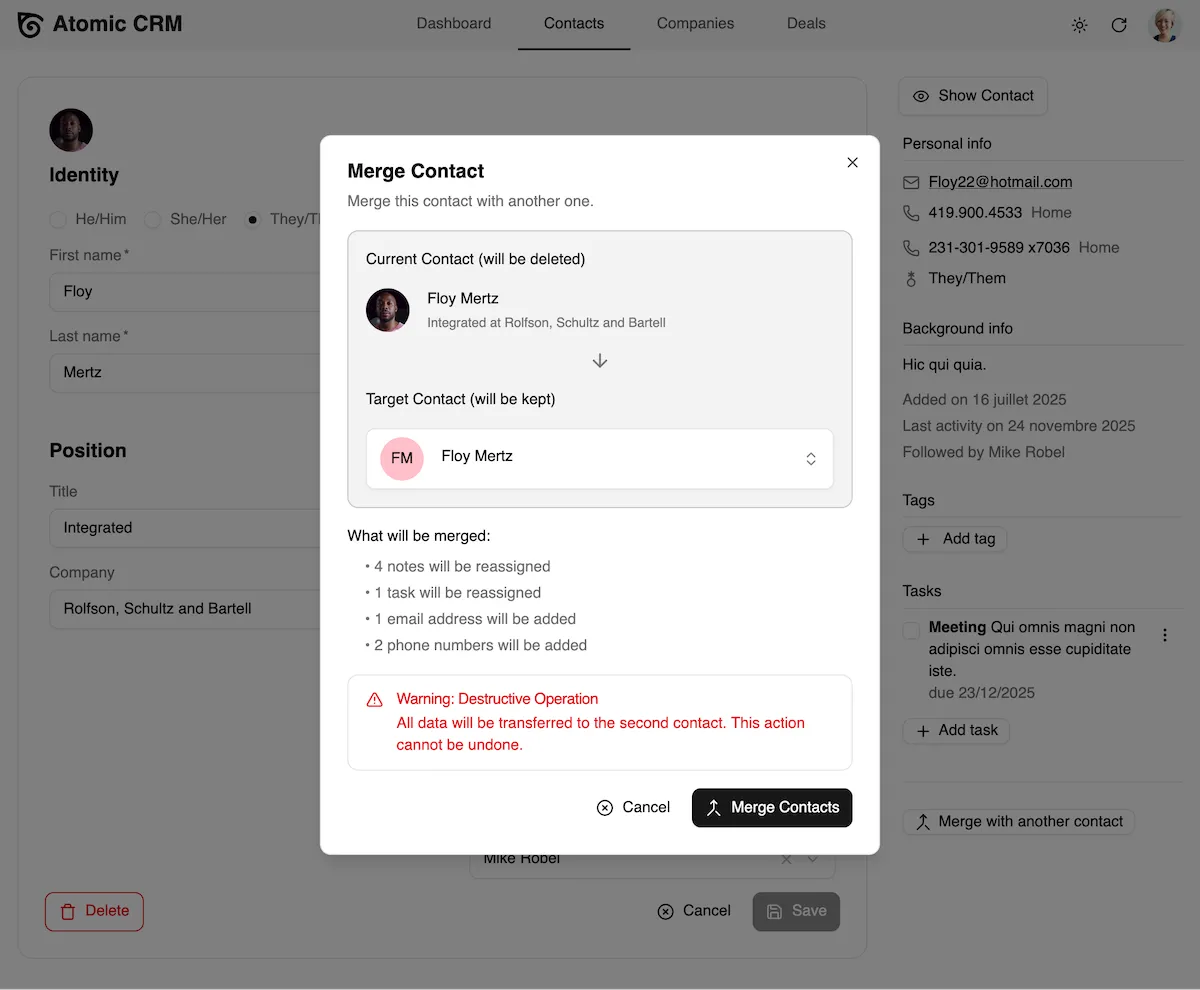
You can check the source code of the Edge function implementing the merge contacts operation.
Authors
Marmelab founder and CEO, passionate about web technologies, agile, sustainability, leadership, and open-source. Lead developer of react-admin, founder of GreenFrame.io, and regular speaker at tech conferences.