
Coding a trading card game on ATProtocol

You may have heard of Bluesky, the alternative social network to Twitter. However, did you know that Bluesky is built on an open protocol called ATProtocol? And did you know that ATProto offers a decentralized data storage and identity system that anyone can build on top of?
That’s right, you can build a web application that stores its data on BlueSky’s servers. To better understand how this works, I decided to code a simple TCG (Trading Card Game) application in Next.js using the official @atproto/api library.
But first, let’s dig into the main concepts of ATProtocol.
ATProtocol Main Concepts
The DID: A Distributed ID
A DID is an immutable and distributed identifier, formatted as follows: did:plc:eqvv6hab5obqrxxx3bfzavaq. You can find all information about a DID by accessing the PLC Directory.
A DID Document is structured as follows:
{ "@context": [ "https://www.w3.org/ns/did/v1", "https://w3id.org/security/multikey/v1", "https://w3id.org/security/suites/secp256k1-2019/v1" ], "id": "did:plc:eqvv6hab5obqrxxx3bfzavaq", "alsoKnownAs": [ "at://marmelab.bsky.social" ], "verificationMethod": [ { "id": "did:plc:eqvv6hab5obqrxxx3bfzavaq#atproto", "type": "Multikey", "controller": "did:plc:eqvv6hab5obqrxxx3bfzavaq", "publicKeyMultibase": "zQ3shetkbKsbjRxNwooKEmCGz9Yb7RWSmezi4G2EqhV39oC84" } ], "service": [ { "id": "#atproto_pds", "type": "AtprotoPersonalDataServer", "serviceEndpoint": "https://hydnum.us-west.host.bsky.network" } ]}We can see a bunch of info:
idis the Decentralized ID itself. This is a permanent, unique identifier, it remains the same even if you change servers or alias.alsoKnownAsis a human readable alias for the ID.verificationMethodcontains the public keys associated with the account to verify that a post or an action was actually signed by you.servicedeclare where your data lives (posts, images…).
The Repository : Your Data Storage
Each DID has an attached repository that contains all your data. By data, I mean actions (likes, reposts, blocks, follows…) and post content, images, etc. Everything you do or send is data. For example, you can find the repository for the marmelab DID on this experimental ATProto browser
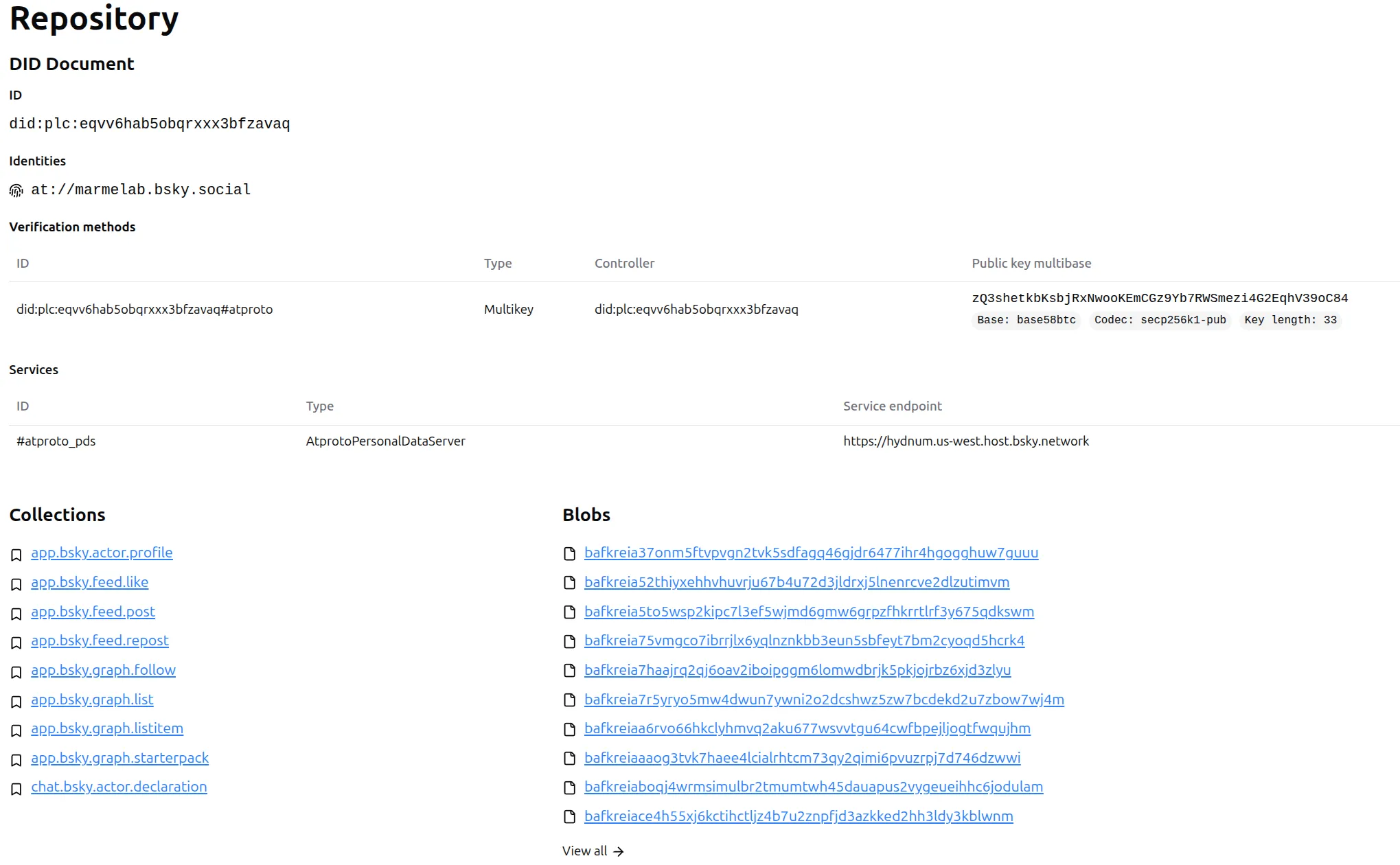
A Repository contains collections, and each collection contains records. A record can be anything.
For example, this is a record from the collection app.bsky.feed.post:
{ "uri": "at://did:plc:eqvv6hab5obqrxxx3bfzavaq/app.bsky.feed.post/3mccwew7nuu2y", "cid": "bafyreicgnoyg53wxgfawvha7asrvidnxybgy3y3nci63qwydlnrf7uc374", "value": { "$type": "app.bsky.feed.post", "createdAt": "2026-01-13T16:00:05.129Z", "facets": [ { "features": [ { "$type": "app.bsky.richtext.facet#link", "uri": "https://zurl.co/8GYMr" } ], "index": { "byteEnd": 294, "byteStart": 281 } } ], "text": "You don’t need code, you need to test hypotheses.💡\n\nToo many teams jump straight into development. At marmelab, we validate first.\n\nOur Design Sprint helps to turn:\n✅ Uncertainty into insight\n✅ Ideas into action\n\nAnd all of this before a single line of code.\n\nLearn more: zurl.co/8GYMr" }}From your point of view, it will be JSON, but under the hood it’s encoded in DAG-CBOR, a binary version of JSON. I won’t go further on this point, but you can find more information in the ATProtocol documentation.
The Personal Data Server (PDS) : Where Your Data Lives
Let’s summarize what we learned:
- We have a unique and distributed ID, the DID.
- We have data attached to it with the Repository.
- The Repository contains collections, which contain records.
A Personal Data Server is a web server that stores your data. Remember the DID Document ? There was an attribute service that declares :
"service": [ { "id": "#atproto_pds", "type": "AtprotoPersonalDataServer", "serviceEndpoint": "https://hydnum.us-west.host.bsky.network" } ]The AtprotoPersonalDataServer points to “https://hydnum.us-west.host.bsky.network”. That means this DID is attached to this server. All of its data will be saved on it.
The best part is that the PDS has been designed with lightweight and portability in mind. That means you can move your repo from one PDS to another without losing anything. You could self-host a PDS, as it does not need a super powerful server to run (official recommendations for 1 to 20 users are: 1GB RAM, 20GB SSD, 1 CPU Core), and move your repository from Bluesky PDS to yours, getting full control over your data.
The Relay And The Firehose : Finding Data On The Network
So we have a bunch of servers, containing data of attached DIDs. But how would I find all the posts of @marmelab.bsky.social? Should I list all available PDS and query them? That doesn’t seem to be a good solution.
To solve this, ATProtocol comes with two concepts. The first one is the Relay.
A Relay “crawls” the network, subscribing to every PDS it can find. It verifies the signatures of every record and bundles all those millions of individual updates into one unified stream, leading to the second concept: the Firehose.
The Firehose is basically a WebSocket streaming all the data the relay aggregated in real-time. You can see it live on Firesky or space rocket into it with Fly the firehose.
The Big Picture
Now that we have all the main concepts, this schema should be easier to understand:
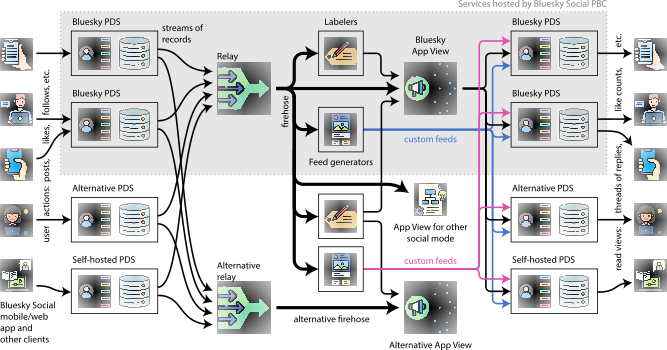
I won’t add more on this, just letting you get lost in the beauty of this schema.
Authentication Mechanism with @atproto/api
We now have the main principles. How hard is it to build a real web application on top of ATProtocol? This is where my idea of Trading Card Games comes in.
First, as I want to write to my ATProtocol repository, I need to authenticate.
Initial Login
We first create an AtpAgent.
import { AtpAgent } from '@atproto/api';
const agent = new AtpAgent({  service: 'https://bsky.social',  persistSession: (evt, sess) => {    if (evt === 'create' || evt === 'update') {      if (sess) {        storeSession(sid, sess);      }    }  },});
The persistSession callback is crucial, it’s invoked by the library whenever session state changes, allowing me to capture and store the session data.
I then login with the agent.
await agent.login({ identifier, password });This authenticates with the AT Protocol server and triggers the persistSession callback with session credentials including:
- Access JWT token
- Refresh JWT token
- User’s DID
- Handle
As I want to persist the agent session, I created a sessionId and manage a little cache to get existing sessions. I send the sessionId to the client via cookie.
res.headers.set('Set-Cookie', `atp_session=${sid}; Path=/; HttpOnly; SameSite=Lax; Max-Age=31536000`);The session ID is stored in an HTTP-only cookie, linking the browser session to the server-side stored credentials.
Getting the Current Session
I first retrieve the sessionId from cookies.
const sid = req.cookies.get('atp_session')?.value;Then I get the agent from my in memory “cache”, or I create it.
let agent = getAgent(sid); // Check in-memory cacheif (!agent) { const sess = getSession(sid); // Get stored session data if (sess) { agent = new AtpAgent({ service: 'https://bsky.social' }); await agent.resumeSession(sess); // Resume with stored credentials storeAgent(sid, agent); }}Then I can get the DID from the agent.
const did = agent.session?.did;Creating Cards
To create a card, I need some textual information and an image. I have to first create the image Blob as I need its ID to link it to the card record.
To upload the image:
const blobRes = await agent.com.atproto.repo.uploadBlob( new Uint8Array(imageBuffer));const image = blobRes.data.blob; // BlobRef with CIDNow I can create my card record:
await agent.com.atproto.repo.createRecord({ repo: did, // User's repository collection: 'app.tcg.card', record: { name: card.name, attack: card.attack, defense: card.defense, type: card.type, rarity: card.rarity, image: image, // BlobRef linking to uploaded blob createdAt: new Date().toISOString(), }});I store my record in a custom app.tcg.card collection. Everybody who requests my repository will see this new collection:
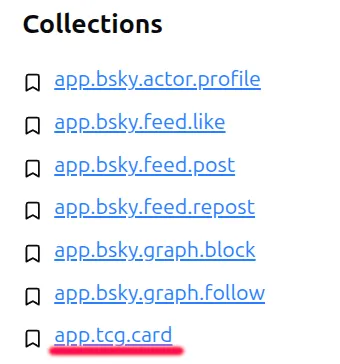
Reading Cards
To get the cards, I have to query the right collection:
const res = await agent.com.atproto.repo.listRecords({ repo: did, collection: 'app.tcg.card',});That’s it.
Conclusion
Building on ATProtocol turned out to be quite straightforward. The well-documented API helps a lot. I spent more time adding a nice but useless shiny effect to my cards than implementing the ATProtocol logic.
What impressed me most is the protocol’s flexibility. Creating custom collections like app.tcg.card is as simple as defining your data structure and calling the API. No need for complex schemas or approval processes - you just start creating records.
While my trading card game is just a simple experiment, it demonstrates the core concepts of ATProtocol in action. Whether you’re building social features, custom data types, or entirely new kinds of applications, the protocol provides a solid foundation.
If you’re curious about decentralized protocols and want to build something beyond traditional social media, ATProtocol is worth exploring. The ecosystem is still young, which means there’s plenty of room for creative ideas and experimentation. You can find a in-depth explanation of the ATProtocol concepts in a Dan ABRAMOV (React, Bluesky…) post here.
You can find the full source code of this experiment on GitHub: marmelab/ATProtoTCG. If you want to try it yourself, feel free to create some cards and explore the ATProtocol ecosystem.
Authors
Full-stack web developer at marmelab, Guillaume can turn complex business logic into an elegant and maintainable program. He brews his own beer, too.