
Can An AI Agent Debug Kubernetes? I Broke A Cluster To Find Out

In my day-to-day fullstack work, I also concierge the app in prod: monitor it, check things run smoothly, and diagnose failures fast when they happen.
With the AI wave, I got curious. Could an AI-driven tool help? I found a few open-source projects and turned them loose on a cluster I broke on purpose. Short answer: yes, they diagnose well, and some even fix things for you (if you are brave enough to let an agent touch your cluster…). I’ll walk you through the experiment: which tools I tried, how they work, and what they do.
The Broken Cluster
To test how good the tools are at diagnosing and (perhaps) fixing issues, I first need a broken cluster. I use k3d to create a local k3s cluster, and deploy Online Boutique, a demo app made of 12 microservices, on it. Then I inject five different failures into the cluster:
- OOMKilled: a pod with a 20Mi memory limit that allocates 250M, which gets it killed by the kernel
- CrashLoopBackOff: a pod that intentionally exits with an error code, causing it to crash and restart repeatedly
- ImagePullBackOff: a pod with a bad image tag, which causes it to fail to pull the image and enter a backoff state
- Readiness probe failure: a probe pointing to a 404 path, which keeps the pod out of the service
- Redis-cart scaled to 0, which causes the whole shop to return HTTP 500 errors
I use k9s to monitor my cluster and see the pods in real time.
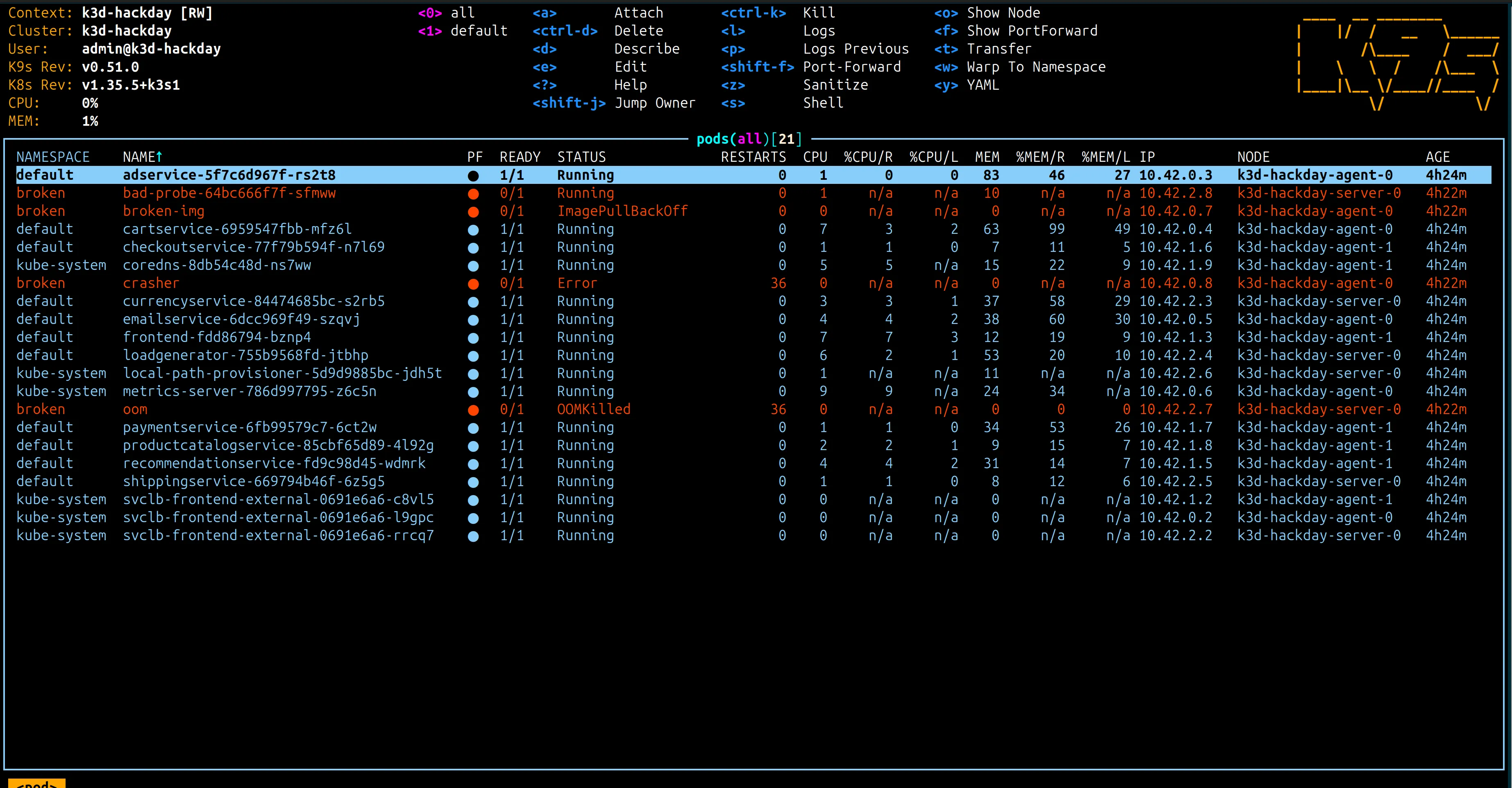
Finally, I test three open-source agents one by one, to see how each diagnoses and fixes the issues:
- k8sgpt: a Go CLI that runs deterministic analyzers on the cluster, then optionally asks an LLM to explain the findings. Also available as an MCP server.
- kubectl-ai: a Google CLI that lets the LLM explore the cluster itself, round-tripping tool calls until it can explain and fix an issue.
- kagent: a set of CRDs (Custom Resource Definitions) that define agents, Model Config, and MCPs, deployed inside the cluster with a chat dashboard, where agents can delegate to each other over A2A (Agent-to-Agent) protocol.
Then comes the fun part: testing the agents.
k8sgpt: The Analyzer
k8sgpt is a Go tool that runs a set of analyzers on a k8s cluster to detect issues. The analysis is deterministic: it always gives the same answer for the same cluster.
The part that interests me is the --explain flag. It makes a round trip to the LLM of your choice to explain the issue. Under the hood, the tool builds a prompt from the output of the analyzers (see the prompt code in the repo).
So I install it and give it a try on my broken cluster.
- Make sure kubectl is installed and configured to point to your cluster
- Install the CLI
- Connect an LLM provider (I use OpenAI, but any provider works):
k8sgpt auth add openai- Run the analyze command with the
--explainflag:
k8sgpt analyze --explain
And it works! It gives me a clear explanation of the issues in my cluster, and even suggests a fix for each one. It also has an “interactive” mode, but I don’t find it convincing: I want something that explores the cluster on its own, not something I have to guide.
That’s nice, but it’s quite rough: just one trip to the LLM, no real exploration of the cluster, and no question of mine. I just ask it to analyze, period.
Fortunately, k8sgpt exposes its tools not only on CLI, but also as a MCP server, which I can plug into my Claude Code desktop:
- configure Claude Code to use the MCP server (in your
claude_desktop_config.json):
{ "mcpServers": { "k8sgpt": { "command": "k8sgpt", "args": ["serve", "--mcp"] } }}- start or restart Claude Code
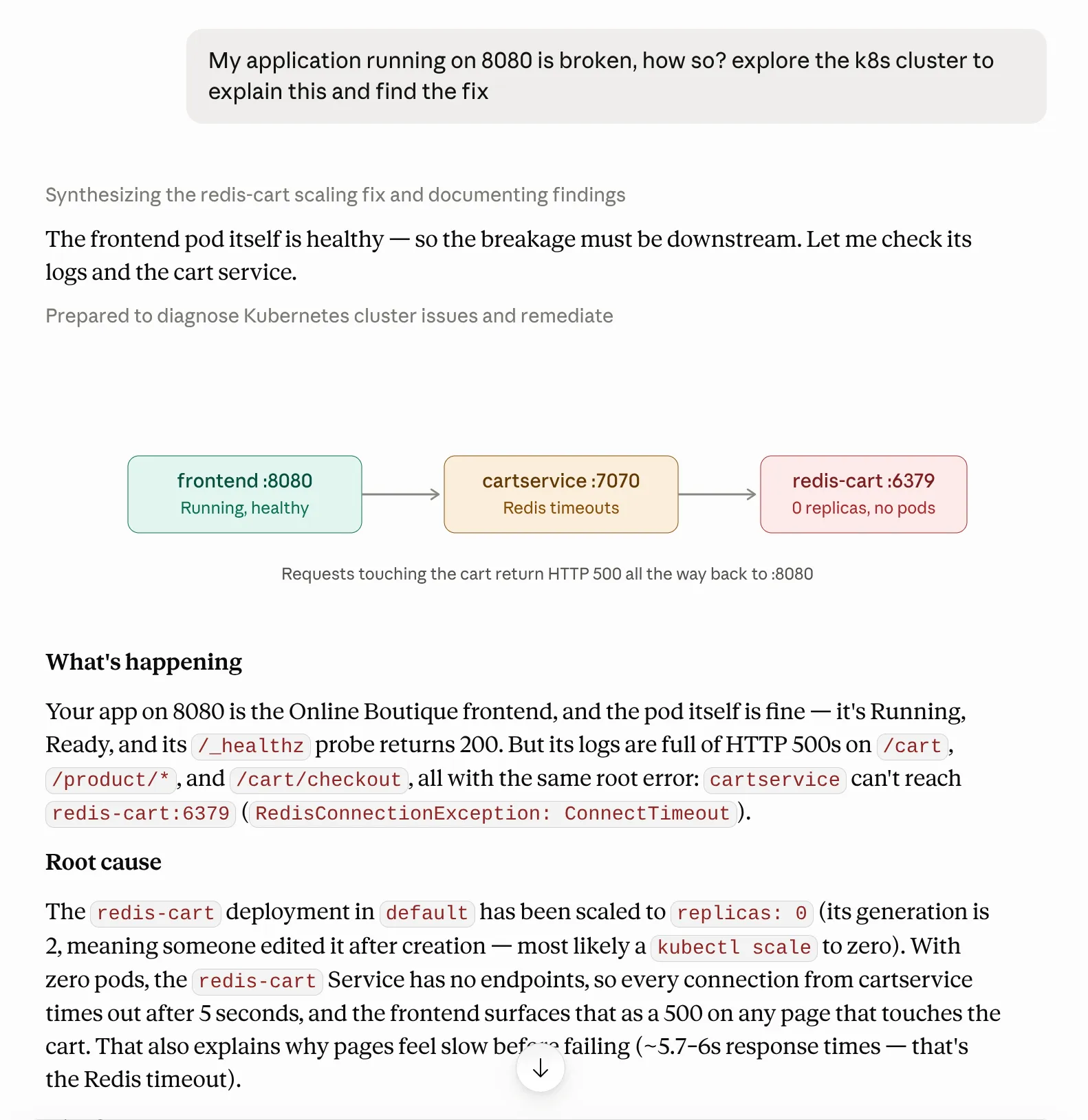
This is much better. I even get a small diagram to help me (Claude Code really knows me… it knows that I’m a visual learner…). I can now ask questions about my cluster, find relevant information in the mass of logs and resources, and get answers from the LLM, all in natural language.
Note: k8sgpt also provides k8sgpt-operator, which is a controller that can run inside your cluster. There is an alpha feature called autoremediation that can fix issues in your cluster automatically, but I didn’t test it.
kubectl-ai: The Investigator
Now comes kubectl-ai, a Google tool that is a bit more agentic than k8sgpt. It explores the cluster on its own and makes round trips with the LLM. It works by exposing a set of tools to the LLM, which decides which tool to call and what to do with the output.
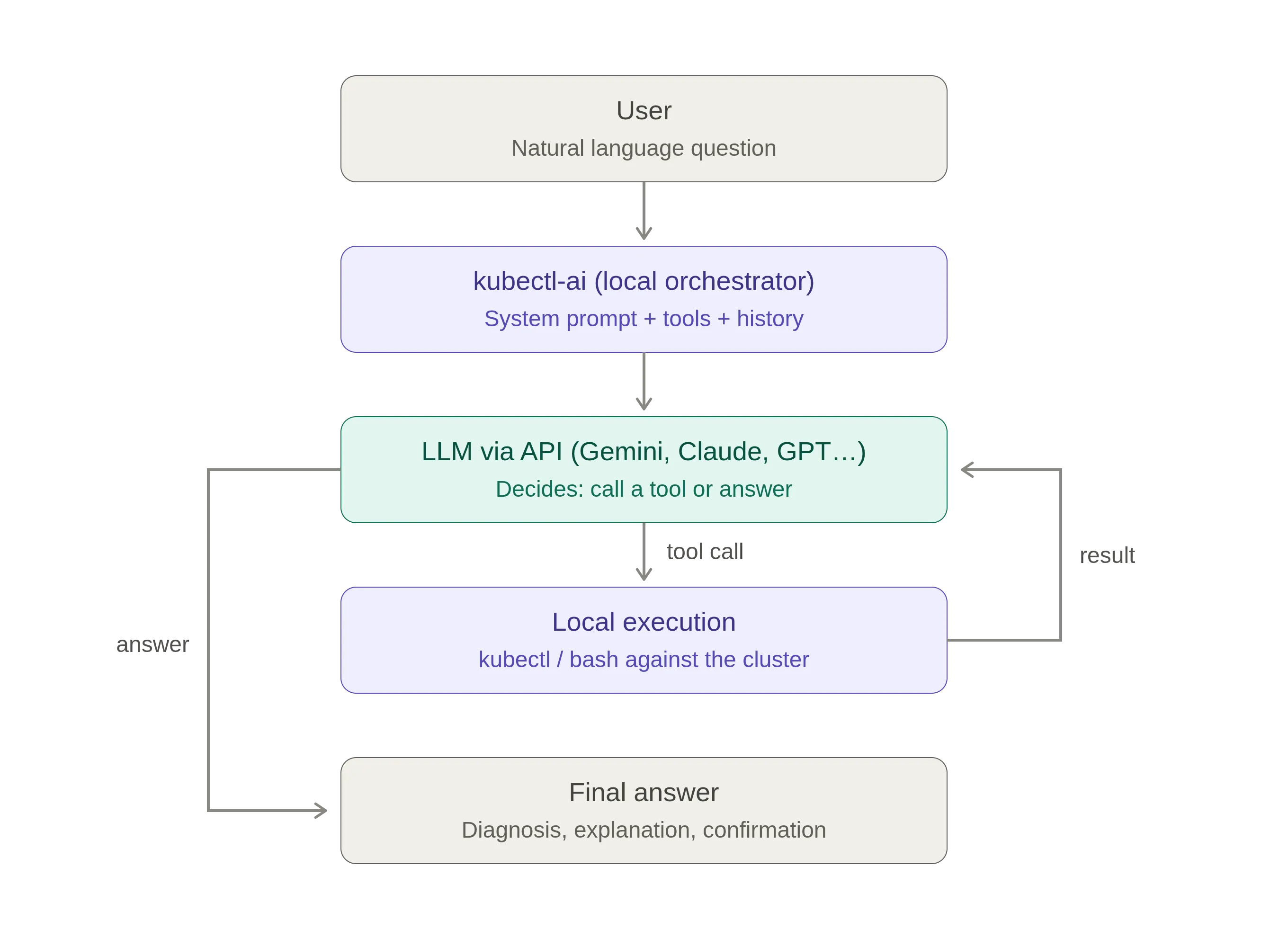
So I install and configure kubectl-ai:
- Install it:
curl -sSL https://raw.githubusercontent.com/GoogleCloudPlatform/kubectl-ai/main/install.sh | bash- Export your OpenAI API key:
export OPENAI_API_KEY=...- Run it with:
kubectl ai --llm-provider openai --model gpt-4o --quiet "In namespace 'default', the app is crashing. I don't know which pod is at fault. Find the source of this crash and propose a fix. Do not modify anything."
This time the answer is far more detailed than k8sgpt’s CLI output: it walks me through its reasoning step by step, and, more importantly, I can ask it a proper question, in natural language.
Note that I can also use kubectl-ai as an MCP server, and plug it into my Claude Code desktop, just like k8sgpt. I find it less useful as an MCP server than k8sgpt, since it is already agentic on its own.
kagent: Agents as Kubernetes Resources
This last one is kagent. Its approach is a bit different, and more integrated with Kubernetes. It is basically a set of CRDs (Custom Resource Definitions) that define agents, Model Config (to talk to the LLM), and MCPs (to expose tools to the LLM).
The agents are deployed inside the cluster, and can talk to each other over A2A (Agent-to-Agent) protocol, letting an agent delegate tasks to other agents.
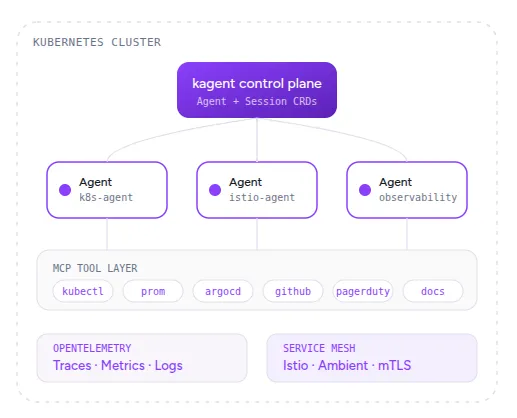
To install kagent on my cluster, I use Helm. The chart is hosted on GitHub Container Registry, so I need to install Helm.
Then I install kagent with the following commands:
helm install kagent-crds oci://ghcr.io/kagent-dev/kagent/helm/kagent-crds --namespace kagent --create-namespacehelm install kagent oci://ghcr.io/kagent-dev/kagent/helm/kagent --namespace kagent \--set providers.default=openAI --set providers.openAI.apiKey="$OPENAI_API_KEY"Once installed, I can see the agents running in the kagent namespace.
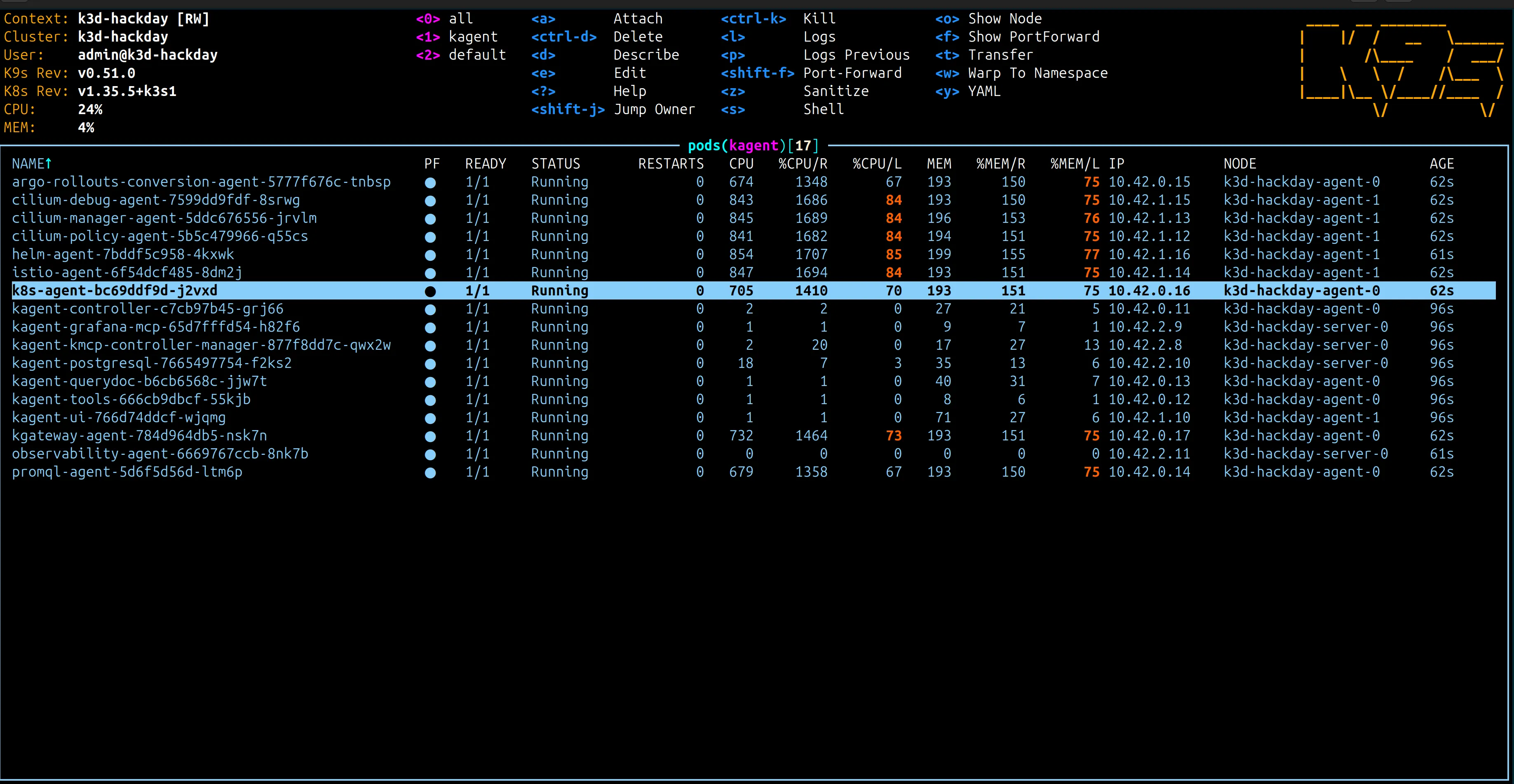
kagent comes with a web dashboard. I port-forward it to access it from my local machine:
kubectl -n kagent port-forward svc/kagent-ui 9090:8080I can then access the web dashboard to configure my first agent:
You can customize your agent with a system prompt, a model, and a list of tools. The tools are exposed to the LLM through MCP servers, and you can add your own tools if you want. For convenience, kagent comes with a set of ready-made agents. For this test, I use the k8s-agent, which is pre-configured to explore a Kubernetes cluster.
The dashboard gives you an interface to interact with your agent, ask for a diagnosis, and see the reasoning of the agent step by step. You can also see the tools that the agent uses to explore the cluster, and the output of each tool.
I fix the broken cluster with kagent without writing a single line of code, just by asking the agent to diagnose and fix the issues. The agent finds the issues and proposes a fix for each one. I just have to approve the fixes, and the agent applies them to the cluster.
This is a real agent, with a much better AX (Agentic Experience) than the previous tools. But it has to run inside the cluster, so it takes more steps to set up than the previous tools.
Bonus: The Docker Agent
Kubernetes is not always needed. For some projects, a well-configured Docker Compose stack is enough, and a common setup is Docker Compose in dev with a Kubernetes cluster in prod. So a broken Compose stack is another thing I sometimes have to diagnose and fix, and for that Docker Desktop ships with a dedicated agent named Gordon.
To test it, I turn my Online Boutique application into a Docker Compose stack, and break it the same way I broke the Kubernetes cluster. Then I install the Docker agent and ask it to diagnose and fix the issues.
Gordon is only available in Docker Desktop (Docker Engine alone isn’t enough). Once Docker Desktop is installed, Gordon is reachable either through the Docker Desktop UI or through the CLI.
Gordon diagnoses the broken stack and proposes fixes, much like the Kubernetes agents.
Same Failures, Three Answers
The aim of my hackday wasn’t to rank the tools, but rather to see what exists, how they work, and which one I would reach for in my day-to-day work. So the opinion I give here is mine alone, based on my own needs.
k8sgpt takes just a few commands to install and configure, and it works well, but, to me, it seems limited in the way it explores the cluster. It is more of a “diagnoser” than an “agent”, and I would use it when I want a quick diagnosis of my cluster, without setting up an agent. I’ll use it in MCP mode in my Claude Code desktop though, to help me explore.
kubectl-ai is, as shown above, more agentic, and can explore the cluster on its own. It takes about as much effort to set up as k8sgpt. It does a good job exploring the cluster, using different tools to find the issues and propose fixes. I think I would use it as my primary tool to find issues in my cluster.
kagent is powerful, with a long list of tools and a set of pre-configured agents that ease the setup. The AX is excellent: the dashboard gives you a chat experience with the agent, as you would have with your favorite LLM. The one thing that holds me back is that I have to install it on the cluster. Neither my client nor I want to install an agent on the cluster, even a read-only one. So I would use it only on my personal clusters, or on clusters where I have full control.
To summarize, I would use kubectl-ai as my primary tool, and k8sgpt as a secondary tool to explore the cluster in MCP mode in my Claude Code desktop. I don’t think I have the use case to justify installing kagent on my clusters for now.
The piece I haven’t tried yet is full autonomy: k8sgpt-operator’s autoremediation, or kagent’s agents delegating to each other over A2A. That’s where I’d go next. If you get there before me, I’d love to hear how much you trust an agent to touch your cluster on its own.
Authors
Full-stack web developer at marmelab, Guillaume can turn complex business logic into an elegant and maintainable program. He brews his own beer, too.