
Getting Started With Dev Containers (and Why They're Not a Perfect Sandbox)


At marmelab, we build web applications for clients, each with its own development stack. In the age of coding agents, working with different technologies is no longer a challenge, but we still face two major challenges with our development environments:
- How to have a replicable dev environment?
- How to prevent coding agents from altering or leaking our local data?
During one of our technology watch sessions, we discovered dev containers. This framework seemed to solve both of our problems at the same time. We tested them in real projects to see if they would really fit our needs. While there are numerous advantages, we also found some caveats. We will discuss what we found in this article.
What Are Dev Containers?
You probably already know a few things about containers (if this is not the case, you should read this introduction to containers from Docker). Containers are the most popular way of deploying applications today: they are lightweight, secure when well-configured and reproducible (no more “it works on my machine!”).
Development containers extend this philosophy to development environments. containers.dev defines them as follows:
A development container (or dev container for short) allows you to use a container as a full-featured development environment. It can be used to run an application, to separate tools, libraries, or runtimes needed for working with a codebase, and to aid in continuous integration and testing. Dev containers can be run locally or remotely, in a private or public cloud, in a variety of supporting tools and editors.
At marmelab, we have to install a set of different tools for each project we develop. We also have some shared tools, such as Claude Code or Docker. Having dev containers in our projects allows us to have reproducible development environments so we do not need to install tools globally.
Dev containers rely on traditional containers to provide the dev environment. You define one in a devcontainer.json file, using a Dockerfile or a container image from any registry as a base image:
{ "name": "Blog", "build": { "dockerfile": "dockerfile" }, "workspaceFolder": "/workspaces/marmelab-website", "remoteUser": "node"}FROM node:24-trixie
RUN apt update && apt install -y sudo build-essential
USER nodeDev containers are natively supported in VSCode, which detects when a dev container is configured in a project folder, and lets you relaunch its tooling inside the container.


When we started to use dev containers, we faced the problem that we lost some local data, such as git worktrees, during reboot. This is due to ephemeral storage in dev containers. To circumvent this, dev containers support both local and named volumes using the mounts configuration. No more state loss during restart.
{ "mounts": [ { "type": "volume", "source": "${devcontainerId}-git-worktrees", "target": "/tmp/worktrees" }, { "type": "volume", "source": "${devcontainerId}-node-modules", "target": "/workspaces/marmelab-website/node_modules" }, { "type": "bind", "source": "${localEnv:HOME}/.claude/projects", "target": "/home/node/.claude/projects" } ]}This is just one configuration option provided by the specification out of the box. The complete set of options (forwarded ports, env…) is available on the dev containers website.
While configuring a dev container manually can be cumbersome, there is another option: you can use a prebuilt development container template.
Dev Containers Templates
The containers.dev website references a list of official and community-supported templates. Our first thought on templates was that they worked like Docker images: we use a FROM <image>, and voilà, we can customize our dev container. This is not the case: using a template requires using the dev containers CLI to copy the template into the repository.
npm install -g @devcontainers/cli
devcontainer templates apply \  --template-id ghcr.io/marmelab/devcontainers/node:latest \  --workspace-folder .
Since dev containers are designed to be customized for your needs, this makes a lot of sense. Having a bloated template can be an obstacle for developers and can reduce the use of templates. With this install method, you can have a template where you can add or remove tools without hassle. Yet, there is a drawback: the original template build is not cached, so we rebuild it the first time we start the container. This can take a few minutes, depending on the machine it runs on.
What if the existing templates do not fit your needs? You can create your own templates and host them on your registry.
Custom Templates Registry
We built our own dev container template registry so we can have a common basis for our projects. To do so, we started from the template registry starter kit from containers.dev. It provides example templates, test suite examples and GitHub Actions out of the box to quickly deploy your first template.
You can host dev container templates on any container registry. The starter kit provides an action to deploy on the GitHub container registry, which is what we did. For instance, we host our Node.js template at ghcr.io/marmelab/devcontainers/node.
Now that we have a base template, how can we add extra tools? When we tested dev containers for the first time, our assumption was to install everything using RUN commands in the Dockerfile we created. Our first Dockerfile contained tens of lines just for Playwright dependencies, which is error-prone. Furthermore, this is not the recommended solution: dev containers provide “features” as the standard to extend them.
RUN apt install -y \ xvfb \ fonts-noto-color-emoji \ fonts-unifont \ libfontconfig1 \ libfreetype6 \ xfonts-scalable \ fonts-liberation \ fonts-ipafont-gothic \ fonts-wqy-zenhei \ fonts-tlwg-loma-otf \ fonts-freefont-ttf \ libasound2 \ libatk-bridge2.0-0 \ libatk1.0-0 \ libatspi2.0-0 \ libcairo2 \ libcups2 \ libdbus-1-3 \ libdrm2 \ libgbm1 \ libglib2.0-0 \ libnspr4 \ libnss3 \ libpango-1.0-0 \ libx11-6 \ libxcb1 \ libxcomposite1 \ libxdamage1 \ libxext6 \ libxfixes3 \ libxkbcommon0 \ libxrandr2Features
A feature is the building block of dev containers: think of it as a build step in a container image (such as a RUN). Use it to add shared tools across projects. A feature needs two building blocks:
- A spec file (
devcontainer-feature.json), used to define the feature name, version, optional dependencies and volumes - An install script (
install.sh) that the build runs as a step
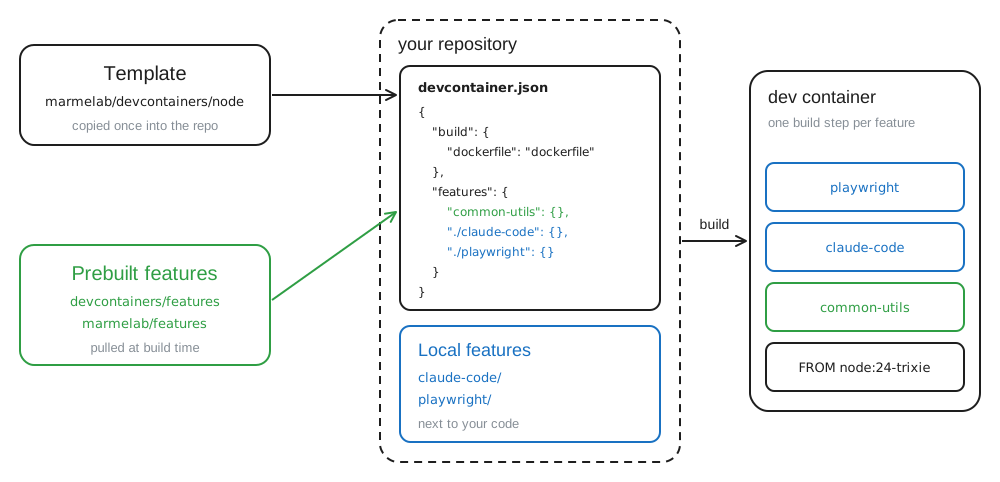
The dev containers website lists a lot of prebuilt features that are either supported by the core team or by the community. You can then easily add tools such as Zsh, Python, or Kubernetes CLI.
{ "features": { "ghcr.io/devcontainers/features/common-utils:1": {}, "ghcr.io/devcontainers/features/kubectl-helm-minikube:1": {} }}Features also support a large subset of the dev containers configuration file. This lets you configure the dev containers directly from shared features and lightens the main configuration file. Features can also extend other features, or order their installs so one tool lands before another feature.
{ "id": "python", "version": "1.8.0", "name": "Python", "containerEnv": { "PATH": "/usr/local/python/current/bin:${PATH}" }, "customizations": { "vscode": { "extensions": ["ms-python.python"] } }, "installsAfter": ["ghcr.io/devcontainers/features/common-utils"]}Local Features
When we started with dev containers, we tended to add all the configuration in the dev containers configuration file. The file was hard to maintain since it was cluttered with a lot of volumes and the install script was hard to follow. To solve this, we relied on local features. Local features follow the same structure as prebuilt features, yet they live next to your code. This can avoid having a devcontainer.json file with hundreds of lines by splitting it into multiple, smaller features.
.devcontainer/├── devcontainer.json├── claude-code/│ ├── devcontainer-feature.json│ └── install.sh└── playwright/ ├── devcontainer-feature.json └── install.sh{ "features": { "ghcr.io/devcontainers/features/common-utils": { "installZsh": true }, "./claude-code": {}, "./playwright": {} }}Just like prebuilt features, local features can extend other features. This is particularly useful when you want to add a volume to an existing feature to persist its data.
{ "id": "playwright", "version": "1.0.0", "name": "Playwright", "postCreateCommand": "npx playwright install", "containerEnv": { "PLAYWRIGHT_BROWSERS_PATH": "/mnt/ms-playwright" }, "dependsOn": { "ghcr.io/postfinance/devcontainer-features/playwright-deps:1": { "installChromiumDeps": true, "installFirefoxDeps": true, "installWebkitDeps": true } }, "installsAfter": ["ghcr.io/devcontainers/features/common-utils:1"], "mounts": [ { "type": "volume", "source": "${devcontainerId}-playwright", "target": "/mnt/ms-playwright" } ]}Custom Features Registry
Just like for templates, we built our own feature registry. This way, our projects can share the extra tooling we install on top of the base templates. We started from the feature starter kit from containers.dev, the counterpart of the template starter. It ships an example feature, a test suite and the GitHub Actions to publish it.
Dev containers distribute features the same way as templates, so the provided action pushes ours to the GitHub container registry, next to our templates. Adding a tool to a project is then a single entry in the features section of its devcontainer.json. No more RUN commands in a Dockerfile nobody wants to maintain.
{ "features": { "ghcr.io/marmelab/devcontainers/claude-code:1": {} }}Dev Containers Security
Many developers also assume that dev containers are an ideal place to run their coding agents (Claude Code, Codex, Copilot, …) autonomously (i.e. in “auto mode” or “yolo mode”), since they offer more security by wrapping the agent in a sandbox.
Unfortunately, that is only partially true.
VS Code dev containers aren’t designed for coding agents – the implementation prioritises convenience shortcuts rather than sandboxing.
– Daniel Demmel in Coding agents in secured VS Code dev containers
What dev containers effectively protect you from
- ✅ Unrestricted host filesystem access, including stealing credentials from your
$HOMEfolder (well, sort of, see below), your password, your other projects… - ✅ Installing persistent malware on your system (it would be limited to the container, which is disposable)
- ✅ Data loss: if ever the agent goes crazy and breaks your system, just delete and recreate the container
What dev containers DO NOT protect you from
- ❌ Infecting your/other repository with malicious code (e.g. supply chain attack)
- ❌ Data exfiltration, for instance leaking your private repo’s source code or credentials out to the internet
- ❌ All protections listed above fall if you enable Docker in Docker (or similar features like Docker outside of Docker or
--privileged). This can even allow code execution on the host!
As you can see, a significant attack surface still exists even when using dev containers, especially if you use Docker in Docker (DinD). To understand, let’s dive deeper into each attack vector.
Repository Infection
This one is quite obvious: when using an Agent to help you write code, you are vulnerable to prompt injection attacks, and risk poisoning your codebase with malicious scripts or binaries, which can in turn affect your colleagues or propagate to other projects you have access to.
The most effective way to protect against this attack vector is to prohibit your agent from pushing code on your behalf. In our latest project, we did not provide our git SSH key to the container, and even used a container image that did not include the ssh binary at all!
Now, don’t get us wrong. This setup only prevents your agent from pushing code to the repository, or opening Pull Requests, but it can still do most of the other git operations like creating commits, merging, rebasing, resolving conflicts or reviewing diffs autonomously. This constraint simply forces you to manually push new branches/commits from outside the container, ensuring you keep total control over what gets sent to your repo. Silently committing to main, or discreetly amending an existing commit, is no longer possible with this approach.
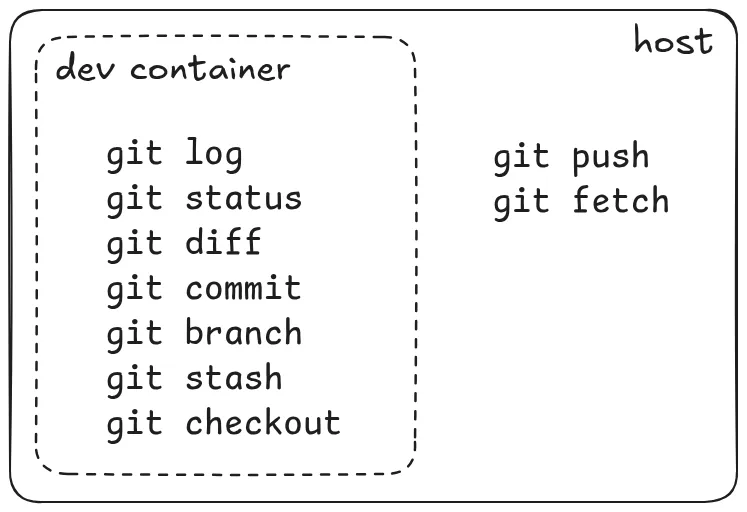
Personal thought: Having previously worked on a project where our agent could push and open PRs on our behalf, we must confess this brought an additional level of comfort, being able to tell Claude things like “do a code review of this branch” or “when you’re done, push and open a PR”.
That being said, also considering we are the team behind the popular framework react-admin, we don’t want to risk a supply chain attack. We considered the benefits of closing that attack vector to be superior to the benefits of providing the agent with our GitHub access.
Similarly, we encourage you to weigh the pros and cons of your own personal situation when deciding whether or not you let an AI push code on your behalf.
Data Exfiltration
This one is a little less straightforward, but it becomes obvious once you think about it. By default your dev container has outbound access to the internet. This is often necessary to fetch the libraries, packages or bundles your code depends on to build and run.
What this means is that your container can make arbitrary requests to any external server by default, so a malicious instruction or script could for instance leak your entire workspace to an attacker. This can be a problem if you expect your code to remain private.
You can mitigate this risk in two ways.
The most common one is to set up what’s known as an egress allowlist, which only allows certain domains or IPs based on a whitelist you control.
Claude Code’s own dev container includes a firewall which is a good starting point. It fetches the IP addresses corresponding to a list of allowed domains, and then restricts the outbound traffic to only these IPs using iptables.
# Resolve and add other allowed domainsfor domain in \    "registry.npmjs.org" \    "api.anthropic.com" \    "sentry.io" \    "statsig.com" \    "marketplace.visualstudio.com" \    "vscode.blob.core.windows.net" \    "update.code.visualstudio.com"; do    echo "Resolving $domain..."    ips=$(dig +noall +answer A "$domain" | awk '$4 == "A" {print $5}')    if [ -z "$ips" ]; then        echo "ERROR: Failed to resolve $domain"        exit 1    fi
    while read -r ip; do        if [[ ! "$ip" =~ ^[0-9]{1,3}\.[0-9]{1,3}\.[0-9]{1,3}\.[0-9]{1,3}$ ]]; then            echo "ERROR: Invalid IP from DNS for $domain: $ip"            exit 1        fi        echo "Adding $ip for $domain"        ipset add allowed-domains "$ip"    done < <(echo "$ips")done
You can also set up an HTTP proxy like tinyproxy or squid, which only allows certain hostnames.
While setting such a filter certainly helps mitigate the data exfiltration risk, both approaches come with limitations:
- The whitelist can only contain domains or IPs, but does not allow for fine-grained filtering, e.g. only allowing
public.ecr.aws/supabasebut notpublic.ecr.awsglobally - They do not prevent DNS-related attacks, e.g. DNS exfiltration where an attacker can exfiltrate data in the subdomain of a DNS request to a server they control (e.g. DNS request to
super-secret-payload.evil.com) - If the proxy only filters by hostname, requests to raw IP addresses can still pass through
- Some solutions only monitor the HTTP traffic, however an attacker can use other protocols such as SSH to exfiltrate data
Bottom line: even though you can make data exfiltration much more difficult with some extra configuration, it is always possible theoretically. So we still encourage you to put only the minimum amount of data (especially credentials) for your app to work inside the dev container.
Docker in Docker Escape
This risk may be the most critical of all, because it can potentially defeat all defenses and mitigations mentioned earlier, while often getting overlooked. Indeed many people (including us prior to working on this topic!) don’t know about the security risk taken when enabling Docker in Docker / Docker outside of Docker / Privileged containers.
A bit of vocabulary
Privileged containers: Containers run with --privileged, which drops isolation-full capabilities, access to host devices, and relaxes security profiles.
Docker in Docker (DinD): Running a full, separate Docker daemon inside a container (usually via the docker:dind image, needs --privileged).
Docker outside of Docker (DooD): Mounting the host’s Docker socket (/var/run/docker.sock) into a container so it controls the host’s daemon rather than its own. Probably the worst option.
The big reveal to us was to discover that all three can be escaped! DinD/privileged containers let an attacker mount the host disk (e.g. /dev/sda) or abuse capabilities/cgroups (release_agent) to run code as host root, while DooD lets them use the mounted docker.sock to spawn a container with -v /:/host and take over the host filesystem.
So, concretely, as soon as you enable DinD (or similar), an attacker can bypass all your other mitigations: limiting the parts of the host FS that the container gets to view, hiding your credentials, or setting up a firewall for the container.
How can you defend against this threat?
The first thing to do is ask yourself: do you really need DinD or not? This is a serious question, because as you’ll see below, mitigations exist but they all are quite heavy or come with significant tradeoffs.
Remember that using one of the containers of your stack as the dev container is perfectly valid. You don’t necessarily need to start your docker-based stack from within the dev container. Reusing one of its containers, or having a neighbor container as the dev container can be enough.
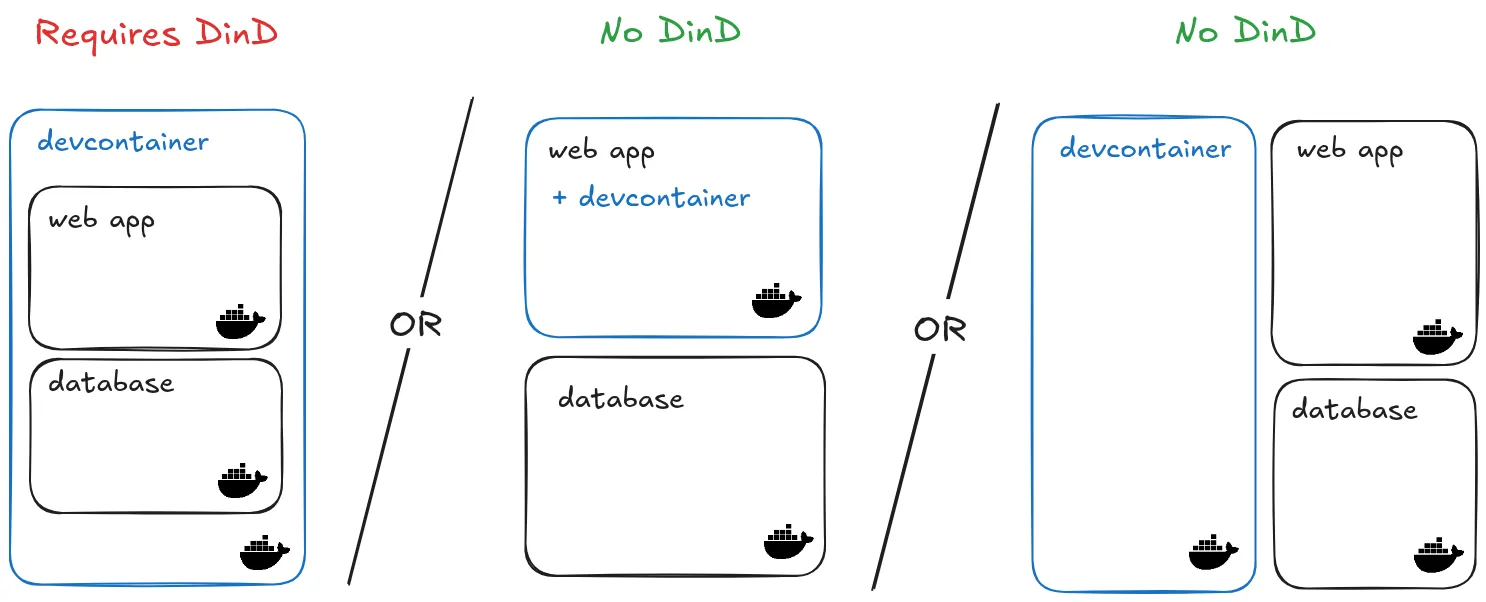
For some use-cases it might also be practical to run your agent in the cloud using remote services like GitHub Codespaces, Gitpod, Coder or Claude Code Web.
This way, you delegate all the security concerns to the cloud maintainer, and have full control over the data you choose to expose to the remote environment.
Unfortunately, we found out that most of these cloud services come at a price. Our Claude plan did include Claude Code Web, but we found out it is still too limited for our needs. For example you can’t expose a port to the internet, making it impossible to test the running app from your local device.
So, as Daniel Demmel says it: “The future might be cloud, but it’s not here yet”.
If you want to run your code locally and really require DinD (we had the case for instance with applications based on Supabase), here are several solutions you can try:
- Use rootless Podman in the dev container. It is daemonless, relies on user namespaces and doesn’t need privileges. Its CLI is compatible with Docker (
alias docker=podman). - Use the Sysbox runtime for Docker, an alternative runtime that aims to enhance container isolation and the ability to run the same workloads as VMs. It allows you to start Docker inside the container without
--privileged. - Wrap your dev container inside an actual VM. It’s the heaviest but most effective way of isolating your container from your host.
Note: On Windows and MacOS, Docker is already running inside a VM, whether that is the one set up by Docker Desktop or WSL. While providing an additional isolation layer compared to Linux, these specific VMs often share way too much data from the host to consider it secure. For instance, Docker Desktop shares a significant part of your $HOME folder with the VM by default. What’s more, the host network is often shared by default, opening the door to local network sniffing and horizontal propagation.
We did take some time to experiment with some of the solutions listed above, and notably tried out several VM-based solutions: multipass, microsandbox, nixbox and docker sandboxes. We also tried alternative Docker runtimes: Podman and Sysbox. However, sharing our findings here would make this article way too long, so we plan to talk about them in an upcoming post, stay tuned!
In the meantime, you might be interested in reading Daniel Demmel’s Coding agents in secured VS Code dev containers post, which shares their own take about using coding agents inside dev containers securely, with an emphasis on finding the best balance between security and development flexibility. Some of the solutions we mention are actually taken from there.
Conclusion
Dev containers solve our first problem: they are great for sharing tools across a development team, with a common environment that everyone can use. Our second problem, keeping coding agents from altering or leaking our data, is only partly solved. Several attack vectors still exist with the default configuration, and enabling Docker in Docker requires significant setup steps to mitigate the induced risks.
This last point matters to us. At marmelab, we want our coding agents to run E2E tests, or to start a Docker Compose stack and navigate the app with Playwright. This is only possible when Docker is available. So we tried to harden our dev containers to run Docker safely. A follow-up article covers what worked and what failed.
Authors
Full-stack web developer at marmelab, Jonathan likes to cook and do photography on his spare time.
Full-stack web developer at marmelab, JB is a Software Engineer with a strong Java experience. He plays the piano and runs fast, and not only because he has long fingers and tall legs.